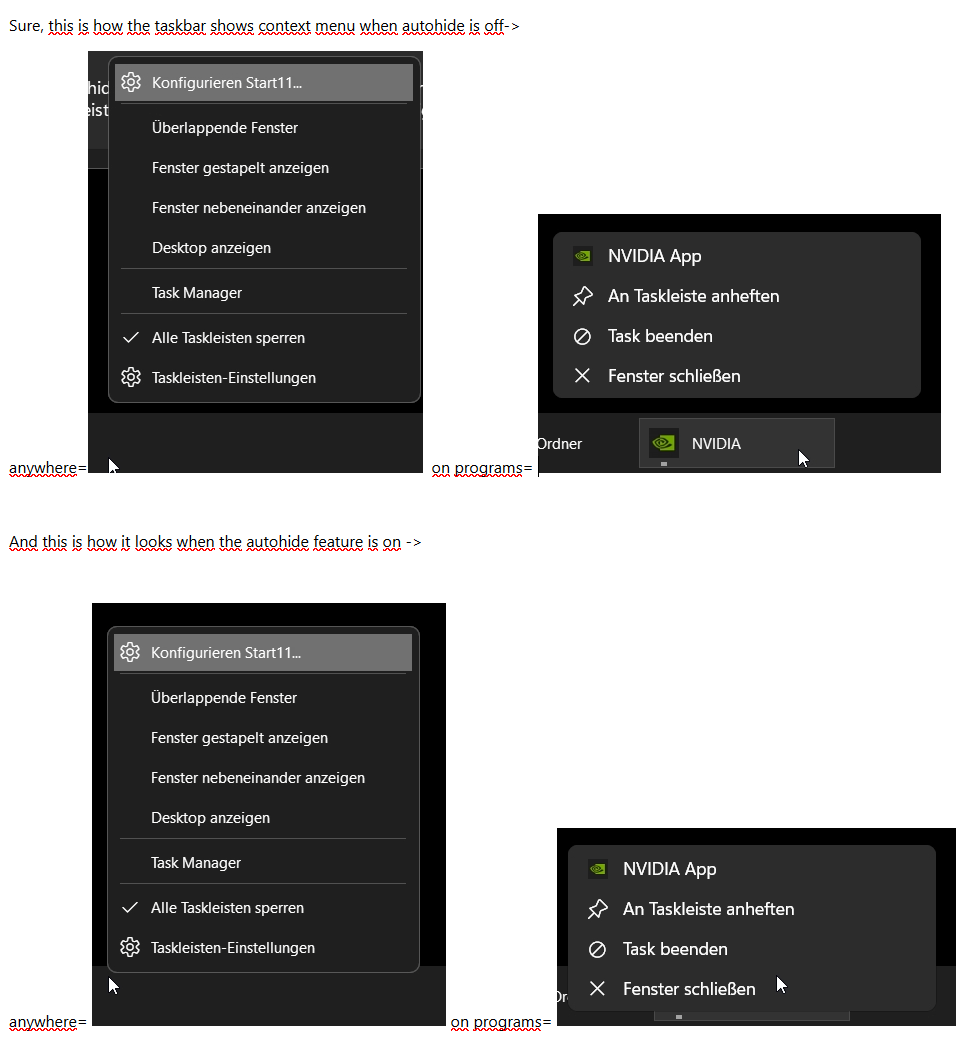
Start11 2.6 - Autohide taskbar context menu issue

Hi, 

I recently started using the hide taskbar feature through Start11 rather than Win11 because it is much snappier. 

But there is one issue: The context menu of programs appear relative to the bottom of the screen rather than the cursor position or above the taskbar. This is not an issue when right clicking an empty space on the taskbar or right clicking the taskbar icons on the right. 

I hope there's a way to fix this because all muscle memory get's thrown out by this :)

300 views 5 replies
Reply #1 Top

Hello,
Sorry to hear you are having issues. It best if you could elaborate more with a video or screenshots showing us your issue.

Thank you,
Basj,
Stardock Community Assistant.

Reply #3 Top

I tested and I see same result as your screenshots, but, I fail to see the issue here. Please elaborate a little more.

Thank you,

Basj,
Stardock Community Assistant

Reply #4 Top

Well the issue is that for me the expected behaviour should be the Windows default and or the same as with an "unhidden" Taskbar. The difference in behaviour is in my opinion not ideal. It messes with muscle memory going between autohide on and off. I have now numerous times killed a task rather than closing the window. Or for explorer windows I will accidentally hit "pin" instead of closing the window.

I admit this might be more of a convenience problem and seemingly not many people have taken issue. Though I also suspect most people don't hide the taskbar.

Reply #5 Top

I tested with Windows 11 autohide setting and the behavior is the same for me. However, I have forwarded your problem/question to Stardock Support Team for their assistance. Please keep an eye on this thread for any updates. We appreciate your feedback and patience. Thank you.

Basj,
Stardock Community Assistant