sdRohan sdRohan

Start11 2.7 Beta Feedback

Start11 2.7 Beta Feedback

With the Start11 2.7 beta release today, we are creating this thread so that users can report any observed issues.  

Obtaining Object Desktop Insider Builds

Object Desktop Manager

Object Desktop members can get beta and Insider builds from within Object Desktop Manager with 'Enable Object Desktop Insider builds' enabled:

image-20240219-210025.png

Stardock Download Page

Or via their download page in the ‘Object Desktop Insider’ section

image-20240219-213743.png

Obtaining Beta Releases

Stardock.com

If a beta was released, Object Desktop Members would see it in the ‘Object Desktop’ section.

Individual purchases would see it on their registration of the product under their download page.

image-20240219-214050.png

Steam

  • Right-click the Product in Steam

  • Properties

  • Betas

  • Select the beta branch at the top right (there is no password)

Example

https://cdn.stardock.us/support/uploads/steamwebhelper_2024-02-19_17-44-35.png

Reporting an issue

Please include the following for anything found:

  • Exact Windows version \ build (winver.exe)

  • Detailed steps to recreate the issue seen

  • Screenshots and videos are very helpful.  Videos can be uploaded to a cloud drive service (GoogleDrive, DropBox, OneDrive, YouTube), with a shared link included in your post.  Images can be copied and pasted directly into a post.

  • If there are specific apps that the app does not work (well) with, please note what apps and their exact versions.  If any app is not common, a link to a trial version would be appreciated.

Thank you for your interest and any time you put into making Start11 v2 a better product.
5,788 views 31 replies
Reply #26 Top

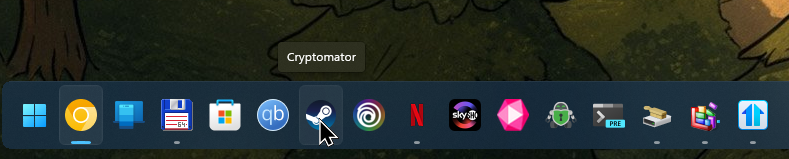
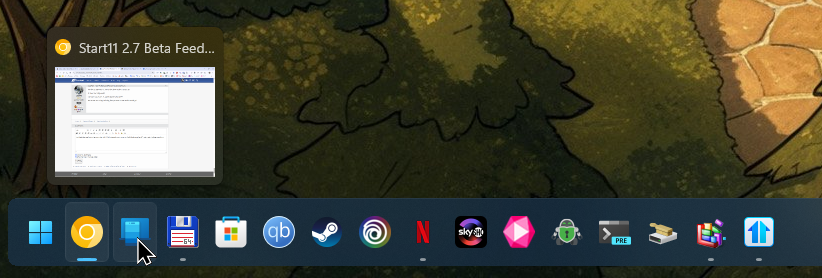
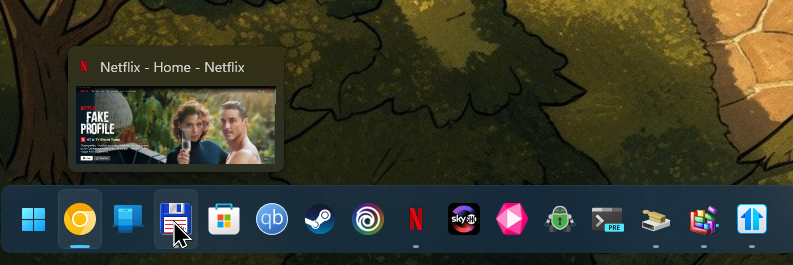
On latest Windows Insider Canary version 29570.1000 the taskbar shortcuts are shuffled/pointing to other shortcuts when Let Start11 enhance the taskbar is enabled:

Not all of them point to other shortcut but a lot of them.

I've already on the latest beta version of Start11 and tried restarting both the system and the explorer.exe, when it's enabled it's shuffled, when not (standard taskbar) it is working normally.

Reply #27 Top

Quoting norti79, reply 26

On latest Windows Insider Canary version 29570.1000 the taskbar shortcuts are shuffled/pointing to other shortcuts when Let Start11 enhance the taskbar is enabled:


Not all of them point to other shortcut but a lot of them.

I've already on the latest beta version of Start11 and tried restarting both the system and the explorer.exe, when it's enabled it's shuffled, when not (standard taskbar) it is working normally.

Hello,
Sorry to hear you are having issues. First, do know that Stardock does not support its product on Windows Insider version. Please try the official released version. Also, would like to suggest to try, uninstall Start11, reboot immediately (important), download latest version available in your account product download page: https://store.stardock.com/myaccount/products. Install it, reboot immediately again. Retest it and report back.

Thank you,
Basj,
Stardock Community Assistant.

Reply #28 Top

Quoting norti79, reply 26

On latest Windows Insider Canary version 29570.1000 the taskbar shortcuts are shuffled/pointing to other shortcuts when Let Start11 enhance the taskbar is enabled:


Not all of them point to other shortcut but a lot of them.

I've already on the latest beta version of Start11 and tried restarting both the system and the explorer.exe, when it's enabled it's shuffled, when not (standard taskbar) it is working normally.

I cannot reproduce this here.  Mouseover is working exactly as expected.

I also notice your taskbar buttons look taller than usual.  What settings have you changed?

Do you have anything else running which might impact explorer/your taskbar?

Reply #29 Top

hmm nein ich brauche kein start11 mehr ist gelöscht, ich finde das neue Menü von windows.  top

Musste auch mal entlich von diesem win 7 menü weg (Modern) ^^

ist nur noch ObjectDock 3 aktiv.

und Stardock Objekt desktop lass ich auslaufen, ObjectDock 3 ist ja so gekauf.

Sind Top Producte aber brauche ich nicht mehr.

Und ich hatte euch schon seit IBM OS/2 Stardock ObjectDesktop for OS/2 1.0-2.0 <3    


lol das erste windows ohne Start Produkt seit win 8 das Windows 12 


Reply #30 Top

Icon size 32px, Button width 48px, Button height 60px

I'm only using Windhawk / Taskbar Clock Customization but that didn't change before this W11 Insider build and when I disable it, the bug is still present.

Here is a small video

I think the mouse overlay uses the original icon and taskbar sizes (not the placement though) and it clicks through the Start11 enchanced taskbar overlay? But it's still buggy because some of the shortcuts are missing on mouseover and are not in order (see overlay on Chrome icon, Microsoft Store and Total Commander are swapped and so on).

It must be some change in the latest Windows Insider build, I hope they'll fix it in the next one.


Reply #31 Top

Start11 2.7 has been released. For details, please see:

https://forums.stardock.com/541381/start11-27-release-feedback-thread

As always, thanks for the time, feedback, and support. 

Sean Drohan
Product Lifecycle Manager