How to get white font

Taskbar dark-text as well

My Windows 10 taskbar has color #022442
Fonts are white, no problem.

Imported settings into Start11 v2.6 on Windows 11, but the fonts are black as well.

How to get white fonts, similar to Windows 10 ?

Thanks.

395 views 5 replies
Reply #1 Top

Hello,
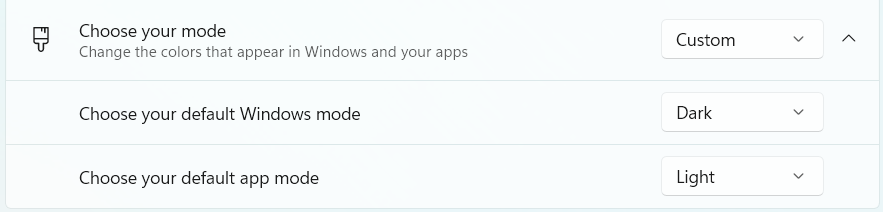
Sorry to hear you are having issues. To have white text on taskbar, you will need to set Windows Mode to Dark.

Thank you,
Basj,
Stardock Community Assistant.

Reply #2 Top

Hello to you,
Thanks a lot. It seems it has something to do with Windows 11 acting differently from 10.

Windows in Dark Mode, frankly, for me, it is not really an option.
No offense meant, don't get me wrong.
I don't like 'dark modes' in any application.

However..., I did find quite a nice Start11 built in solution:
1. Enable "Enhanced taskbar settings" (gradient colour)
2. In 'Colour' select White

Looks fine.

Thanks again.


Reply #3 Top

Try using these settings.

Reply #4 Top

Quoting pelaird, reply 3

Try using these settings.


Yes Windows has two dark modes.  One for the taskbar / startmenu and another for apps.  Setting Windows mode to dark will give you a dark taskbar and thus white text.

Reply #5 Top

Sorry for the delay. Had no time, will try tomorrow. Thanks a lot.