Hi there

I'm having a terrible experience with Fences. I've been a long time customer and have never encountered so many issues, but then I'm pushing Fences pretty hard. I see it's a 32-bit application and I'm wondering if it simply just can't cope with my configuration.

I have 18 Fences defined, being a mix of normal Fences (5) and Folder Portals (13) across 3 different pages.

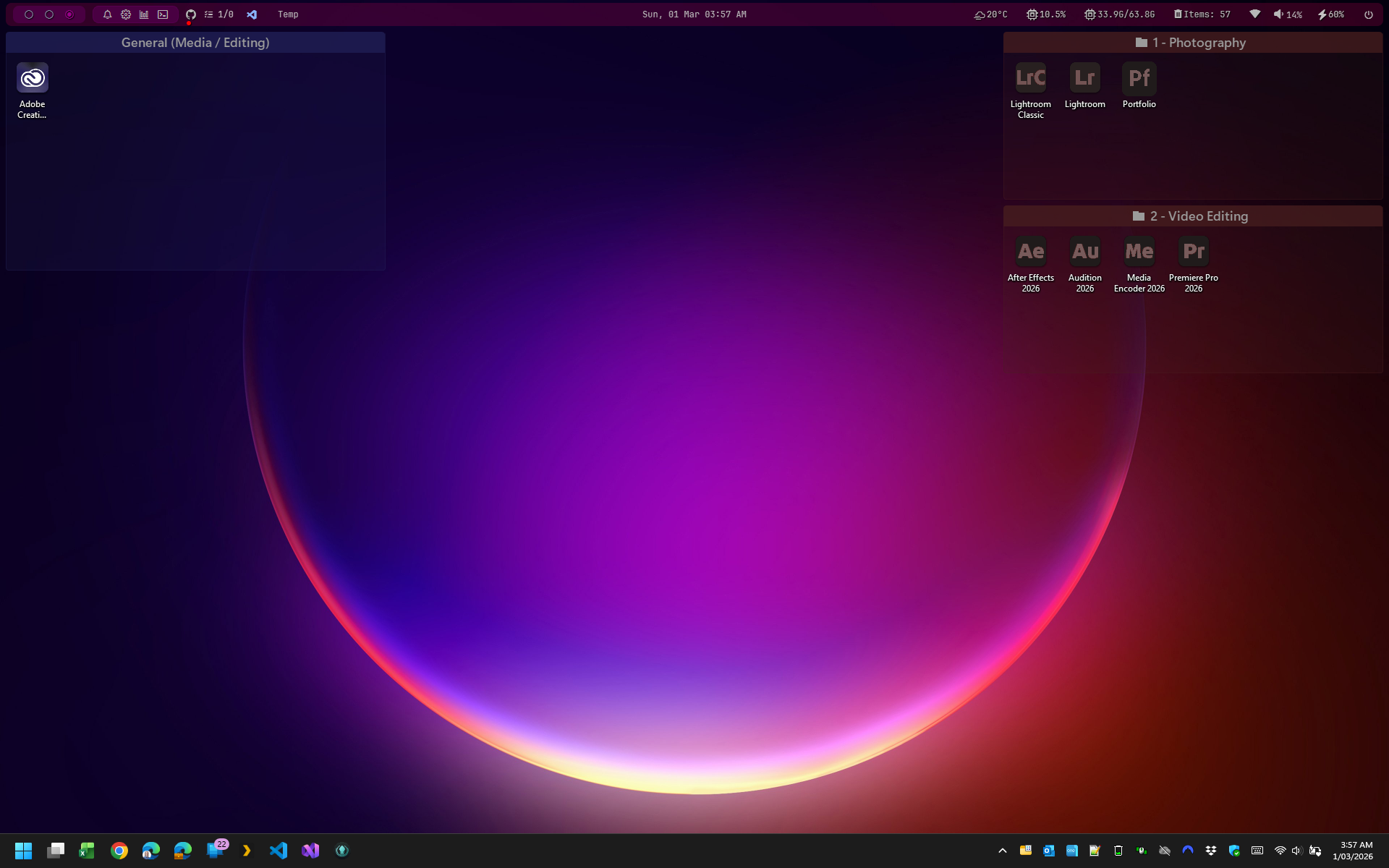
Here is what my desktop with the 3 pages is meant to look like:
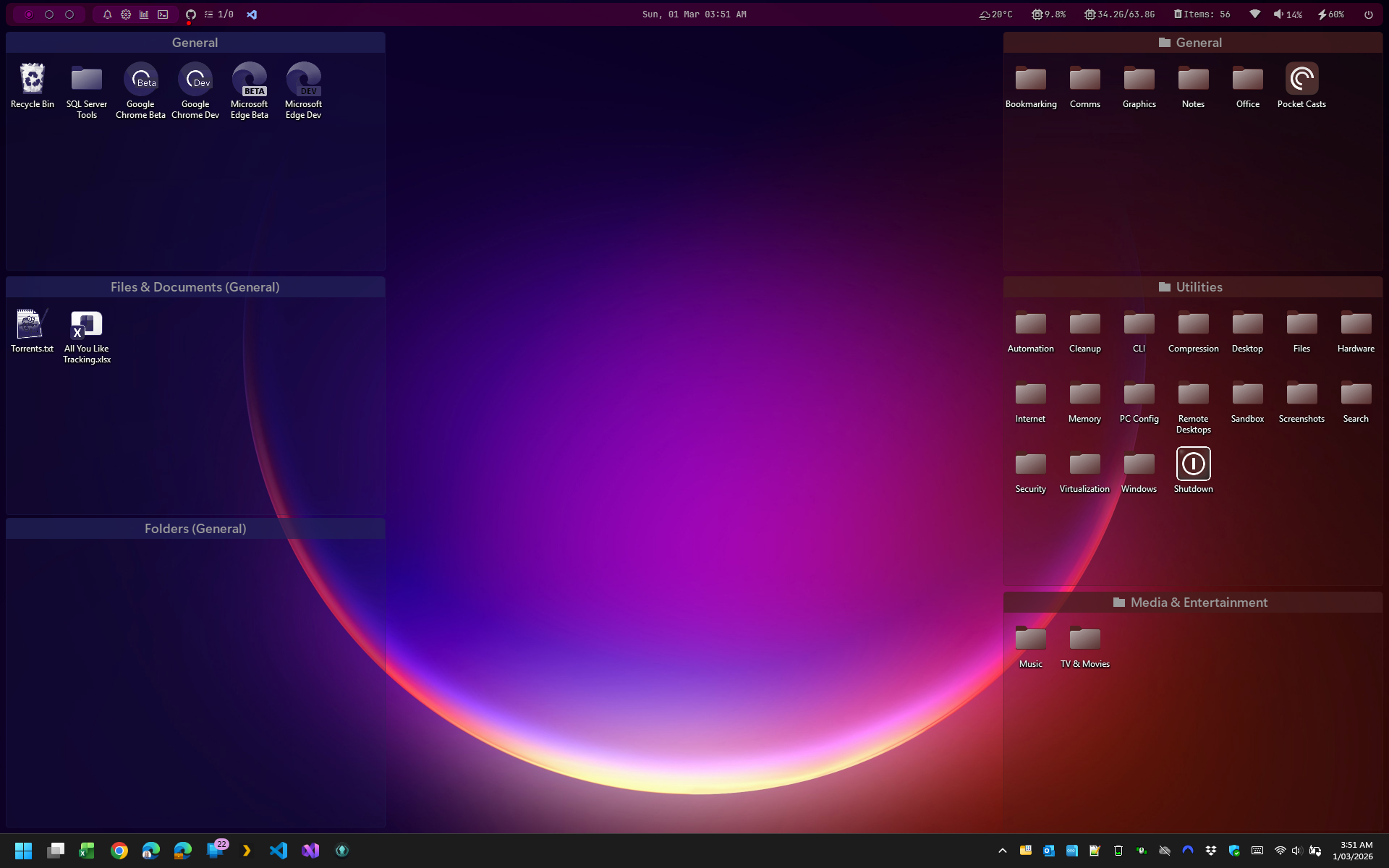
Page 1

Page 2 (has some artifacts)

Page 3


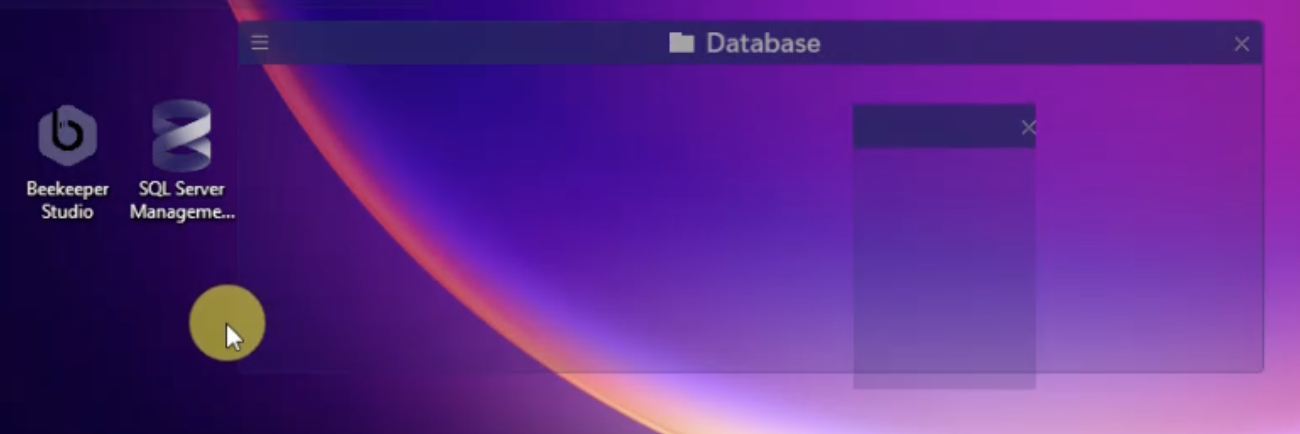
As you can see above, Page 2 has some rendering issues, but the problems are much more extensive than that...

It seems that Fences simply can't cope with this amount of fences. Here's all the issues I'm encountering:

  1. Icons being shown outside of their fence (there are no icons outside of a fence)
  2. Fences showing no icons
  3. Icons being displayed in the right place but on the wrong page (so overlapping, stacked on top of each other)
  4. Icons being replicated and shown multiple times on top of different fences, sometimes on their own page, sometimes on the wrong page
  5. Bits of fences being displayed in the wrong place and on the wrong page
  6. Any fence on one particular page, when any part of it overlaps a certain empty area of the desktop, jumps out of place.
  7. Clicking an item in one folder portal, opens that item but in a different folder portal

All of these issues are seen in videos in the attached external reference (Dropbox).

I noticed that you had a Beta available, 6.4 so I tried a Purge Uninstall but encountered exactly the same issues. I thought it might have helped as it said it helped with icon stability on a multi-monitor environment. It didn't help. My environment is multi-monitor but for the time being I'm only using the primary monitor. The attached screengrabs only show the main monitor.

After testing the beta I reverted back to 6.20. Again, I performed a Purge Uninstall but it's made no difference at all.

For transparency's sake I've noted in the video filenames which where taken on what version, but honestly, the version made no difference. All the issues seen whilst running the 6.4 beta also occur on the 6.20 version and I couldn't be bothered to create more videos showing the same thing.

I'm still rebuilding my machine from scratch. I am anticipating installing still more software and was expecting to be able to further configure Fences with more items. Quite honestly I didn't think Fences would have so much issues with a configuration of this size. But being a 32 bit application I'm wondering if I should be surprised or not. Still, it would have been nice to be able to yet add more to it, but at this stage even using it as it is isn't viable. It's actually rather disappointing.

Hoping something can can be done to fix this.


Cheers,

Paul

10,305 views 18 replies
Reply #1 Top

Thanks for the detailed report, going to flag this for the dev to take a look at it as this should not be taxing the application to its capacity.

Reply #2 Top

Hi Aylwyn, this is some serious visual carnage! Thank you for the video upload.

I'm a little confused, so, some questions to help clear this up if you could.

You're stating that you're a long time customer, however you're only citing that only now have a whole bunch of visual issues have cropped up (per your video), while also stating that it occurs on both new and old versions (v6.40 and v6.20). From the sound of it, this is a "rebuilt system from scratch" as well as you're saying, so sounds like a Windows reinstall (with potentially the same hardware? perhaps new?), and new software installed before installing Fences.

Given the situation, I have to think that there is some piece of software that's on the system that is causing this conflict. Likewise, typically we only see things like this rarely, and when we do, it's commonly in tandem with some other system extension that is installed. Fences is installed on a lot of computers, and we do not see problems like this generally in instances besides that.

So – please let us know what other system extensions are installed, and again provide more context about the software environment going on here. We are compatible with things like Wallpaper Engine, but in some instances it has caused problems, etc. Again it sounds like it's been working for you well for years, but now something has occurred and now versions both old and new do not work correctly. Let me know if that sounds about right.


In either event regarding a couple of things mentioned

- Fences is a 64-bit native application, both the configuration UI and the shell extension – not a 32bit application. It does live in "Program Files (x86)" by default, but just out of convention.

- Likewise, the number of groups has no impact on the visuals of the app, so, it's not a matter of how many it can handle.

Reply #3 Top

Hi there

Thanks to both @bdsams and @Dr W for such a speedy response. 😍

To provide that 'missing' context (you asked for it so you're gonna get a full download! 🤣) - I've used Fences for many years, but I've never pushed it like this before. Generally I might have had maybe 3 fences and that was it.

But I also discovered virtual desktops fairly recently, relatively speaking (maybe 3 or 4 years ago) and since then I've been expanding and revising the way I work. I actually now have a dedicated virtual desktop for each of my work streams (General, Development, Video Editing) along with a dedicated Fences page for each, and I use a (very) hand-crafted AutoHotKey v2 script to keep my Fences page in sync with my virtual desktop (it's very cool and I might write up a suggestion for native support for this by Fences in the future).

Yes, it's a relatively new build. I have a little time off work at the moment so I'm taking the time to really set up my machine the way I want. 98% of the software installed was done so using UniGetUI (combines winget, choco, .NET tool, etc into a single UI) and it's pretty easy to extract all my software for you to peruse using UniGetUI (it's open source). I started this Windows install fresh (not an over-the-existing OS reinstall) toward the end of January this year. I can also multi-boot fairly easily as I use Windows' Native Boot from VHD functionality to run the OS from a virtual disk (VHDX) which is virtually identical to running on bare metal (1-2% reduction in disk IO).

It's a couple of years old now, but my machine is a Microsoft Surface Laptop Studio 2, so it's pretty gutsy - 13th Gen i7 CPU with 20 cores, 64GB RAM, dedicated NVIDIA GeForce RTX 4060 with 8GB GPU memory as well as a discrete Iris Xe graphics GPU from Intel. It ought to handle most things I can think to throw at it.

Here are the proper system specs:

Processor 13th Gen Intel(R) Core(TM) i7-13700H (2.90 GHz)
Installed RAM 64.0 GB (63.8 GB usable)
System type 64-bit operating system, x64-based processor
Pen and touch Pen and touch support with 10 touch points

And the Windows specs:

Edition Windows 11 Pro
Version 25H2
Installed on ‎ 21/‎01/‎2026
OS build 26200.7922
Experience Windows Feature Experience Pack 1000.26100.300.0

I installed the official firmware / driver pack for this Surface model from Microsoft, and I also installed NVIDIA App and am using the "Studio Driver" mode which recommended the latest NVIDIA driver for my GPU: NVIDIA Studio Driver Version 591.74 (released 5th Jan 2026).

I tried the Fences 6.4 beta as the release notes said it was more stable on multi-monitor setups (and it was listed as addressing a lot of the issues I'm having) but as mentioned the result was the same. I was just trying to see what worked. I rolled back to the 6.2 version but both times uninstalled using the purge bat file script.

Hmmm... I don't really have other software that deals with the visual elements of the desktop (such as "Wallpaper Engine" that you cited). Stardock is pretty much the only customization software I use. I do use DisplayFusion to handle the multiple monitor context, but I've previously used both Fences and DisplayFusion together for years and had no issues.

I'm not really sure I understand what you mean by "system extension". Do you mean customization software similar to Fences? If so, I just addressed that above. Maybe I will just pre-emptively give you that list of my installed software. I'll put a zip file ("Package Audit - 2026-03-03 03.00.zip") in the same Dropbox folder as my original thread. In the zip will be a "ubundle" file. To get the best experience you will need to install UniGetUI from GitHub, but ultimately it's just a JSON file with the list of software - the UniGetUI software will just present the best way for you to consume it, plus for everything that wasn't already on the machine with the OS, it'll give you all the package details, which package manager it was installed from and links to the developers' website or repository etc. It will even allow you to sort the list which will come in handy for you to analyze my system.

Apologies about assuming Fences wasn't a 64-bit app. It was sitting in the "Program Files (x86)" folder which is why I thought it must have been 32-bit. TBH, the display issues look like a classic memory address problem which is why I was so ready to believe it was a 32-bit app - I naively assumed Fences was having issues with addressable space within a 32-bit context... My bad.

Ok, I just took a software audit. And even though I've been using UniGetUI for over a month now, I'm still amazed.... You really should take a look at it's capabilities, and maybe even consider using it for your support desk workflow (I actually work as a CTO so understand typical SaaS / ISV vendor environments). For complex cases (like mine!) you could ask customers to install it and create a system software audit they can then give you. I literally created a full software audit (including PWA apps installed via browser!) in less than 2 minutes!

Over to you I guess... I have no more 'context' to give you! 😂


Cheers,

Paul

Reply #4 Top

Noted! So a few things pop out

(1) Indeed, Virtual Desktop sync is something we are looking at! The undocumented Windows API is unstable around this so we're having to tread carefully, and likewise there are other complexities, but it's something we're looking at for the next "Major vNext" update. That said, I'm curious about this script you've put together with AutoHotKey, as there is no API functionality of sorts to switch pages today. So, I want to make sure I ask the questions:

- If you reboot, and then use pages before using this AutoHotKey script (unload entirely to make sure it's not being invoked), does the problem still occur?

- When DOES the problem start to occur? Always?

I say this as either something is getting stuck or corrupted, in terms of the visual buffer and/or drawing system mode. And since page switching isn't something that you can automate by-design today, seems like there's opportunity for something to go wrong. And in either event, I'm likewise left with the question of "is it like this immediately upon boot? or when does this begin."

(2) Given your role, I'm not sure if your layout contains sensitive information, but if it's something you can do, you can upload your configuration to us so that we can reproduce. Again I can't imagine that you're possibly "over-stressing it", but for sake of just seeing if there's anything about your settings that we can reproduce as a problem, getting your settings would help us see this. You can do this by going to "About" -> "Troubleshooting" -> "Create error package"

(3) Correct, DisplayFusion "shouldn't" cause any problems. I guess again if the problem is starting "right away" upon boot up, that might be something to try disabling via task manager -> startup and rebooting just to see if any impact, but yah.

(4) Likewise, I'll have to see about us adding ability to dump a list of all DLLs loaded into Explorer upon doing the error package creation, again just to see what other apps are loaded up in the space. But yeah sounds like this isn't a factor.


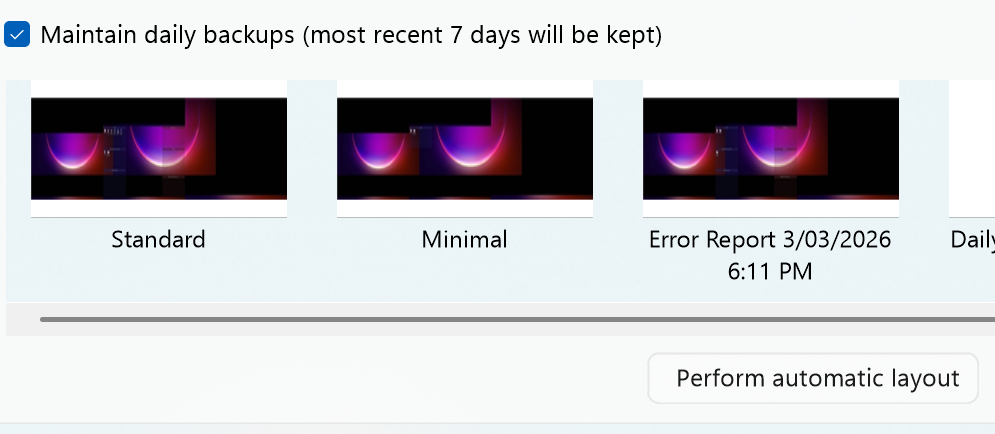
To that point too, one option might be to capture a backup snapshot via "Layout" tab, and then in the same area, resetting your layout to the default auto-layout and rebooting, then likewise seeing if the problem occurs. Likewise, adding stuff back in that you think you might be causing the problem until it breaks. And likewise, if unable to get it to break, loading up your backup snapshot, and seeing if it immediately breaks, or what, etc. Again really just trying to figure out "what" causes break and "when".


Hoping this helps...

Reply #5 Top

Heads up that Windhawk is a tool that not only could – but definitely would – be a likely source of something like this. It's entire purpose is to apply hacked patches on top of explorer. So, I'm betting it is this. Very likely some patch is interrupting a draw procedure of some kind and causing what you're seeing. Might want to give that one a look.

For sake of reference, let us know what patches you have applied, so that we can figure out which one is causing the conflict? Since the source is available, it's likely pretty apparent what is going on, if indeed this is it.

Reply #6 Top
  1. I'm pretty sure it's not the Virtual Desktops sync. My script just detects when the VD has been changed and then sends a hot key shortcut to Fences to slide the page.
    1. That being said, I've disabled the script but the issue remains.
    2. It happens pretty much as soon as I load my standard layout.
    3. I've been using a minimal layout version with no folder portals and a single fence on each page and it's been fine, so issues at all.
    4. Again, as soon as I load the standard layout it immediately has redraw / rendering issues.
    5. Kind of why I thought it might have been an issue with load...
  2. I'm not doing anything sensitive at the moment, but thanks for considering it. I', creating a package and it'll be on it's way to you shortly.
  3. I actually hadn't been using DisplayFusion until more recently but the issue with Fences is older. TBH I've been struggling with it for a few weeks but was concentrating on other things and doing my best to ignore it.
  4. 👍

Like I said, a minimal layout is no issue and works fine.

Oh, I forgot about Windhawk.... Let's see.... 

I've taken a screenshot and popped it into the same Dropbox folder. I'll try turning these off and on and see what happens. In the meantime take a look at the dump and see what you can see.

Reply #7 Top

Ok, it's not anything in Windhawk. I disabled all mods and re-started my system and the display / rendering issues started almost immediately.

I'll keep trying to troubleshoot at my end.

Reply #8 Top

Ok, I've tried most things. Windhawk is off. My AHK script is off. I even neglected to use virtual desktops at all since rebooting (simply stayed on the one desktop). The only thing that seems to trigger the display issue is moving between Fences pages (using both mouse buttons to drag the desktop).

Also, please don't forget that really strange issue where one of the Fences would jump to a different position, but only when moved within a particular small area of the desktop. I think it's one of the last videos.

I'm pretty stuck at this stage and not sure what else I can do.

Reply #9 Top

Aye, yes we were able to open up the settings you sent, but could not recreate the issue 💔. It's something that's going on on this system.

Clearly it's having to do with the folder portals however. The regular icons seem to be fine.


Since you've taken a backup snapshot, have you tried resetting with "Perform automatic layout" and adding just one or two to another page, and seeing if you can reproduce? More or less... does this happen regardless?

Likewise, backing up your... backups, at "%appdata%\Stardock\Fences\Backups", and then uninstalling in full including erasing settings, reinstalling. Then again just starting fresh just for sake of determining – does this happen right away?


Sorry that we're not coming up with great ideas so far here. Have not seen something like this before. We'll have to figure out what the approach would be to diagnose 

Reply #10 Top

Honestly have never seen anything like this. Last time I remember seeing any remotely of this sort (not this, but funny behavior) was maybe a decade+ ago when video card driver bugs were more prevalent, especially in regards to Layered Window / alpha blending support. In that case, layered windows simply weren't hiding/showing properly, as in, they remained visible even when set to invisible. But this one is even more bizarre x100.

What you show in "Fences 6.20 - 2.mp4" with the graphical tearing that updates in realtime – that is just bizarre, and looks like texture corruption, which would happen only at the graphics card layer. There's nothing that our program could do to make that happen. It simply would not be able of drawing the header bar twice like that. Especially not in a cropped manner, where it's updating in realtime. The amount of extra code we'd have to have, that we do not have, to do that is just...yeah.

I don't know what's going on with your setup, and I hate to be like "this isn't us" / "this is out of our control", but that really seems like a case here. Those layered windows simply are not obeying the laws, and obvious visual buffer corruption when resizing the window. (We don't have access to the visual buffer, so again, we can't be corrupting it.) If it's not Windhawk, then my next guess goes to video card drivers. I'm not sure what to suggest.


Reply #11 Top

PS of course last guess here is this pretty cool status bar app you have going on. (yasb?) Guessing maybe you shut that off as well to test, but yeah. From what I'm aware YASB doesn't live inside Explorer.exe's process. But, nonetheless.

Reply #12 Top

Yeah, I had the issue before YASB. In fact I've been working on a widget in YASB so the status bar has been up and down whilst I've been testing and it hasn't made a difference to the Fences issue.

You know what? A loooooooong time ago (ok, maybe 10 years) I remember installing an NVIDIA driver that SAID it was for the system but in actual fact it just created a lot of instability. At that time my Surface had a specialized driver and would only work well with the one supplied by Microsoft.

I'd be surprised if that was the case here, but I'll try reverting the graphics driver back to the one supplied by Microsoft and see what happens.

Good job spotting the issue appears to only be with the Folder Portals though. You've a keen eye. I missed that.

Reply #13 Top

Yeah, I had the issue before YASB. In fact I've been working on a widget in YASB so the status bar has been up and down whilst I've been testing and it hasn't made a difference to the Fences issue.

You know what? A loooooooong time ago (ok, maybe 10 years) I remember installing an NVIDIA driver that SAID it was for the system but in actual fact it just created a lot of instability. At that time my Surface had a specialized driver and would only work well with the one supplied by Microsoft.

I'd be surprised if that was the case here, but I'll try reverting the graphics driver back to the one supplied by Microsoft and see what happens.

Good job spotting the issue appears to only be with the Folder Portals though. You've a keen eye. I missed that.

Reply #14 Top

I just realized.... Fences isn't the only area where Explorer is having a graphical display issue. I didn't realize until I put a couple of contextual pieces of information together from things you've said, but the Task View button stopped displaying the Virtual Desktops around the same time I seem to remember Fences starting to go awry (about 2 - 3 weeks ago).

It could be an indication there's something else going on like you said, or it's possible they're unrelated like I assumed prevously.

Reply #15 Top

Oh, yeah. That is definitely buffer corruption.

Yeap, looks like a video card and/or driver issue indeed.


Hopefully you can get some different drivers installed and get that resolved. Step one, uninstall current drivers in full, see if problems resolve, and go from there.

🤞🤞!

Reply #16 Top

I'm trying to rollback and install the graphics drivers from Microsoft but it's a little involved (technical reasons)...

However, I just realized it's not going to be my NVIDIA GPU like I presumed (from prior experience). It'll be the discrete Intel Iris Xe GPU as this is the one that Explorer will be using by default.

I'll try various options including continuing to unload the newer drivers but also trying to assign Explorer to use the NVIDIA GPU instead.

Will let you know what happens.

Reply #17 Top

Ok, so there's something REALLY funky going on.

Firstly, I'm unable to rollback my display drivers to the official MSFT release. All software, drivers and firmware for the SLS2 come bundled in an MSI which will neither let me uninstall nor reinstall. So I don't even know which the official driver release version is. Furthermore, I've tried to unpack the MSI but it's simply a series of binary files that are meaningless.

Hence I'm unable to return to the original drivers. I've tried to uninstall the drivers for both GPUs via device manager whilst also telling it to remove the driver files, but as soon as I boot up again it's installed the latest drivers again. I could boot into Safe Mode I guess, but what would be the point? I don't have access to the original drivers anyway.

But back to the funky thing...

I changed my configuration to so that Explorer is MEANT to use the NVIDIA GPU:

Then I restarted...

NO CHANGE. 😭😭😭

It's like I didn't switch GPUs at all. Exactly the same behavior as soon as switching Fences pages almost from boot up.

My only conclusion is that Windows didn't respect the GPU preference I specified, but I'm surprised as I Googled the pros and cons before doing it and Google clearly articulated what making this change would do. My NVIDIA GPU utilization spikes when I change my virtual desktop, but not at all when I only change my current Fences page. But other simple things like opening or closer an Explorer window also seems to cause a spike in my NVIDIA GPU utilization but then so does moving a Chrome window or even just moving my mouse. I have no idea which GPU Explorer is actually using.

So at this point, as I see it, I only have two options:

  1. Move forward with the newest drivers (a program called "Driver Fusion" is reporting there are new drivers for both the Intel and NVIDIA GPUs - I do not hold out much hope for this but will try
  2. Reinstall the OS again from scratch - 😭😭😭😭😭😭😭😭😭

I really don't know what else to do.

But I also just find it odd that after switching the GPU that Explorer is meant to use, the exact same behavior re-occurs. Wouldn't that mean that it's NOT a faulty driver or hardware issue?

Do you know what else I might do to further troubleshoot? I'm not a low-level programmer nor do I know a lot about hardware IO, etc... Are there tools out there that can help me determine graphics display issues?

Sigh.

Thanks for your assistance thus far.

Reply #18 Top

Aaaaaaand I'm confused...

I found there's a diagnostic tool built into DirectX but it's reporting my monitors are using the Intel Iris Xe, but I thought it was programs that use a particular GPU.

I've found some diagnostic tools like "Unigine Heaven" which I will try, but if you can think of anything else please let me know.