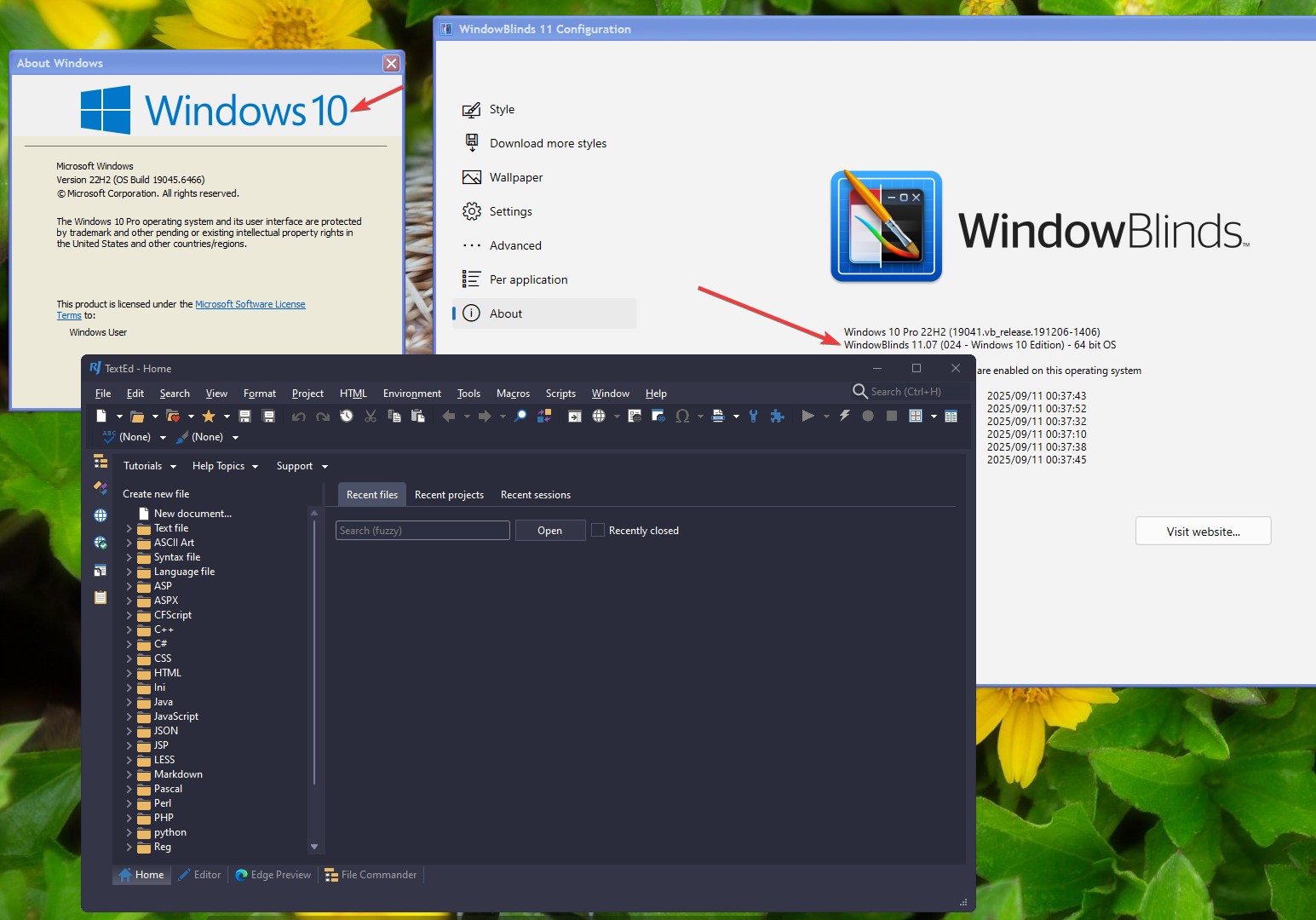
Whoa! Yet another crazy thing happening on my system!!

This is another new problem, and a rather crazy one... it *also* started this afternoon, after I did the "WB config set dark UI" switch...
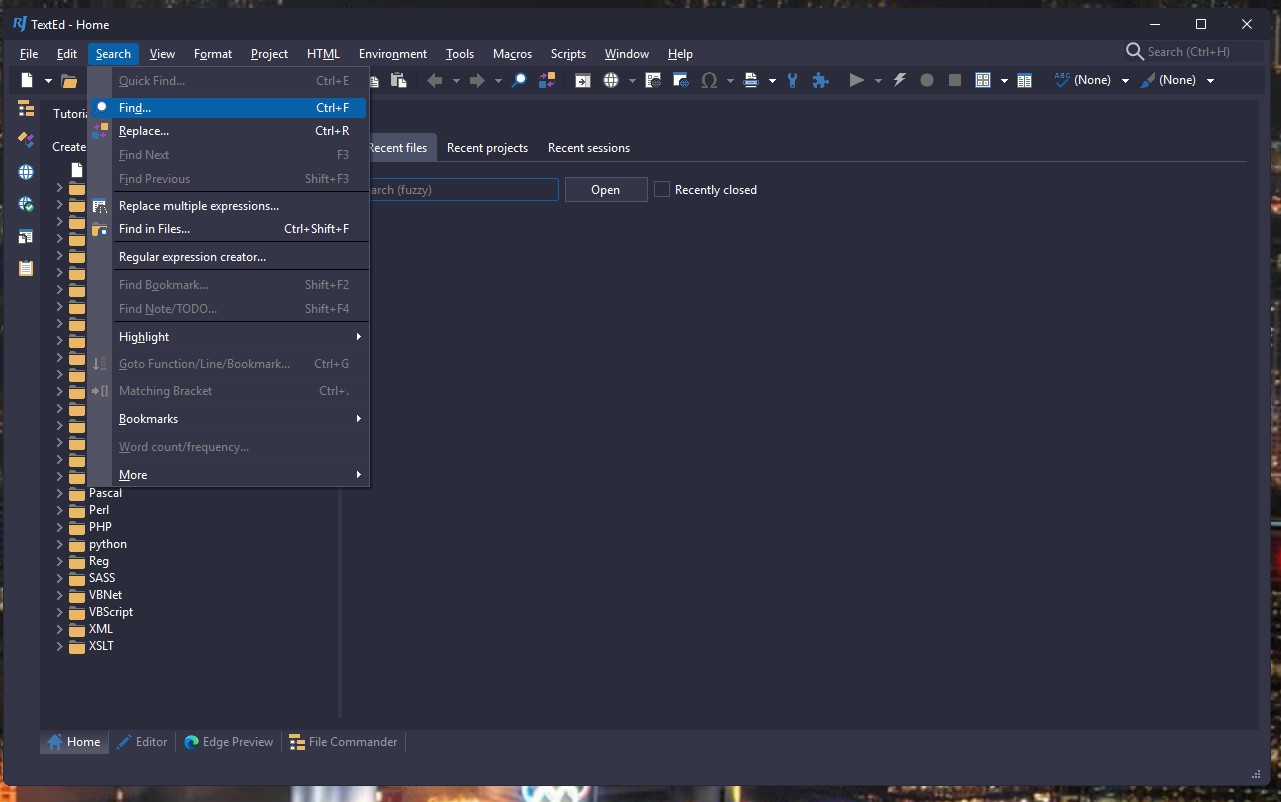
Several programs will show nuked menu bars after I load a new skin...

This particular example was after loading the Denim skin, but this is happening with *any* new skin load...

After loading skin:
https://www.flickr.com/photos/derelllicht/55120260908/

after closing/reopening the program:
https://www.flickr.com/photos/derelllicht/55120260913/

This artifact is occurring in RJTextEd (RJ Text Editor, my programming editor), and at least one other program, though I can't find it right now...

1,986 views 14 replies
Reply #1 Top

Hello,
Sorry to hear you are having issues. When these issue happen, have you tried restarting Explorer.exe? Most of the time, restarting Explorer.exe do help when strange issue appear.

Thank you,
Basj,
Stardock Community Assistant.

Reply #2 Top

Nope, rebooting the computer didn't resolve this issue...


Reply #3 Top

Here is further details on this issue:

If I have RJTextEd minimized when I change the WB theme, then I get the effect that I documented above.

If, however, I leave RJTextEd open when I change WB theme, then the editor *appears* to be drawn correctly with the new theme -
but when I click on any of the filename tabs, the editor just hangs...

In either case, closing and re-opening the editor restores it to a working state.

soooo... this is not lethal, but certainly not desirable either!!

Reply #4 Top

Also, I found the other program that is having this effect... 
I use a reminder program called EPIM Mail (Formerly EssentialPIM Free) ... both the program itself, and especially its reminder dialogs, are corrupted when I change the WB theme... 

very odd...

Reply #5 Top

Quoting Derell, reply 2

Nope, rebooting the computer didn't resolve this issue...

No, I mean just restart explorer.exe. Refer here for steps how to simply restart explorer.exe: https://www.ninjaone.com/blog/restart-the-explorer-exe-process-in-windows/ 

If the issue don't get resolved by restarting Explorer.exe, usually it is best to add those app into WB exclude list.

Thank you,

Basj,
Stardock Community Assistant

Reply #6 Top

Quoting basj, reply 5


Quoting Derell Licht,

Nope, rebooting the computer didn't resolve this issue...


No, I mean just restart explorer.exe. Refer here for steps how to simply restart explorer.exe: https://www.ninjaone.com/blog/restart-the-explorer-exe-process-in-windows/ 

If the issue don't get resolved by restarting Explorer.exe, usually it is best to add those app into WB exclude list.

Thank you,

Basj,
Stardock Community Assistant

Well, restarting explorer did not, in fact, fix this issue...

but this issue started in the past couple of days... nothing has changed with RJTE in that time...
Just excluding everything from WB handling, is *NOT* a solution!!!!!!!!

There is no point in me paying for your software if I can't use it with any of *my* software...

Reply #7 Top

Strangely, I tested RJ textEd with Dragon WB applied to the system, and it don't get skin at all. I assume, you are seeing RJtext that somehow get skinned? If so, perhaps, there is something done on your system that forcing those frame to get skin. Similar to your Thunderbird issue. Your thunderbird also get its frame skin while not skin on my system at all.

Would like to suggest for you look into those mod you have done on your system, perhaps those mod have some strange side effect.


Thank you,

Basj,
Stardock Community Assistant

Reply #8 Top

Well, first of all, here is RJTE with the Dragon skin...

https://www.flickr.com/photos/derelllicht/55121964704

and again, after I loaded this skin, RJTE was completely frozen... 

ummm... there *is* one point that perhaps we've left out of the discussion??

I'm still using Windows 10 Pro on this machine...
I upgraded WB to 11.07, in order to get access to that 
"Do not apply any style system wide fonts" option, so older themes would work on my system without trashing my selected fonts...

but *you* are on Win 11, yes??  That may be the difference between us...

I'm considering reverting to WB 10.89, and just giving up on that font option...


Reply #9 Top

Here is what I get on my Windows 10 test system. It look the same, not skinned.

Thank you,

Basj,
Stardock Community Assistant

Reply #10 Top

Wait a moment, @basj ...

You are saying that you cannot get skins to display on your Win10 system with WB11 ...

Don't you *already* have a reportable bug there??  It *should* work...  it works fine for me, except for this application issue.

I have exactly the same Windows 10 and WindowBlinds versions as you have.

=================================================
On a separate question, you previously suggested:
"Would like to suggest for you look into those mod you have done on your system, perhaps those mod have some strange side effect."

I don't know what "mod" you are referring to??
I don't have any visual styles mods except WindowBlinds - in fact, I don't *know* of any other visual styles modes for Windows 10.
I used to use WinStep, but it doesn't really do anything except create its own apps, so I removed it long ago.

I *do* use Open Shell for my start menu, because it has the Window XP-style cascading start menu that I prefer.
ummm... I *do* have Start 11 2.0 installed in parallel... could that be causing an issue??  
but neither of these start-menu programs should have anything to do with RJTextEd (or EPIM)

If you are referring to the "mods" that I made, to fix Thunderbird, those are not mods, per se, it is just a css file (chrome/userChrome.css) that Firefox and Thunderbird define, which allows users to use css code to modify the display characteristics of the programs.  
It has no influence on any other program(s) at all.


Reply #11 Top

Quoting Derell, reply 10

I *do* use Open Shell for my start menu, because it has the Window XP-style cascading start menu that I prefer.
ummm... I *do* have Start 11 2.0 installed in parallel... could that be causing an issue??  

Yes. Found this:

  • Start11 is designed to work with the modern Windows 10/11 Start menu and taskbar, while Open Shell replaces the Start menu with a classic-style interface and can interfere with the default Windows 10 taskbar behavior. 

  • Running both simultaneously can cause:

    • The Windows key not opening the intended Start menu.

    • Taskbar customization issues or crashes.

    • Explorer instability or crashes when opening the Start menu. 

  • Best Practice: Use only one Start menu replacement tool at a time.  If you want a classic Start menu, Open Shell is the better choice. If you prefer a modern but customizable Start menu, Start11 is more compatible with Windows 10’s current shell. 

Resolution:

  • Uninstall or disable one of the tools if conflicts arise. 

  • If using Open Shell, ensure Start11 is uninstalled to prevent interference. 

  • For users who want both classic Start menu and modern taskbar features, consider using ExplorerPatcher (free) or StartAllBack (paid) alongside Open Shell, as they are designed to work together without conflict. 

✅ RecommendationAvoid using both Open Shell and Start11 together. Choose one based on your preference for classic vs. modern UI. "

That's from Leo, Brave's AI from various sources on the net. https://search.brave.com/search?q=Open+Shell+and+Start+11+on+Windows+10+conflicts%3F&source=web&summary=1&conversation=08cbdb890235abe44d46ed4cc57c4cb2a1e5

From seeing basj interacting for quite some tome, I've gathered that having 2 programs operating on the same part of the GUI will most likely cause problems and to choose one or the other. I prefer Start11 but that's just me. You might decide differently.

Reply #12 Top

Quoting Derell, reply 10

Wait a moment, @basj ...

You are saying that you cannot get skins to display on your Win10 system with WB11 ...

Don't you *already* have a reportable bug there?? It *should* work... it works fine for me, except for this application issue.

No, as you can see from my screenshot above, the Winver.exe is skinned, Windows explorer.exe is skinned, not shown there. Only some application that don't use Standard Windows frame are not skin such as Thunderbird and TextEd. That is not a bug, it is just incompatibility issue. Very same as most Web Browser no longer skinable.

Thank you,

Basj,
Stardock Community Assistant

Reply #13 Top

Okay, I uninstalled Start Menu, rebooted, but this issue is still present.

https://www.flickr.com/photos/derelllicht/55121943082/

Also, I have a Windows 11 laptop; I just tested all of these issues (VLC Media Player, and corrupted menus in RJTextEd when loading new WB skins), and they are present with Windows 11 as well.  So none of these are Windows 10 issues.

Reply #14 Top

well... okay... I took the simple solution here...

I un-installed WB11, Start 11, SkinStudio 11, rebooted, then installed WB10.89 again...
Almost all of these issues are now resolved, at least until MS finally coerces me to downgrade Win10 to Win11 ... hopefully that will be awhile yet.  Maybe I'll be fortunate and all my WB11 issues will be resolved by then (or maybe not).  

For now, this thread can be closed.