Crash: On installation

Hi,

Purchased upgrade to ObjectDock 3.0. Can't even install. Sometimes it fails with "Application corrupted" Sometimes gets to "Checking file location" Sometimes it seems like it is installing, but crashes before it is 50% finished. Have tried disabling VPN and also my firewall. Still crashes. Any ideas?

Here is the problem from event viewer:

Faulting application name: irsetup.exe, version: 9.5.3.0, time stamp: 0x5c2e5626

Faulting module name: irsetup.exe, version: 9.5.3.0, time stamp: 0x5c2e5626

Exception code: 0xc0000005

Fault offset: 0x001c7ffe

Faulting process id: 0x4A8C

Faulting application start time: 0x1DCA3705171F499

Faulting application path: C:\Users\danjg\AppData\Local\Temp\_ir_sf_temp_17\irsetup.exe

Faulting module path: C:\Users\danjg\AppData\Local\Temp\_ir_sf_temp_17\irsetup.exe

Report Id: 3cb96844-c6c9-402d-8342-3da3a9b98adc

Faulting package full name: 

Faulting package-relative application ID: 
1,038 views 6 replies
Reply #1 Top

Hello,
Sorry to hear you are having issues. If you already have only version of ObjectDock installed, Please try, uninstall ObjectDock, reboot immediately (important), download latest version available in your account product download page: https://store.stardock.com/myaccount/products. Install it, reboot immediately again. Retest it and report back.

Thank you,
Basj,
Stardock Community Assistant.

Reply #2 Top

Unfortunately, no luck. Rebooted and stopped all startup applications I could. Still getting either "Application Corrupt". Tried again, got as far as "Checking file locations", then the app silently crashes (just disappears from screen and taskbar).


Any way to debug the installation program?

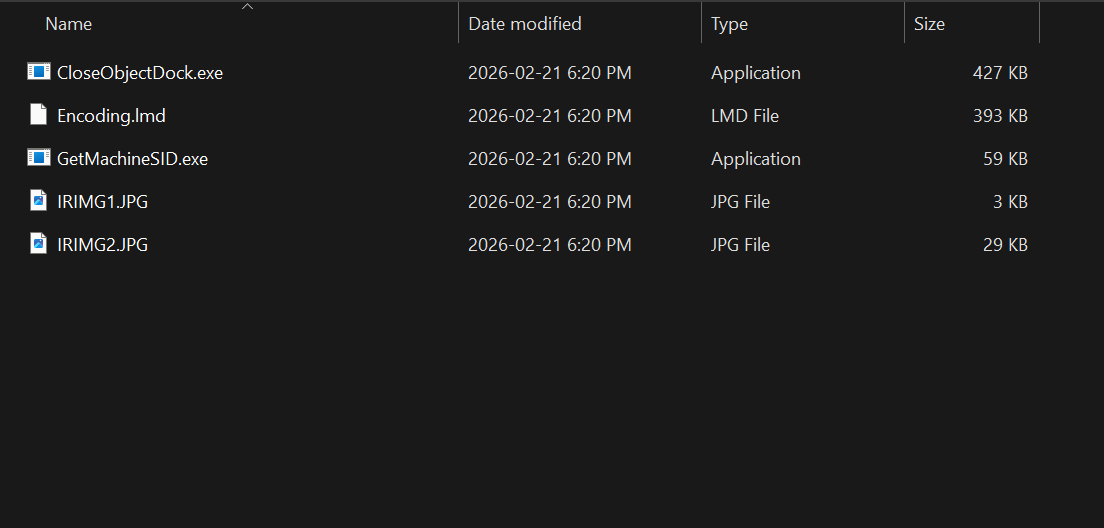
Since  it seems to run from C:\Users\[name]\Local\Temp\_ir_sf_temp_[num], I looked in that directory, and it contains the files I attached in the screenshot, if that is on any help.

contents of temp

Reply #3 Top

I am not really good with debugging things. Not a coder just a normal user. However, please do testing in Windows Sandbox. Something similar mention here: https://support.stardock.com/space/SHC/1416560645/Testing+Fences+in+Sandbox. If it still appear while in there, than, perhaps, it is corrupted installer or something to do with your security setting.

Thank you,

Basj,
Stardock Community Assistant

Reply #4 Top

dgill, just wondering...what version of Windows are you running? Please run winver and post the result. Thanks.

Reply #5 Top

So, the good news is that it is finally working. I went into startup apps and turned off literally everything - Windows Defender, VPN, anything that was enabled. That allowed me to finally install it. No idea what app was interfering.


Anyway, thanks to all for your help.


Reply #6 Top

Great, really glad you resolved it.

Thank you,

Basj,
Stardock Community Assistant