Fences 6 unilaterally rearrange desktop

I've noticed for the last couple of months that Fences 6 would move my file/folders on my desktop to a specific pattern every few days. But I have auto sorting disabled.

Fences will always follow this specific sorting method that's unknown to me, at random timing. Sometimes it's 1 day after I restore my layout, at other times it could be after 5 days.

I always have 'This PC' and 'Recycle bin' as my first 2 items on desktop. But after a few days, a picture named 'omron' will be first, 'This PC' second while 'Recycle bin will be pushed back (by 20 items currently). The 'unilaterally sorted' arrangement/layout is always the same, until I add new file/folder, which would get slotted in.

This often left me wondering if I've lost files until I noticed that the arrangement has changed.

5,721 views 20 replies
Reply #1 Top

Hello,
Sorry to hear you are having issues. Need to know more on your issue.

  1. Windows full version and OS Build number, please use Winver.exe.
  2. Fences 6 full version number.
  3. Desktop auto arrange icons turn on or off?
  4. Issue happen within a Fence or on the desktop, outside any fences?
  5. Post screenshot showing us the issue.

Thank you,
Basj,
Stardock Community Assistant.

Reply #2 Top

Hello,

  1. I'm currently on Windows 10 Ver 22H2 Build 19045.6466
  2. Fences v6.20
  3. Windows Desktop auto arrange is off
  4. All my desktop items are split between 2 fences, issue occurs in both. There's nothing outside fences.
  5. I've just restored and deleted all backups with the issue, so I can't provide screenshot ATM. I'll provide some when it occurs again.


Reply #3 Top

Was the Fences v6 installed over previous version of Fences such as Fences v4 or below? Perhaps the setting was not properly set on Fences v6. 

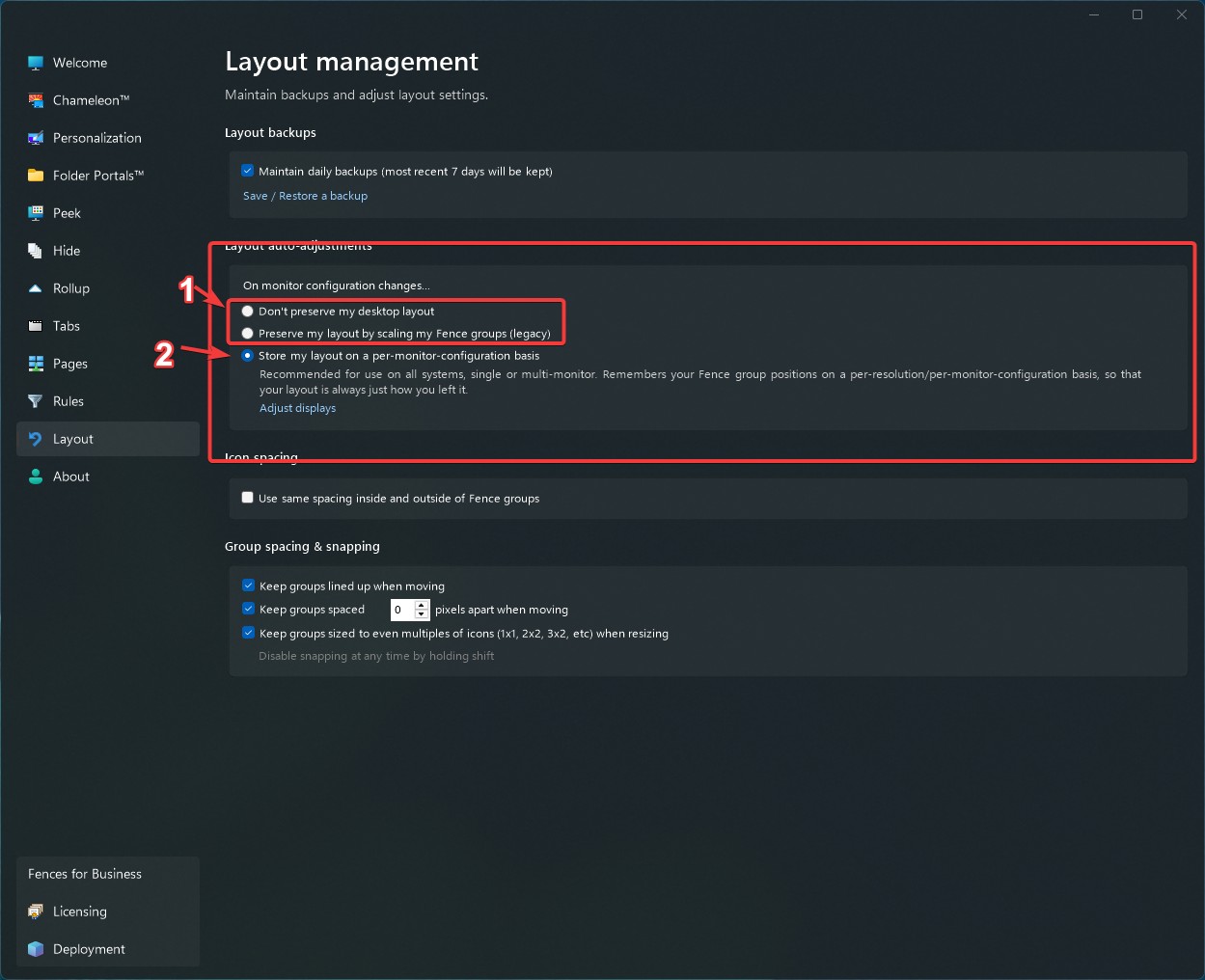
Sometimes issue of layout can be resolve just by selecting different auto layout option, those top 2 options, and than set back to the "Store my layout on a per-monitor-configuration basis" option.

Thank you,

Basj,
Stardock Community Assistant

Reply #4 Top

I uninstalled my fences 4 before installing fences 6. But I did restore from my fences 4 backup.
I will try the solution. 

Thank you for your assistance.

Reply #5 Top

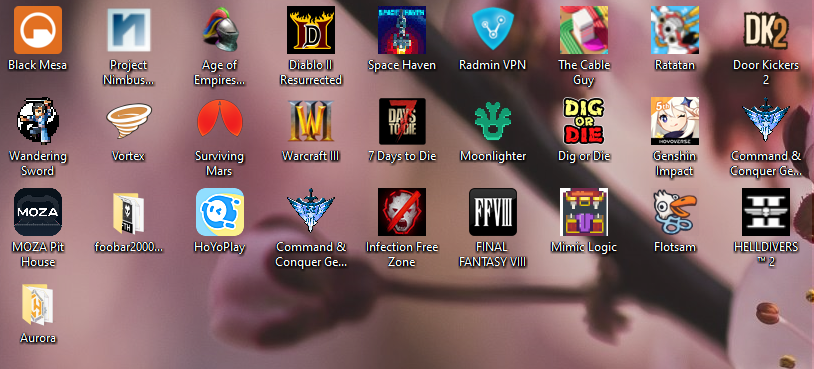
I found a back up where 1 of the fences has the issue in question. The picture labelled (1) is the original arrangement, (2) is after the issue had occurred. 

P.S. The pictures had to be moved to the next post as it became an error when I switched pictures.

Reply #7 Top

Hello,
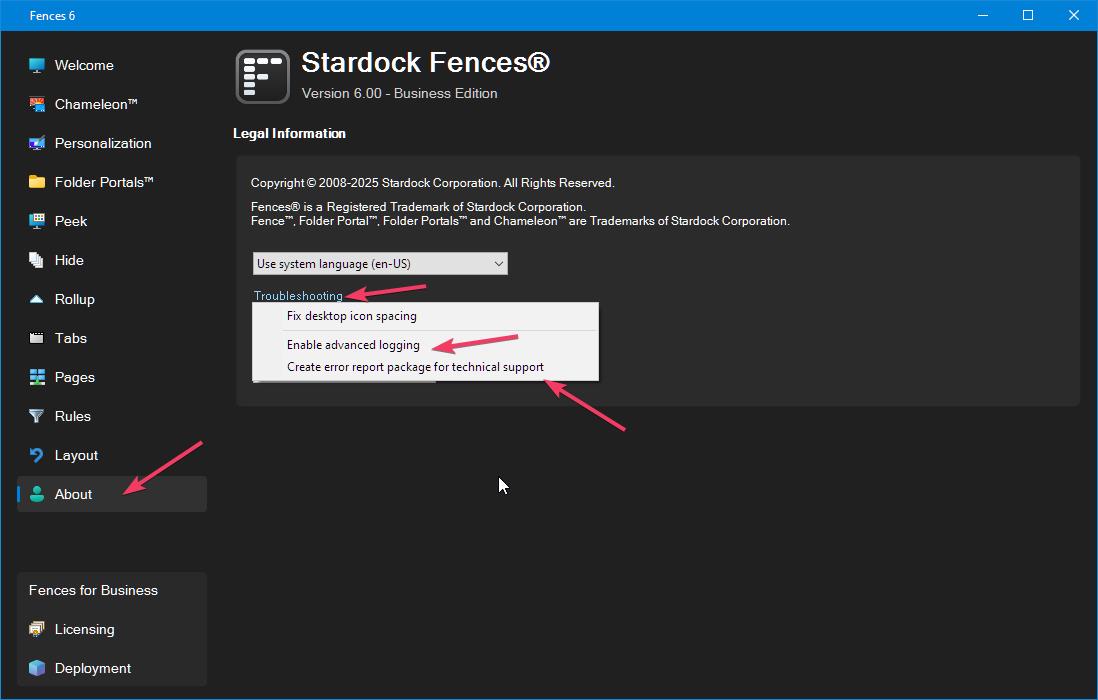
Sorry to hear you are having issues. Please try this, rearrange those icons to your liking. Saved a new layout backup. Turn on advance logging. (refer screenshot below). When the issue appear again, Create error report package and send it in for review by Support. Please post this thread in there as reference.

Thank you,
Basj,
Stardock Community Assistant.

Reply #8 Top

Hi asanidar thanks for going into all this detail. It might take us a moment but we’d like to dig into this. We might need to figure out what kind of debug output we might want to put in to help track this down. No hypothesis yet from the team on what could be causing this so still working to figure out how to proceed.

Sounds pretty infrequent, but one thing is wondering if it has anything to do with monitor sleeping etc, resolution changes etc. (Our guess is likely not, but, to ask.)


We look forward to figuring this out and sorry for the hassle in the meantime. One thing that might be good to flip on now is advanced debug logging, which you can find in About → Troubleshooting → Enable advanced logging? (Log out and back in or reboot to enable once you turn on, and it gives a chance for information to be logged, so that you can submit a report via Troubleshooting → Create Error Package after the next occurrence. There is likely already enough information in the logging to get an idea, with this advanced logging enabled and alongside the screenshot you shared.)

 Thank you!

Reply #9 Top

I've activated the advanced logging.


I've not made any actual resolution changes other than games. Even then, I don't notice any changes.
It's the same for monitor sleeping.

Reply #10 Top

Ok. Good to know.

The advanced logging should hopefully capture some additional insight on at least "when" this shift occurs so we can help narrow it down. With that in hand, we should be able to add some additional logging around where it's occurring to help further narrow down. So, submit error log via "Troubleshooting → Create Error Package" whenever you do see it reoccur and we'll proceed.

Thanks again

Reply #11 Top

Hi asanidar,

We've added additional logging to an upcoming build that might help with this further. In the meantime, keep "Advanced logging" on from "Troubleshooting" in the About pane, and send a report if you see a problem. Thanks for the help

Reply #12 Top

Update @asanidar, new beta build is ready at https://www.dropbox.com/scl/fi/3yesbjb58xmwy8yyn4i4f/Fences6_6.4.0.1-j108-Setup.exe?rlkey=ufu1yu5i85elo27ucioia3od8&st=j1d2qmlp&dl=1, and includes the latest debug logging. Please give it an install and it'll track considerably more info about icon moves, which will hopefully help us narrow it down. Thanks again

Reply #13 Top

Sorry for the late reply, I will give the new build a try. So far the issue has not reoccurred, so I am guessing that reply #3 might have fixed the problem.

Reply #14 Top

I've just had the issue reoccur using the new beta build that I installed yesterday. I've created the error report package and uploaded it to  dropbox as per instructions.


My observations:

Just as I log into my windows account, I noticed that the fences were small and off to the top left of the screen. After a few seconds, the screen refreshed (blinked) and then they are finally back to their original positions and sizes, but the icons arrangements are off again.
The order sequence seems to have changed this time.


EDIT: I've now restored to yesterday's backup and ran the solution in Reply #3

EDIT 2, 25Feb: It didn't work, icons rearranged again. Within the new/wrong arrangement, 1st icon and last 3 icons in each fence are the same as yesterday's issue but the other icons aren't the same. I've generated a new report but didn't send it out.

Reply #15 Top

Definitely seeing something in these logs, and this is definitely strange. Thanks again for sending the logs

Looks like the system is switching to a configuration of 640x480, and things are going haywire then.

Will have to work to recreate on our side. Hope to get to the bottom of this

Reply #16 Top

Hi asanidar, we've got a new build ready, that hopefully gives some additional clues. It might take a few shots here, but can you recreate the problem and share the logs from this? Attached v6.41 (6.4.1.4) below:

https://www.dropbox.com/scl/fi/m4zxfd1ynmw75a991zvpv/Fences6_6.4.1.4-j113-Setup.exe?rlkey=rnfr843eia2eylsv1eygq4ovp&dl=1


Reply #19 Top

Hello, the issue has not reoccurred since running the new version (v6.4.1.4)

EDIT: March 25th, still doing well with no issues.