Multi-Monitor Swapping

hi!

I am running the latest version of windows 11 and the latest version of fences 6. I have a 2 monitor setup with monitors beeing placed one above (1) one below (2).

On every monitor sleep, relogin or restart of the computer my fences end up on the wrong monitor (monitor 2), So I have to go to the fences configuration -> Layout -> Layout auto-adjustment - > Store my layout (...) -> Adjust displays -> Swap contents of Monitors 1 and 2

See attached screenshot.

So while it perfectly recognizes the monitors it still does not memorize the fences position in relation to the monitors.


Why is that?


Thanks

Sascha


2,968 views 9 replies
Reply #1 Top

Hi sakodockadmin,

We'd love to take a look. Can you help us out by reproducing with advanced logging enabled, and uploading a report?

First, we have a beta that does have some improvements on the multi-monitor front, so might want to install that first. You can get it here:
https://www.dropbox.com/scl/fi/p6jmjdw17nzvesjp06ajy/Fences6_6.2.2.1-j95-Setup.exe?rlkey=xl70vk3fn6tdpzj5n6qunkfbw&dl=1

This has been shown to resolve issues for some people, so it's definitely worth checking out. If it does not, steps are below:

Steps:
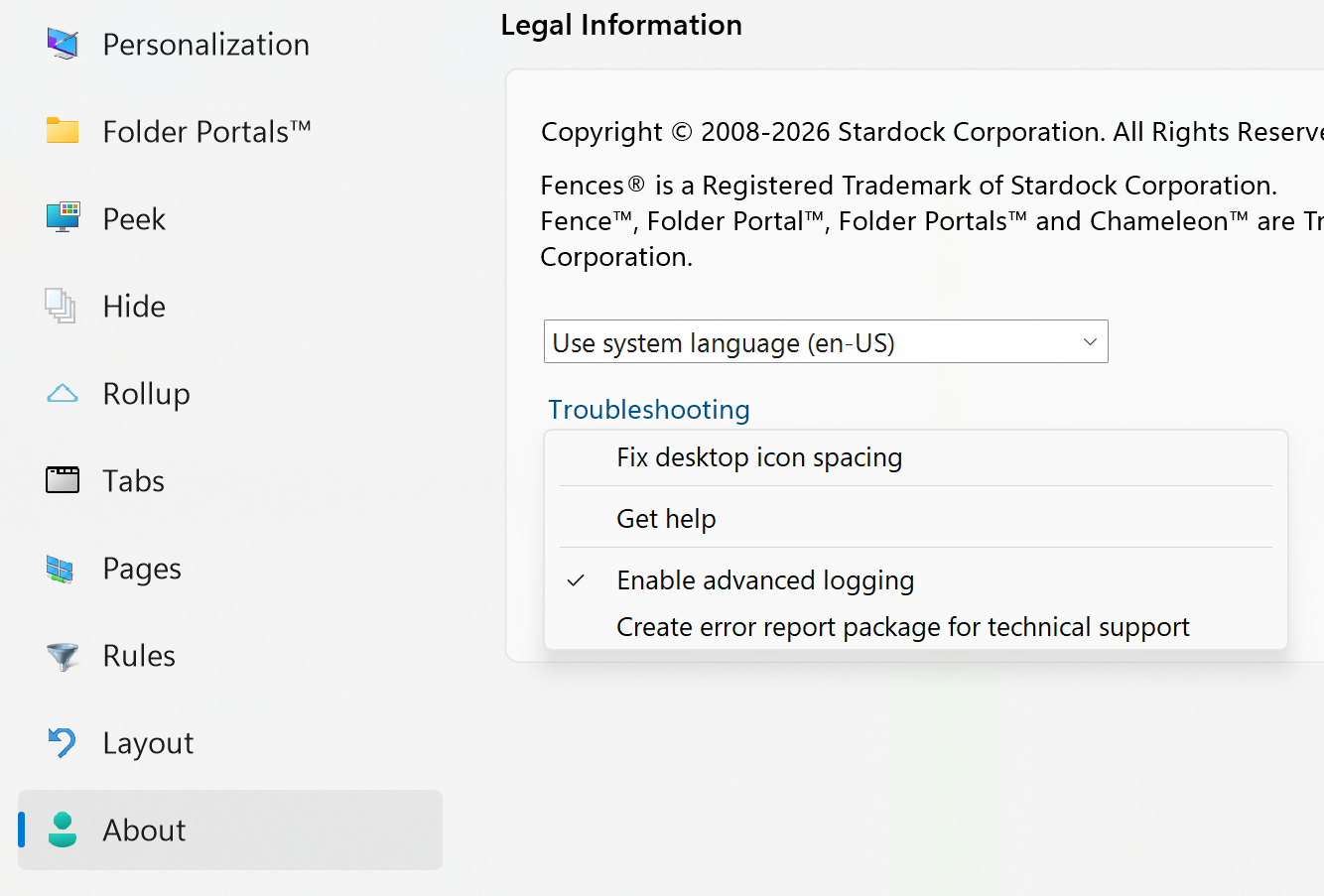
(1) About -> Troubleshooting -> Enable advanced logging

(2) Reboot or log off/on, so this setting takes effect

(3) Get things how you want them, then take a "before" snapshot/backup from the Layout panel, and rename it "Before"

(4) Reproduce the issue, so that the bad thing has happened and things are not as you want them.

(5) Take an "after" snapshot/backup from the Layout panel, rename it "After"

(6) Submit a report via About -> Troubleshooting -> Create error report


With this information, we should have enough information to figure out the issue for you. Thanks for the help. Our guess is something about the monitors being identical, but in either case, this shouldn't be occurring.


Reply #3 Top

Hi sakodockadmin just an update,

Looks like we've identified a shortcoming of the "swap monitors" data transformation that is likely causing this.

We're looking in to it and hope to have something for you to test soon. Thank you!

Reply #4 Top

Hi sakodockadmin, good news! With the help of your debug data, I think we've been able to resolve this.

Let us get together an installer and we'll get you a link for testing and verification. Thank you for your help and patience

Reply #6 Top

Hi sakodockadmin, the new build is ready for testing. v6.40 beta is available via Object Desktop Manager, your My Products download page, or here at this link: https://www.dropbox.com/scl/fi/3yesbjb58xmwy8yyn4i4f/Fences6_6.4.0.1-j108-Setup.exe?rlkey=ufu1yu5i85elo27ucioia3od8&st=j1d2qmlp&dl=1

Thanks for letting us know

Reply #7 Top

Hi sakodockadmin, just checking to see if you've been able to test to see if this resolves the issue. It has a lot of additional debug info as well, in case it doesn't – but I think it should be resolved!

You can get the latest-latest version at https://www.dropbox.com/scl/fi/7rg79de1cl7jumfls02zw/Fences6_6.4.1.2-j110-Setup.exe?rlkey=vslexmaoq2fzoyud17h4n7wo6&dl=1 (v6.41, 6.4.1.2)

Thanks for any insight you have to share

Reply #8 Top

Hi!

seams to work! No more sudden switching of fence positions since your last update.

But your latest version link here:

https://www.dropbox.com/scl/fi/7rg79de1cl7jumfls02zw/Fences6_6.4.1.2-j110-Setup.exe?rlkey=vslexmaoq2fzoyud17h4n7wo6&dl=1

is not working ;)

Reply #9 Top

Oh no, thanks for the heads up! Fixed link is here

But yes for your purposes, I believe v6.40 should do it. Thanks for confirming and glad to hear!