Rollup Fences roll behind other Titlebars (Fences 6.2)

Rollup Fence icons obscured by other Rollup Titlebars covering the icons

Fences 6.2 Rollup fences roll down and behind existing rollup titlebars, obscuring the icons in the original Rollup fence. Makes the upper Rollup fences practically useless when stacked over lower Rollups...

I've tried move, recreating in a different order. Nothing works!

Please advise

-Rob

5,743 views 17 replies
Reply #1 Top

Hello,
Sorry to hear you are having issues. Need few more details.

  1. Windows 10 or 11? Also need its full version and OS Build number. Please use Winver.exe to get these numbers.
  2. Post a video showing us your issue so we understand it better.

Thank you,
Basj,
Stardock Community Assistant.

Reply #2 Top

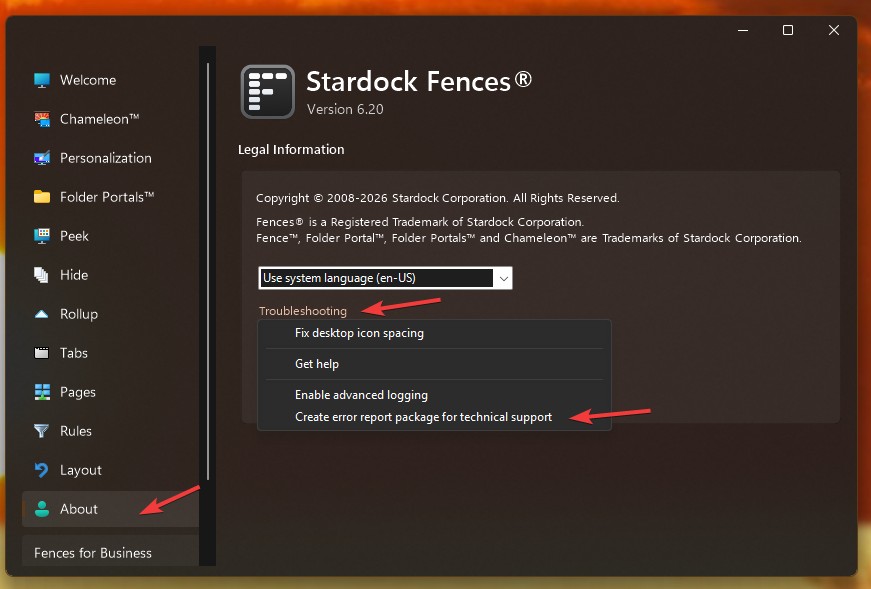
Also, on Dev request, please upload your configuration setting to them. This can be done by click the About tab->Click the "Troubleshooting" link-> click on Create error report package for Technical support-> Click "Yes" Fill up the form-> Click on "Create Report Package"-> Follow the instruction that popup to submit the report to Dev. Refer screenshot below.

Thank you,

Basj,
Stardock Community Assistant

Reply #3 Top

OS Name:    Microsoft Windows 11 Pro
Version:    10.0.26200 Build 26200


Single Click, Rollup comes down, can click any icon normally...

Move mouse away, Fence Rolls up normally. (so far so good).

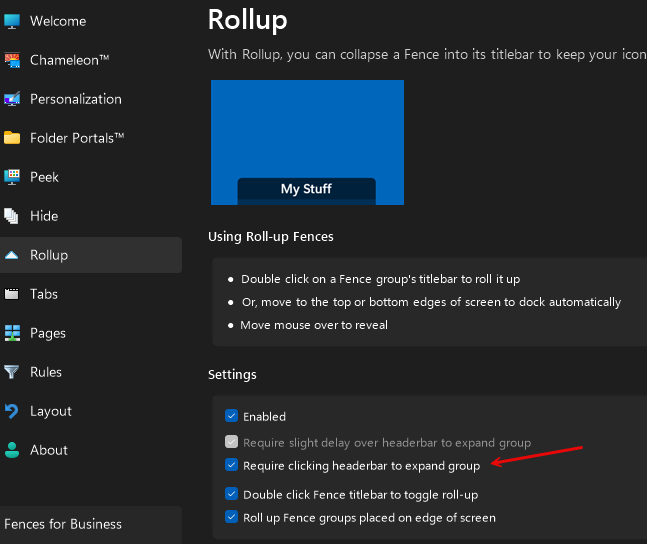
Double Click Titlebar, Fence rolls down and stays down (per Rollup>Settings>Titlebar Toggle)

Click any icon within the fence (even if no Titlebar is below it, Lower Titlebars suddenly pop over the icons obscuring the icons below. 


Thanks!

Reply #4 Top

Please send in you configuration setting for Dev to review it. Refer to my reply#2 above.

Thank you,

Basj,
Stardock Community Assistant

Reply #6 Top

Great, please wait for Dev input on your issue.

Thank you,

Basj,
Stardock Community Assistant

Reply #7 Top

Hi mrbeavers, sorry for the lack of intuitiveness in the feature here.

It looks like you're double-clicking, as opposed to single-clicking, which turns off the roll-up feature entirely rather than just open it up temporarily. The result is that groups that are then covered are brought to the top.

I'm wondering if you're intentionally double clicking and intentionally turning off the feature entirely, or if you are meaning to single click as to just reveal the contents temporarily?

Thanks for the insight

Reply #8 Top

Yes. If I click once the fence rolls down normally, but when I move the mouse off of the fence, it rolls up again. I need the fence to stay down until I click the Titlebar again. So click to roll down, then click again to roll up.

This allows me to “pull down” the fences that I need, then I can roll in and out of several fences without needing to roll them down first. When finished with those tasks, I can click the Titlebar again to roll them up and out of the way. So Click to ”Pull Down”, click again to “Roll Up”. Much like a window blind in your home…

So far, the only way I’ve been able to induce this behavior is to double click, which allows the fence to roll down and stay down, but now lower fence title bars pop over when clicking anything inside the fence.

Thanks,

-Rob

Reply #9 Top

Hi Rob. Good to know. Hm. A followup question would be about desired behavior, given the reality of multiple needs being met.

In this scenario, you'd be expanding a group so that it entirely covers another. In this situation, those covered ones would become inaccessible. Current versions specifically make it so that groups that are covered up are brought to the top so that they're not lost, as it has been a common complaint that when you cover one up with another accidentally, you can "lose" them. Obviously we'd like to adjust it to not break the scenario you're describing as well.

Short of an option to "disable this" that could be coarse and that roughly no one would find, how might you recommend we reconcile these two things?

Perhaps one simple answer is to allow this covering-up to happen in situations where nothing is "moved", as in this roll-up disable scenario, but, that would feel fairly fragile, as that's sortof not how the "recovery" algorithm works. It functions the way it does now (upon clicks and similarly other actions like startup) as monitor changes and etc likewise can "move" groups, so, right now it's a bit of a catch all that runs periodically based on the current state of settings.

We'll work to think on it on our end, but suggestions are welcome. Again the situation here is when one group is entirely engulfed by another, the logic is to surface the engulfed groups. Thanks again for the help.

🤔

Reply #10 Top

Hi Dr W,

Thanks for looking into this.

I am also a programmer for 45 years and counting, so making suggestions from a user perspective would be right up my alley... 

In my use case, the most practical thing to do would be to Click once to "Pull Down", then click again to "Roll Up". Some suggestion on how to avoid "loosing" the fences below.

1.) Add a "Click again to Roll-Up (shrink)" or "Shift-Click again to Roll-Up (shrink)" sub option to the existing "Require clicking header to expand group" option...

2.) Add a Titlebar status Icon or indicator to make it obvious to the user that this is a Roll Up and not a Static fence. Currently, there really is no obvious way to know. This may also provide a target area to "Click again" which may limit the need for Shift-Click etc...

3.) Offer a method to toggle all Rollup's "Up / Down" manually (similar to peek). Maybe something like Shift-Alt-Click on desktop to toggle all Rollups? And/or a context menu item?

4.) Make Optional: Force Rollup background field transparency to a minimum of say, 20% to a max of 75% (user adjustable), so that you can tell there is still something below it. Maybe only show the faint lower fence outlines in the transparency to avoid Icon image & visual clutter. Then a user will know to roll up the fence manually to reveal the fences below.

Some of these seem fairly simple to implement given your existing logic (I know it's never as easy as it sounds). Can you keep me posted on any progress?

I have many other helpful suggestion to improve usability. We'd be happy to Beta test for you and Stardock anytime :)

Feel free to reach out if you would like us to test any minor revisions or if you need clarification.

Thanks,
-Rob


Reply #11 Top

Interesting.

So, dropdown choice:

Triggering:
- Mouseover
- Click to open
- Click to toggle open/closed

The double-click to turn feature on and off as a whole is an odd paradigm, but, it does seem to have a high convenience factor at time of configuration which is why it remains, vs just being a menu option. (It's not really *designed* to be toggled on and off frequently, though, people may.)

In this scenario of the options above, "Click to toggle", does have a downside of that, if you choose that, then now you HAVE to click to toggle it closed, every time, verses digression to single click to open, double click to "pin-open" in a way by disabling entirely. Further now one might have expectation of just single clicking on ANY Fence to toggle it open/closed. Which, maybe that should be the option, unsure. An awkward two-step / ambiguity of double click to enable, single click to open/close emerges.

...And as well – this interaction convo aside – all the above still leave the post-origin situation where groups are being covered, and coming to the top. 😂

Hmmmmmmm.

(2-4) Titlebar adornment I don't know helps us and not really space for that, similar keyboard combos are a bit buried. Likewise, opacity is somewhat niche. So – looking for the best singular interaction, and what to do about the fact of groups being covered and that being "ok" in specifically this scenario, but not other scenarios, wherein usually people have been made happy by no longer losing groups during various stuff including monitor changes, other accidents etc. 

Reply #12 Top

It is odd that double clicking to disable the roll up feature initially does cover the lower Titlebars. It’s only a secondary click within the fence that moves the fence to the back.

I think the cleanest method would be as you eluded…

Double Click - Enable / Disable Rollup

Disabled - Behaves as it does now, moves lower fences to the top when clicked

Enabled - Single Click toggles Roll Up / Down

Still think it would be helpful to indicate the fence is a rollup, maybe a small icon next to the Titlebar “options” icon when enabled.

-Rob

Reply #13 Top

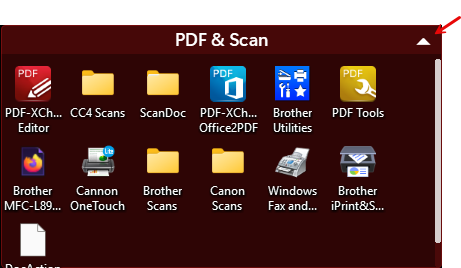
It could be something as simple as adding an Up/Down arrow that represents the opposite state...


This serves both purposes of Identifying Rollup Fences, with the optional Click to toggle Rollup selected.

-Rob

Reply #14 Top

Agreed! Good stuff

Team has long had the question of whether this has more utility than a close button (experimented with things like this). Thanks for bringing it back to the forefront.

We'll have to reconsider this for future versions. Rollup is a pretty prominently used feature from what we understand.

Alternatively of course, X'ing does make it easy for users to configure, which is critical as well, so, tradeoffs. We're pretty sensitive to adding visual load. One of the other downsides of such an arrow is it implies you need to click it to roll up and down, which, today you don't need to do. Can leave it so that you can do the whole titlebar, but, it becomes odd as a non-button-actually-just-indicator that looks like a button. Decisions decisions. (/option for options down the line.)

Anyhow will be continuing to consider this. Thanks for adding. We'll see if we can slip in anything into an upcoming update. Particularly if we can think of quick solutions to the not-coming-to-top part, which is the nuance essence here. 

Reply #15 Top

If there is an option in Rollup configuration to make the Rollup "Manual" (with arrows) or "Automatic" (hovering), the Arrows would only show when the "Manual" option is selected.

Maybe some other indication that this is a Rollup fence when in Automatic (hovering). Something like an A?

-Rob

Reply #16 Top

Right. Yes I think the concept might be, either an option to switch to single-click to toggle or an option to add a toggle icon up & down. Tbd on that. But, in good news, we did add ability to turn this off manually. In the upcoming-soon release:

HKEY_CURRENT_USER\Software\Stardock\Fences\Settings
"NoRescueGroupsFromUnderOtherGroups" = (DWORD) 1


For reference again, if the option were "Single Click toggles Roll Up / Down", that would be acceptable to have it so that you *always* had to click to close groups, correct? (No idea if this will get added or when etc, but for the sake of the survey verification, since it has been mentioned!)

Thanks again for chipping in here

Reply #17 Top

For reference again, if the option were "Single Click toggles Roll Up / Down", that would be acceptable to have it so that you *always* had to click to close groups, correct?

Yes. But understanding that others may also prefer the "hover" method, making a configuration menu option would be more universal.
similar to...

Rollup:
      [ x ] Enabled
      [ x ] Double Click fence titlebar to toggle roll-up
            [ x ] Do not rescue groups from under other groups          
      [   ] Automatic - Require slight delay over titlebar to expand group (hover) <Grayed out, non functional when "Manual" mode selected
            [ x ] Show Automatic (hover) mode status on titlebar
            

      [ x ] Manual - Single Click to toggle Roll Up / Down <Grayed out, non functional when "Automatic" mode selected
            [ x ] Show Roll Up/Down Arrows on Titlebar
            

Just a general concept...

-Rob