Start11 Menu issue not immediately showing pinned items, can not make Start11 Menu larger like I was able to before

Windows 11 25H2

Lately, the Start11 Menu does not immediately show pinned items like it used to with a previous version of Start11. Now, instead of clicking just on the Start11 menu icon, I have to click twice to see the pinned items which is less convenient than before. I now have version 2.6. How can this be resolved? Now, when I left click on the Start11 Menu, at the top it says, "Suggested."

I can not find any way now to make the Start11 Menu larger (taller) after cleft clicking on it the Start11 icon like I did before. How can I make the Start11 Menu taller?

3,153 views 16 replies
Reply #1 Top

Hello,
Sorry to hear you are having issues. First, Please try, uninstall Start11, reboot immediately (important), download latest version available in your account product download page: https://store.stardock.com/myaccount/products. Install it, reboot immediately again. Retest it and report back.

If the issue still these we need more information.

  1. We need to know Windows 11 full version and OS Build number. Please use Winver.exe to get these numbers.
  2. Start11 full version number installed.
  3. Do you have any other application install on your system which also change how your Start Menu, taskbar and Explorer. Application such as StartAllBack, DisplayFusion, OpenShell etc.

Thank you,
Basj,
Stardock Community Assistant.

Reply #2 Top

I uninstalled and reinstalled Start11 and there was no change in operation! The Windows 11 version is 25H2, Build 26200.77.7705. Start11 version is supposedly 2.60.2 but the program reports 2.6. I am using too much time to troubleshoot Windows 11 issues. In order to uninstall and reinstall Start11, I had to shut down a program so I do not loose data and do other things so I end up not being able to do what I need to do. I just like things that work.

Reply #3 Top

Unfortunately, from what I understand Start11 need to be install properly with rebooting and all, since it work very closely with Windows system. And there always possibilities for conflicting with any other application that also share similar function/control on Windows system. 

Thank you,

Basj,
Stardock Community Assistant

Reply #4 Top

Your response is nonsense. I rebooted the computer. It worked okay earlier with the same programs. I do NOT have any programs that share similar function/control on Windows 11. When will Start11 be fixed? I am still waiting after reporting the issues on February 9th and today is February 18th,

Reply #5 Top

I am going to ask what sounds like a dumb question now.  Is Start11 actually running?

Easy way to tell, right click on the menu, does the menu have configure Start11 on it.  

I suspect whats going on here is Start11 is not starting on your PC, perhaps due to some AV app getting confused or optimizing tool disabling the service to 'speed up your PC'

The other option is Start11 is set to not provide the menu, you can check this from the Start11 settings window.

My usual recommendation is uninstall, REBOOT and then reinstall but you say you have done this which points to one of the above being the issue.

If you know how you use Taskmanager you could check if under details you can see Start11Srv and Start11_64.exe running.

Reply #6 Top

Your response was not helpful at all. I need to communicate with a Support person who can resolve the issues I reported without further delay! I did not response sooner since your response shows a lack of knowledge of addressing the issues. It's too bad that Stardock does not provide Support by the company for their own product! Since the forum cannot, who can actually address the issues I raised? I an tired of using a dysfunctional Start11 menu!

Reply #7 Top

Actually, Neil is the Dev Lead on Start11, he has the knowledge on everything about Start11. It is unfortunate you feel that we are not helping you. 

Thank you,

Basj,
Stardock Community Assistant

Reply #8 Top

He has resolved nothing. As for his question about whether Start11 was running, of course it is running. The Start11 special icon is shown.

Reply #9 Top

We need information to actually see what is the issue, we can't simply suggest something that might not work. If the Start11 is running, a simple "Yes, it is running" would be the correct way to move forward with your issue.

All the question so far is to narrow down your issue. But, strangely, you hesitant to do, we can't help you if you wish not to help yourself.  

Moving forward, please post a video showing your issue or some screenshots so we understand your issue better.

Thank you,

Basj,
Stardock Community Assistant

Reply #10 Top

I have already explained the issues. See first Post. I get the impression that the people who have responded are not familiar with Start11's operation on Windows 11. Your response, "But, strangely, you hesitant to do, we can't help you if you wish not to help yourself." This shows unprofessionalism since I have taken steps to help myself. Stardock greatly lacks proper Support for Start11 since a person cannot speak to Support.

Reply #11 Top

Quoting waynecar, reply 8

He has resolved nothing. As for his question about whether Start11 was running, of course it is running. The Start11 special icon is shown.

Have you perhaps set the Start11 menu to open in all apps by mistake?  This is a setting you can set in Start11 settings by opening it, clicking configure and scrolling down to the advanced section.

If not then please provide a screenshot of what you are seeing as this clearly isn't normal and would help us solve the problem very quickly.  Otherwise we have almost no usable information to go on unfortunately and this isn't a known issue in Start11.

Reply #12 Top

The "Open all apps" Menu as a Menu" is On which I want. The option "Start menu should open showing all programs list" was On. I turned it Off and now the Menu works as it used to which was when I click on the Start11 icon on the Taskbar the Recent opened programs are shown. I would like to suggest that the Menu include the word "Recent" at the top of the menu. When the "Start menu should open showing all programs list" was On, the word "Suggested" was at the top of the Menu.

The other unresolved issue as I reported approximately 3 weeks ago is not resolved which is "I can not find any way now to make the Start11 Menu larger (taller) after cleft clicking on it the Start11 icon like I did before. How can I make the Start11 Menu taller?" I can make the Menu larger but I do not want the Menu wider. I used to be able to increase the number of items listed which makes the Menu taller but not wider. How can I make the Menu taller only?

Hopefully, the menu height issue can be resolved soon.

Thank you.

Reply #13 Top

Quoting waynecar, reply 12

The other unresolved issue as I reported approximately 3 weeks ago is not resolved which is "I can not find any way now to make the Start11 Menu larger (taller) after cleft clicking on it the Start11 icon like I did before. How can I make the Start11 Menu taller?" I can make the Menu larger but I do not want the Menu wider. I used to be able to increase the number of items listed which makes the Menu taller but not wider. How can I make the Menu taller only?

Hopefully, the menu height issue can be resolved soon.

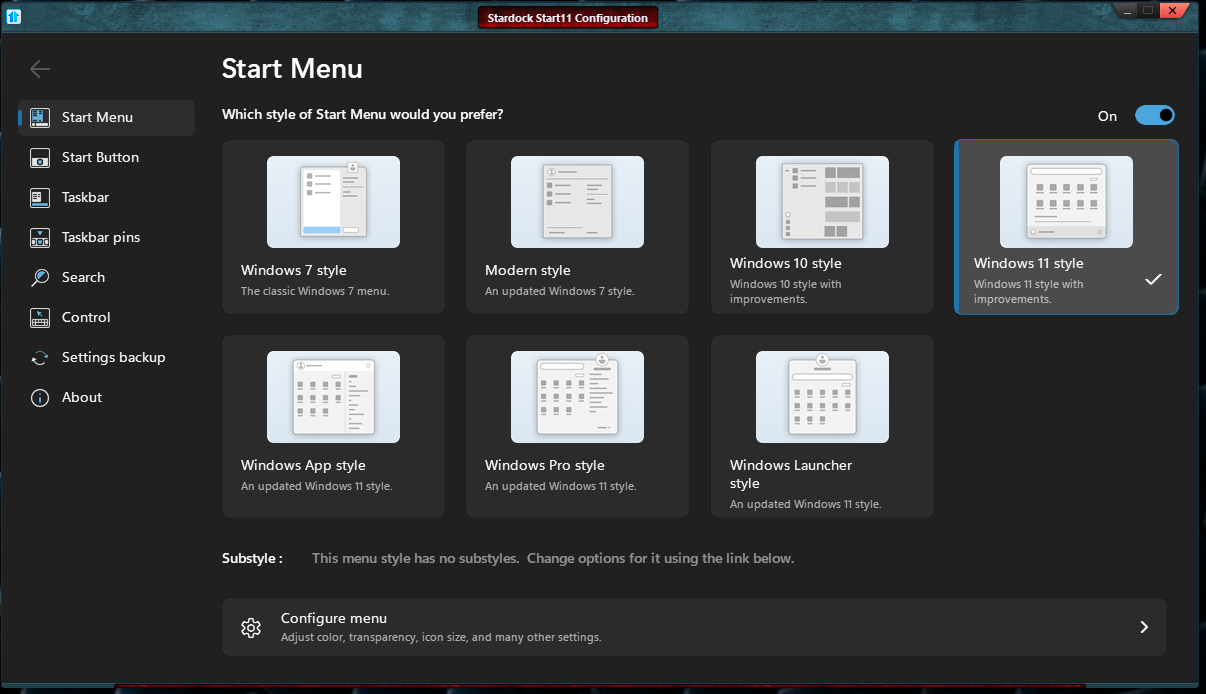
Need to know which Start11 Start menu style you're using first to answer that.

Thank you,

Basj,
Stardock Community Assistant

Reply #15 Top

to change Windows 7 style you will need to adjust this.

Vertically:

Thank you,

Basj,
Stardock Community Assistant


Reply #16 Top

The last instruction resolved the problem. For some reason upon reinstallation, the previous setting was not retained and I could not find the needed setting.