Problem with enhanced taskbar

After activating the enhanced taskbar, some elements are no longer displayed in the center. Restarting Explorer does not change this.

This looks very unattractive, and some text is even cut off.




1,039 views 4 replies
Reply #1 Top

Hello,
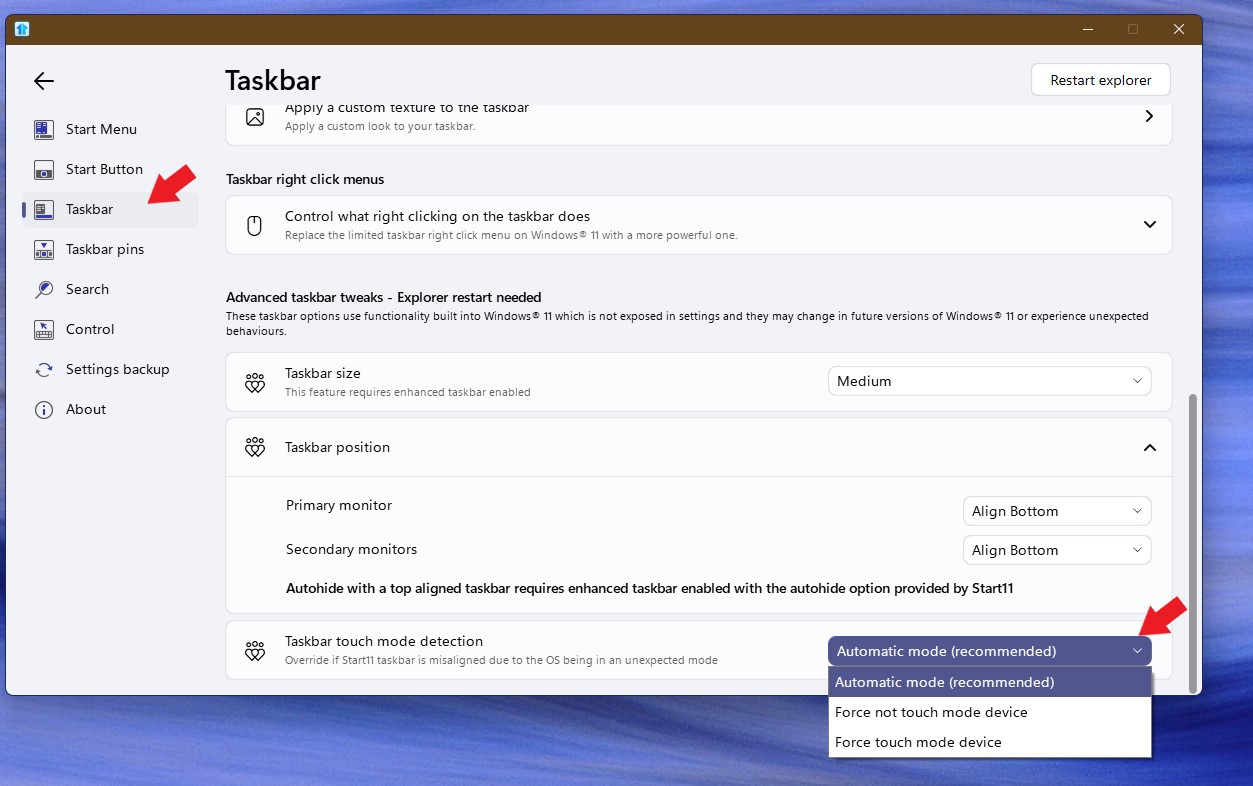
Sorry to hear you are having issues. Are on touch enable system? If so please try changing between these settings.

Thank you,
Basj,
Stardock Community Assistant.

+1 Loading…
Reply #2 Top

Thank you, this option helps. I thought the “Vertically center the taskbar buttons” option was intended for that purpose.

But this seems to only apply to pinned button shortcuts. Is there a reason for this? I would have expected it to also affect the “Start” button, the search button, widgets, and the tray symbols.

Reply #3 Top

I’m seeing the same issue on my end with the option enabled. It seems like only pinned shortcuts are affected, not the rest of the taskbar. Kind of inconsistent with the overall look.:rolleyes:  

Reply #4 Top

Quoting Kynorix, reply 3

I’m seeing the same issue on my end with the option enabled. It seems like only pinned shortcuts are affected, not the rest of the taskbar. Kind of inconsistent with the overall look.:rolleyes:  

Hello,
Sorry to hear you are having issues. Have you tried my suggestion above?

Thank you,
Basj,
Stardock Community Assistant.