Option not showing up in my Object Desktop Insider section

I want to try this out, but I don't seem to have the option in my Insider section to download and install it.  I see nothing in my settings to turn on/off insider. Other programs, like fences and curtains do show up in Insider.

817 views 6 replies
Reply #1 Top

Many programs don't show in object desktop insider. Several programs that were bought before installing object desktop only show but you can't start them or configure them, you have to goto the individual program to start. You can't even do a FORCE update in object desktop only automatically by setting time & day. Sorry but my PC is not on 24/7.

Reply #2 Top


I want to try this out, but I don't seem to have the option in my Insider section to download and install it.  I see nothing in my settings to turn on/off insider. Other programs, like fences and curtains do show up in Insider.

Hello,
Sorry to hear you are having issues. You can turn this option off to hide the Desktop Insider build.
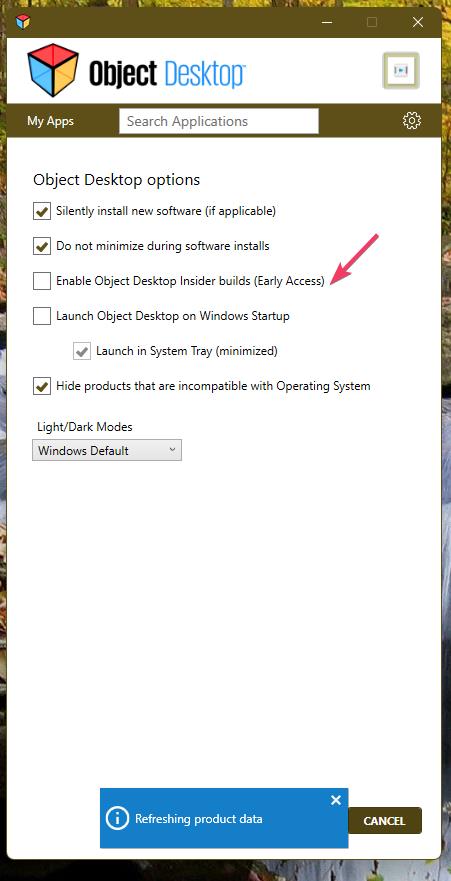
Quoting Azhmandiaus, reply 1

Many programs don't show in object desktop insider. Several programs that were bought before installing object desktop only show but you can't start them or configure them, you have to goto the individual program to start. You can't even do a FORCE update in object desktop only automatically by setting time & day. Sorry but my PC is not on 24/7.

Only application that are listed under Object Desktop will appear under the Object Desktop Insider list. Usually only application that have Beta or early release version show up in the OD Insider list. And sometimes newly full release also appear in there.

Also, from what understand, only products listed under OD Insider work on System with ARM base CPU.

Hope this clarify things.

Thank you,
Basj,
Stardock Community Assistant.

Reply #3 Top

Windows 11 pro here, no bypasses for install. Still not showing what it's suppose to. still can't do 'Check update now'.

Reply #4 Top

Quoting Azhmandiaus, reply 3

Windows 11 pro here, no bypasses for install. Still not showing what it's suppose to. still can't do 'Check update now'.

Hello,
Sorry to hear you are having issues. But, not really sure what you mean by bypasses. Please elaborate. Also, have you tried using your account product page to download installer? 

https://store.stardock.com/myaccount/products 

Thank you,
Basj,
Stardock Community Assistant.

Reply #5 Top

Bypasses=not haven't the right recommended hardware.

Secure Boot capable, TPM 2.0.Edition

Windows 11 Pro

Version 25H2

Installed on ‎6/‎10/‎2025

OS build 26200.7462

Processor Intel(R) Core(TM) i5-8500 CPU @ 3.00GHz (3.00 GHz)

Installed RAM 40.0 GB

System type 64-bit operating system, x64-based processor

And yes have tried download installer.


Reply #6 Top

Quoting Azhmandiaus, reply 5

Bypasses=not haven't the right recommended hardware.

I believe, those has nothing to do with Object Desktop manager.

Do know that Object Desktop manager (ODM) don't run those application for you. ODM only help you install, update check and tell you if there is a newer version available to download and installed. Activation, and actual running of each software need to done on each application separately. If you have issue on Starting these software, please let us know which software you're having issue with. Also it is best to work on each software one at a time. For example, Install Fences 6, reboot as soon as the installation is done, after reboot, setup Fences. Learn on how to use it. Let us know if you have issue with it. Once you're okay with it. Install another software, reboot again, setup etc etc. repeat on all other software listed.

Thank you,

Basj,
Stardock Community Assistant