Personalise - Windows 11 Context Menu

Maybe I missed the memo, but, why does Fences 6.05 commandeer the Windows 11 Context Menu - Personalize selection?

I don't recall this happening with Fences 5.x.

After a restart this Desktop Context Menu selection works correctly, and opens the Windows - Settings>Personalisation Settings page.

After some time delay, right clicking the Windows 11 Desktop and selecting 'Personalise' from the Context Menu results in the opening of the Fences Settings page with the 'Welcome' page being displayed.  A reboot will temporarily resolve the issue only for it to come back some time later.

This has being going on for some time now. Here's my Windows data...

------------------------------------------------------------------------
Edition    Windows 11 Pro
Version    25H2
Installed on    ‎02/‎03/‎25
OS build    26200.7309
Experience    Windows Feature Experience Pack 1000.26100.275.0

------------------------------------------------------------------------

Cheers.

8,224 views 20 replies
Reply #1 Top

Hello,
Sorry to hear you are having issues. Unfortunately, I can not reproduce your issue on my system. Is the issue recently appear? What change? Perhaps, new Windows 11 update?

Thank you,
Basj,
Stardock Community Assistant.

Reply #2 Top

Just curious. Was this happening with 26200.7171?

Reply #3 Top

pelaird, I got the same right click context menu 'personalize' change on my machine: 24H2 26100.6901. When I click more, I get the old personalize settings option.

Reply #4 Top

Quoting DrJBHL, reply 3

pelaird, I got the same right click context menu 'personalize' change on my machine: 24H2 26100.6901. When I click more, I get the old personalize settings option.

For me, the Personalize and Display settings do nothing when Fences 6.0.5.2 is running. If I disable Fences, both work as expected. As you say, if you click "Show more options" both also work as expected.

25H2 26200.7171

Reply #5 Top

To basj... No this has been an on going issue with Fences 6.x beta. I don't recall having an issue with version 5.

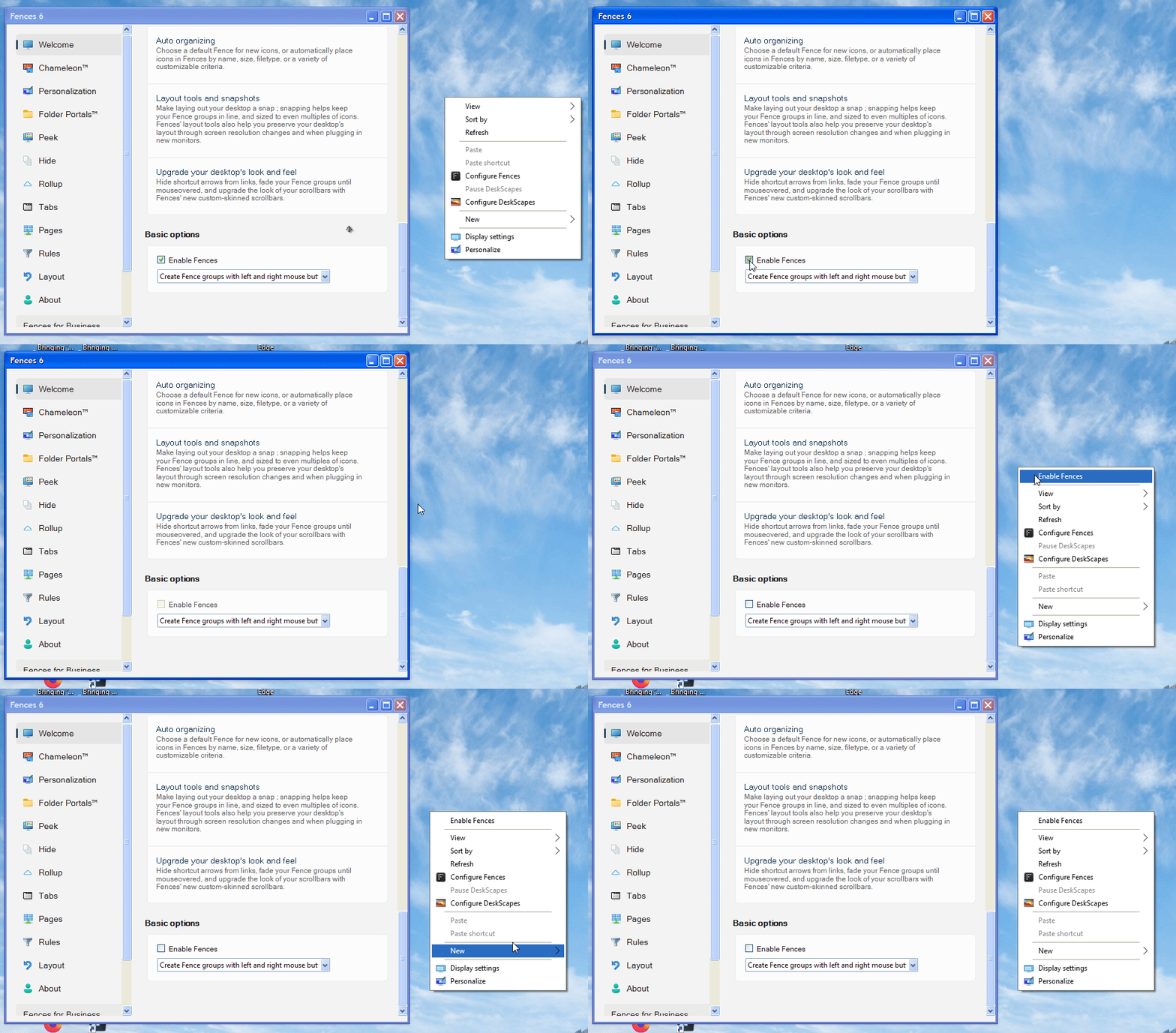
To pelaird... Yes it was happening with 25H2 26200.7171 and I get the same result as DrJBHL. In fact I can fix the problem in real time by simply, from the Fences 'Basic Options', toggling fences OFF and closing the Options. My Desktop reverts to 'Non-Fences' config. Then checking the Context Menu and 'Personalise' is back to normal.
Re-enabling Fences, via the same route, causes the issue to re-appear once again. I don't need to reboot. Just turning Fences off then back on triggers the issue.

Cheers.

Reply #6 Top

Imo, it's perfectly fine for Fences to add Fences config to the right click menu. It's almost as if the Fences Config pushed the system 'personalize' dowm the choices list into the 'more options slot. The original 'Personalize' should open Settings, and the Fences config should carry that label...not 'Personalize'...if only for clarity.

Reply #7 Top

I can not reproduce this issue on my system. However, I have forwarded your problem/question to Stardock Support Team for their assistance. Please keep an eye on this thread for any updates. We appreciate your feedback and patience. Thank you.

Basj,
Stardock Community Assistant

Reply #8 Top

Hello all and thank you for posting.

I was able to reproduce an occasional issue using the current Fences 6.0.5.2 Beta on a Sandbox install.

To clarify: After right-clicking desktop and using "Show more options" -> Personalize, this appeared to work normally. 

However, after closing Windows Personalization Settings from the above attempt, then trying the default Win11 right-click -> Personalize, the Fences config application opened instead of the Windows Personalization Settings menu. 

We have this logged for review.

Internal Ref: ODNT-11674

Thanks again and best regards,

Adam McGuinness
Stardock Support Specialist


Reply #9 Top

DrJBHL, I understand your reasoning, and I thought the same, however, I maintain a Laptop with standard Windows 11 Pro - for reference -  with no additional extras modifying the UI, and the 'Personalise' selection is available on both the primary and secondary Context Menus by default.

Cheers.

Reply #10 Top

Thanks, Adam. On my W11 computer, this happens as tne baseline (default) w/o logging in, etc. all you had to do to replicate it.

pdenomy, when you refer to your other computer with standard GUI, do you have Fences installed on it? I ask because Fences per se shouldn't change the GUI...and Personalize shouldn't missing to Fences on any menu.

Reply #11 Top

Hi all, good news. We were able to reproduce this internally and have resolved for the next update, coming within the next 2 weeks. Thanks again for the report

+2 Loading…
Reply #12 Top

Great news! Thanks! 👍

Reply #13 Top

DrJBHL... "when you refer to your other computer with standard GUI, do you have Fences installed on it? I ask because Fences per se shouldn't change the GUI...and Personalize shouldn't missing to Fences on any menu."

No, I do not have Fences, or any other GUI modifying programs on my laptop. As I said, my laptop is standard Windows 11 Pro with no added extras. I maintain it to standard because I need a reference Windows 11 computer to compare to because my main desktop runs beta versions of Windows 11 Pro for testing. It's easier to notice changes and bugs when I have a standard comparison to work with.

Dr W... That's great news! I'll keep an eye out for the update.

Cheers.

Reply #14 Top

Hello everyone,

I upgraded from Fences 3 to Fences 6 today, and I’m experiencing the same issue being discussed here on Windows 10.

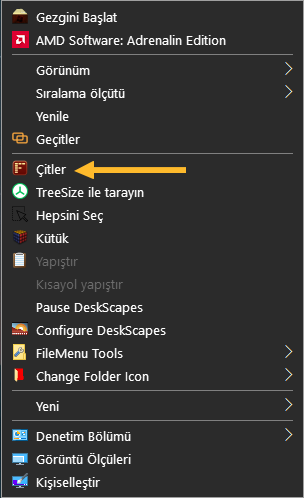
When I disable Fences from the Basic Options, the Desktop Context Menu shows up with all its options. However, once I enable Fences again, many of those options disappear.

Also, the options that normally appear with Shift + right-click are missing. In addition, some entries in the File Context Menu are not showing up either.

Reply #15 Top

Quoting MSerif, reply 14

Hello everyone,

I upgraded from Fences 3 to Fences 6 today, and I’m experiencing the same issue being discussed here on Windows 10.

When I disable Fences from the Basic Options, the Desktop Context Menu shows up with all its options. However, once I enable Fences again, many of those options disappear.

Also, the options that normally appear with Shift + right-click are missing. In addition, some entries in the File Context Menu are not showing up either.

Hello,
Sorry to hear you are having issues. Please try, uninstall Fences 6, reboot immediately (important), download latest version available in your account product download page: https://store.stardock.com/myaccount/products. Install it, reboot immediately again. Retest it and report back.

If the issue still appear, We need more information.

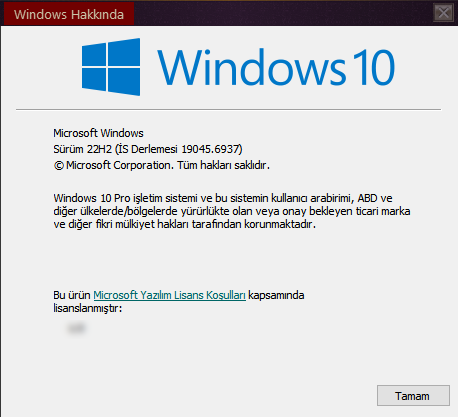
  1. Windows 10 full version and OS Build number. Please use Winver.exe.
  2. Fences full version installed.
  3. Post a video or screenshots showing these issue.

Thank you,
Basj,
Stardock Community Assistant.

Reply #16 Top

I uninstalled Fences and restarted my computer. Then I installed the latest version of Fences. Just to be safe, I restarted my computer once more.

Winver info:


Video:

https://streamable.com/j37cg4


Additional notes:

Interestingly, there is no issue with the Directory Background Context Menu. However, the folder and file context menus are also affected. 

When I enable and disable Fences from the Basic Options, the Fences icon in the Desktop Context Menu disappears.

Reply #17 Top

Quoting MSerif, reply 16

I uninstalled Fences and restarted my computer. Then I installed the latest version of Fences. Just to be safe, I restarted my computer once more.

Winver info:


Video:

https://streamable.com/j37cg4


Additional notes:

Interestingly, there is no issue with the Directory Background Context Menu. However, the folder and file context menus are also affected. 

When I enable and disable Fences from the Basic Options, the Fences icon in the Desktop Context Menu disappears.

I've review your video, those items appear on your context menu without Fences turn on, those are added by specific application? Since most of those icons do not appear on my Windows 10 default context menu when I disable Fences.

Thank you,

Basj,
Stardock Community Assistant

Reply #18 Top

I don’t think that matters. I added some of these items myself, while others were added by software I installed.

Reply #19 Top

Quoting MSerif, reply 18

I don’t think that matters. I added some of these items myself, while others were added by software I installed.

From what I know Fences work with default context menu. Moving forward, I have forwarded your problem/question to Stardock Support Team for their assistance. Please keep an eye on this thread for any updates. We appreciate your feedback and patience. Thank you.

Basj,
Stardock Community Assistant

+1 Loading…
Reply #20 Top

I have resolved the issue. I hope you will release a permanent fix soon for other users experiencing this problem.

Quoting basj, reply 19


Quoting MSerif,

I don’t think that matters. I added some of these items myself, while others were added by software I installed.


From what I know Fences work with default context menu. Moving forward, I have forwarded your problem/question to Stardock Support Team for their assistance. Please keep an eye on this thread for any updates. We appreciate your feedback and patience. Thank you.

Basj,
Stardock Community Assistant