Pinned group disappeared

Start 11 v2


Hello, I thought what a great product. It's really well designed. But after a while, when setting up the groups, I noticed that it wasn't running very smoothly.

It crashed completely once. What I also find annoying is that when I automatically add a shortcut to Start, it isn't added at the end. This means that the order of my symbols keeps getting mixed up.

When I sorted the icons again, a group suddenly disappeared completely. How can I restore the “Pinned” group?


4,105 views 16 replies
Reply #1 Top

Hello,
Sorry to hear you are having issues. Need to know more on your system.

  1. You on Windows 10 or 11? Also need its full version and OS Build number. Use Winver.exe to get these numbers.
  2. Start11 full version number.
  3. If you have saved you setting, you can restore it via: Settings Backup->Restore settings. (Start11v2)

Thank you,
Basj,
Stardock Community Assistant.

Reply #2 Top

My system: 

Edition: Windows 11 Pro
Version: 25H2
    Build: 26200.7171

Start11v2 ver. 2.56

If you have saved your setting, you can restore it via: Settings Backup -> Restore settings. (Start11v2)

Unfortunately, that doesn’t help me anymore. I assumed that Stardock automatically created a backup. I didn’t expect entries to disappear from one moment to the next.

Reply #3 Top

Those pinned items don't usually vanished by itself. Perhaps something went wrong, but unless you can somehow recreate the issue and get it recorded and post it here, we can learn more what actually gone wrong.

Moving forward, it is best to do periodical backup of your setting so you always have some point to revert to when something like this happen.

Thank you,

Basj,
Stardock Community Assistant

Reply #4 Top

Hi basj,

I didn't delete the group, and if I'm not mistaken, you'll be asked again in that case.

Is there a way to recover the icons from the default Windows 11 “Pinned” group if they say there is no way to recover the lost group?

Reply #5 Top

Just to be sure...

You could have accidentally moved the group to a new page. How many pages are shown at the bottom of your Start11 menu?

This image shows that I have two pages (two dots).


Reply #6 Top

Quoting pelaird, reply 5

Just to be sure...

You could have accidentally moved the group to a new page. How many pages are shown at the bottom of your Stsart11 menu?


This image shows that I have two pages (two dots).


Thank you, I saw that you can add more pages.

I have now restored many entries from this group. But an icon or shortcut for the Win11 start window is missing. It was something like Start Menu.

Reply #7 Top

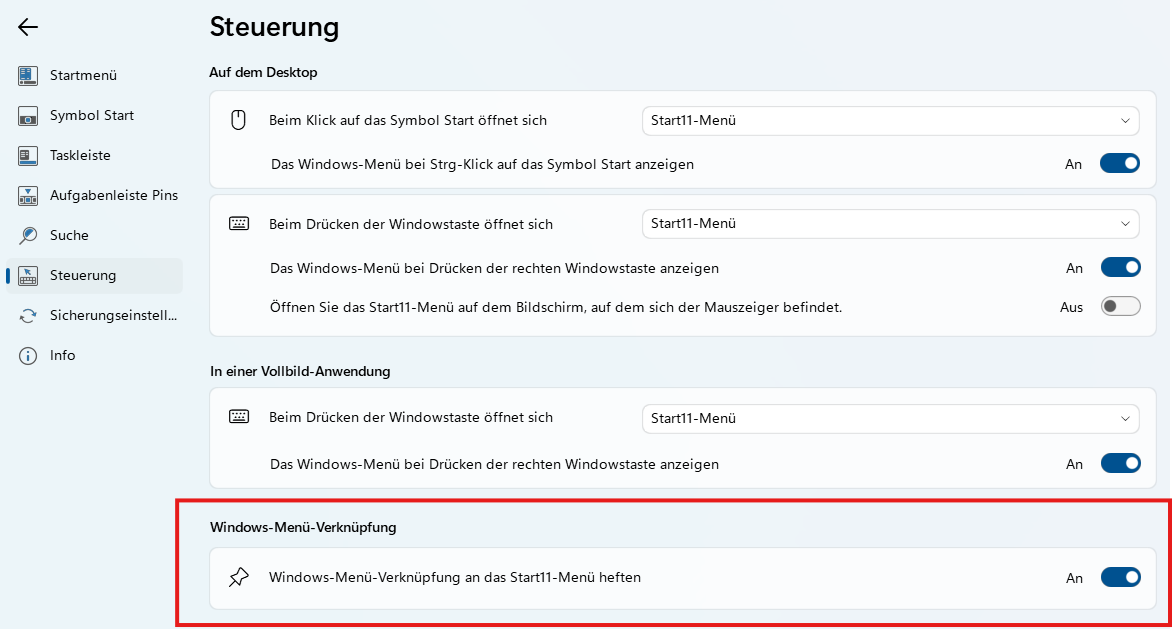
Check the "Control" section of the config app. There should be a setting to "Pin Windows menu shortcut on Start11 menu."

If you continue to have issues, you may need to consider uninstalling and then reinstalling from a fresh download of the most recent installer from you Account download page. https://store.stardock.com/myaccount/products


+1 Loading…
Reply #8 Top

Hi pelaird,

unbelievable, but true. Disabling and re-enabling this setting also made the missing group visible again.

Reply #9 Top

Very strange. I fear your installation is somehow corrupted. You may need to reinstall as I mentioned above. 

Reply #10 Top

Quoting basj, reply 3
Those pinned items don't usually vanished by itself. Perhaps something went wrong, but unless you can somehow recreate the issue and get it recorded and post it here, we can learn more what actually gone wrong.

Moving forward, it is best to do periodical backup of your setting so you always have some point to revert to when something like this happen.

Thank you,

Basj,
Stardock Community Assistant


Hello,

once this problem occurred, I created a backup. I restored it today and activated, then deactivated, the setting "Pin Windows menu shortcut on Start11 menu."

The missing group reappears. This issue is reproducible. I also created a backup of this. Now that the missing group is back, you can see that it was just hidden. ;)

If you're interested, I can send you the two backup files privately.

I've ruled out a corrupted installation, as pelaird suspects. I reinstalled the Start11 app from scratch.

Reply #11 Top

Great to know that its reproducible, please post a video showing us how you make it from "appear" to "hidden". I than can try to reproduce it on my side.

Thank you,

Basj,
Stardock Community Assistant

Reply #12 Top

I think there's a misunderstanding. I don't know why the group disappeared. 

I can only make the disappeared group visible again. Just as I described. 

I offered to send you the backup files (before and after). Maybe that will help identify the problem or understand what might have gone wrong on my end.

If you give me an email address, I can send you the files

Reply #13 Top

Hello, I don't know exactly what caused my problem.

But the entry “4” causes the “Pinned” group to become invisible.

1. Disable the Start menu.
2. Remove entry “4” from the registry.
3. Enable the “Windows 11” Start menu style.

=>  The “Pinned” group is visible again.


Code: css
  1. Windows Registry Editor Version 5.00
  2. [HKEY_CURRENT_USER\Software\Stardock\Start8\Start8.ini\Groups]
  3. "0"="GRP2009|Angeheftet|0|0|0|0|0|1|0|0||0||9999|0|0||-1|"
  4. "1"="GRP2004|Multimedia|0|0|0|0|1|2|0|0||0||9999|0|0||-1|"
  5. "2"="GRP2002|Office|0|0|0|0|1|1|0|0||0||9999|0|0||-1|"
  6. "3"="GRP2001|Games|0|0|0|0|1|1|0|0||0||9999|0|0||-1|"
  7. "4"="$PINNEDDEF$||0|"


Reply #14 Top

Hello,
I have forwarded your problem/question to Stardock Support Team for their assistance. Please keep an eye on this thread for any updates. We appreciate your feedback and patience. Thank you.

Basj,
Stardock Community Assistant

Reply #15 Top

Hi thomas-k,

Can you clarify if you're still experiencing the issue of the missing group, or have you resolved the problem? 

If you're still having trouble, could you detail the exact steps leading up to the disappearing group? 

If you can send your S11Backup file to me, I will be happy to test your steps under your exact settings to see if I can reproduce this. 

Thank you and best regards,

Adam McGuinness
Stardock Support Specialist

Reply #16 Top

Adam, I was able to solve the problem thanks to pelaird. I was just trying to find out which entry is responsible for making the missing group visible again, and thought this might help you investigate the issue further.

Since the missing group was also the default group “Pinned,” it’s very likely that it is related to the registry entry mentioned above, or to the setting “Pin Windows menu shortcut on Start11 menu.”

Anyway, I have now completely recreated the “Pinned” group and deleted the old original group.

Moving newly added pinned apps around is still a bit glitchy and doesn’t seem entirely stable. Otherwise, this wouldn’t have happened.

Best regards,

Thomas