butchmcneill

Intermittent Windows 11 Explorer.exe hangs

Intermittent Windows 11 Explorer.exe hangs

I've been fighting this explorer.exe hangs problem for about 6 months, no help from Windows forum, except sfc, dism, create new profile, clean boot and clean Windows 11 install.  Nothing worked problem still occurs.  Change graphic cards, no go.  I have 3 apps on all my PC builds: Start11, Fences6 and Deskscapes, I have 4 other PCs I'm updating to Windows 11 for my family members.  My PC was the only one with the problem.  By accident I caused another PC, that was working fine, to start intermittent hangs of explorer.exe by adding a second monitor.  I disable the second monitor on both PCs with the problem and that resolved the problem, but I do need my second monitor.  I'm asking about Deskscape, because I noticed right before the hangs occur, in the Event Viewer there was a MiniDump file created.  I used windbg to see if it would shed a light on the problem, I don't understand about 95% of what it shows, but every occurrence is a Memory_Management (1a) problem and under Process_Name it always shows DSHost.exe. I've run memtest86 several times, no problem, WD ssd diagnostics, no problem and intel CPU diagnostics, no problems.  It's not a major problem, just annoying, because when it does happen and I click on my desktop it does a windows explorer restart.  Is this a known problem and if so is there a work around.  I have the latest version of Deskscape11, Start11 and Fences6.

I'm running the latest version of Windows 11 Pro, 24h2, Build 26100.6899 currently.  I have an Asus Mobo ROG Strix Z890-E, and Intel CPU Ultra 7 265K, and 128GB Memory, and a Radeon RX9060-XT Graphics Card with 16GB Memory.

Any help would be appreciated.

Gordon

25,441 views 37 replies
Reply #26 Top

Hi Basj,

My primary monitor is 1920 x 1080 and my secondary is 1600 x 900. My GPU is NVIDIA GeForce GTX 1650.

It happens after a few hours of normal use, although it can happen within a few minutes. I haven't yet noticed a pattern as to what starts it, but I know it happens when it's supposed to switch wallpapers. Maybe set it on 1 minute and let it chug??

Reply #27 Top

My primary at 3840x2160 and secondary at 1920x1200 both at 100% scale. I am now testing with animated wallpaper playlist on both monitors and changing every 1 minutes. Will report back later if I found anything.

Thank you,

Basj,
Stardock Community Assistant

Reply #28 Top

Hello JaSunni,

Just to report back. I have run deskscape with animated wallpaper for nearly a day, with my normal daily use with System sleep, shutdown, restart etc, but I don't see any hang issue on my system.

Thank you,

Basj,
Stardock Community Assistant

Reply #29 Top

Hi Basj

Can you confirm you tested on Windows 11 with dual monitors as your initial post suggested you were still using Windows 10 and only had Windows 11 in a VM?

If you get a chance to read my post above, is it worth me starting a separate thread or submitting a support ticket if it isn’t related?

I’ve found my hanging stops when activating second monitor if I disable the Statdock Deskscapes Windows service which I assume is also what’s responsible for the animations

Reply #30 Top

Quoting marchk01, reply 29

Hi Basj
Can you confirm you tested on Windows 11 with dual monitors as your initial post suggested you were still using Windows 10 and only had Windows 11 in a VM?
If you get a chance to read my post above, is it worth me starting a separate thread or submitting a support ticket if it isn’t related?
I’ve found my hanging stops when activating second monitor if I disable the Statdock Deskscapes Windows service which I assume is also what’s responsible for the animations

That's the challenge—my Windows 11 25H2 VM isn't set up with dual monitors, so I’ve been staying on the sidelines, hoping the ongoing discussion might surface some useful clues.

That said, I genuinely don’t believe the issue lies with Windows 11’s multi-monitor setup itself. If that were the root cause, we’d likely see a much broader wave of users reporting similar hangs with Deskscape.

What I’m really trying to pinpoint is the common denominator across all three of your systems—something shared that could be triggering the issue.

Added: I have forwarded this issue to Stardock Support Team for their assistance. Please keep an eye on this thread for any updates. We appreciate your feedback and patience. Thank you.

Basj,
Stardock Community Assistant

Reply #31 Top

If it's worth anything, my playlist is mixed animated and stills of various resolutions. The problem goes away if I restrict it to playing on only one monitor. I have an NVidia GEForce that's a few years old running on an MSI MB.

Reply #32 Top

I have the same problem, from time to time (very often in fact) the explorer freezes, the desktop is empty and the mouse cursor shows the pause symbol. Clicking the desktop (normally twice), makes Windows ending the explorer and restarting it. Then everything is fine until the next crash.
First I changed the timing for the pictures to change, as I thought the crashes came after the change or better with the change, but I was wrong as the crashes also happened in between two changes.

I thought my problem was connected with Display Fusion as this problem only exists, when I have Display Fusion and Deskscapes running at the same time. Display Fusion I use for several things, including changing the taskbar.
When running it with Display Fusion the taskbar of Display Fusion also acts weird. You need to click it, before you can use/click anything on it, as if I need to activate the taskbar, like it would be with a window.

As I have these crashes only in conjunction with Display Fusion and because of the weird acting of the taskbar, I thought the problem lies within Display Fusion and asked their support. So far they have no clue, now I read this and ask myself, what the real problem is. I haven't tried to use the background just on one monitor.

My configuration is a 3 monitor layout.

  1.  5120 x 1440 with two virtual screens divided by Display Fusion (by the way it would be cool to give both virtual screens it own background)
  2. 3840 x 2160
  3. 1080 x 1920 (yes this monitor is vertical as I use it for chat clients like Teams or Discord)

I never had problems with Windows 10 and the same configuration and hardware, so it must be something in Windows 11 or better an incompatibility as Windows 11 doesn't have all features Windows 10 has.


Yours

Loeffel

Reply #33 Top

Hi Loffel,

I started this post back in October because I had been fighting this problem for months prior to going to Stardock Forum for help.  I tried Microsoft Windows forum and tried all the normal stuff that their "MVP" told me to try, which by the way I had already tried prior to contacting them: SFC, DISM, Clean Boot, Default BIOS, Updating all drivers, etc...  My last resort with Windows Forum was a suggestion byt the "MVP" to do a clean install of Windows 11 Pro, that's what I've been using since Windows came out with Win11.  I put that off as a last resort because it's a pain to have to install all the apps again and try locating all the activation keys to get them working again!  But that too didn't help, and when I asked for further ideas to help isolate the problem the "VIP" never answered again and closed the topic.

The only way I found out it had something to do with dual, or multi, monitors was when I added a second monitor to a working Win11 system with one monitor, and the explorer hangs started happening on that PC, and when I switched back to single monitor it stopped.  I inquired, using DuckAi, and it suggested I use the event viewer to see what was happening.  When I did that, every time a hang occurred I got a warning first telling me there was a problem with explorer.exe and a mini dump file was created, and immediately following the warning I got an error report reporting the explorer hang.  I asked the Ai again how to interpret the minidump file and it suggested I download and run WinDbg, which would analyze the dump file and, if possible, tell you what app it was using at the time of the error.

I did that, and after a while trying to figure out how to use it, and seeing the printout of it's analysis, the majority of which I didn't understand - lots of hexadecimal numbers, at the very bottom of the analysis it always showed that the problem occurred while using DSHost.exe, which has to do with Deskscapes.  That's when I contacted Stardock.  

I use Start11, Fences6 and Deskscapes11 on all my PCs, and the hangs occur only on dual monitor systems.

The thing is now that I updated all the Stardock apps to the latest versions and updated Window 11 Pro to 25H2, the problem stopped.  After Windows 11 25H2 was installed, Start11 came out with an update a couple days later, and the hangs, on both dual monitor systems, has stopped, at least since my last reply to this post.  (I hope I didn't jinx myself)

My setup is Wiindows 11 Pro

Version 25H2

Build 26200.7171

Start11

Version 2.56

Deskscapes11

Version 11.02

Fences6

Version 6.03

2 Dell Monitors, both 1920 x 1080 resolution.

Hope this gives you some insight.

Regards,

Butch


Reply #34 Top

Hi Butch,

I have the latest Updates installed, but no change for me. The explorer crashes and I can't use the windows taskbar, as I need to click it first before I can do anything and double clicks are most times impossible because when the second click comes the taskbar is already unresponsive anymore and I need to click it ones.

The crashes alone are so often, that using DeskScapes is a no go. I tested other configurations, only ony playlist on all monitors, just for one monitor and so on. It doesn't make any difference I can set DeskScapes on hold and the crashes come. As long as the DeskScapes service is running, the explorer crashes.

So DeskScapes is at the moment dead for me, an absolute no go. I'm pi....ed about that as it was running absolutely fine on Win 10. I don't know another program with those features. Additionally I don't want to pay money for another program, when I have already such a program.
The only thing I'm missing with DeskScapes is to set different backgrounds for the virtual monitor parts.

Reply #35 Top

Hi,

I found this post while looking for my recent issue, which is the same.

After ( forcibly ) upgrading to 25H2, I started getting the same explorer hangs.

I found Deskscapes as a culprit since, when I prevented Deskscapes from running on windows logon, that solved the problem.

And yes, I have dual monitors.

Personally I don't need Deskscapes in the background as I am using static images so it is not blocking my experience.

But when I launch Deskscapes to find and set new images, on the moment of applying them, the system goes into the hangs loop.

Thanks,

Ahikam

Reply #36 Top

Quoting ahikamro, reply 35

Hi,

I found this post while looking for my recent issue, which is the same.

After ( forcibly ) upgrading to 25H2, I started getting the same explorer hangs.

I found Deskscapes as a culprit since, when I prevented Deskscapes from running on windows logon, that solved the problem.

And yes, I have dual monitors.

Personally I don't need Deskscapes in the background as I am using static images so it is not blocking my experience.

But when I launch Deskscapes to find and set new images, on the moment of applying them, the system goes into the hangs loop.

Thanks,

Ahikam

Please try, uninstall Deskscapes, reboot immediately (important), download latest version available in your account product download page: https://store.stardock.com/myaccount/products . Install it, reboot immediately again. Retest it and report back.

If the issue still there we need more information on your system.

  1. Windows 11 25H2 OS Build number.
  2. Deskscapes full version installed.
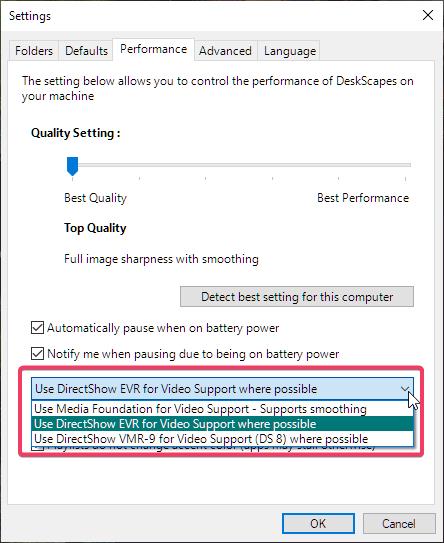
  3. Please check if any of these setting option gave better result. (refer screenshot below.
  4. Also, try the slider between Best Quality  to Best Performance.


Thank you,

Basj,
Stardock Community Assistant

Reply #37 Top

Do you have the latest beta of Deskscapes installed as it had some tweaks to blocking the desktop in certain situations.