Request for recent and pinned items to show always

Taking Microsoft Office as example... When Excel is pinned to the taskbar or is pinned in a menu tab, and you right click, you see recent items and pinned items (i.e., frequently-used, or favorite, spreadsheets). However, When Excel is pinned within a FOLDER inside of a StarMenu tab, those recent and pinned items do not appear. It would be nice to see them there, too!


I'm sure other apps may have context menus that would be lost if contained within a FOLDER on the Start Menu.

Moved to Start Menu Products area
1,310 views 3 replies
Reply #1 Top

Hello,
Sorry to hear you are having issues. You post in Start8 area, was you asking about Start8 or Start11? Also need few more details.

  1. Windows 10 or 11? Also need its full version and OS Build number. Use Winver.exe to get this numbers.
  2. Start8 or 11 full version numbers.
  3. Post some screenshot on your issue will help us understand your issue easier.

Thank you,
Basj,
Stardock Community Assistant.

Reply #2 Top

Thank you for the reply. The situation I described has been fixed, perhaps by a recent Start11 update.

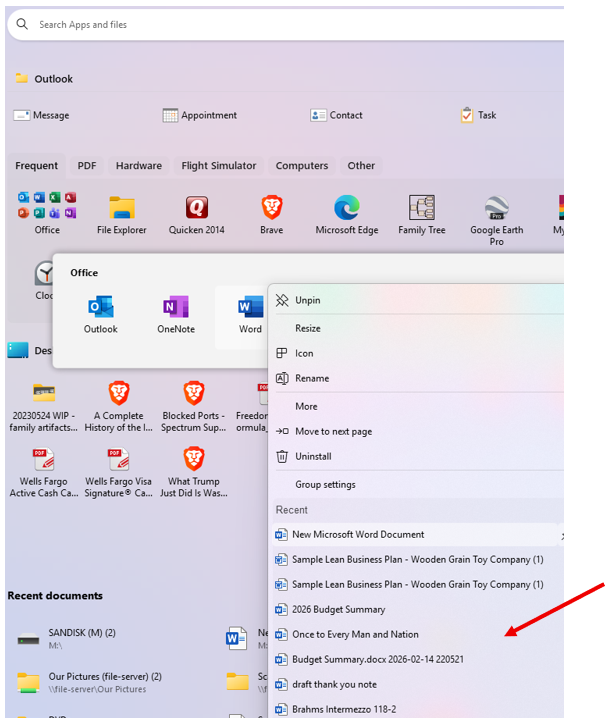
What I was referring to is (correctly) showing below. I clicked on Start | Frequent (tab) | Office (group/folder) | Word (right-click).

Before, recent documents were not showing here (whereas recent documents did show if Word was pinned to taskbar).

That's all. Consider this closed. Thank you!

Reply #3 Top

Great, glad to hear that.

Thank you,

Basj,
Stardock Community Assistant