codec
Dreams No Worky Solved
from  WinCustomize Forums
WinCustomize Forums
Hey guys, been a while. What codec do I need to get Dreams to run?


Dreams No Worky Solved
WinCustomize Forums
Hey guys, been a while. What codec do I need to get Dreams to run?
 Stardock Forums
Top
Stardock Forums
Top
Hello,
Sorry to hear you are having issues. Not sure which codec, but I downloaded K-Lite codec pack, installed it and dreams seem to work for me.
Thank you
Basj,
Stardock Community Assistant.
WinCustomize Forums
Top
Yeah, I remember now! Thanks Jaz!
 Stardock Forums
Top
Stardock Forums
Top
Glad to help, Jim.
Thank you,
Basj,
Stardock Community Assistant
WinCustomize Forums
Top
Still not working.
Stardock Forums
Top
Maybe try, uninstall Deskscape, reboot immediately (important), download latest version available in your account product download page: https://store.stardock.com/myaccount/products. Install it, reboot immediately again.
Thank you,
Basj,
Stardock Community Assistant
Stardock Forums
Top
If you have not yet, try changing these setting first.
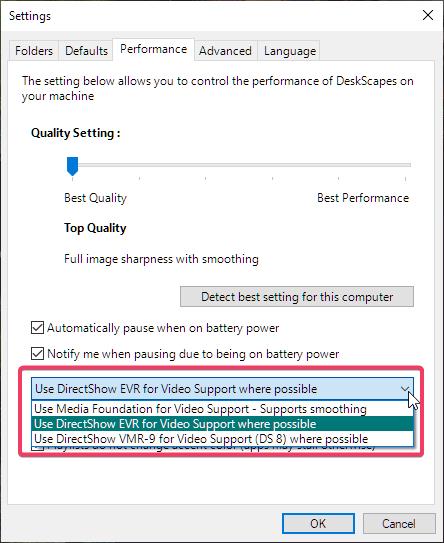
Thank you,
Basj,
Stardock Community Assistant
WinCustomize Forums
Top
Tried that, it was already set.
Uninstalled and then rebooted.....tried to reinstall and I see this:

WinCustomize Forums
Top
Ok, I restarted ObjectDesktop several times and back to normal.
Stardock Forums
Top
Changing the 5 lb. hammer to the 15 lb. one often helps. 
WinCustomize Forums
Top
I have one hybrid dream working. Seems like all hybrids work. Only hybrids.
WinCustomize Forums
Top
It's funny but I just downloaded and ran ( with no issues ) my very first dream made 18 years ago 2007 , and it works fine . I run Deskscapes as is no tweeks along with K Lite Mega ( not sure I need it but have always had it installed ) latest version and all works fine ..... might be your video card causing your issue try an update or tweek on your card , see if that works ..
WinCustomize Forums
Top
It is a high end card, and fully updated. I'm sure it's my system, but was hoping someone knew the answer.
WinCustomize Forums
Top
I forgot, I did get a C++ error once.
WinCustomize Forums
Top
I installed all the C++ redistributables, and K Lite Mega. Still no joy
Stardock Forums
Top
Maybe something blocking it, Jim? Try a clean boot?
WinCustomize Forums
Top
I fixed it!! I downloaded all the C++ redistributibles, the Windows Media Pack, and reset my graphics settings to normal. All is well.
WinCustomize Forums
Top
Tell Doc the 15lb was still too light...
If ya can't fix it with a sledgie then ya doin' it wrong ...;)
Stardock Forums
Top
Now that thar's good news! 
Dammit Jafo, I only got one of these:

Welcome Guest! Please take the time to register with us.