Fences 6 - Tab group keeps coming undone

I have several tab groups on my desktop and the rest of them seem to be working fine.
However, I have one two tab group that every time I restart the computer it comes undone and they sit on top of each other slightly askew.

I can put them back together but the same thing happens again.

Anything I'm doing wrong? or any things I should look out for when combining fences into tab groups?

8,762 views 8 replies
Reply #1 Top

Hello,
Sorry to hear you are having issues. Need more information on your system and issue.

  1. Windows 10 or 11? Also need its full version and OS Build number. Please use Winver.exe.
  2. Fences 6 version number.
  3. How many tabs you have when you start to see this issue?
  4. How many tabs be un-grouped? Ant it un-group randomly or after reboot?

Thank you,
Basj,
Stardock Community Assistant.

Reply #2 Top

Quoted and properly replied below, editing to delete the duplicate....

Reply #3 Top

Quoting basj, reply 1

Hello,
Sorry to hear you are having issues. Need more information on your system and issue.

    1. Windows 10 or 11? Also need its full version and OS Build number. Please use Winver.exe.
    2. Fences 6 version number.
    3. How many tabs you have when you start to see this issue?
    4. How many tabs be un-grouped? Ant it un-group randomly or after reboot?

Thank you,
Basj,
Stardock Community Assistant.


Hey there!

Thanks for looking into this:

1. Windows 10 Pro Version 22H2 (OS Build 19045.5737)
2. Fences 6 (Beta 1) - Business Edition
3. Just 2? I have a few groups on my desktop 3-4 tabs and it doesn't happen with them.
4. Its almost guaranteed to separate, and being just the two of them, its just those two.

This is the example of them before they separate:


This is what they look like after a reboot:

Reply #4 Top

Need to know if the un-group happen immediately after you successfully grouped them. Or it get un-group upon reboot or awake from system sleep, etc?

Thank you,

Basj,
Stardock Community Assistant

Reply #5 Top

Quoting basj, reply 4

Need to know if the un-group happen immediately after you successfully grouped them. Or it get un-group upon reboot or awake from system sleep, etc?

Thank you,

Basj,
Stardock Community Assistant


Immediately after System reboot
They are fine until then.

Reply #6 Top

I believe I did saw similar issue on my system, but in my system it happen on my 7th tab. The rest of the tabs stay grouped and never drop off. There is a new Fences 6 Beta 2 coming out soon, perhaps when this one come out, you can retest and see if the issue appear on this new version.

Thank you,

Basj,
Stardock Community Assistant

Reply #7 Top

Hi Evan626 thanks for the report. We'd like to get more data.

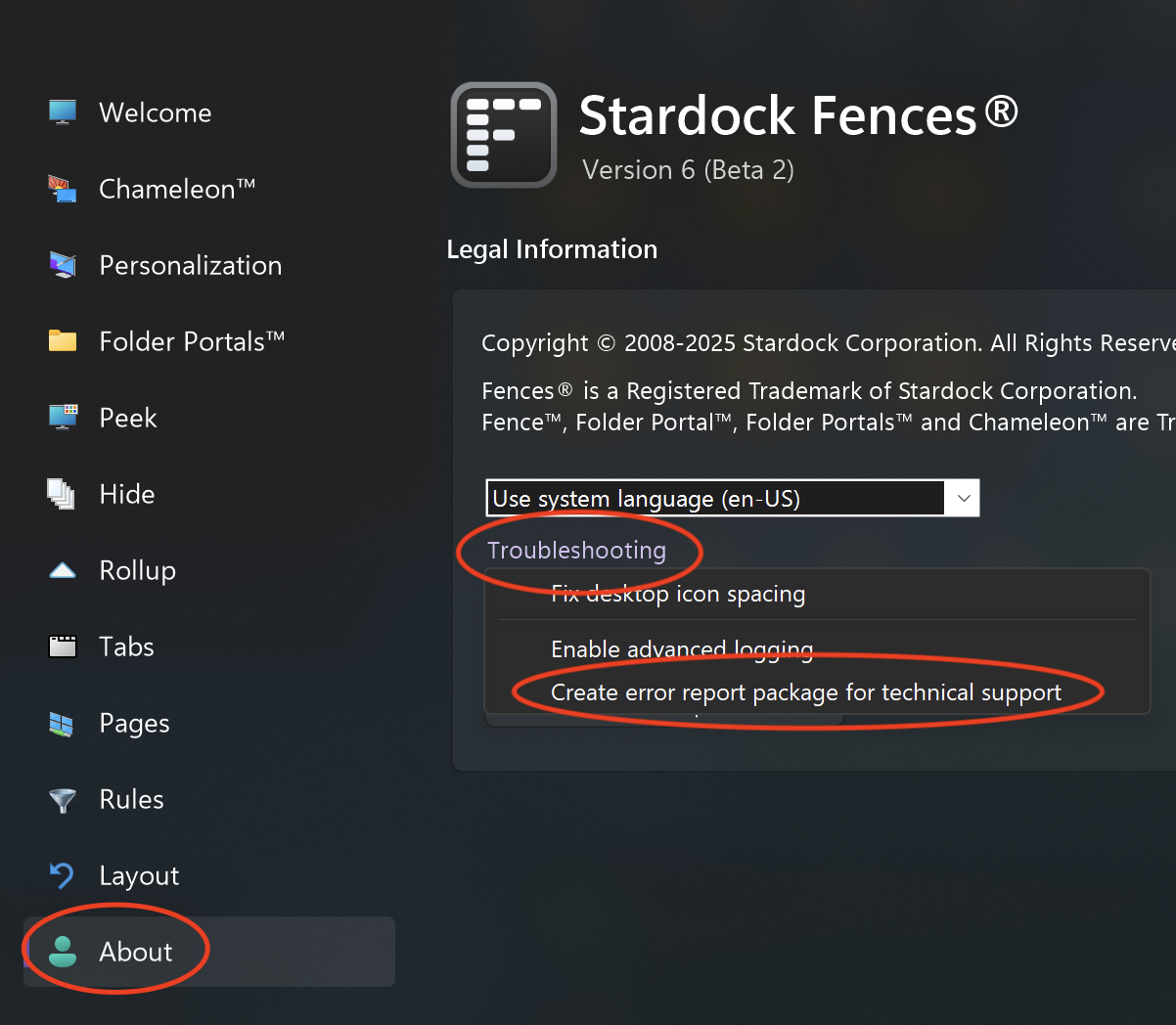
Can you upload a troubleshooting log? We may have to get you a special build if we're unable to figure it out with the data sent, but we'd really like to figure this one out.

You can access it by:

(1) Open About tab

(2) Troubleshooting menu

(3) Click "Create error report package"

(4) Follow the instructions on-screen to upload.


Maybe upload a couple. One right after joining the two as a group, and then again after rebooting. Sounds like it's the "Printing" ones we should be looking for you in your log.

Hopefully this gets us a step closer. Thank you for the help!


+1 Loading…
Reply #8 Top


So good and bad news...

Good news: It's not longer doing it, I was moving around the fences this morning, and added a new fence to my desktop. Then I tried combining the two that were giving me issues, and running the report like you had asked for, and now it's not showing the issue. They are staying grouped as a tab group now.

So Bad news is I can't get you the data you're looking for, sorry!
I guess if the issue happens to someone, advise them to make a new fence and see if that helps? haha
If it comes back, I will take the reports and respond on this page to send them in.

Thanks for all the helps on this!

-Evan

+1 Loading…