Stop the Pop-ups!!!

Fences

I have fences installed on a windows 10 machine. I do not plan to upgrade this machine to Windows 11.  Every time my computer starts I get a pop-up to update to Fences 11. I can't stand pop-ups. So I disabled the Fences startup process within Task Manger, and it is still popping up every time I start my computer. How to I stop this process short of uninstalling all my Stardock software and never looking back!! I assume there is a registry key for it.


Thanks


RJ 

Moved to Fences Area

4,496 views 14 replies
Reply #1 Top

Hello,
Sorry to hear you are having issues. Need to know your Fences full version number. Also, do you have IObit Software Updater or any other application which manage your software version status. If you do please set Fences to be ignore by it.

Thank you.
Basj,
Stardock Community Assistant.

Reply #3 Top

Fences 4.21. The pop-up is not part of any software updater, and I do not have any such updator installed on my computer, at least to my knowledge. It is an advertisement from stardock, And most Likely installed with the program, and there has to be a registry key to edit to remove it.

Reply #4 Top

Please post a screenshot of the popup as requested by Dev above. To add image to this forum please use any one of these two buttons.

As a reference, here is a search on our forum with regard on IOBit vs Fences. Most have very similar issue as yours: https://forums.stardock.com/search;IObit%20/user;-1/category;501/post;-1/date;all/sortby;lastreplydate;desc/tags;null

Thank you,

Basj,
Stardock Community Assistant

Reply #5 Top

I may have chosen the wrong word to describe the situation. It is not a pop-up in the pure sense of the word, it is a splash screen that appears during the initial boot-up of my computer. There are 2 that splash, Start 11 and Fences. I currently use Start 10 and Fences 4. It is not part of any software updater but is an advertisement from Star-Dock to get me to update the version. I am not sure if there is a cost associated with upgrade, and since I do not plan to update this computer to Windows 11, I am happy with what I have especially if there is a cost. My point is that I want control of my computer completely and do not like sharing that control with other software companies. I do not understand why I need to post a screenshot of what is perfectly obvious. I just want to know the registry key to eliminate to stop it from happening. Never the less, I have posted the Fences one here.


Reply #6 Top

For Fences you can use this guide: https://forums.stardock.com/486084/fences-support-faq#disableupdate

For Start11 You should be able to disable update check in the About page in Start11 configuration Windows.

Thank you,

Basj,
Stardock Community Assistant

+1 Loading…
Reply #7 Top

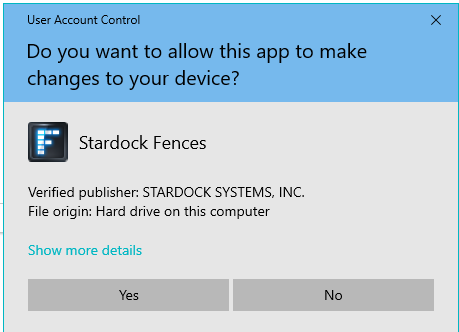
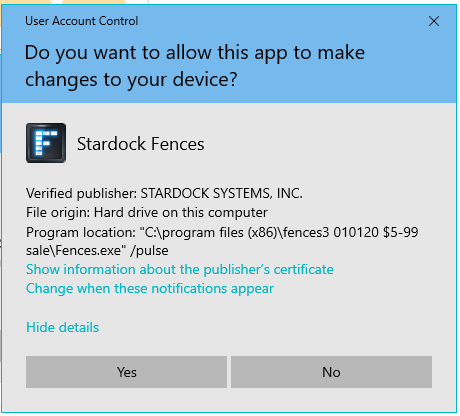
I don't know if you ever got this figured out, but I had the same problems & concerns.  I was also happily running Fences4 on my Windows10 computer, but was constantly interrupted with flash screens that I also suspected were attempts to get me to upgrade.  My pop-up screens were different — they asked if I wanted Fences to make changes to my computer.  I was constantly clicking out of them.  If you get a screen like that, click on the More Details button and you'll find there are 4-6 areas they point to.  I finally resorted to ChatGPT with the problem and after much back and forth, I seem to have gotten rid of them (and will sleep well tonight knowing that I won't have to deal with it any longer.  Who needs more nagging in their life?:\ ).  Depending on the way you have your computer set up, the steps you'll be given may not match what you're seeing on your screen.  I'd just reply "there is no xxxxxx in that folder," and I'd get another work-around.  I'm still checking to make sure all the notifications have been disabled since I only finished it about an hour ago.  I don't know how your question to the forum popped up on my screen, especially since I hadn't consulted the forum, but it seemed like a good opportunity to share my fix.  Let me know if I can direct you any further.  Always glad to pay it forward when I can.
Reply #8 Top

Quoting Lucy, reply 7

My pop-up screens were different — they asked if I wanted Fences to make changes to my computer.

Hello,
Sorry to hear you are having issues. I am very interested to see which popup screen is this one. Really appreciate if you could post a screenshot of it.

Thank you,
Basj,
Stardock Community Assistant.

Reply #9 Top

Here are samples of the screens.  It is only available because I failed to get rid of this one, which I'm about to do now:


The "Show more details" screen:


Reply #10 Top

Those were something not related to Fences update or upgrade. Those are UAC notices from Windows. From what I know, it should be okay to click on Yes, and it should stop sending on the popup. Unless, you installed Fences using Installer file downloaded from somewhere not Stardock's own site. And once you click yes, it should stop sending these popup again.

However, to be sure, I have forwarded your problem/question to Stardock Support Team for their assistance. Please keep an eye on this thread for any updates. We appreciate your feedback and patience. Thank you.

Basj,
Stardock Community Assistant

Reply #11 Top

Believe me, I've tried that and it doesn't work. Yes, the process to get rid of them is a Windows function, but the files themselves are found within Fences.  And, I bought it from Stardock itself.

Moderator: basj and all Stardock Support personnel are quite human, not ai bots. basj has made every effort at this Support level to help, and has elevated your problem to a higher Support level. Abuse of Stardock personnel will not be countenanced in this forum therefore your response has been edited.

+1 Loading…
Reply #12 Top

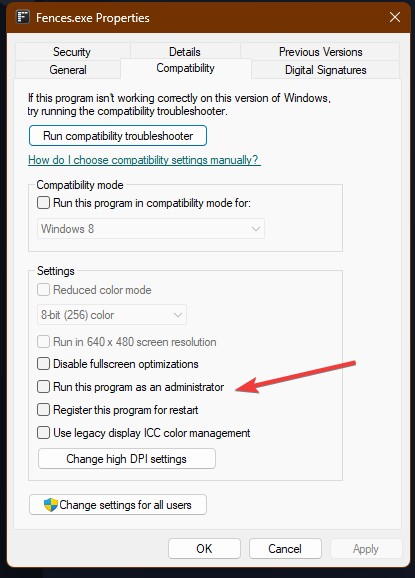
Also, the Dev has come back, with a request: please check if you have not turn on the "Run this program as an administrator". If you did please turn it off. And see if the popup still come up. Refer screenshot below.


Thank you,

Basj,
Stardock Community Assistant

Reply #13 Top

My Fences program is not set to run as an administrator.  No offense was intended by my comment to let the AI bots work it out.  All of the answers I got, though, sounded very much like they were AI generated.  What I should have said and would have been more to the point is that I'd made it clear from the get-go that I'd found the solution that worked for me and, thus, really didn't want to spend any more time on it.  I hope Stardock can find a succinct explanation for others facing this problem.  I know they'd appreciate it.

Reply #14 Top

Appreciate your reply, and glad to hear you have found the solution that worked for you. Do know that Support and Dev already known on your issue, hence my previous suggestion. 

Thank you,

Basj,
Stardock Community Assistant