Object dock

icons from the old version?

I'd like to install the new object dock, but I need to know if all my saved icons from previous years will still work on the new version.


Moved to ObjectDock Forum area

11,818 views 15 replies
Reply #1 Top

Hello,

I believe those icons should still be there. You should also backup your setting using this guide: https://forums.stardock.com/485816/objectdock-support-faq#docksettings. Do note that some docklets no longer work with ODv3.


Thank you.
Basj,
Stardock Community Assistant.

Reply #2 Top

Quoting basj, reply 1

Hello,

I believe those icons should still be there. You should also backup your setting using this guide: https://forums.stardock.com/485816/objectdock-support-faq#docksettings. Do note that some docklets no longer work with ODv3.


Thank you.
Basj,
Stardock Community Assistant.

I've been using the 2012 version all along, so I gave up on the docklets quite some time ago. I really miss the weather docklet, that was my favorite. But regardless, Windows updates are breaking everything in their path, so I think i'm going to update finally to the new version and see how it runs.

Reply #3 Top

You should do the 30 days trial on ObjectDock v3 and see if some of the features that no longer there work for you.

Thank you,

Basj,
Stardock Community Assistant

Reply #4 Top

Could someone post the link for the object dock download? I can't find it on the page, and I even did a word search on that page and the word download is nowhere to be found.

Reply #5 Top

If you go here: https://www.stardock.com/products/objectdock/ and if you want to do the free 30 days trial, you just need to click on that link, refer screenshot below.

And if the download don't start automatically, click on the link shown in the screenshot below.


Thank you,

Basj,
Stardock Community Assistant


Reply #6 Top

I already purchased it, and I 100% do not see a download link when I click on get it now.

Is it really that hard to code a space that says DOWNLOAD??

Reply #7 Top

Quoting Monsoon1, reply 6

I already purchased it, and I 100% do not see a download link when I click on get it now.

Is it really that hard to code a space that says DOWNLOAD??

You should have gotten an email with the download and License. Check your account download page at https://store.stardock.com/myaccount/products and see if it's there.

+1 Loading…
Reply #8 Top

You should have mentioned you've purchased it. Yes, please follow the link provided by pelaird.

Thank you,

Basj,
Stardock Community Assistant

Reply #9 Top

I have it installed now. I've spent a little bit of time on it already i've figured most of it out. But can someone show me how to change the platform under the icons? I've always used the gloss blue one on the older version, but I can't find it.

Edit* I found it. I see that I can only run one version, the new one or the old one, but not both. I was hoping to copy everything one at a time. Oh well, no big deal, I'll get it sorted out.

Reply #10 Top

This thing is very frustrating to use. I had the old version running and I was able to add the weather docklet on it, but it wouldn't update.

So I though it might have a conflict with the new version, so I deleted the old one.

Now on the new version when I click on add a new docklet, I don't see the weather app in that list.

All I get now is Clock, Calendar, Start Menu, Show Desktop, and Recycle Bin.

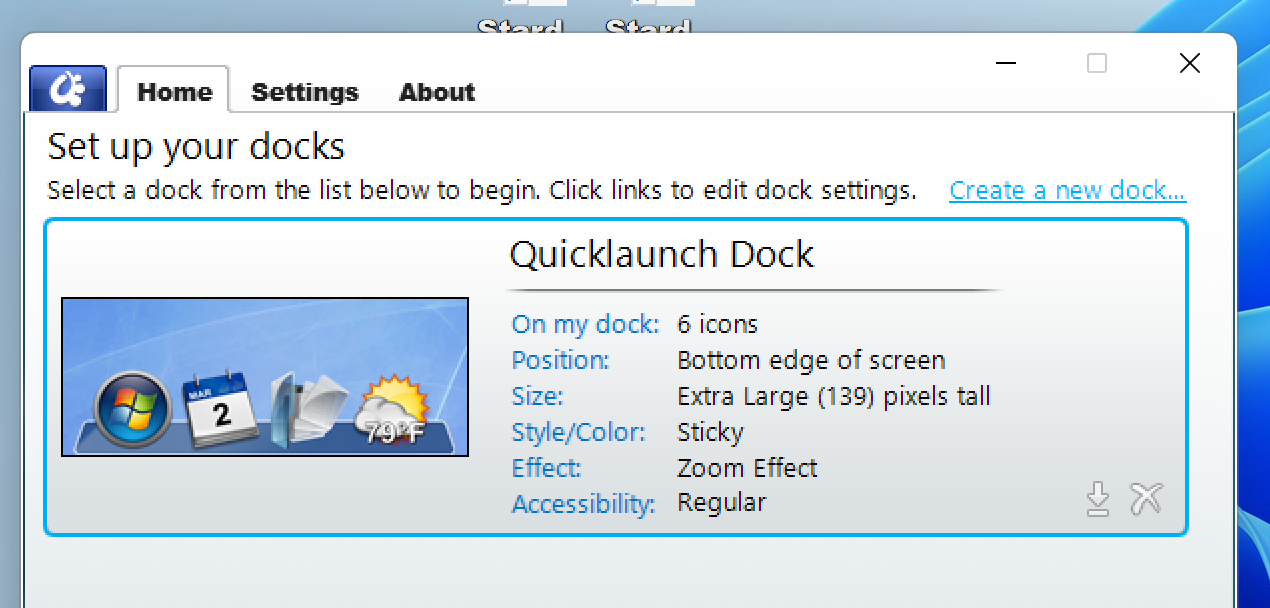
Edit* I uninstalled the program, rebooted, then did a reinstall, and still no sign of the weather app, even though it clearly shows it in the dock photo that you click on to get to the docklet settings.

As it exists, there's nothing in this version (that I intend to use) that my old version couldn't do.
I can see where the extra docklet options could be helpful to someone, but it's not for me.

Reply #11 Top

Quoting Monsoon1, reply 10

This thing is very frustrating to use. I had the old version running and I was able to add the weather docklet on it, but it wouldn't update.

So I though it might have a conflict with the new version, so I deleted the old one.

Now on the new version when I click on add a new docklet, I don't see the weather app in that list.

All I get now is Clock, Calendar, Start Menu, Show Desktop, and Recycle Bin.

Edit* I uninstalled the program, rebooted, then did a reinstall, and still no sign of the weather app, even though it clearly shows it in the dock photo that you click on to get to the docklet settings.

As it exists, there's nothing in this version (that I intend to use) that my old version couldn't do.
I can see where the extra docklet options could be helpful to someone, but it's not for me.


The weather docklet was removed in v3. Many of the older plugins no longer work as of this version.

Reply #12 Top

I see the pic of it in the preview window. That should be removed if it's not in the app.

Reply #13 Top

This is a screen cap of the new object dock, it shows the weather app in the window.


Reply #14 Top

Quoting Monsoon1, reply 13

This is a screen cap of the new object dock, it shows the weather app in the window.

Understandable, those graphics sample should be changed, I have forward your problem/question to Stardock Support Team for their assistance. Please keep an eye on this thread for any updates. We appreciate your feedback and patience.

Thank you.

Basj,
Stardock Community Assistant

Reply #15 Top

The Dev has informed that this will be fix on the next version release. But, currently there is no official announcement on when that will be.

Thank you,

Basj,
Stardock Community Assistant