Groupy 2.20 Release Feedback Thread

With the Groupy 2.20 release, we are creating this thread so that users can report any observed issues.  

Obtaining the product

Object Desktop members can get the release from within Object Desktop Manager 

Individual purchases (as well as Object Desktop Members) can also be obtained from your account page: https://store.stardock.com/myaccount/products

For guest check-out purchase (no account), from this link: http://www.stardock.com/support/productkeyretrieval

Reporting an issue

Please include the following for anything found:

  • Exact Windows version \ build (winver.exe)

  • Detailed steps to recreate the issue seen

  • Screenshots and videos are very helpful.  Videos can be uploaded to a cloud drive service (GoogleDrive, DropBox, OneDrive, YouTube), with a shared link included in your post.  Images can be copied and pasted directly into a post.

  • If there are specific apps that the app does not work (well) with, please note what apps and their exact versions.  If any app is not common, a link to a trial version would be appreciated.

Thank you for your interest and any time you put into making Groupy 2 a better product.

Sean Drohan
Stardock Support Manager

69,649 views 44 replies
Reply #1 Top

Groupy 2.20 Changelog (Released 10/17/2024)

10/17/2024

Version

  • UI: 2.20

  • GroupyConfig.exe: 2.2.0.1

Platforms

  • Stardock and Steam

Changes

  • This extends the - File explorer text removal to 23H2.  I suspect the issue is in the beta update to 23H2 but have included 23H2 original in it too just in case.

  • Tweak which may stop extract zipped folder auto grouping, though it did not reproduce in-house.

  • Fixes the - File Explorer text and - Notepad text on Windows Explorer and Notepad windows on Win11 24H2 

  • Fixes for space on the right-hand side of tabs when there is insufficient space.

Language update

+1 Loading…
Reply #2 Top

Known issues

While we appreciate all feedback, please remember that we offer no official support for beta \ preview \ developer channel versions of Windows. If you report issues while in any of those early release channels, you should not expect them to be addressed unless it still exists in a retail version of Windows.

  • tbd
Reply #3 Top

***Reserved***

Reply #4 Top

Microsoft Edge, loaded in InPrivate mode, has been saved into a group with a couple of other tabs.  Following a restart, loading the group does load Edge, yes, but not in InPrivate mode.

System is W10 x64, fully patched as of 22/11, and with Groupy V2.2

Reply #5 Top

Windows 10 Pro 22H2, Groupy2 v2.20

1. When starting KeePassXC and type password and PIN code, the window with Groupy2 will automatically shrink to a fixed size, which is 100% reproducible.

2. Sometimes in normal use, the windows of all programs disappear, and only a groupy2 tab bar is displayed.

Reply #6 Top

Quoting lapollo37, reply 5

Windows 10 Pro 22H2, Groupy2 v2.20

1. When starting KeePassXC and type password and PIN code, the window with Groupy2 will automatically shrink to a fixed size, which is 100% reproducible.

2. Sometimes in normal use, the windows of all programs disappear, and only a groupy2 tab bar is displayed.

Hello,
Sorry to hear you are having issues. Need more information.

  1. Windows 10 or 11? Also need its full version and OS Build number. Please use Winver.exe.
  2. Groupy 2 full version number.
  3. I can not reproduce your first issue. Did you set all Windows to auto group? Refer short video below.

Thank you.
Basj,
Stardock Community Assistant.

Reply #8 Top

Quoting lapollo37, reply 7

3.Yes,I set all windows to auto group.

If you disable all Windows auto Group and instead use selective application auto group. Does it resolve your issue?

Thank you,

Basj,
Stardock Community Assistant


Reply #9 Top

Suggestion for UI/menu improvement:

Once Groupy is set up, the most frequently accessed item is launching Saved Groups but you have to navigate 3 sub menus to reach this

For me, 95% of access is to Saved Groups 5% to create new OR tweak settings. A workaround is to create a desktop shortcut to the Start Menu >> Saved Groups

Consider an option for the Groupy icon on Tabs: On hover displays Saved Groups on click you see menu list On/Off

Reply #10 Top

Quoting barrat_patel, reply 9

Suggestion for UI/menu improvement:

Once Groupy is set up, the most frequently accessed item is launching Saved Groups but you have to navigate 3 sub menus to reach this

For me, 95% of access is to Saved Groups 5% to create new OR tweak settings. A workaround is to create a desktop shortcut to the Start Menu >> Saved Groups

Consider an option for the Groupy icon on Tabs: On hover displays Saved Groups on click you see menu list On/Off

Hello,
I have forwarded your request to the Stardock Support Team for their review and recommendations. Please keep an eye on this thread for any updates. We really do appreciate your feedback, Thanks

Basj,
Stardock Community Assistant.

Reply #11 Top

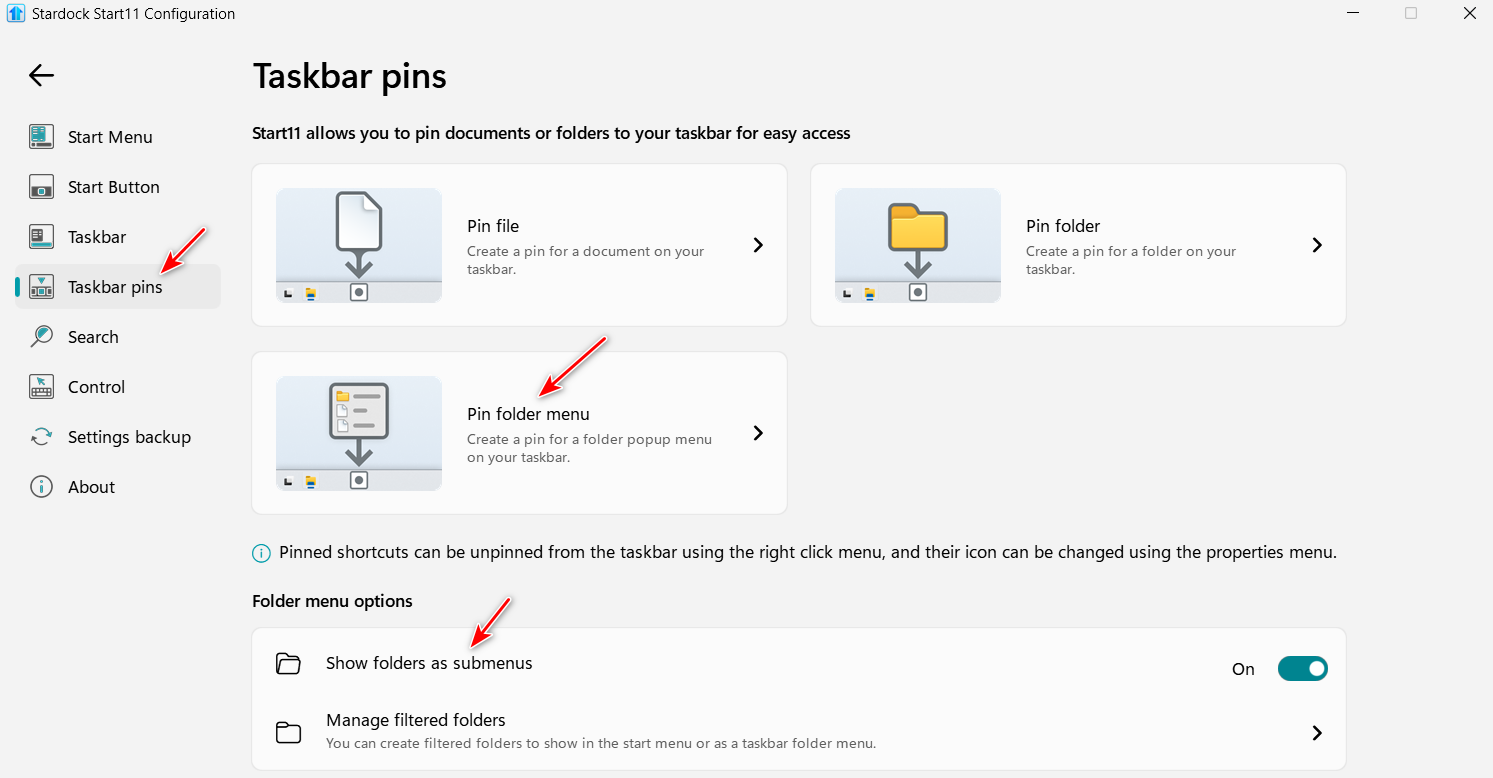
If you are using Start11v2, you could pin "C:\Users\user name\AppData\Roaming\Groupy" as a Pinned Folder Menu.

+1 Loading…
Reply #12 Top

I don't have Start 11, but have pinned it to the taskbar for the moment:

Good clear instructions for Win 11: https://www.groovypost.com/howto/pin-files-folders-or-drives-to-windows-11-taskbar/

Reply #14 Top

Quoting sanliangsan, reply 13

groupy_64.dll,总是引起资源管理器重启。

Please try, uninstall Groupy, reboot immediately (important), download latest version available in your account product download page: https://store.stardock.com/myaccount/products . Install it, reboot immediately again. Retest it and report back.

Thank you,

Basj,
Stardock Community Assistant

Reply #16 Top

Quoting sanliangsan, reply 15

问题依然存在

Look like your issue is unique to your system. Please create your own new thread and we will continue to help you there.

Also include few more details there.

  1. Windows 10 or 11? Also need to know its full version and OS Build number. Please use Winver.exe.
  2. When Explorer.exe crash what was you doing? It happen when you trying to Start a specific application? When you are trying to Group a specific application? etc Can you identify and easily recreate the Explorer.exe crash issue?

Thank you,

Basj,
Stardock Community Assistant

Reply #17 Top

OK, This program is amazing. I am unclear on how to make Groupy auto start when I boot W11 and have it open with my 5 programs tabbed together. Do I need all of these programs to auto start with W11? Some I have to open manually when W11 starts. I did create a saved group in grouping rules. I just don't understand how to make what I created auto start upon rebooting my computer.

Reply #18 Top

Quoting masterblaster73, reply 17

OK, This program is amazing. I am unclear on how to make Groupy auto start when I boot W11 and have it open with my 5 programs tabbed together. Do I need all of these programs to auto start with W11? Some I have to open manually when W11 starts. I did create a saved group in grouping rules. I just don't understand how to make what I created auto start upon rebooting my computer.

What may be better for you than Groupy doing anything that it does not (it does not start apps on Win startup) is this Windows setting

The single greatest feature MS has ever added...

Sean Drohan
Stardock Product Lifecycle Manager

Reply #19 Top

I will try that. Thanks.

Loving Groupy2.  Change subject.....The program creating taskbar or start menu links doesn't seem to do anything (Windows 11). Is this a known issue?

Reply #20 Top

Feedback related to this version: I haven't used any previous version but the tab colors seem to be very buggy. I can set the colors and save a group and when I open the group again the colors aren't saved, or only some of them work. I've tried setting colors in various ways and they don't seem consistent at all.

Reply #21 Top

I have the exact same problem. Some of the programs I use in my Group save and others never save. EVERY time I restart my computer and open this group, I have to add color to the tabs of two of the programs in my Group.

Reply #22 Top

Hello and thank you for posting.

Quoting reputable6827, reply 20

I can set the colors and save a group and when I open the group again the colors aren't saved, or only some of them work. I've tried setting colors in various ways and they don't seem consistent at all.

To either of the users noticing this, is there anything you can help isolate regarding which specific programs lose the saved tab color?  For example, in testing a Saved Group entirely of File Explorer windows seems to be functioning normally.  More specifics about that might be helpful.

Thanks again and best regards,

Adam McGuinness
Stardock Support Specialist

+1 Loading…
Reply #23 Top

Here is my confusion with Groupy 2.

First of all I LOVE THIS PROGRAM!!!

I have a group saved with Steam Library, Steam voice chat, Discord, XYPlorer, and Notepad.

Since Groupy 2 does not save to the start menu nor the taskbar as it should. It is saving to Desktop/Saved Groups (saves inside here). I made a copy of my shortcut from here to Objestdock. 

If I restart my computer, If I click on that link, it will not run and load the group unless they had previously been opened (this would be a great addition to Groupy 2, when I launch my Groupy 2 shortcut, it would be nice if it automatically opened the programs in that group then adds them to Groupy 2).

So Right now, I have to open all the programs in that group, then run my Groupy 2 shortcut and more often that not, not all the programs will be added to my group (My group is not locked). I have to add they with the + to the right of the Groupy 2 tabs. Also some tab colors are not added and I have to add them here also.

Reply #24 Top

My main use for Groupy2 is as a replacement for Firefox's containers. So I have multiple Brave profiles set up with Groupy automatically grouping all instances of Brave.exe. This works perfectly, but the colors do not.

Each group entry has a unique APPID. For example, with my Brave group the entries look something like this:
APPID=Brave.UserData.Profile1
APPID=Brave.UserData.Profile2

The CommandLine= tells each group entry to load a different Brave profile:
CommandLine= --profile-directory=Default
CommandLine= --profile-directory="Profile 1"
CommandLine= --profile-directory="Profile 2"
etc

They are all each given a unique name as well:
NewTabName=Main
NewTabName=Financial
NewTabName=Clients
etc

The Targets are all identical, because they each load the same Brave browser, just with a different profile:
WorkingDirectory=C:\Program Files\BraveSoftware\Brave-Browser\Application
Target=C:\Program Files\BraveSoftware\Brave-Browser\Application\brave.exe

I can set the colors with Pick Accent Colour but they will not persist after I restart the group, even if I manually save the group or even save to a new group name. If I set as default for the application or the whole group it will persist, but obviously that's not what someone using Groupy with different browser profiles would want. I've also tried creating accent color labels and those do not work properly in browsers either.

Even though setting a color will add a SavedColour= line to the .groupy file, the application seems to ignore it regardless of the color.

FYI, I've tried this with Microsoft Edge as well and had very similar results.

I wonder if making the SavedColour= line override any other color option saved is the way to go, or perhaps the app needs to use the APPID identifier as a way to detect which tab needs to be which color.

Reply #25 Top

Quoting Abisnabidam, reply 22

Hello and thank you for posting.


Quoting reputable6827,

I can set the colors and save a group and when I open the group again the colors aren't saved, or only some of them work. I've tried setting colors in various ways and they don't seem consistent at all.


To either of the users noticing this, is there anything you can help isolate regarding which specific programs lose the saved tab color?  For example, in testing a Saved Group entirely of File Explorer windows seems to be functioning normally.  More specifics about that might be helpful.

Thanks again and best regards,

Adam McGuinness
Stardock Support Specialist

Did my response above make sense?