bdsams bdsams

Ready for Windows 11 24H2

Ready for Windows 11 24H2

Stardock Software is ready for the Windows 11 24H2 release

Microsoft announced today that the company has started rolling out the long-awaited Windows 11 update that introduces some new AI features. Like many of the previous second-half releases, this includes some fundamental changes to how Windows operates.

For the past few months, Stardock has been diligently evaluating our applications like Start11 v2 and Fences 5 to make sure that they are fully functional with these changes. You may have noticed that we have been shipping more updates recently, while not always directly related to 24H2, it was part of our effort to make sure that when the new Windows release hits your device, your applications are ready.

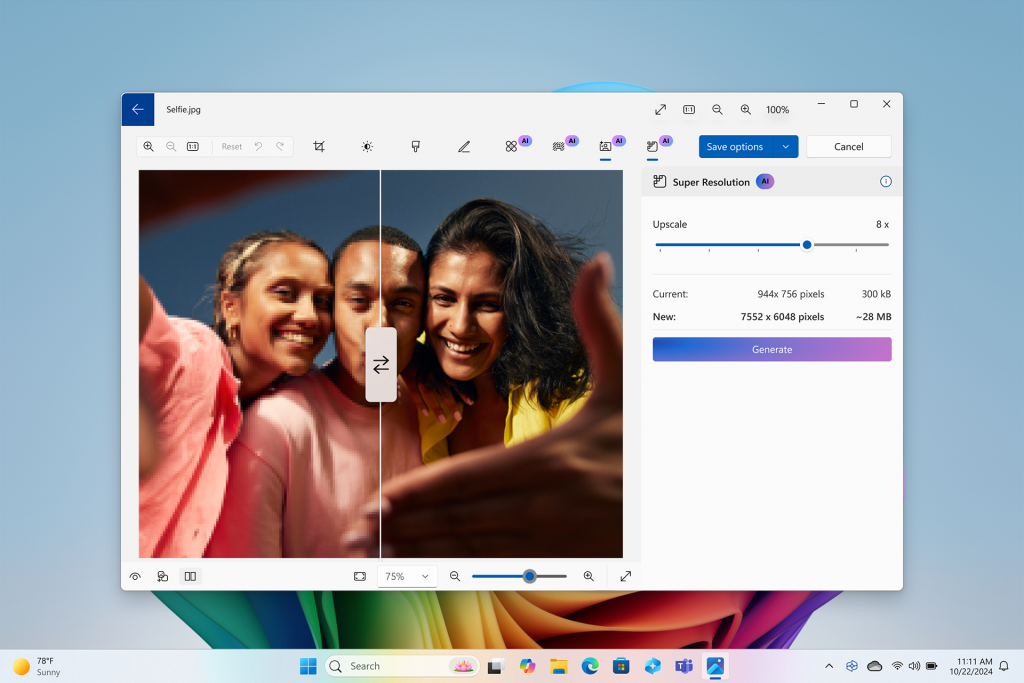
Super Resolution feature used with photo of three people

And this includes Groupy 2 as well, which has one additional fix that addresses some text clarity when used in conjunction with File Explorer – you can find this new release in the beta channel.

Microsoft has an extensive post detailing what is new but many of the updates relate to new AI features detailed below:

  • Click to Do – Microsoft’s answer to “Circle to Search”, this feature is part of snipping tool that allows you to select items in an image or text and turn it into a search query, blur backgrounds, erase objects and extract text.
  • Recall – The controversial feature that makes it easier to find what was open on your desktop will start testing with ARM-based devices this month and Intel/AMD devices next month; Microsoft is also overhauling the security and storage of this feature.
  • Photos – A new “Super resolution” feature lets you upscale any image with the power of AI.

And there is a lot more to this release than AI tools including an improved security baseline and additional improvements to the update process. While the consumer features will grab all the headlines, it's these under-the-hood updates that will continue to improve the OS to be more resilient and reliable.

Our ability to make sure our applications are ready for new builds of Windows is thanks to our community. With 24H2, we frequently run our applications through various testing flows with each Insider release, but nothing truly beats the feedback we receive from readers like you. Many of the new additions to our applications are based directly from the feedback we receive, if you haven’t joined yet, you can find us on Discord and in our forums.

62,929 views 49 replies
Reply #26 Top

Quoting DrJBHL, reply 25

kwagraphics and LLkoskaa, could you run winver and post your machine stats? Also, I wouldn't reinstall SAB nor EP.

Have you rolled back 24H2?

Here it is again

Edition Windows 11 Pro

Version 24H2

Installed on ‎10/‎2/‎2024

OS build 26100.1882

Experience Windows Feature Experience Pack 1000.26100.23.0

I don't see any other info, in fact not as much info using winver.exe.

I have reinstalled SAB because I need a start menu I can actually use. I haven't reinstalled EP. Since it isn't helping with anything right now, I'm not going to.

And I posted a couple of screen shots from event viewer showing there is a problem. There are similar events for SAB if you need to see them.

I have not rolled back to 23h2. I still have a few days before I'm committed (maybe I should be committed) to using 24h2.

Reply #27 Top

Quoting basj, reply 19


Quoting kwagraphics,

I have the latest drivers. I'm very diligent about that. After every update I check for new drivers and I always back up the current drivers, just incase there's an issue and I need to go back to a previous version.

Thanks for your help.

Just a little fyi. I was using StartAllBack because there's a setting on the start menu screen, "use enhanced classic start menu", that I turned off. With Explorer Patcher I was able to use a Windows 10 style start menu. I've been happy with that.

But that doesn't work either after the 24h2 update. SAB does give me a windows 7 style start menu. I'm just not happy with it. 


Just as a test, please try test it inside Windows Sandbox: https://forums.stardock.com/505872/start11-support-faq#windowssandbox. Try it and report back.

Note: I just updated my Windows 11 24H2 (OS Build 26100.1882) and I still don't see the issue. As a reference, I am running without StartAllBack and ExplorerPatcher, for I don't really think these application compatible with Start11 as all of them change how Explorer/StartMenu/taskbar work.

Thank you,

Basj,
Stardock Community Assistant

Quoting basj, reply 17


Quoting kwagraphics,

I uninstalled Explorer Patcher. I installed Start11, rebooted and took this screen shot...


Something else might be blocking Start11, have you tried updating the drives as mentioned by Doc in reply#10?

Thank you,

Basj,
Stardock Community Assistant

I was looking through the thread and saw you requested I use sandbox. I didn't see that earlier. I've never used it before. I'm working on it.

Reply #28 Top

Quoting kwagraphics, reply 27

I was looking through the thread and saw you requested I use sandbox. I didn't see that earlier. I've never used it before. I'm working on it.

Yes please test it in Sandbox and try not to install those other 3rd party software first.

Thank you,

Basj,
Stardock Community Assistant

Reply #29 Top

Quoting kwagraphics, reply 27


Quoting basj,

Okay, got sandbox set up and Start11 works with it. As does the way I had SAB and EP set up to give me a win 10 start menu.

I've beem racking my brain trying to figure out what could be causing this problem. 

I use Power Toys just for finding the mouse. Not using any other feature from it.

I have Display Fusion but I don't let it modify the taskbar. I went through the settings and can't see anything that would be a problem. It doesn't do anything to the start menu. It does manage the lock screen image.

I do have WinAeroTweaker. I've uninstalled it and will have to reboot. I couldn't see any setting that would be causing an issue, but I'll find out after I reboot.

And sandbox was just so bad for my eyes. Since I can't activate it I can't change to the dark theme. I need eye surgery (can't have it till I turn 65 cause I can't pay for it) and all that bright white really caused me a lot of pain and I can't see squat now. But I digress. Time to reboot and see what happens.


Quoting kwagraphics,


I have the latest drivers. I'm very diligent about that. After every update I check for new drivers and I always back up the current drivers, just incase there's an issue and I need to go back to a previous version.

Thanks for your help.

Just a little fyi. I was using StartAllBack because there's a setting on the start menu screen, "use enhanced classic start menu", that I turned off. With Explorer Patcher I was able to use a Windows 10 style start menu. I've been happy with that.

But that doesn't work either after the 24h2 update. SAB does give me a windows 7 style start menu. I'm just not happy with it. 


Just as a test, please try test it inside Windows Sandbox: https://forums.stardock.com/505872/start11-support-faq#windowssandbox. Try it and report back.


Note: I just updated my Windows 11 24H2 (OS Build 26100.1882) and I still don't see the issue. As a reference, I am running without StartAllBack and ExplorerPatcher, for I don't really think these application compatible with Start11 as all of them change how Explorer/StartMenu/taskbar work.


Thank you,


Basj,
Stardock Community Assistant


Quoting basj,


Quoting kwagraphics,


I uninstalled Explorer Patcher. I installed Start11, rebooted and took this screen shot...


Something else might be blocking Start11, have you tried updating the drives as mentioned by Doc in reply#10?


Thank you,


Basj,
Stardock Community Assistant


I was looking through the thread and saw you requested I use sandbox. I didn't see that earlier. I've never used it before. I'm working on it.

Reply #30 Top

Quoting basj, reply 28


Quoting kwagraphics,

I was looking through the thread and saw you requested I use sandbox. I didn't see that earlier. I've never used it before. I'm working on it.


Yes please test it in Sandbox and try not to install those other 3rd party software first.

Thank you,

Basj,
Stardock Community Assistant

I uninstalled WinAeroTweaker and rebooted, installed Start11 and it still doesn't work. 

Reply #31 Top

Quoting kwagraphics, reply 30

I uninstalled WinAeroTweaker and rebooted, installed Start11 and it still doesn't work.

What is your result when you test Start11 in Windows Sandbox?

Thank you,

Basj,
Stardock Community Assistant

Reply #32 Top

Well I found a solution that got my old start menu back just the way I left it!

Some time ago (probably over a year ago) I tried WindHawk. I uninstalled it. It just seemed a bit much for me.

Well, I installed it and am using the Windows Start-Menu styler (for Windows 24h2) with Explorer Patcher set to use the Windows 10 start menu. Clicked on my start menu and it was there!

And there are a few settings in SAB that I like so I reinstalled it as well and turned off the "use enhanced classic start menu" so EP can give me the Windows 10 start menu.

I'm surprised this worked and that I figured it out. Why it's working is beyond me. I've never been so glad to see my start menu!

Reply #33 Top

Thank you for the info on how to upload images. 

Going back to my issue after upgrading to Windows 11 Pro 24H2 where my start buttons are compressed in size, I am posting two images that demonstrate how the image is supposed to look, vs how it looks now.  


Just FYI, I have tried this across the board regarding multiple WindowBlind themes from multiple creators, and over multiple years.  All of the results are the same; the start buttons are compressed in size.

And since it was asked of others my OS and Build Number is Windows 11 Pro 24H2 OS Build:26100.1882 

The first image is of my desktop currently.  It shows the compressed start button.  Compare how the start button appears to the second image which is taken from a preview of a WindowBlind theme made by Lightstar that was just released yesterday.

Compressed Start Button post 24H2 upgradeStart button appearing correctly pre 24H2 upgrade

Reply #34 Top

Quoting Digicoma, reply 33

Thank you for the info on how to upload images.

Going back to my issue after upgrading to Windows 11 Pro 24H2 where my start buttons are compressed in size, I am posting two images that demonstrate how the image is supposed to look, vs how it looks now.


Just FYI, I have tried this across the board regarding multiple WindowBlind themes from multiple creators, and over multiple years. All of the results are the same; the start buttons are compressed in size.

And since it was asked of others my OS and Build Number is Windows 11 Pro 24H2 OS Build:26100.1882

The first image is of my desktop currently. It shows the compressed start button. Compare how the start button appears to the second image which is taken from a preview of a WindowBlind theme made by Lightstar that was just released yesterday.

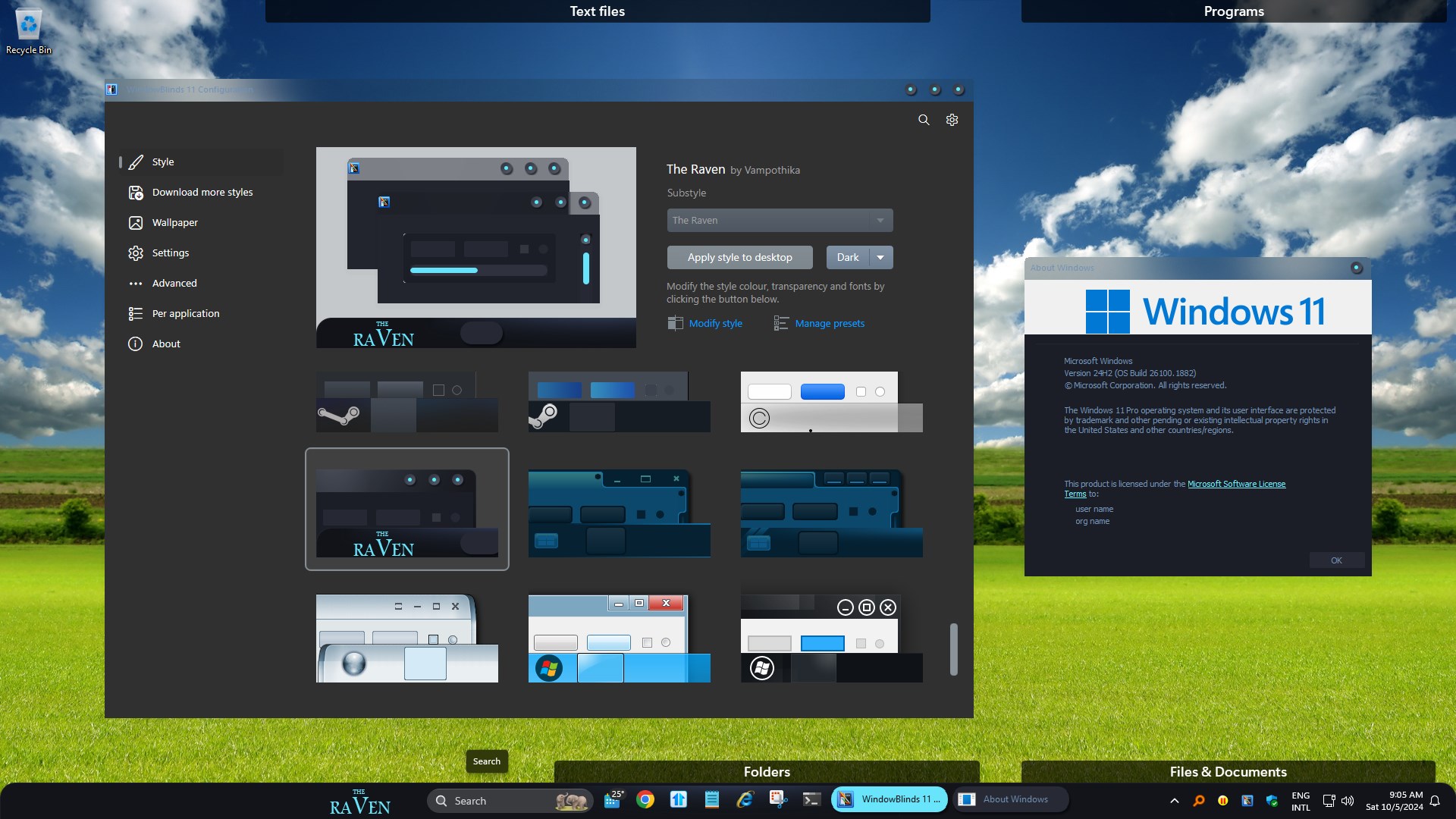
I checked, but on my system the Start button look normal to me. I don't have the theme your tested on, so I can't do direct comparison, but, I tried "The Raven" by Vampothika, which have quite a big start button, and it look normal size to me on my Windows 11 v24h2. Refer screenshot below. Moving forward, it is best to create your own thread on this issue so that it don't get confuse with other posts. And we will try to help you from there.

Thank you,

Basj,
Stardock Community Assistant

Reply #35 Top

I haved rolled back ofc to 23H2 , since im only using your products and its not working start 11 with 24H2.

WINVER

Edición Windows 11 Pro

Versión 23H2

Instalado el ‎28/‎09/‎2022

Versión del sistema operativo 22631.4169


Experiencia Windows Feature Experience Pack 1000.22700.1034.0


MACHINE STATS


Nombre del dispositivo pchabitacion

Procesador AMD Ryzen 7 7800X3D 8-Core Processor              4.20 GHz

RAM instalada 64,0 GB (63,6 GB usable)

Identificador de dispositivo 1842AFFB-E0D2-46B4-A083-69C77046769C

Id. del producto 00330-80000-00000-AA441

Tipo de sistema Sistema operativo de 64 bits, procesador basado en x64


Lápiz y entrada táctil La entrada táctil o manuscrita no está disponible para esta pantalla


DXDIAG ( WALL OF TEXT )

------------------

System Information

------------------

      Time of this report: 10/5/2024, 10:47:40

             Machine name: PCHABITACION

               Machine Id: {1842AFFB-E0D2-46B4-A083-69C77046769C}

         Operating System: Windows 11 Pro 64-bit (10.0, Build 22631) (22621.ni_release.220506-1250)

                 Language: Spanish (Regional Setting: Spanish)

      System Manufacturer: ASRock

             System Model: B650 PG Lightning

                     BIOS: 3.08 (type: UEFI)

                Processor: AMD Ryzen 7 7800X3D 8-Core Processor            (16 CPUs), ~4.2GHz

                   Memory: 65536MB RAM

      Available OS Memory: 65112MB RAM

                Page File: 13359MB used, 55848MB available

              Windows Dir: C:\WINDOWS

          DirectX Version: DirectX 12

      DX Setup Parameters: Not found

         User DPI Setting: 120 DPI (125 percent)

       System DPI Setting: 96 DPI (100 percent)

          DWM DPI Scaling: Disabled

                 Miracast: Available, with HDCP

Microsoft Graphics Hybrid: Not Supported

 DirectX Database Version: 1.6.1

           DxDiag Version: 10.00.22621.3527 64bit Unicode


------------

DxDiag Notes

------------

      Display Tab 1: No problems found.

      Display Tab 2: No problems found.

        Sound Tab 1: No problems found.

        Sound Tab 2: No problems found.

          Input Tab: No problems found.


--------------------

DirectX Debug Levels

--------------------

Direct3D:    0/4 (retail)

DirectDraw:  0/4 (retail)

DirectInput: 0/5 (retail)

DirectMusic: 0/5 (retail)

DirectPlay:  0/9 (retail)

DirectSound: 0/5 (retail)

DirectShow:  0/6 (retail)


---------------

Display Devices

---------------

           Card name: AMD Radeon RX 7900 XTX

        Manufacturer: Advanced Micro Devices, Inc.

           Chip type: AMD Radeon Graphics Processor (0x744C)

            DAC type: Internal DAC(400MHz)

         Device Type: Full Device (POST)

          Device Key: Enum\PCI\VEN_1002&DEV_744C&SUBSYS_2422148C&REV_C8

       Device Status: 0180200A [DN_DRIVER_LOADED|DN_STARTED|DN_DISABLEABLE|DN_NT_ENUMERATOR|DN_NT_DRIVER] 

 Device Problem Code: No Problem

 Driver Problem Code: Unknown

      Display Memory: 57048 MB

    Dedicated Memory: 24492 MB

       Shared Memory: 32555 MB

        Current Mode: 2560 x 1440 (32 bit) (144Hz)

         HDR Support: Supported

    Display Topology: Extend

 Display Color Space: DXGI_COLOR_SPACE_RGB_FULL_G22_NONE_P709

     Color Primaries: Red(0.685547,0.308594), Green(0.264648,0.667969), Blue(0.150391,0.057617), White Point(0.313477,0.329102)

   Display Luminance: Min Luminance = 0.098400, Max Luminance = 400.000000, MaxFullFrameLuminance = 343.000000

        Monitor Name: LG ULTRAGEAR(DisplayPort)

       Monitor Model: 27GL850

          Monitor Id: GSM5B7F

         Native Mode: 2560 x 1440(p) (144.000Hz)

         Output Type: Displayport External

Monitor Capabilities: HDR Supported (BT2020RGB BT2020YCC Eotf2084Supported )

Display Pixel Format: DISPLAYCONFIG_PIXELFORMAT_32BPP

      Advanced Color: AdvancedColorSupported 

         Driver Name: C:\WINDOWS\System32\DriverStore\FileRepository\u0407465.inf_amd64_25af0ae2eb807985\B407987\atidx9loader64.dll,C:\WINDOWS\System32\DriverStore\FileRepository\u0407465.inf_amd64_25af0ae2eb807985\B407987\amdxx64.dll,C:\WINDOWS\System32\DriverStore\FileRepository\u0407465.inf_amd64_25af0ae2eb807985\B407987\amdxx64.dll,C:\WINDOWS\System32\DriverStore\FileRepository\u0407465.inf_amd64_25af0ae2eb807985\B407987\amdxc64.dll

 Driver File Version: 32.00.12011.1036 (English)

      Driver Version: 32.0.12011.1036

         DDI Version: 12

      Feature Levels: 12_2,12_1,12_0,11_1,11_0,10_1,10_0,9_3,9_2,9_1

        Driver Model: WDDM 3.1

 Hardware Scheduling: DriverSupportState:Stable Enabled:True 

         Displayable: Supported 

 Graphics Preemption: Primitive

  Compute Preemption: Dispatch

            Miracast: Not Supported by Graphics driver

      Detachable GPU: No

 Hybrid Graphics GPU: Not Supported

      Power P-states: Not Supported

      Virtualization: Paravirtualization 

          Block List: DISABLE_HWSCH

  Catalog Attributes: Universal:False Declarative:True 

   Driver Attributes: Final Retail

    Driver Date/Size: 26/09/2024 2:00:00, 141616 bytes

         WHQL Logo'd: n/a

     WHQL Date Stamp: n/a

   Device Identifier: {D7B71EE2-370C-11CF-3073-C92A67C2ED35}

           Vendor ID: 0x1002

           Device ID: 0x744C

           SubSys ID: 0x2422148C

         Revision ID: 0x00C8

  Driver Strong Name: oem84.inf:cb0ae414a2261e58:ati2mtag_Navi31:32.0.12011.1036:PCI\VEN_1002&DEV_744C&SUBSYS_2422148C&REV_C8

      Rank Of Driver: 00CF0000

         Video Accel: Unknown

         DXVA2 Modes: {C58B9A06-7E89-11E1-BB00-70B34824019B}  DXVA2_ModeH264_VLD_NoFGT  {4245F676-2BBC-4166-A0BB-54E7B849C380}  {9901CCD3-CA12-4B7E-867A-E2223D9255C3}  DXVA2_ModeH264_VLD_Stereo_Progressive_NoFGT  DXVA2_ModeH264_VLD_Stereo_NoFGT  {D1C20509-AE7B-4E72-AE3B-49F88D58992F}  DXVA2_ModeHEVC_VLD_Main  {EA72396A-67EC-4781-BEDE-56F498F04EF2}  {C152CA8F-738C-461B-AD89-FC292CF8F162}  {514A356C-7027-4AFF-8A60-AFD2C1F672F1}  DXVA2_ModeHEVC_VLD_Main10  {65D1FA41-58AF-453A-9CAB-5D981156DA9F}  {2DB154B6-DBB2-4079-A3FF-60D7A898A6AB}  {C74A3FD0-D713-4581-A02E-8EDFB112ACE3}  DXVA2_ModeVP9_VLD_Profile0  DXVA2_ModeVP9_VLD_10bit_Profile2  {2D80BED6-9CAC-4835-9E91-327BBC4F9EE8}  {B8BE4CCB-CF53-46BA-8D59-D6B8A6DA5D2A}  {603A4756-A864-4F91-BB62-2C935B7A1391}  {84AD67F6-4C21-419A-9F0B-24F0578906C1}  

      Deinterlace Caps: n/a

        D3D9 Overlay: Not Supported

             DXVA-HD: Not Supported

        DDraw Status: Enabled

          D3D Status: Enabled

          AGP Status: Enabled

       MPO MaxPlanes: 2

            MPO Caps: HDR (MPO3)

         MPO Stretch: 1.000X - 1.000X

     MPO Media Hints: 

         MPO Formats: R16G16B16A16_FLOAT,R10G10B10A2_UNORM,R8G8B8A8_UNORM,B8G8R8A8_UNORM

    PanelFitter Caps: HDR (MPO3)

 PanelFitter Stretch: 1.000X - 1.000X

   Component Drivers: 

             Driver Name: Unknown

          Driver Version: Unknown

             Driver Date: Unknown

         Driver Provider: Unknown

      Catalog Attributes: N/A

             Driver Name: Unknown

          Driver Version: Unknown

             Driver Date: Unknown

         Driver Provider: Unknown

      Catalog Attributes: N/A

             Driver Name: Unknown

          Driver Version: Unknown

             Driver Date: Unknown

         Driver Provider: Unknown

      Catalog Attributes: N/A

Reply #36 Top

Hello,

For all that have issue with Stardock Software product on Windows v24H2 recent update. It is best to create your own new thread so we can help your issue individually in those thread.

Thank you,

Basj,
Stardock Community Assistant

Reply #37 Top

I will.

What i posted is this helpful or not.


What more do you need to ask me.

Reply #38 Top

Quoting LLoskka, reply 37

I will.

What i posted is this helpful or not.


What more do you need to ask me.

I have replied on your own thread.

Thank you,

Basj,
Stardock Community Assistant

Reply #39 Top

Just found out that Icon Developer isn't working on Build 24H2. Will this get updated?

Reply #40 Top

So far the update hasn't come through for me. I don't think I want it. 8C  

Reply #41 Top

Quoting Chasbo, reply 40

So far the update hasn't come through for me. I don't think I want it. 8C  

Resistance is futile, Chuck of Widget. :borg:  

+1 Loading…
Reply #42 Top

Quoting DrJBHL, reply 41


Quoting Chasbo,

So far the update hasn't come through for me. I don't think I want it. 8C  


Resistance is futile, Chuck of Widget. :borg:  

you cannot step twice into the same stream

Reply #43 Top

Quoting MarkSnyder61, reply 39

Just found out that Icon Developer isn't working on Build 24H2. Will this get updated?

Hello,
Sorry to hear you are having issues. But, I have just installed IconDeveloper and it is working in my system.

Thank you,
Basj,
Stardock Community Assistant.

Reply #44 Top

I updated to 24h2 and Start11's start menu choices aren't working. No matter which one I select it stays the windows 11 start menu. I saw on this forum that EP doesn't play well with Start11. I backed up my EP settings and uninstalled it. And I rebooted.  I still have the windows 11 start menu. I'm trying to decided whether to go back to 23h2.

stardock start11 and windowblinds both work great I'm on 24h2

Reply #45 Top

So pretty disappointed in WindowBlinds. I am a OD Subscriber for many years and I like the products I have paid for. WB works great on Windows 10 but I'm not going backwards. When WIN11 came out I immediately installed WB and although most of the skins work it bogged down my system that I could not even open up outlook until I excluded it "per app" and Stardock claims WB is faster than the default skin WIN11 gives right Out of the Box.  So I put WB aside and pretty much all Stardock products. When Build 24H2 came out that build was pretty fast. BTW...I have an Intel i9 10th gen with 64 GB RAM. So with that build I decided to give OD and all it's apps a chance but can you imagine that all the Skins I load bog down my system. When opening Outlook it was so slow I had to revert back without WB and low and behold everything starting working normally again. I think what is happening is OD's WB is optimized for 24H2 but I could be wrong. What I think is happening here is all the WB skins here on Wincustomize are designed for Win7 and Win10. I would like to see Stardock go through the skins available on Wincustomize and separate them out based on Win7/10/11 accordingly and maybe even use separate libraries because right now they seem to load up but wreak havok with your resources, etc. What do you think Stardock, are you up to the challenge to keep happy customers!

Reply #46 Top

Quoting MarkSnyder61, reply 45

So pretty disappointed in WindowBlinds. I am a OD Subscriber for many years and I like the products I have paid for. WB works great on Windows 10 but I'm not going backwards. When WIN11 came out I immediately installed WB and although most of the skins work it bogged down my system that I could not even open up outlook until I excluded it "per app" and Stardock claims WB is faster than the default skin WIN11 gives right Out of the Box.  So I put WB aside and pretty much all Stardock products. When Build 24H2 came out that build was pretty fast. BTW...I have an Intel i9 10th gen with 64 GB RAM. So with that build I decided to give OD and all it's apps a chance but can you imagine that all the Skins I load bog down my system. When opening Outlook it was so slow I had to revert back without WB and low and behold everything starting working normally again. I think what is happening is OD's WB is optimized for 24H2 but I could be wrong. What I think is happening here is all the WB skins here on Wincustomize are designed for Win7 and Win10. I would like to see Stardock go through the skins available on Wincustomize and separate them out based on Win7/10/11 accordingly and maybe even use separate libraries because right now they seem to load up but wreak havok with your resources, etc. What do you think Stardock, are you up to the challenge to keep happy customers!

Hello,
Sorry to hear you are having issues. And I believe you repost your question here: https://forums.stardock.com/534583/. Let carry on there.

Thank you,
Basj,
Stardock Community Assistant.


Reply #47 Top

bonjour
Pour moi c'est Clôtures qui block pendant 1mm30 les paramètres graphiques au démarrage de Windows!
j ai fait une autre session sans créer de Fences et tout va bien !

win 11 V24h2  build 26100.3323  = = Fence 3.1.6.1


Reply #48 Top

Quoting toustardock, reply 47

bonjour
Pour moi c'est Clôtures qui block pendant 1mm30 les paramètres graphiques au démarrage de Windows!
j ai fait une autre session sans créer de Fences et tout va bien !

win 11 V24h2  build 26100.3323  = = Fence 3.1.6.1

Hello,
Sorry to hear you are having issues. But, do know that Fences 3 is not compatible and not supported on Windows 11.

Thank you,
Basj,
Stardock Community Assistant.


Reply #49 Top

Start11 v2.51 (but I've had this problem for at least 3 months, before v2.51 was installed) on Win11 23H2 - 

I have four monitors connected with a Wavlink Thunderbolt dock.

Regularly, one of the problems I'm having with Start11 is if I have multiple windows open on one of the non-primary monitors, the taskbar icons that should be showing me all the separate windows I have open on that display disappear - which means while I'm working on other screens I can't see what windows are actually open on the screen I'm not working on. The only way to get the taskbar to display those ungrouped icons is to click somewhere in the taskbar (click somewhere toward the right) - then they all re-appear.