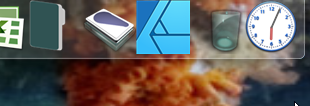
ObjectDock shows app icon as low-res

Hi.

Oddly i can't find a category for Objectdock so hope find posting here.

For some reason my Affinity Apps icons create Low-res icon thumbnail image on the dock, when the Affinity app icons are definitely high-res and show up well on other docks other than Objectdock ... what can I do about this?

TIA


Here are how they actually look ...

Moved to ObjectDock Forum

5,839 views 8 replies
Reply #1 Top

Hello,
Sorry to hear you are having issues. How did you pinned that application to dock? Try these steps. Open Object Dock setting. Click on Show running applications. Once that been turn on. Start Affinity, once that is done, right click Affinity app icons that show up on that dock-> Pin this program to dock. That should pinned a proper icon to that dock. You can disable "Show running application" once that is done.


Thank you.
Basj,
Stardock Community Assistant.

Reply #2 Top

Thank you Basj

Maybe you can help with a different issue ...

With the Tabbed docks .. is there any way to have the items name show under folders?

If inning a couple of folders, it's impossible to tell them apart by just looking at them.

Reply #3 Top

Quoting basj, reply 1

Click on Show running applications. Once that been turn on. Start Affinity, once that is done, right click Affinity app icons that show up on that dock-> Pin this program to dock. That should pinned a proper icon to that dock. You can disable "Show running application" once that is done.


Ps ... I tried what you suggested but Affinity still shows up as low-res even when running as a program.

Looks fine on other docks like that of Nexus

Reply #4 Top

Quoting cosmicfx, reply 2

Thank you Basj

Maybe you can help with a different issue ...

With the Tabbed docks .. is there any way to have the items name show under folders?

If inning a couple of folders, it's impossible to tell them apart by just looking at them.


I believe, there is not option to force Icon text appear permanently. The text will appear when you hover over those icons. What you can do is assign different icons for each folder. You can use this set to make the folder look different from each other.

For example these:

https://www.wincustomize.com/explore/icons/4773/

https://www.wincustomize.com/explore/icons/4759/

Or Browse for more icons choices

https://www.wincustomize.com/explore/icons/search/

Thank you,

Basj,
Stardock Community Assistant


+1 Loading…
Reply #5 Top

Quoting cosmicfx, reply 3

Ps ... I tried what you suggested but Affinity still shows up as low-res even when running as a program.

Looks fine on other docks like that of Nexus

Not sure why this happen on your system. It was fine on my system. Here is what it look like now on my system after I pinned it.

And it only on Affinity Designer? Not effecting Affinity Photo or any other applications?

Thank you,

Basj,
Stardock Community Assistant

Reply #6 Top

It effect all Affinity ... Photo, Designer and Publisher.

But what I've done is googled for png icons, and then changed icon manually.


Thanks again

Reply #7 Top

Quoting basj, reply 4

I believe, there is not option to force Icon text appear permanently. The text will appear when you hover over those icons. What you can do is assign different icons for each folder. You can use this set to make the folder look different from each other.

For example these:

https://www.wincustomize.com/explore/icons/4773/

https://www.wincustomize.com/explore/icons/4759/

Or Browse for more icons choices

https://www.wincustomize.com/explore/icons/search/


Thanks for this ... will do so

Reply #8 Top

Great, glad to help.

Thank you,

Basj,
Stardock Community Assistant