New Purchase....Looks like a faulty install

Really disappointing launch

See attached screen grab. 

While the main dock appears as expected on the right hand side of the screen, the second tab, configured to appear at the top is a complete and utter mess. You can see below that it has a ghosted appearance, icons are missing.

I have tried several colour themes to ensure no conflict with the normal desktop background.


So disappointing to have to start with a support issue.

I have rebooted several times and have double checked I have the latest software.


27,792 views 34 replies
Reply #1 Top

I got one of the styles to appear. It allows me to try and configure further, but I am finding lots of issues. Will post details when I get to a logical stage.


Reply #2 Top

Hello,
Sorry to hear you are having issues. If you still have issue, first please try uninstall, reboot, redownload the installer file, install it, reboot again. And test. Do report back.

Thank you.
Basj,
Stardock Community Assistant.

Reply #3 Top

I have spent hours configuring tabs. 

1. How can I back them up / restore such tabs.

2. Why is there no (obvious to me) Help Function, Usage Faqs (Not Subscription /Account Faqs), Intro Videos. A trawl thru forums did not reveal answers to common questions.

Reply #4 Top

First, need to clarify does those tabs that come with OD3 work? this is how my tabs look like when I apply the eminence tab on my system. Try the eminence and take a screenshot so we can try to understand your actual issue.

Thank you,

Basj,
Stardock Community Assistant

Reply #5 Top

I have made some progress, have found out how to backup my existing settings, downloaded and reinstalled.


The good news is my previous tab settings have been retained.


What time zone are you in, so I can figure out the best time to post or figure out when a reply might be likely.


It is 7:34 am now in Dublin Ireland. I am getting ready for a number of appointments, so may not be able to post again until 2 or 3pm Irish time.


I will summarise my status / issues at that stage.


Can I post a pdf attachment to this thread.


Reply #6 Top

Since I have got no response to my previous post.... I have posted a summary of my experience and list of issues via this post.

https://forums.stardock.com/528675/my-installation-experience-not-good


I would have preferred to send an email to the authors and not make this list public, but the authors have decided I cannot send them emails.

I would happily have summarised this in a pdf attached to this post, but that option was not available to me either.

I do hope that the authors take note... as I think the fundamentals of Stardock are good, but tweaks are needed to make the end user experience better, especially first time users.


Reply #7 Top

Hello,

Any reason you are not answering my question in Reply#4?

Thank you,

Basj,
Stardock Community Assistant

Reply #8 Top

I did answer it in post 5.  

I informed you that I ran the reinstall as promised and that I had a working system (ie progress from failed install.


I then asked you the following.


It is 7:34 am now in Dublin Ireland. I am getting ready for a number of appointments, so may not be able to post again until 2 or 3pm Irish time. 

I will summarise my status / issues at that stage. 

Can I post a pdf attachment to this thread.


I waited almost 48 hours and got no reply.  I wanted to send you a structured pdf with a summary of what I felt was not working and try to establish what gaps existed or what could be achieved via configuration.

As I continued to try and get your apps to work .... I waited for 48 hours and then posted my summary at this link ... https://forums.stardock.com/528675/my-installation-experience-not-good

which you shut down with 10 mins or so of my post.


I will create individual posts for individual issues. Give me 5 mins or so to post the first one re Time and Date Docklets..

Reply #10 Top

Quoting Gnits, reply 8

I will create individual posts for individual issues.
Please don't! There is no need for that. You've got your own thread here to continue your conversation with support.

Reply #11 Top

Then please answer my query re Date Time Docklets.

Reply #12 Top

Date Time Docklet Query

1. Time Icon is showing date, not time.

2. Date Time Docklets are not dynamic. They do not show the date or time. Yes… I can see the date if I mouse over, but that is not a practical everyday action.

I have a 32inch 4k screen…. it takes ages plus effort to drag my mouse to the top right hand corner where I have these Docklets.


Hopefully there is a workaround…. If not then it is a major dis-incentive to consider using StarDock as an alternative to the standard Windows Taskbar.

Reply #13 Top

You will need to be patient to get your answer. We will try to answer your question as soon as we are able to. We appreciate your patience.

Quoting Gnits, reply 12

1. Time Icon is showing date, not time.

You're asking about this, yes? It is obviously clear that you don't need the time repeated on the popup text since the time already known if you look at the clock face. Hence you get the next information usually needed which is the date. Its practical for most users since it was like this since long time ago.

Quoting Gnits, reply 12

I have a 32inch 4k screen…. it takes ages plus effort to drag my mouse to the top right hand corner where I have these Docklets.

You could create another dock and put it at the bottom of the screen so it's close to you.

Thank you,

Basj,
Stardock Community Assistant


Reply #14 Top

The clock is working now...showing the current time.

I will check again later, just to confirm the icon is not frozen at the time of creation.


I have since created my own mini app.... which updates the date and time dynamically every minute. I can place this anywhere on the screen and presents the info in a font and style that suits me.

As well as showing me the date and time dynamically.... it has other features.

The Date button puts the Date and Time (as formatted) into my clipboard, making it very easy for me to paste DateTime stamps in to emails or documents.  I use this a  lot and gobsmacked I did not think of this 20 years ago.


I take from your reply  that the Date is not updated dynamically. Maybe my workaround will work for the longer term.


So.... lets close the Date Time conversation... unless you have anything else to add.


The Following Is  Nice To Have. I mention it now because its functionality relates to my MOB_Dashboard.


Is there any method to launch multiple apps at the same time. 


It is useful for me for different tasks. Eg . I launch Roon Server, Splashtop  and iTunes always at the same time  if I have purchased music on iTunes and want to use the Splashtop Remote control App to transfer the Music from my main PC to my Roon Server (which delivers music to various rooms / systems).  Another good example is that I regularly launch the same apps when I start up my PC..... but do not want to use Windows to start these apps automatically, because there are many scenarios where I want to use my PC for processor intensive apps (eg AutoCad, or Photoshop / Lightroom and do not want all these other apps running at the same time and also clogging up my screen.


My workaround is that I have created a button called Start to launch the apps I use mostly when I start my PC.

This was just a quick 5 min fix, as I had the Dashboard working for my Date Time needs.

I can easily add buttons to cater for other scenarios (such as Cad, Music, Photography).

However, my preference is not to develop tools myself, but to use tools built by companies who specialise in specific expert areas.

So... the question.

Can I launch multiple apps with a single click ??


Reply #15 Top

Quoting Jan, reply 10


Quoting Gnits,

I will create individual posts for individual issues.

Please don't! There is no need for that. You've got your own thread here to continue your conversation with support.

Indeed, please don't. It will only cause confusion.

I've left a message with Support as well as basj having done so, since time wise basj is ½ the planet from you, and Support is on EDST. Just keep in mind Support works M-F, 9-5. On weekends, a Support folks visit the forums, though less frequently.

From your other post:

"Here is a screen grab of the Date and Time Docket Icons.

Q1.  The Time Docklet does not work.... it shows the date.

Q2. Why are these dumb Docklets....... they are useless and a waste of space  if they do not update the date and time. Further, it is a serious dis-incentive to consider using Stardock as my main TaskBar if there is not a working date and time feature.


Is there a workaround to this issue."

Please don't create new posts referring to your current problem/s. Thanks.

Reply #16 Top

Quoting Gnits, reply 14

Is there any method to launch multiple apps at the same time.

No, this function is not available in ObjectDock.

Thank you,

Basj,
Stardock Community Assistant

Reply #17 Top

I will keep the posts on this thread.


Just to establish where we are..... I am awaiting a response for the question .... Is there any method to launch multiple apps at the same time. ... (This is a nice to have).

Details above in reply #14.  Also I understand you are in US based Eastern Time.  I had no idea what continent was responding to my messages.  


Also, as a retired CIO of several large PLCs / Global organisations.... I fully understand the value of support and will not abuse it.  Typically, I will have several queries at the start if I cannot find the answers in the documentation.  If I use something very regularly I will make suggestions for features or bug fixes from time to time.... perhaps every few years.


Given my background ... I place a high value on been very efficient with my daily tasks and my exploration of Stardock / ObjectDock stems from my increasing frustration with recent Win 10 GUI behaviour and the disaster that is the Win 11 GUI.


I think Stardock / ObjectDoc has potential.... but my experience of your product from an install / documentation perspective has been poor.

Regards....


Hopefully we can deal with my remain queries asap.


Matt O'Brien

Dublin, Ireland.

Reply #18 Top

Quoting Gnits, reply 17

I will keep the posts on this thread.


Just to establish where we are..... I am awaiting a response for the question .... Is there any method to launch multiple apps at the same time. ... (This is a nice to have).

I did respond to this one in my Reply#16.

Thank you,

Basj,
Stardock Community Assistant

Reply #19 Top

Just saw it. Thanks for prompt reply. 

I had a query re Live running apps… but have discovered how to use the default taskbar.  I have removed all apps from it and it now only shows active tasks….. which is very sweet. Will use for the next few days…. but I like how that is working.


Also…. I recognise your support times…. 


My next techie query is that despite the fact I have the settings ticked to load at startup…. It doesn’t. I have to manually launch the app.

I will use the app for the next few days, not raise any more questions until I have had the chance to test the tool  further.  Hopefully at  that that stage I may not have any further queries, but may have a few suggestions.


My priority was to get to a point where I had a decent basis to test your app.

Reply #20 Top

Quoting Gnits, reply 19

My next techie query is that despite the fact I have the settings ticked to load at startup…. It doesn’t. I have to manually launch the app.

Please check your task manager -> Startup tab->make sure "ObjectDock" is listed and the status is enabled. Refer screenshot below. This is on Windows 10, Windows 11 have slightly different layout on its Task Manager.

Thank you,

Basj,
Stardock Community Assistant

Reply #21 Top


Quoting Jan, reply 10


Quoting Gnits,

I will create individual posts for individual issues.

Please don't! There is no need for that. You've got your own thread here to continue your conversation with support.

Quoting DrJBHL, reply 15

Quoting Jan Oscar,reply 10

Quoting Gnits,reply 8
I will create individual posts for individual issues.
Please don't! There is no need for that. You've got your own thread here to continue your conversation with support.
Indeed, please don't. It will only cause confusion.

basj and other software support personnel do this at my request (insistence, really).  If a client has multiple unique \ distinct issues, I want them in their own threads.  The reasons for this are evident in most threads where multiple issues are reported - the OP (and the others trying to help) jumps around to those various issues and it's very difficult to keep track of what has, or has not, been addressed.  It's often choas. 

Furthermore, attempting to address multiple issues in a single thread does not help the people searching in the future.  If a thread is titled 'My icons in ObjectDock show blank', it has a beginning, middle, and an end germane to just that issue.  Conversely, if there is a thread titled (and worked) 'Here are 12 things about ObjecDock', that helps nearly no one in the future. 

If it helps bring the point home, one does not carry on multiple conversations about different subjects, with multiple people, at the exact same time. 

Sean Drohan
Stardock Product Lifecycle Manager

Reply #22 Top

I do not want to get into an extended discussion or escalate this into a bigger issue than it might be.  I am not expecting a response or any follow up actions to this specific reply.

I would just like to make the following points. 


I had a list of issues I wished to discuss. I was happy to put such a list into a structured order, with background details and send it to you as pdf.  So I posted the following request.


I waited patiently for close to 48 hours and did not get a response to this request. In the interim, I tried to progress as many items as I could myself.


With no response I posted a summary of my status, some suggestions, details of issues I still had, etc...


Within 10 mins I got a response to state I should post the issues as individual items.


I can understand that ... so I posted a message with a specific single issue... namely the Date/Time Docklets.


I am not sure of the sequence but you shut down my summary post and my individual post of the Date/Time Docklets asking me to continue with the original thread.


So, I posted item #12.... to this post... which described a  single issue (Date/Time Docklets).


I got a response to that.... so I then posted the next issue .... which related to launching multiple apps with a single click.


You responded to that in Reply #16. 


In Reply 19.... I raised my next tech query.... in that ObjectDock was not launching at PC start up.  

That was responded to in your post #20.


This note from me is in response to your note 21.


I do not know how else I should have / could have responded to the various message / instructions I received.


I am happy just to let this be the conclusion on how to progress my issues.  I am not expecting a response to this note or any follow up actions.


Next week I will report back using this thread  on if setting the Start Up option works (as per reply #20) and reporting if any issues arising from testing ObjectDock for a few days.


Reply #23 Top

I have been monitoring ObjectDock start times.


Here is a screen grab from TaskManager.


.

133 Seconds (133,967 ms) is a crazy long time for an app to launch.

I only have 7 startup apps enabled.

For comparison start up times for a number of apps are as follows...

Macrium Reflect   35 ms.  This is a pro level backup system.

MoB_Dashboard. 315ms. This is my own app, which displays the date and time (with decent font size for a 32 inch screen)  in a small window and has a few action buttons. Sample below.

Directory Opus.  1,865 ms.  This is a super alternative to File Explorer.

ObjectDock  at 133,967 is exponentially off the scale.


Here is my own Dashboard... as it has features built in which are not possible in ObjectDock.


Reply #24 Top

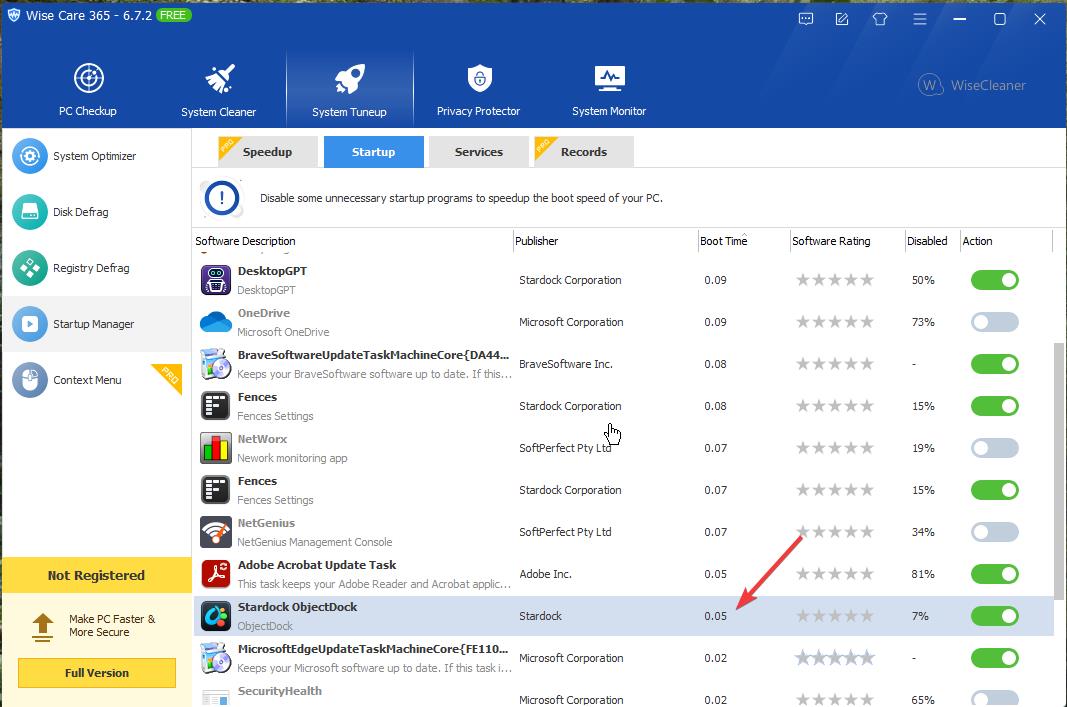
Not sure if we are looking at the same thing but this is what I get.

Thank you,

Basj,
Stardock Community Assistant

Reply #25 Top

Thanks for prompt reply.


I am using the StartUp Tab in TaskManager.


What utility are you using ?


I just rebooted... and got the following numbers....


1. ObjectDock...

2.  slowest at 133,967

3. This shows all the apps I have auto startup. Everything else has auto start disabled.