No preview-windows over the dock, no minimised windows shown

Hi, I have installed OD 3 on my new WIN 11 PC. (Previously I had vs.2 on WIN 10, everything worked perfectly).

Two things are not working:

1) when I move the cursor to the icon of an open program, the opened windows were always displayed as a small preview window above the dock. this is now (VERY!) missing.

2) I would like to set the settings so that ALL open programs are displayed on the right side of the dock. BUT, the corresponding checkbox cannot be changed...no idea why.

Who has an idea and can help me?

Kind regards,
Lorenz

6,901 views 9 replies
Reply #1 Top

Hello,
Sorry to hear you are having issues. I forwarded your problem/question to Stardock Support Team for their assistance. Please keep an eye on this thread for any updates. We appreciate your feedback and patience.

Thanks
Basj,
Stardock Community Assistant.

Reply #2 Top

Hi Lorenz,


1) when I move the cursor to the icon of an open program, the opened windows were always displayed as a small preview window above the dock. this is now (VERY!) missing.

2) I would like to set the settings so that ALL open programs are displayed on the right side of the dock. BUT, the corresponding checkbox cannot be changed...no idea why.

Thanks for posting.  I've logged the #2 issue internally.

Internal Reference: ODNT-8339

As for #1, we've noted that this feature is unfortunately no longer available at this time.

Thank you again for the feedback.

Adam McGuinness
Stardock Customer Support Specialist

Reply #3 Top

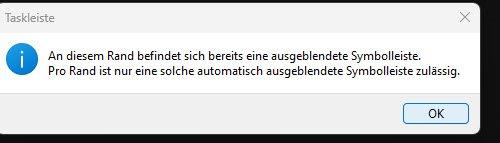
Unfortunately, another error has been shown...it is not possible to permanently hide the taskbar. When I hide them via the OD settings, the message from WIN appears after logging in again that not two taskbars can be hidden at the same time...it's quite annoying. As a result, a strip of the Eestop always remains visible under an open and maximized window.


Best regards, Lorenz.

Reply #4 Top

"There is already a hidden toolbar on this edge. Only one such automatically hidden toolbar is permitted per border"

That's what then appears...but it was already like that with the old version...I just remembered. That's why I did the upgrade. Must be due to WIN 11...!?

Reply #5 Top

Quoting SD_McGuinness, reply 2

Hi Lorenz,


Quoting ,
.


Internal Reference: ODNT-8339

As for #1, we've noted that this feature is unfortunately no longer available at this 

Ist dieses Feature in der alten Version noch verfügbar?

Reply #6 Top

Are you using multiple monitors?  Try right clicking on your Taskbar to open Taskbar settings, and select 'Automatically
hide the taskbar'.  See if setting it that way works to keep the setting through signing off, and then through a full restart.  

Reply #7 Top

Hi McGuinness, no multiple monitors. And...this " hide the taskbar"- setting is annoying! It unchecks by itself if OD setting" hide the taskbar" ist activated. Never had any issues under WIN 10...😵‍💫

Reply #8 Top


Hi McGuinness, no multiple monitors. And...this " hide the taskbar"- setting is annoying! It unchecks by itself if OD setting" hide the taskbar" ist activated. Never had any issues under WIN 10...😵‍💫

This isn't something I've been able to reproduce in Windows 11.  Three things you could try:

  • You may try forcing the software to write with this method

  • If that doesn't work, you might want to try purging and reinstalling the program through the latest download on your account page.  This would ensure you've got the latest build version and also allow you to go through the settings you have set 1-by-1 to see if there's any bug from some highly specific configuration of the software. 

  • If it still occurs after the above attempts, the next recommended step would be a Clean Boot.  This would be a more involved way of determining if your Windows setup itself, or another program you have enabled is causing the issue.

I hope that works for you.

Adam McGuinness
Stardock Customer Support Specialist

Reply #9 Top

Hi Adam, thank you for your help! Currently I have tried a workaround with a registry hack...I moved the taskbar up...let's see if it works..

Best regards, Lorenz.