Hot Spot Issue

Hi everyone. I have noticed with my CursorFX creations, that there is a issue with the hot spots, and while the cursor works fine in some ways, in other ways, it is tricky to position the cursor correctly in order to make a change, like on the CursorFX settings area, when you want to change the size or color of a cursor. If anyone wants to help me reset and fix the hot spots, I would most certainly appreciate it. And a special thank you to Pelaird for letting me know of this issue, which I was aware of but didn't know how to fix or reset.  Something is off, and I have tried to fix it by tinkering, but my so called tinkering didn't help. 

13,696 views 7 replies
Reply #1 Top

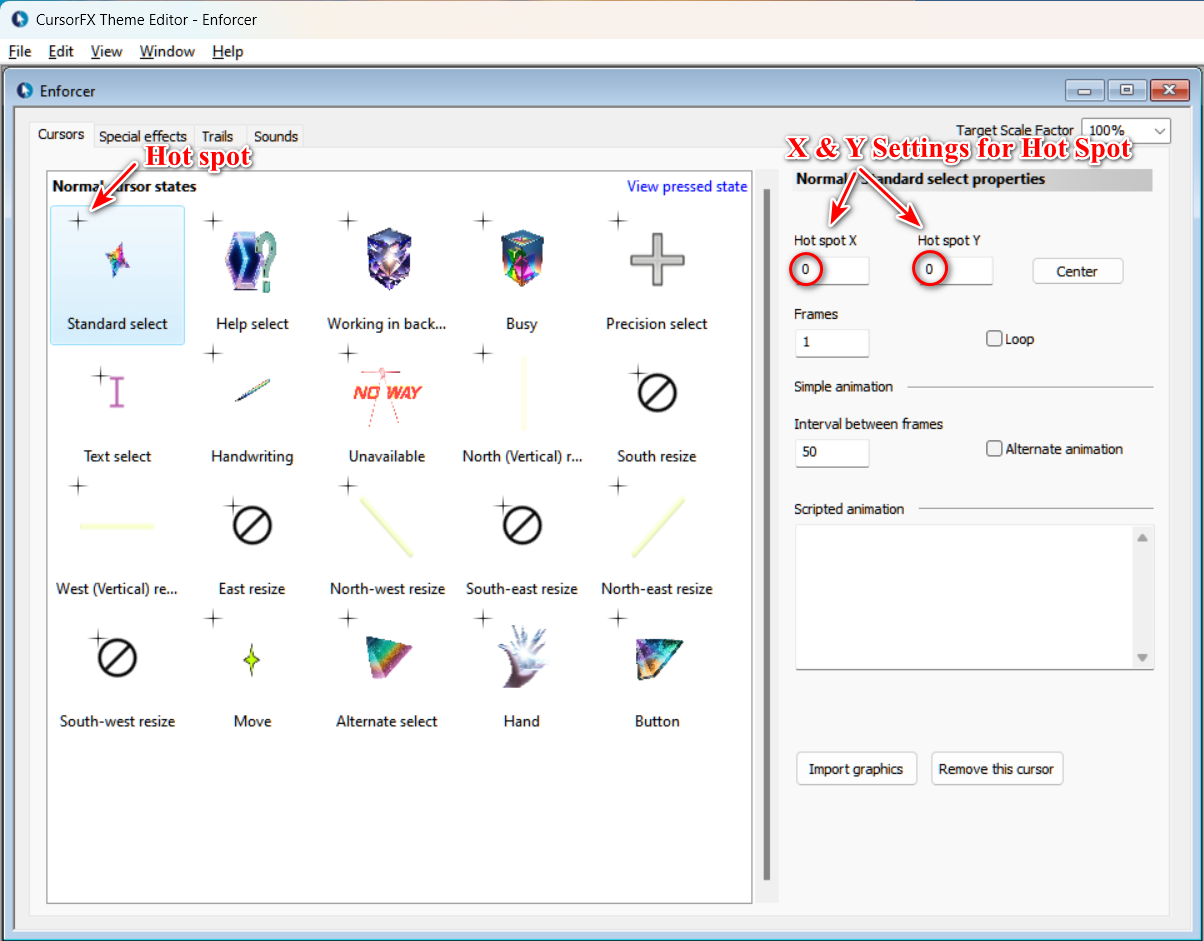
Open the Cursor in the Editor and adjust the Hot spot X and Y Settings. You can also drag the Hot spots, but it's touchy; fine tune in the right panel settings. Make sure to save your changes.

Here is a good website where you can test your cursor states. Scroll down the page and hover your cursor over the different boxes.

https://www.digitalocean.com/community/tutorials/css-cursor-property

Let me know if you need more help.

Reply #2 Top

Thank you  Pelaird, and I will see what I can do tomorrow to fix and reset those hot spots. B)

Reply #3 Top

To the best of my knowlege, I have fixed those hot spot issues, and I will reupload those cursor files soon, perhaps on Sunday. Thanks for the help, I figured out what the problem was, and everything works better now. So cool!  *_*  

+1 Loading…
Reply #4 Top

Great. Glad to help. :grin:  

+1 Loading…
Reply #5 Top

Quoting 3java3, reply 3

To the best of my knowlege, I have fixed those hot spot issues, and I will reupload those cursor files soon, perhaps on Sunday. Thanks for the help, I figured out what the problem was, and everything works better now. So cool!  *_*  

If the solution is germane to CFxs you've uploaded, please make the corrections and upload the Cursors again so I can update them in the CFx Gallery. Thanks.

Reply #6 Top

Hey, I have deleted the old cursors that had issues, and have reuploaded the ones that I have fixed and corrected. They should work better and more smoothly. Also, I have made some tweaks here and there. Also, on the Aerodromeda upload, I seem to have a issue with a upload of a screen sample. I see the one that I want, but when I click on it, I see the one I do not want. Weird. 

Reply #7 Top

Everything is looking good! All systems go!  B)  

+1 Loading…