Start 11v2 - Icon Overlap

So I updated all my licenses to Start 11v2 from Start 11 this past weekend.  Uninstall full Start 11, rebooted, install Start 11v2, and I'm experiencing an issue with my HP EliteBook X2 tablet.  It appears the 1st application launched ends up having a shadow icon next to it:

Other apps that are launched do not exhibit this behavior:

Doesn't matter which application I launch first (Edge, Outlook, etc.)  For clarity my OS/App information is:

  • Edition: Windows 11 Pro
  • Version: 23H2
  • OS build: 22631.2861
  • Experience: Windows Feature Experience Pack 1000.22681.1000.0
  • Start 11v2: Version 2.03

I've already done a clean removal/reboot/reinstall of the tool to validate that isn't the obvious fix.


Any help will be greatly appreciated.


11,081 views 7 replies
Reply #1 Top

Hello,
Sorry to hear you are having issues. I believe this is known issue and has been logged in by support. https://forums.stardock.com/524005/get;3915887. Hopefully it get resolved soon.

Thanks
Basj,
Stardock Community Assistant.

Reply #3 Top

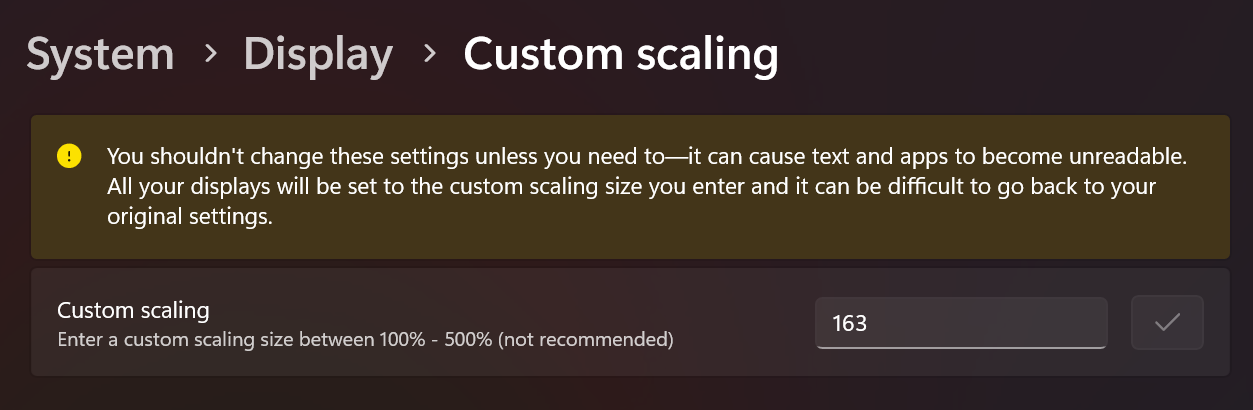
Currently scaled at:


Due to an odd resolution for this tablet:

Reply #4 Top

Your tablet came with that scaling setting?

I suspect that may be linked to the issue as Windows doesn't handle odd sizes that well.

Reply #5 Top

Quoting Neil, reply 4

Your tablet came with that scaling setting?
3000 x 2000 is the native screen resolution of the 13.5-inch Surface Book devices. Just like the rest of the Surface family, it has a 3:2 aspect ratio display.

RogCo, does the issue go away if you set the scaling to 100%? If so, does 150% work? (163% as your screenshot shows is not ideal for a lot of reasons.)

+2 Loading…
Reply #6 Top

JanOscar,

Your suggestion/fix was the solution.  Forced the scaling to 100% (super tiny) and reinstalled, rebooted, and everything worked.  Scaled it back up to a pre-built windows scaling (150% and then 175%) and it is good to go.  Not sure why it was at 163%....maybe the HP software/OS build set it to that after updates? 

Regardless, it's working as intended |-)  

+1 Loading…
Reply #7 Top

Quoting RogCo, reply 6

Not sure why it was at 163%....maybe the HP software/OS build set it to that after updates?
That may be the reason or something else like software/apps/games etc ., but usually that's done at the keyboard end. ;)

Glad it worked out!

+1 Loading…