Start11 - Option to Change Icons & HoverText

Windows11 Menu Shortcuts

Can there be a way to change the icons and text that displays when hovering for a shortcut.

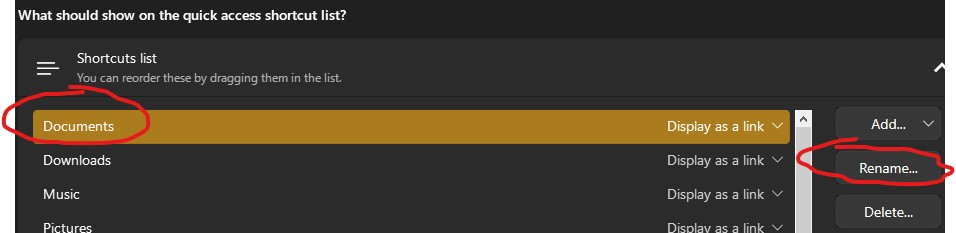
Referring to the ones added from Start Menu -> Configuration -> Shortcuts List.


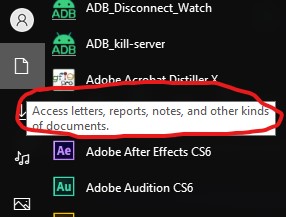
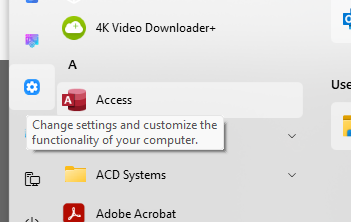
The text used by default is overly long and some use the same text, like for Control Panel and Settings.

Any custom location also just uses the Documents icon and its hover text being the full location path of the folder instead of just the folder's name.

4,580 views 22 replies
Reply #1 Top

Hello,
It is best if you can post a screenshot, showing us which area you're referring to.

Thanks
Basj,
Stardock Community Assistant.

Reply #2 Top

There doesn't appear to be a way to change these icons or the text which is displayed when hovering over the icon. There is an option to rename the shortcut, but that doesn't change anything on the actual Start menu. Your post brings up an interesting point. The text which appears when you hover over these shortcut icons should reflect the name change made in the settings instead of static tool tip text. I would recommend this as a change that should be made by the development team.

Reply #3 Top

Quoting basj, reply 1

Hello,
It is best if you can post a screenshot, showing us which area you're referring to.

Thanks
Basj,
Stardock Community Assistant.


https://i.imgur.com/dFxHed7.png

https://i.imgur.com/FOqxPGx.png


I was able to change the text for the other icons, but had to manually edit the en-us.lng file in C:\Program Files (x86)\Stardock\Start11\lang, but that doesn't really work on custom shortcuts or any of the icons.


Both Control Panel and the Settings App share the same string (from within that .lng file) of "Change settings and customize the functionality of your computer." So even editing that one string still had it for both shortcuts.

Reply #4 Top

This is a great find! Thanks for sharing.

Reply #5 Top

Hello,
I have forward your request to the Stardock Support Team for their review and recommendations. Please keep an eye on this thread for any updates. We really do appreciate your feedback, Thanks

Basj,
Stardock Community Assistant.

Reply #6 Top

Almost 3 years have past since this initial post, but it appears this request has fallen on a cold stone within the development team.

Yet, it's also a frustration I share.... Yes you can change the shortcut icons on the left side of the start menu, but not the hover text...

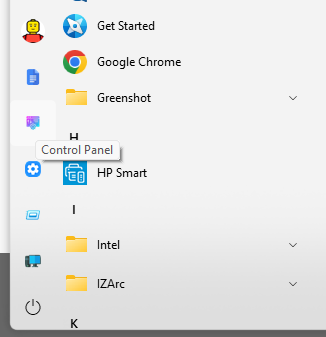
I don't want some long sentence here, I just want the name of the program/settings I'm hovering. For example, I just want "Settings" when hovering over the settings icon, not the full explaination of what it does.

The icon above it, I just want "Control Panel" displayed, not "change settings and customize the functionality of the computer".... it's to long to read, and the description could fit both "Control Panel " or "Settings" so it's actually not helpful.

Reply #7 Top

Unfortunately, there's nothing new to report on this at the moment. Just a reminder that not all feature requests make it into development. If more users express interest in this functionality, there's a chance it might get prioritized. That said, there are many other areas currently in active development, especially as Windows continues to evolve and introduce changes.

Thank you,

Basj,
Stardock Community Assistant


Reply #8 Top

I'm using the latest Start11v2 version as of this writing.

I agree with the OP.  I'm a retired comp/net engineer and programmer. The data providing the "displayed" shortcut names SHOULD be taken from the names which can be edited.  Otherwise, what is the point in being able to edit those names if they are NEVER displayed for the user.  This should be an extremely SIMPLE change.

Can you at least ASK the devs where the "displayed" data is stored?  PLEASE, as a PAYING customer !!!

If they are NOT willing to listen to customer requests they should at least be willing to help the customers help themselves !!!

(NOTE: As a new (well educated customer), I see this post/request is almost 3 years old, so I'm making an educated presumption that changes don't happen often at the customer's request with THIS company !!!)  That is a LAZY attitude !!!

And PLEASE ... don't respond UNTIL you get an actual answer from the devs about this issue.

Thanks

AW

these screenshots go with this post ...

shortcut list menu names

shortcut displayed names


Reply #9 Top

These screenshots go with the previous post ...  I edited them in the original post after I realized it could be edited after the fact.

Is there a way to delete your own post ???  There should be.

shortcut list menu names

shortcut displayed names


Thanks

AW

Reply #10 Top

Hi Guys,

That’s a great suggestion! Having the ability to customize icons and hover text for shortcuts would make the Start11 experience much cleaner and more personal. Shorter, user-defined labels and relevant icons would help differentiate similar entries and make navigation much more intuitive.


Reply #11 Top

Hi "mpbhulekh",


Agreed, as I stated earlier.  But, the icons can already be changed ... it's just the text that can't.  Even though it "appears" the mechanism is in place, it just does not work.  For me, this isn't a request for a feature as much as a request for a "fix" to an existing feature. That's just my opinion with over 40 years in the industry.


AW

Reply #12 Top

I have added all your request to Start11 internal feature request list. Appreciate your feedback.

Thank you,

Basj,
Stardock Community Assistant

Reply #13 Top

Hi ...

Again, Basj ...

This is NOT a feature request.  It is simply asking devs to "fix" the bug where the "edited" names for the quick start / shortcut list are "displayed" properly (as edited) when hovering over the items.

I can see no other reason to have the ability to edit those names if they aren't actually displayed anywhere.  The ONLY place you can see the edited names is in the "Shortcut list" editing window !  You're obviously NOT understanding the issue here.

This should be a "bug fix", NOT a feature request ... so it should get higher priority.  Especially after 3 years !!!

Reply #14 Top

Those strings are the ones Windows used for those shortcuts on Windows 7.

On that OS the text is displayed always so those are the help text in a tooltip.

For the Windows 10 menu there is no text always visible so I can see why it might not be as clear and we can look to tweaking things a bit.

Reply #15 Top

Thanks Neil !

So hopefully we can see something in the next version?

In the mean time is there a place I can change them manually?  I'm a retired engineer so I'm comfortable with the registry and such.  I just haven't found all of those strings to change.


Thanks

AW

Reply #16 Top

I've just installed the latest update (2.6) and I'm very happy to report that the icons now just mention "Settings" or "Control Panel" when hovering over them, instead of the dreadful elaborate description.

Thanks Stardock Team for listening to our comments !

Reply #17 Top

I'm encouraged by your post indicating that the text for hover is working as this forum is requesting, however, I'm not getting the same.
Window 10, Start11 v2.6 (latest), Start Menu (Windows 11 Style).  Are you using links from the "Standard Locations" list?   While testing, the Documents shortcut was deleted and added back again.  Now when I hover over the Documents shortcut the text displayed is "-1" (see screen capture).  For other shortcuts, after delete/add the same verbose text in the hover.

Documents shortcut hover text

Reply #18 Top

I'm on Windows 11, with the latest Start11 v2.6

Settings in Start 11 is "Windows 10 Style" :grin:  

Other than that, no special settings, just did the upgrade, and noticed the change in behaviour, as you can see from my screenshot (hover is simply control panel', not the elaborate description seen in my previous screenshot some posts higher in this thread....)


+1 Loading…
Reply #19 Top

Quoting support18, reply 17

I'm encouraged by your post indicating that the text for hover is working as this forum is requesting, however, I'm not getting the same.
Window 10, Start11 v2.6 (latest), Start Menu (Windows 11 Style).  Are you using links from the "Standard Locations" list?   While testing, the Documents shortcut was deleted and added back again.  Now when I hover over the Documents shortcut the text displayed is "-1" (see screen capture).  For other shortcuts, after delete/add the same verbose text in the hover.

Documents shortcut hover text

Hello,
Sorry to hear you are having issues. Need more details.

  1. Windows 10 full version and OS Build number.
  2. As a test, if you remove that link, restart explorer. Add back that link, restart explorer again, does the issue still appear?

Thank you,
Basj,
Stardock Community Assistant.

Reply #20 Top

Thank you for checking into this issue. 

As requested,

Windows 10 Pro version 22H2  Build 19045.6466

The steps you provided were completed and the problem persists. 

That said, it appears the "-1" issue is isolated to the

Start Menu - Shortcuts list - Standard locations - Documents folder.

As mentioned in this post, it would be helpful to have the hover text display the name of the shortcut and not the description text.


Reply #21 Top

Quoting support18, reply 20

Thank you for checking into this issue. 
As requested,
Windows 10 Pro version 22H2  Build 19045.6466
The steps you provided were completed and the problem persists. 
That said, it appears the "-1" issue is isolated to the
Start Menu - Shortcuts list - Standard locations - Documents folder.
As mentioned in this post, it would be helpful to have the hover text display the name of the shortcut and not the description text.

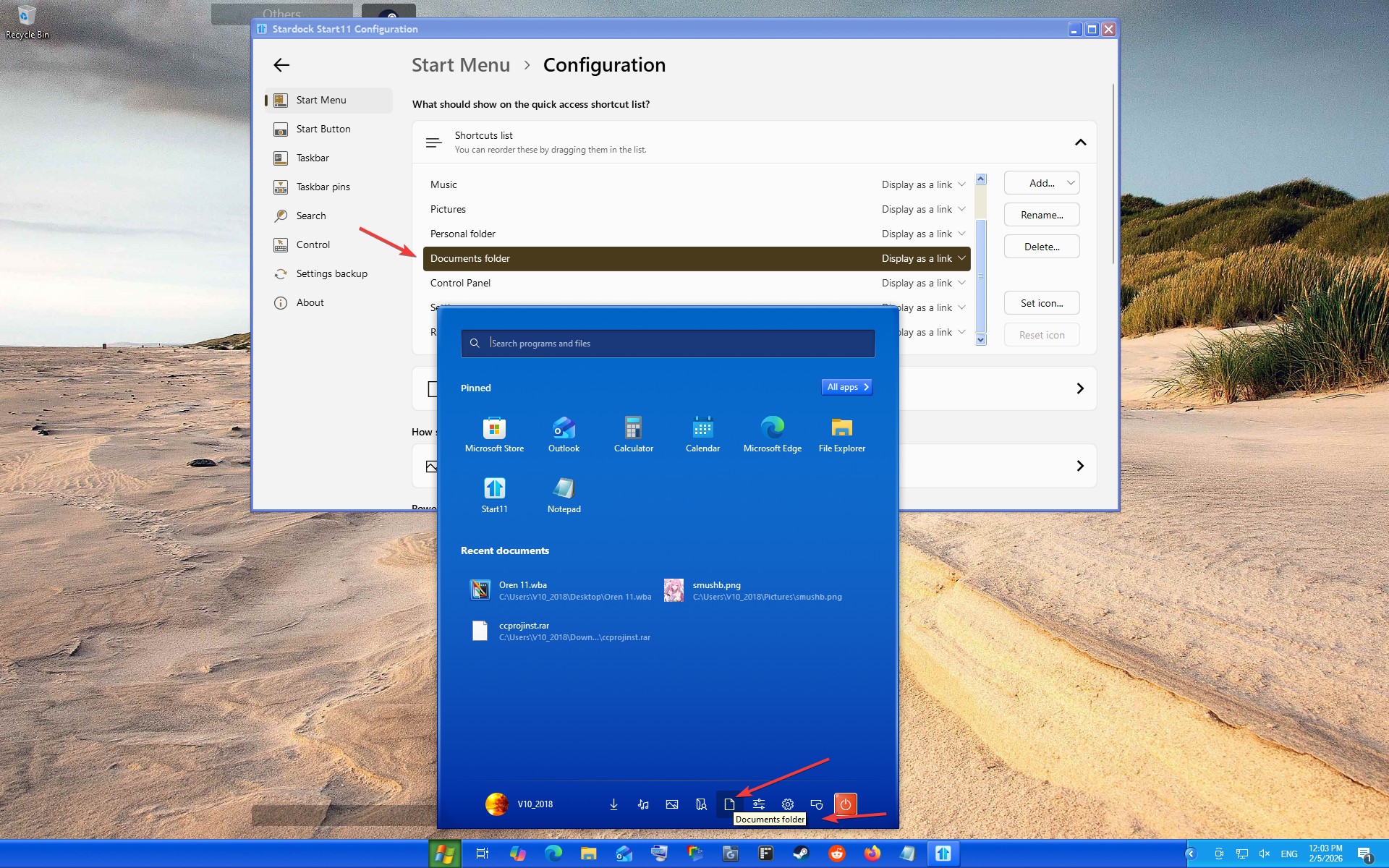
I checked but, I can not reproduce your issue refer to my screenshot below.

Perhaps, something went wrong while installing Start11, Please try, uninstall Start11, reboot immediately (important), download latest version available in your account product download page: https://store.stardock.com/myaccount/products. Install it, reboot immediately again. Retest it and report back.

Thank you,

Basj,
Stardock Community Assistant

Reply #22 Top

As suggested, the Start11 app was uninstalled, new version downloaded and tested.  Problem resolved AND the hover now shows the function not the verbose description.  Thank you.   

One note:  prior to uninstalling the app, the version listed was 2.6.0.2 and after the new install the version the About shows 2.6.  I find that odd.