CursorFX

Trails

    I'm trying to install some CursorFX Trails from Winscustomize called Christmas Time Trails and Christmas Trails 2005. However, in the 'C:\Users\Public\Documents\Stardock\CursorFX' there are folders for 'Sounds' and 'Themes', but not for 'Trails'. Since they are just '.png' pics, should I just make a 'Trails' folder myself and place them in there? I don't know how to install them anymore. I haven't been able to add any new trails since CursorXP. lol

    Can new 'Trails' still be installed manually at all? If so can anyone please help me to do this? Thank you!

14,502 views 6 replies
Reply #1 Top

Hello,
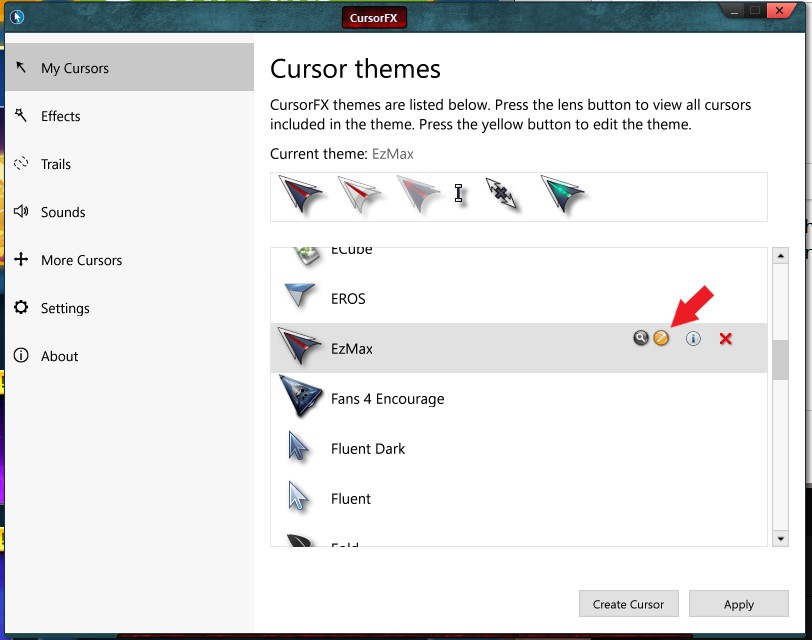
Sorry to hear you are having issues. Okay I tested and there is no way directly to add those png old trails. What you can do is use CursorFX editor and create a trails from those graphics. Refer to screenshot below. Need some work to create good animation.


Basj,
Stardock Community Assistant.

Reply #2 Top

I have never tried to make or edit CursorFX themes before and I didn't know the excistence of a CursorFX editor (and I've been here for 20+ years) - until now, because of your screenshot, when I found it in Program Files Stardock folder. Why isn't a shortcut added when you install it?

Reply #3 Top

Actually that editor will open when you click an edit icon on installed cursor. Click that small "yellow pen icon" to open up editor.

Thank you,

Basj,
Stardock Community Assistant

Reply #4 Top

Quoting basj, reply 3

Actually that editor will open when you click an edit icon on installed cursor. Click that small "yellow pen icon" to open up editor.
Now that's embarrasing! :blush:   Many of the cursors lack that (and other) icon(s), though. You can't delete the EROS cursor without going to the cursor folder and do it manually.

Reply #5 Top

    👍👍 Wow! Thank you SO much for your responses Basj, and you too JanOscar!!! :grin:  

    This explains why they didn't bother to add a folder for the 'Trails'. This way is just as easy to do! I never would have figured that out on my own. I already have lots of little png's with blank backgrounds that I used in photoshop to make stamps. Now I can make my own trails using any of them. This is going to be fun! :rofl:  

    Thank you again!

+1 Loading…
Reply #6 Top

Quoting FalseZen, reply 5

This is going to be fun!

Thank you again!
Gratitude and enthusiasm like that are unfortunately quite rare both here and elsewhere. We could use more of that. Have fun!:thumbsup:  

+2 Loading…