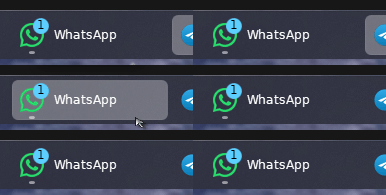
when I enable (let start11 enhance the taskbar ) my apps icon badges disappear

Hi there, my problem is that when I enable (let start11 enhance the taskbar ) my app icons badge disappears. I mean taskbar has stopped showing the icon badge ( notification numbers) and when I disabled (let start11 enhance the taskbar) icon badge (notifications numbers) returns to be shown in the taskbar. could you please fix it in the next update so the notifications numbers can be shown even if the taskbar enhancement is enabled

icon badge (start11 enhancement is disabled)

icon badge disappeared (start11 enhancement is enabled)


thanks in advance.

4,166 views 9 replies
Reply #1 Top

Hello,
Sorry to hear you are having issues. Need to know more information.

  1. Windows 10 or 11? And need its full version number. Use Winver.exe to get it.
  2. Start11 version no?

Thanks
Basj,
Stardock Community Assistant.

Reply #2 Top

Hello, 

1.windows11 (dell I5 optiplex3020)\

2.

please tell me if there is any other missing information.

thanks for helping me very much.

Wael Talaat

Reply #4 Top

Notion, WhatsApp, Facebook I think any app has notification badges (numbers)

Reply #5 Top

It would be normal for those to vanish when you start the enhanced mode after the apps are running as the information is not available to start11 from past events.

But I would expected them to work from the next time you sign in.  Is this not the case?

Reply #6 Top

Thank you for your help, this is very kind of you.

Reply #7 Top

I am experiencing same issue. I have already restarted PC so the previously logged in whatsapp shouldn't matter. Should I create a new post for this?

Reply #8 Top

This happens on the latest 2.56 of Start 11 on Windows 25H2 in Beta - build 26220.7271

When you toggle enhance taskbar for example in MS Teams the Red circle I have on my icon is blank - the outline is there but empty.  Similar to the Phone Link app it shows a + instead of the number of notifications.  Turn off the enhance taskbar and they come back.

Reply #9 Top

Quoting chrischilderhose, reply 8

This happens on the latest 2.56 of Start 11 on Windows 25H2 in Beta - build 26220.7271

When you toggle enhance taskbar for example in MS Teams the Red circle I have on my icon is blank - the outline is there but empty.  Similar to the Phone Link app it shows a + instead of the number of notifications.  Turn off the enhance taskbar and they come back.

Hello,
Sorry to hear you are having issues. Unfortunately, Stardock does not support its software when it use on Windows Beta released. However, we appreciate your report.

Thank you,
Basj,
Stardock Community Assistant.