Any way to force to work with Abbyy Finereader 15?

Love Groupy, but does not seem to work with Abbyy Finereader 15 (pdf utility like Acrobat Pro).  Abbyy never shows an option to group and I cannot see any way to force Abbyy to load Groupy or allow it run.  Any suggestions, as being able to have tabbed windows in Abbyy as opposed to 5 different windows open is the only thing that stands between me an finally being able to get free of Acrobat (which just gets more expensive, but not better)?

Thanks,

Cary  


18,988 views 10 replies
Reply #1 Top

Hello,

If the app has a custom titlebar, it will not.
Reply #2 Top

Guessing that is the issue.  How do you identify a custom titlebar?


Thank you

Reply #3 Top

Do Abbyy reader have some sort of trial edition so I can test it out with groupy? I googled it but can't seem to find a free trial version on it. I am asking because I do remember someone asking about it before but it was on Abbyy reader 14. https://forums.stardock.com/492288/.

Thank you,

Basj,
Stardock Community Assistant

Reply #4 Top


Love Groupy, but does not seem to work with Abbyy Finereader 15 (pdf utility like Acrobat Pro).  Abbyy never shows an option to group and I cannot see any way to force Abbyy to load Groupy or allow it run.  Any suggestions, as being able to have tabbed windows in Abbyy as opposed to 5 different windows open is the only thing that stands between me an finally being able to get free of Acrobat (which just gets more expensive, but not better)?

Thanks,

Cary  


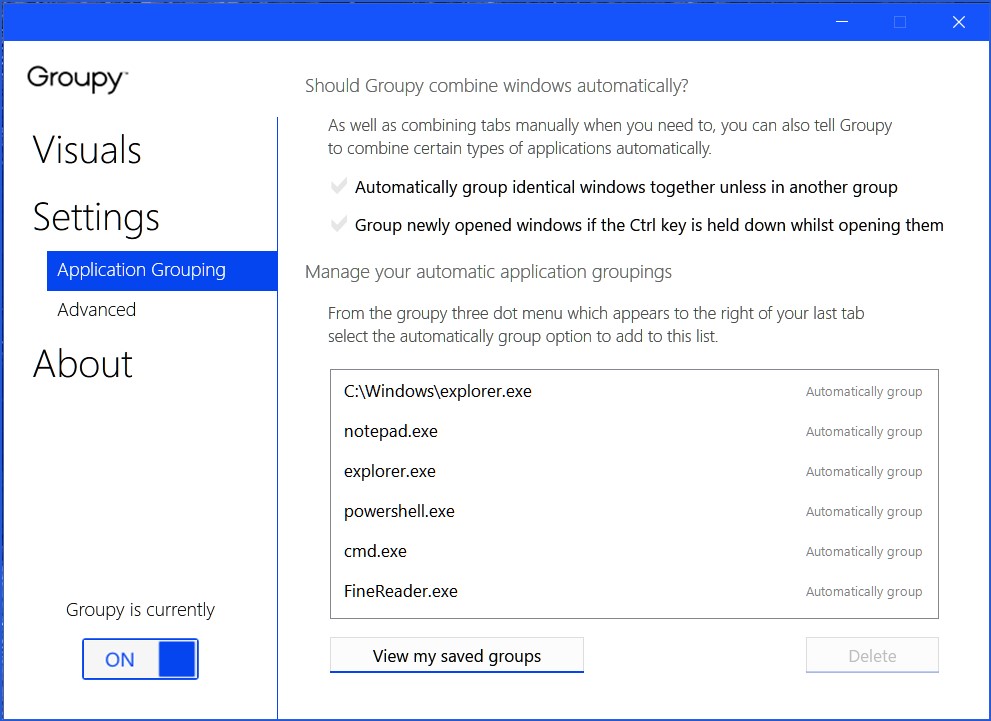
I use FineReader 15 and it does have a strange behavior with Groupy. Open two FineReader 15 documents and then drag one over the other until they group. Then pull down the three dot menu and select "Automatically group all `FineReader.exe` windows together." Now Fine Reader will automatically group windows, However, this is where it gets messy. When you open the the second document, the FineReader app gets minimized to the taskbar. When you click on the app in the taskbar, the app un-minimizes and the two documents are grouped in the same window with tabs.

I find it easier to just manually group windows together (by dragging on top of each other until grouped) when I want two or more FineReader documents grouped together.

+1 Loading…
Reply #6 Top

Quoting pelaird, reply 4


Quoting ,

Love Groupy, but does not seem to work with Abbyy Finereader 15 (pdf utility like Acrobat Pro).  Abbyy never shows an option to group and I cannot see any way to force Abbyy to load Groupy or allow it run.  Any suggestions, as being able to have tabbed windows in Abbyy as opposed to 5 different windows open is the only thing that stands between me an finally being able to get free of Acrobat (which just gets more expensive, but not better)?

Thanks,

Cary  


I use FineReader 15 and it does have a strange behavior with Groupy. Open two FineReader 15 documents and then drag one over the other until they group. Then pull down the three dot menu and select "Automatically group all `FineReader.exe` windows together." Now Fine Reader will automatically group windows, However, this is where it gets messy. When you open the the second document, the FineReader app gets minimized to the taskbar. When you click on the app in the taskbar, the app un-minimizes and the two documents are grouped in the same window with tabs.

I find it easier to just manually group windows together (by dragging on top of each other until grouped) when I want two or more FineReader documents grouped together.


Thanks.  Interestingly, I can get it group two windows together when I click on a PDF to open it, but then the third will open in a separate window.  I cannot get it to let me drag one window over the other to group, checked the settings and set to allow and works for other apps.  Any special settings you are using?  

I could also be having issues with installation.  Windows as it is prone to do has started getting flaky on this machine after 4 years.  I went to do a fresh install from a USB and it just overwrote instead of doing a fresh install (should have formatted the drive first).  Decided it was time to just replace the machine as coming up on 5 years and have had 2 dell Precisions arrive dead (refurbs which I have always bought as they have been really reliable as bench tested and should be fully burned in).  Have a thinkstation on the way and will be setting up over the weekend, so perhaps that will cure some of weird behavior.  

Appreciate the help and hopeful, as really prefer to use Abbyy as my primary PDF and OCR software.  It works better than Acrobat, which after all these years, still only runs on 1 core, which makes a huge difference when doing larger OCR projects.  

Reply #7 Top

Quoting carymcreynolds, reply 6

Thanks.  Interestingly, I can get it group two windows together when I click on a PDF to open it, but then the third will open in a separate window.  I cannot get it to let me drag one window over the other to group, checked the settings and set to allow and works for other apps.  Any special settings you are using?  

Hope this helps. I can group multiple FineReader documents without issue.

 
Reply #8 Top

Still not working reliably but will be setting up the new system fresh this weekend so will spend more time then.  I appreciate the help.  

Reply #9 Top

Just a follow up.  The issue I had preventing grouping was under settings had the "Only group windows of the same application type" selected.  Apparently, Groupy sees multiple windows of Abbyy as different applications.  When opening a new window, it does minimize, but groups.  I can live with that.  Thank you for the help.  Now I can put Acrobat where it belongs, as a backup in case of emergency.  

Reply #10 Top

I don't have "Only group windows of the same application type" selected in my settings and Groupy groups all the FineReader 15 documents that I open, but I'm glad you got it working.