Start 11 does not open with centred window (Windows 10 OS)

Successfully installed and configured Start11. Despite setting the start menu to be centred, it opens on the left side. How do I get it to be centred? I am using Windows 10 Home, version 21H1, OS Build 19043.1466.


Thanks in advance.


Zed

16,464 views 16 replies
Reply #1 Top

Hello,

Sorry to hear you are having issues.

See below click on ON to set it to center


AzDude
Stardock Community Assistant

Reply #2 Top

I think AzDude thinks you are on Windows 11.

On Windows 10 you go to the same place but are offered three options.  Left aligned, Centre aligned and position the taskbar buttons in the centre of the taskbar.

You want centre aligned not position the taskbar buttons in the centre of the taskbar.

Be aware that if you have Stardock Curtains you must ensure you have the very latest version installed or it will not work.

Reply #3 Top

Thanks for the prompt reply. I must be missing something - my menu doesn't look like yours. In fact, I can't find a setting that says "Position the start button in the center of the taskbar" anywhere.  See the screen caps below.  Thanks.


Zed


Reply #4 Top

Quoting Neil, reply 2

I think AzDude thinks you are on Windows 11.

On Windows 10 you go to the same place but are offered three options.  Left aligned, Centre aligned and position the taskbar buttons in the centre of the taskbar.

You want centre aligned not position the taskbar buttons in the centre of the taskbar.

Be aware that if you have Stardock Curtains you must ensure you have the very latest version installed or it will not work.


Hi -  thanks for the reply. As you can see from the screen cap just posted - I am already set up that way. The taskbar buttons align centrally, but the Start Menu is still lined up on the left side.  If I set that same dropdown to "center aligned" the start button moves towards the middle of the taskbar, but when the menu is opened, it is still right below the start button, but now moved more to the center. See this screen cap:

No matter what settings I use, I cannot get the start menu centralised on the screen, as it is in Windows 11 and also on the Start11 website (see below):
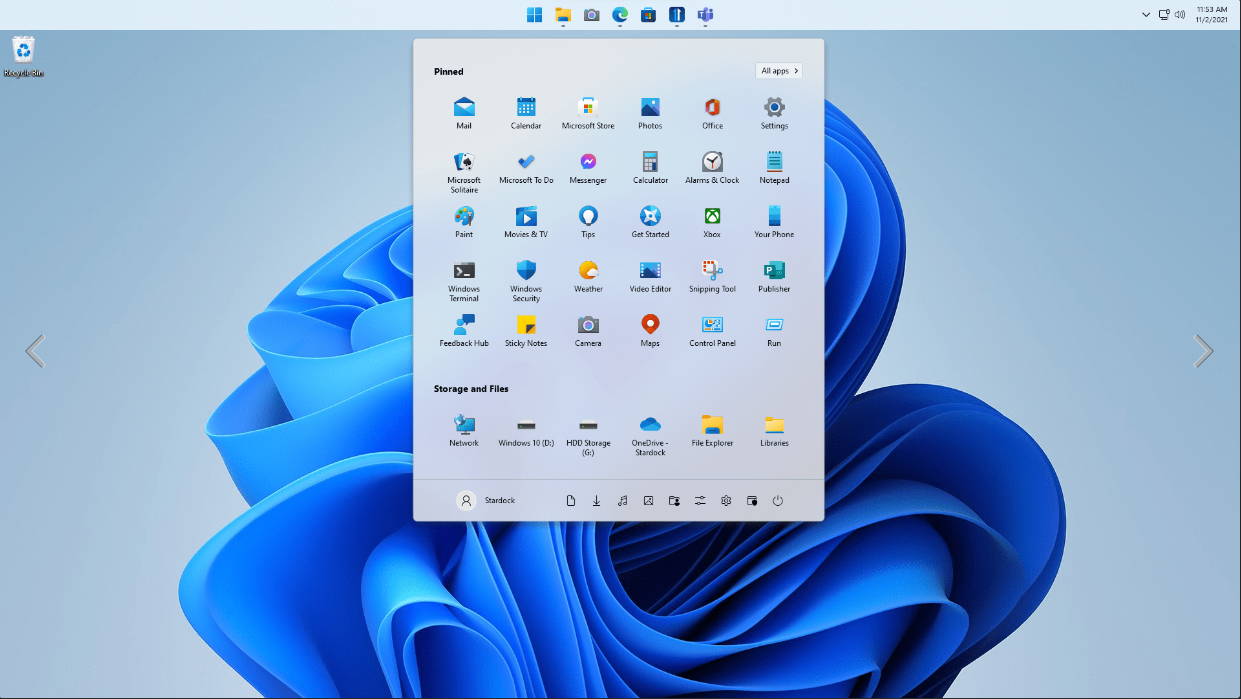
I notice that they only have 7 icons on the taskbar, so it looks centred but isn't really. Nor is this how Windows 11 works, where the start menu is centered no matter where the start button is located (ie to the extreme left). I bought Start 11 principally for this feature, so if it only works with 7 icons on the taskbar, it doesn't really do what I thought it did.


Any ideas gratefully received and thanks for the help so far.


Zed


Reply #5 Top

There is a new update today for Start11

Try un install reboot and re install from your account page reboot .. Test and report back .

Reply #6 Top

Quoting AzDude, reply 5

There is a new update today for Start11

Try un install reboot and re install from your account page reboot .. Test and report back .


Thanks. According to 'About' I am on the latest version, and I only installed Start11 today. I am on ver 1.1 - is this the latest?  Thanks.


I did uninstall once already and reinstalled because I thought I had set the initial screen wrong, where it asks if you want the menu centered or to the left. I chose centered the second time for sure. Is there a registry key hack that I could use to be sure it is set to 'center'? I definitely chose 'center' but it seems to have ignored it.


Are you able to replicate this issue on Windows 10 Home?


Thanks again.

Reply #7 Top

Hello, zedzedtop

I have forwarded your report to the Stardock support team for their review and recommendations.

Please keep an eye on this thread for any updates.

We really do appreciate your feedback, thanks.

+1 Loading…
Reply #8 Top

Quoting AzDude, reply 5

There is a new update today for Start11

Try un install reboot and re install from your account page reboot .. Test and report back .


The update that is slated to fix windows 11 DEV build is not yet live. It may be out later today, but as of now it is not

+1 Loading…
Reply #9 Top

Thank you for the replies. I will look out for further updates, and the update mentioned. 👍

Reply #10 Top

Start11 positions the menu where the start button is as clicking one place and then potentially moving your mouse a long way to go to the menu isn't a good experience.

That said if you wish for it to work like that we have an option.  There is a setting in the config UI but it seems to not be working so this has to be a registry key change.

In HKEY_CURRENT_USER\SOFTWARE\Stardock\Start8\Start8.ini\Start8 you create a REG_SZ value called ForceMiddleMenu and give it a value of 1.

Then sign out and in again and it should work like you would like it to IF the start button is set to be centred.  It will appear on the left if the start button is set to always be on the left.

Reply #11 Top

Quoting Neil, reply 10

Start11 positions the menu where the start button is as clicking one place and then potentially moving your mouse a long way to go to the menu isn't a good experience.

That said if you wish for it to work like that we have an option.  There is a setting in the config UI but it seems to not be working so this has to be a registry key change.

In HKEY_CURRENT_USER\SOFTWARE\Stardock\Start8\Start8.ini\Start8 you create a REG_SZ value called ForceMiddleMenu and give it a value of 1.

Then sign out and in again and it should work like you would like it to IF the start button is set to be centred.  It will appear on the left if the start button is set to always be on the left.


That is terrific - thanks Neil. I will try the registry hack and will report back later.

Reply #12 Top

Bingo!  Thanks guys - I have done the registry hack and the start menu is now centered. I appreciate the point about moving the mouse from the start button to the start menu, but for me, it isn't a problem. It is great to have the choices.

For the sake of feedback, Start11 offers the option to center the start menu or to place it on the left, when first installing the program, but that option is nowhere to be found in the normal settings UI later. Since it isn't working anyway (from the UI), this doesn't matter much, but it is potentially confusing (as it was for me). No doubt this is something the devs will pick up on later.

The program is fabulous and I love the way it looks and works, and the choices and add-ons it gives me, over and above the now-dated Windows 10 UI. Also, thank you all for the tremendous support - fast, helpful and leading to a solution!  A great experience.


Best regards,


Zed


Reply #14 Top

Thank you for the REGEDIT tip, Neil. I, too, was having issues. I have a dual-screen setup, and  when restarting the computer, one of the 2 taskbars would go left instead of center. Sometimes the secondary, sometimes primary. Setting this regedit flag and it seems to work for now. So, thank you! I'm on windows 10, and while I can't upgrade to win11, I quite like the new start menu. Well, I like it now that it's useful like in your app versus the standard one. More features and customizations!

EDIT: Nevermind. It doesn't work. I restarted and the taskbar on the main screen went to the left and the one secondary is centered.