CursorFX - Problem: Code 121
I tried to install CursorFX via the ObjectDesktop app and I a red error popup with "CursorFX - Problem: Code 121".
I've tried restarting and reinstalling, but the same issue.
Any ideas how to fix this?
I tried to install CursorFX via the ObjectDesktop app and I a red error popup with "CursorFX - Problem: Code 121".
I've tried restarting and reinstalling, but the same issue.
Any ideas how to fix this?
Hello,
Sorry to hear you are having issues. Please download directly from your account and install that. : https://store.stardock.com/myaccount/products
Thanks
Basj,
Stardock Community Assistant.
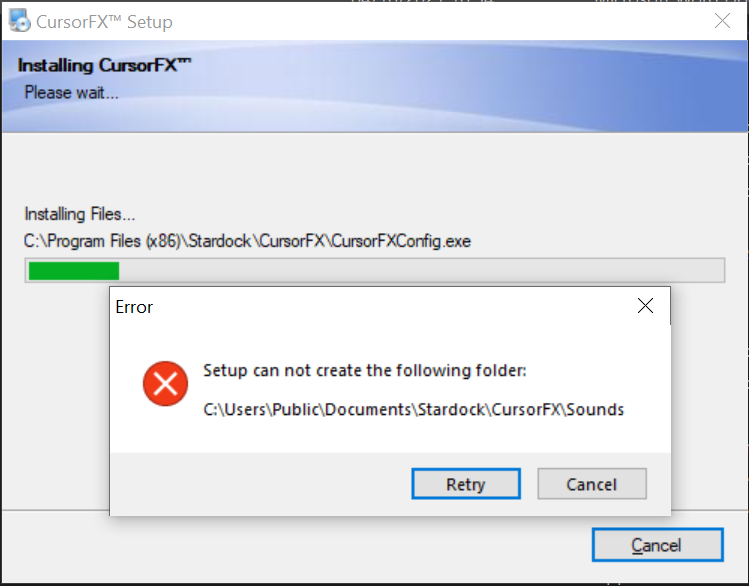
Already tried that! Same issue. It says it can't create a file in users/Public... it shouldn't be trying to create anything there anyway... very strange! Also other issues with apps being installed via the objects desktop app.
I requested a refund.
Try this guide : https://forums.stardock.com/486311/accounts-and-activation-support-faq#error212
Thank you,
Basj,
Stardock Community Assistant

Same issue.
Also taking a very long time to get any response to my refund request...
So, did you get your refund yet?
Thank you,
Basj,
Stardock Community Assistant
Unfortunately not ![]()
Hello,
It just been two days, might need to wait a little longer. But, I have forward your problem/question to Stardock Support Team for their assistance. Please keep an eye on this thread for any updates. We appreciate your feedback and patience.
Basj,
Stardock Community Assistant
I would expect a website like this to be able to process refunds instantly, rather than having to open a Jira issue and then wait for X many days. It's not good customer service.
Hello,
Sorry to hear you are having trouble.
We did not see it because you had updated it a couple of times and we sort by the last ativity.
That said, I have refunded it.
Sean Drohan
Stardock Support Manager
I only updated it because it was automatically updated to "Waiting for Customer Response"... Maybe make refunds a user initiated process that is easy and doesn't rely upon waiting for approval.
Welcome Guest! Please take the time to register with us.