sdRohan sdRohan

WindowBlinds 10.8.9.0 Release Issue Report Thread

WindowBlinds 10.8.9.0 Release Issue Report Thread

With the WindowBlinds 10.8.9.0  release, we are creating this thread so that users can report any observed issues.  

Obtaining WindowBlinds 10.8.9.0 

Object Desktop members can get the release from within Object Desktop Manager 

Individual purchases (as well as Object Desktop Members) can also be obtained from your account page: https://store.stardock.com/myaccount/products

For guest check-out purchase (no account), from this link: http://www.stardock.com/support/productkeyretrieval

Reporting an issue

Please include the following for anything found:

  • Exact Windows version \ build (winver.exe)
  • Detailed steps to recreate the issue seen
  • Screenshots and videos are very helpful.  Videos can be uploaded to a cloud drive services (GoogleDrive, DropBox, OneDrive, YouTube) and links included in your post.  Images can be directly added.
  • If there are specific apps that Groupy does not work (well) with, please note what apps and their exact versions.  If any app is not common, a link to a trial version would be appreciated.

Thank you for your interest and any time you put into making WindowBlinds a better product.

Sean Drohan
Stardock Support Manager

57,446 views 44 replies
Reply #26 Top

Quoting basj, reply 25


Quoting gevansmd,

Running the latest WindowBlinds (this thread discussion) and applying a blind, it skins the file explorer windows but not the Start menu. My Curtains comment is because the Start menu looks as it did the last time I applied a Curtain style.


Understood, Need more information on your system.


    1. Windows 10 or 11? And its version, please use Winver.exe to get full version numbers.


    1. Does reboot resolve the issues


BTW, you need to be in Windows 7 style in Start11 to have it skin by Windowblinds.

Thank you,

Basj,
Stardock Community Assistant

End of basj's quote


That was it, switching to Windows 7 style applied the WB skin.  Thanks!

Reply #27 Top

Now that Christmas is over I want to return to running Curtains rather than WB.  WB no longer shows in the Task Manager startup list nor the registry Run list.  How do I prevent it from running when I reboot?

Reply #28 Top

Applying a WB skin will disable curtains and applying a curtains style will disable WB.

Reply #29 Top

Quoting Neil, reply 28

Applying a WB skin will disable curtains and applying a curtains style will disable WB.
End of Neil's quote


It does until the next reboot and the WB is back.

Reply #30 Top

Try, while having WB still active. Apply the "Default theme by Microsoft"( The very first theme listed in WB config). That will disable WB. Reboot and see if WB still load. If not apply Curtains theme. Reboot and see if that make it stick..

Thank you,

Basj,
Stardock Community Assistant

Reply #31 Top

Windowblinds causing problems in Windows 11 Home, OS Build 22000.469, x64.

Immediately after installing, File Explorer will crash within a few seconds of opening. This is repeatable, even after a System Reset and reinstall of Windowblinds. The Event Log seems to suggest a memory leak. A c000005 code. The crash consists of an explorer window close and an event log entry. Nothing further.

Rick

Reply #32 Top

Pythor

Windowblinds 10 is is not compatible with windows 11 and was made specifically for Windows 10

Later this year Windowblinds 11 will be released which will be specifically designed for Windows 11

However, If you would like I have found a way to make Windows 11 download and install the Windows 10 taskbar and explorer. By doing this you will not have the crash issue but would have to use Windows 10 explorer instead of Windows 11's. This is the link

https://forums.stardock.com/509020/page/1/#3830404

+2 Loading…
Reply #33 Top

Thank you oh wise one!

I guess I was confused by seeing a "Windowblinds" AND a "Windowblinds 10" in Object Desktop. I should not ASSume! 

Reply #34 Top

Quoting Pythor1, reply 33

Thank you oh wise one!

I guess I was confused by seeing a "Windowblinds" AND a "Windowblinds 10" in Object Desktop. I should not ASSume! 
End of Pythor1's quote

Also you can check The Windowblinds 11 Planning Topic , many relevant comments in there for you.

Reply #35 Top

No new version ?

Reply #36 Top

Quoting Robert84MK, reply 35

No new version ?
End of Robert84MK's quote

Nothing yet.

Thank you,

Basj,
Stardock Community Assistant

Reply #37 Top

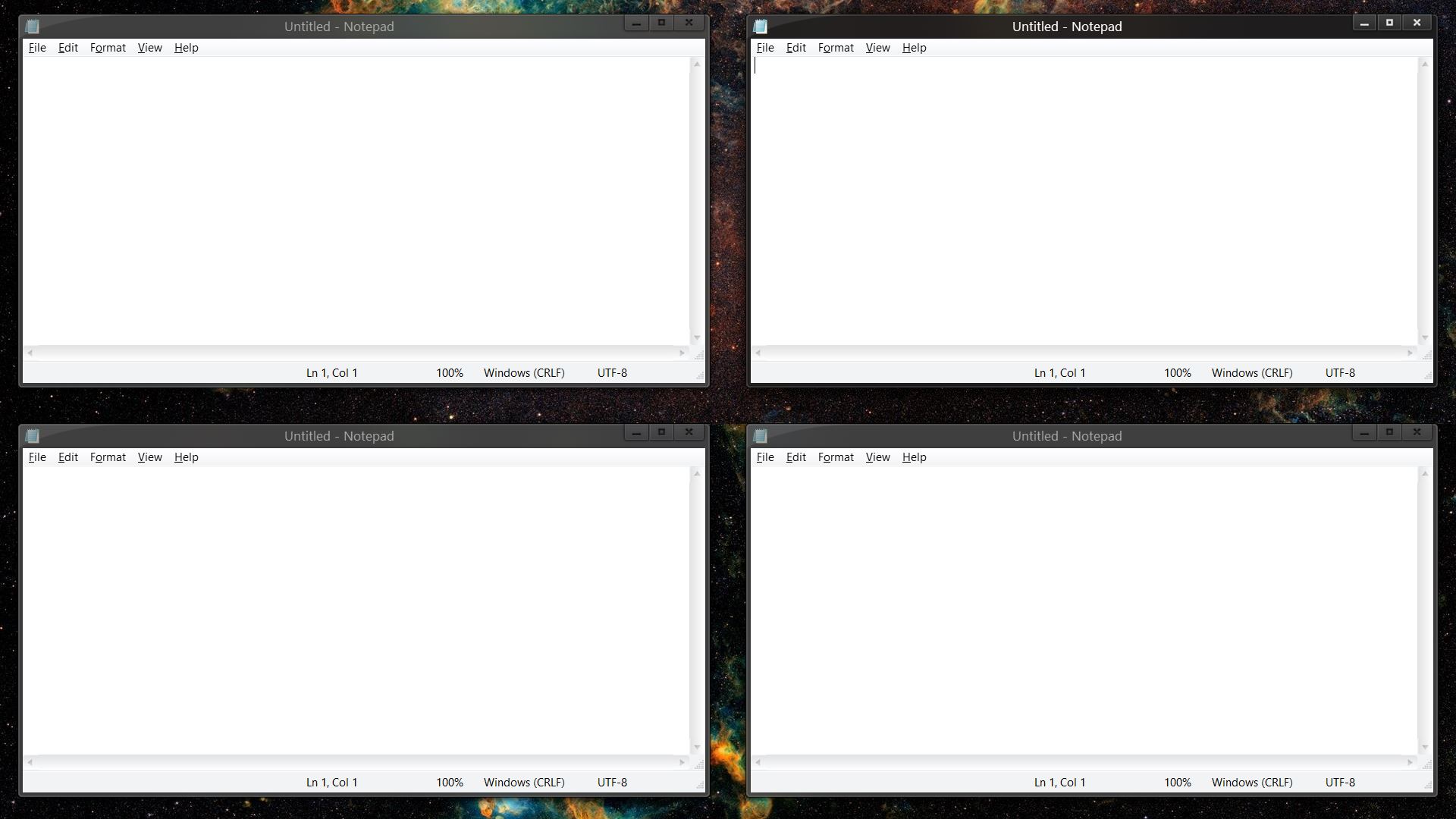
When I try to tile windows side-by-side (2X2) on the desktop, there is unwanted spacing when using a custom skim (e.g. ICE).  See the picture below.  The wallpaper (space nebulae) show behind the stacked notepads.  There shouldn't be any space between the windows.

Reply #38 Top

Quoting surfeity, reply 37

When I try to tile windows side-by-side (2X2) on the desktop, there is unwanted spacing when using a custom skim (e.g. ICE). See the picture below. The wallpaper (space nebulae) show behind the stacked notepads. There shouldn't be any space between the windows.

End of surfeity's quote

Hello,
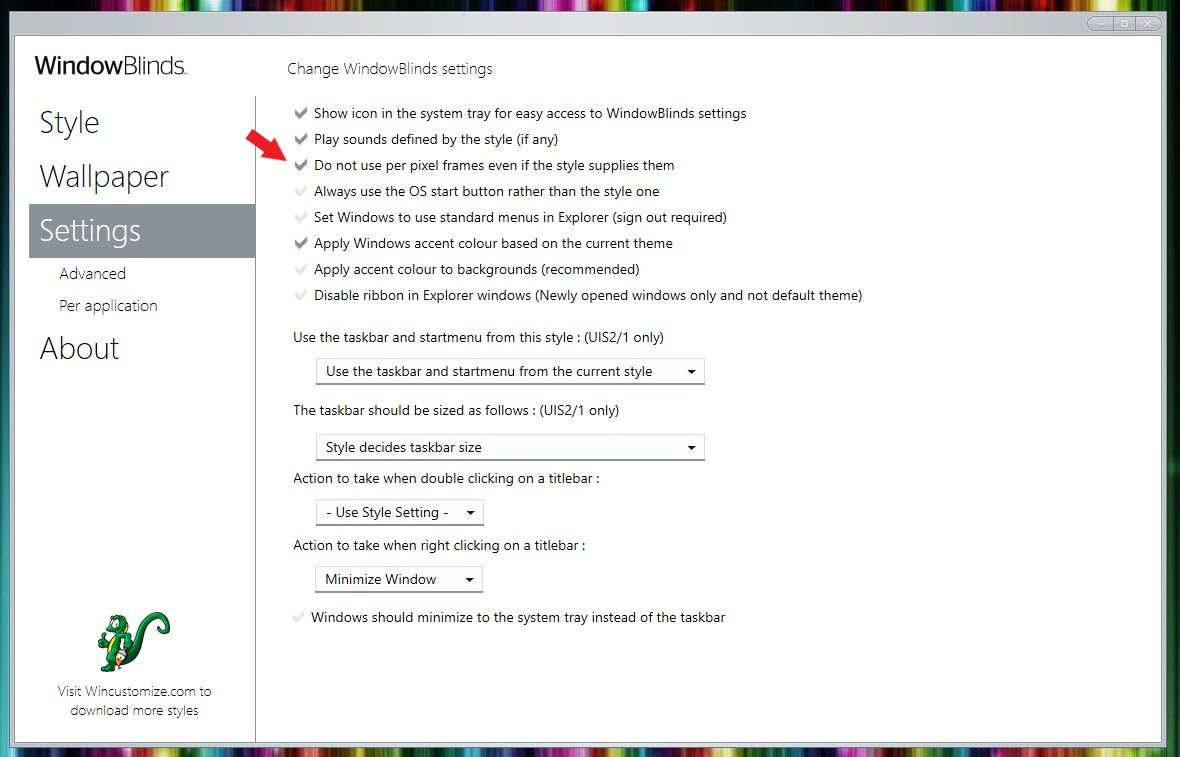
Sorry to hear you are having issues. This is known with Windowblinds skins which introduce shadows around their Windows frame. If you wish, you can  disable those by setting Windowblinds not to use per pixel frames. Refer to screenshot below.

Thanks
Basj,
Stardock Community Assistant.

+1 Loading…
Reply #39 Top

After using WindowBlinds with a Flat Dark style, my computer randomly becomes unresponsive to mouse clicks.  I can use my keyboard and see my mouse move around, but clicking does nothing.

Reply #40 Top

Quoting surfeity, reply 39

After using WindowBlinds with a Flat Dark style, my computer randomly becomes unresponsive to mouse clicks. I can use my keyboard and see my mouse move around, but clicking does nothing.
End of surfeity's quote

Hello,
Sorry to hear you are having issues. Need to know more on your system please.

  1. You on Windows 7,8,10 or 11? And need its full version numbers please. Use Winver.exe to get those numbers please.
  2. Your install Windowblinds version please.
  3. "Flat Dark Style" where can I download it? Link please.

Thanks
Basj,
Stardock Community Assistant.

Reply #41 Top

Windows 10: Version 21H2 (OS Build 19044.1826)

WindowsBlind: Version 10.89 (064 Windows 10 Edition) [Windows 10 Home 21H2 (19041.vb_release.191206-1406)

Flat Dark: https://www.wincustomize.com/explore/windowblinds/8764/

The problem seems to resolve itself when i re-install the skin.  Then the next day (maybe after locking the laptop while still leaving it on) it randomly freezes so I have to do a hard reboot.  The issue is so random that I'm not sure what the correct relationship is yet, but the problem started happening when I installed WindowsBlind and used this skin.

Edit: It just happened now after finishing this initial post.  I can edit this post, but I cannot click or use any other application in the OS other than my browser.  That happens to other software I'm using, and not just my browser.  I quit my browser, and then could use another application (e.g. email), but then i could only use that application unless I exited that one and moved onto the next.  Logging back in (via ctrl-alt-del) temporarily resolved the issue.

Reply #42 Top

Can you try to see if the issue still happening if you use any other skin, please. Also try using different mouse. Could be something wrong with the mouse itself?

Thank you,

Basj,
Stardock Community Assistant

Reply #43 Top

The issue happens with all skins that I've tried (default, ICE, flattened, flat dark).  Once I uninstalled WindowBlinds completely, the issue disappeared.  I also tried using the integrated mouse on my laptop to no avail, so it is not a particular mouse issue.  Please refund me if you cannot fix the issue.  I would happily pay for your software if I did not have this issue, so I hope you can fix it.

Reply #44 Top

Quoting surfeity, reply 43

The issue happens with all skins that I've tried (default, ICE, flattened, flat dark). Once I uninstalled WindowBlinds completely, the issue disappeared. I also tried using the integrated mouse on my laptop to no avail, so it is not a particular mouse issue. Please refund me if you cannot fix the issue. I would happily pay for your software if I did not have this issue, so I hope you can fix it.
End of surfeity's quote

Please try purge and reinstall steps as mention here : [Link]. Just make sure to redownload the latest version from your account page. Reboot after the purge. Reinstall and reboot again after the installation. Retest and report back here.

Thank you,
Basj,
Stardock Community Assistant.