
Curtains 1.0 Released

With the release of Curtains 1.0, we are creating this thread so that users can report any observed issues.  

Obtaining Curtains 1.0:

Object Desktop members can get Curtains 1.0 from within Object Desktop Manager

Individual purchases (as well as Object Desktop Members) can also be obtained from your an account page:

https://store.stardock.com/myaccount/products

For guest check-out purchase (no account), from this link:

http://www.stardock.com/support/productkeyretrieval

Reporting an issue:

Please include the following for anything found:

  • Exact Windows version \ build (winver.exe)
  • Detailed steps to recreate the issue seen
  • Screenshots and videos are very helpful.  Videos can be uploaded to a cloud drive services (GoogleDrive, DropBox, OneDrive, YouTube) and links included in your post.  Images can be directly added.
  • If there are specific apps that Curtains does not work (well) with, please note what apps and their exact versions.  If any app is not common, a link to a trial version would be appreciated.

Note: For any issue reproducible by many (more than one), it is likely that a new thread will be created for it or clients will be directed to one that already exists. 

Thank you all for your interest in Curtains and for helping us make it even better.

Sean Drohan
Stardock Support Manager

59,874 views 25 replies
Reply #1 Top

Changlog for Curtains 1.0

  • Fixed an issue that could result in titlebar UI elements showing an onhover state when the cursor was away from them.
  • Fixed a tool window border issue with a number of styles
  • Fixed a font issue in the config app where the font for some UI elements gets switched to a small bold one after using the advanced properties window
  • Fix missing back button in Windows Photos app
  • By default, Curtains will now skin Chromium browsers
  • Fixed an issue where Curtains would always prompt for restarting browsers even if you didn't have the option enabled to theme them
Reply #2 Top

With the release of 1.10, closing this thread,

Thanks to all that took the time to provide feedback.

Sean Drohan
Stardock Support Manager

Reply #3 Top
Hello ... I have a curtains license, I do not have process information ... I would be glad if you inform how to make aero glas.

RESİM 1 -

https://hizliresim.com/Pn6aDv

RESİM 2 - https://hizliresim.com/7Wg3Cb
Reply #4 Top

Hello,
Sorry to hear you are having issues. There is no guide available yet. But, I believe the "Edit Style" option in there is quite easy to figure out.


Thanks
Basj,
Stardock Community Assistant.

Reply #5 Top

Still having conflict with Startisback 2.9.1 prevent it to load correctly ( got message at desktop boot " press ESC to prevent SIB from loading followed by black screen - Uninstalling Curtains solves it . 

Reply #6 Top

Quoting innuendo33, reply 5

Still having conflict with Startisback 2.9.1 prevent it to load correctly ( got message at desktop boot " press ESC to prevent SIB from loading followed by black screen - Uninstalling Curtains solves it . 

I had our QA dept test with it and were unable to reproduce any issues here.

Reply #7 Top

Thanks , I then have to figure why my system behaves like that 

Reply #8 Top

Quoting innuendo33, reply 5

Still having conflict with Startisback 2.9.1 prevent it to load correctly ( got message at desktop boot " press ESC to prevent SIB from loading followed by black screen - Uninstalling Curtains solves it . 

Can you post a screenshot of the error?

If you remove SIB entirely, reboot, install Curtains - do you get any errors?

If you then install SIB, do you get any errors - does it function?

If you do get errors, is there any notation of it in your Windows Event viewer (Windows Logs - Application)?

Sean Drohan
Stardock Support Manager


Reply #9 Top

Quoting sdRohan, reply 8


Quoting innuendo33,

Still having conflict with Startisback 2.9.1 prevent it to load correctly ( got message at desktop boot " press ESC to prevent SIB from loading followed by black screen - Uninstalling Curtains solves it . 


Can you post a screenshot of the error?

If you remove SIB entirely, reboot, install Curtains - do you get any errors?

If you then install SIB, do you get any errors - does it function?

If you do get errors, is there any notation of it in your Windows Event viewer (Windows Logs - Application)?

Sean Drohan
Stardock Support Manager


I will try that and see if it solves the issue . Thank you 


I have another question : is windows terminal app supported because I still have native controls when running terminal ? 


Reply #10 Top

Quoting innuendo33, reply 9


Quoting sdRohan,


Quoting innuendo33,


Still having conflict with Startisback 2.9.1 prevent it to load correctly ( got message at desktop boot " press ESC to prevent SIB from loading followed by black screen - Uninstalling Curtains solves it . 


Can you post a screenshot of the error?

If you remove SIB entirely, reboot, install Curtains - do you get any errors?

If you then install SIB, do you get any errors - does it function?

If you do get errors, is there any notation of it in your Windows Event viewer (Windows Logs - Application)?

Sean Drohan
Stardock Support Manager


I will try that and see if it solves the issue . Thank you 


I have another question : is windows terminal app supported because I still have native controls when running terminal ? 


Reduced 67%
Original 1236 x 166


The Microsoft Terminal app uses a highly custom titlebar with tabs etc in it.  This is not supported by Curtains and will be ignored automatically.

Reply #11 Top

I finally fixed startisback conflict with message " press ESC to prevent SIB from loading " and broke loading of some other apps at the same time ( 7 taskbar tweaker for example )  

I made some tests ( uninstall both apps and install again each ) which forced me to rollback to a previous build ( 2.9 ) , and at boot no more issues. So conflict came with SIB build 2.9.1 ( last current one ) , I'm quite satisfied to have all system work fine now and SIB 2.9 is ok for my daily use :) 

Reply #12 Top

edit update: seems I talked too fast . Got today the same message from Startisback. 

Seems obviously I have a conflict with. Wondering how others startisback and curtains  users make them working beside... 

Reply #13 Top

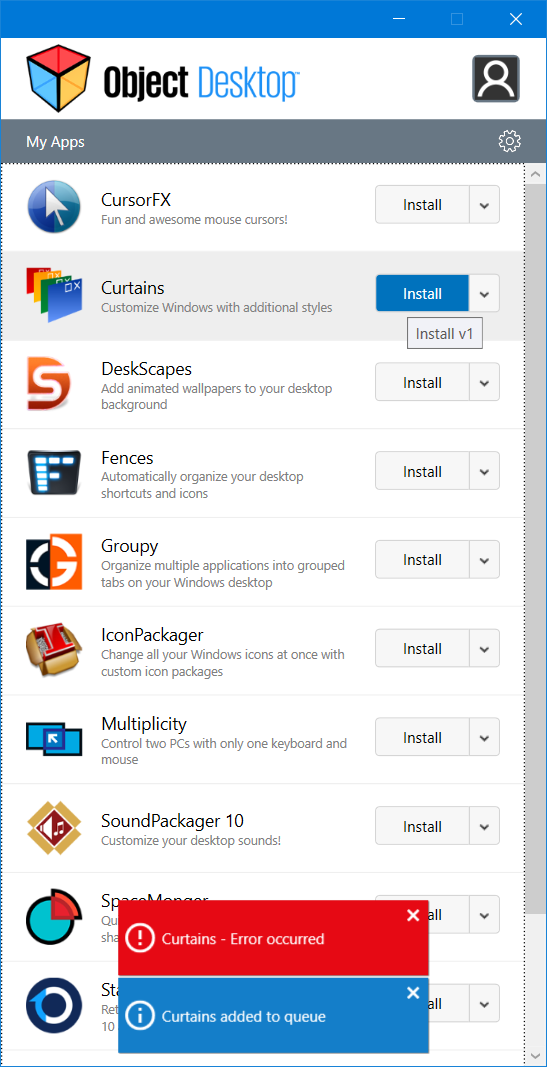
Can't install Curtains. Object Desktop just says "Error Occurred".  Anything I can do or more details as to what the error is?

Reply #14 Top

Quoting ToddLindberg11, reply 13

Can't install Curtains. Object Desktop just says "Error Occurred". Anything I can do or more details as to what the error is?

Hello,

Sorry to hear you are having issues. Please try downloading it directly from your account : https://store.stardock.com/myaccount/products


Basj,

Stardock Community Assistant.

Reply #15 Top

Win10 v1909 b18363.959

Quirk- If you have image files set to open with Photos so that you can double-click them to preview in Photos, the initial image will not show its filename.  Scrolling through the images (left/right arrows) will only refresh/update the filename after changing the window state by clicking elsewhere, or by mousing over the window buttons.  Can get a little annoying.

Thanks.

Reply #16 Top

By the way, I saw in another thread that you're undecided about enabling the use of system color settings in Curtains.  If you do decide to do that, I'd ask that you perhaps include a global option to enable/disable their use - I've grown quite fond of the the Win10 dark arrangement, and the freedom from the complications that system colors can create. :)  

+1 Loading…
Reply #18 Top

Quoting NeilBalmer, reply 17

Opening an html file associated with chrome also opens a second tab with 'http://--disable-windows10-custom-titlebar/'


win10 ver 19041.329

chrome Version 83.0.4103.116 (Official Build) (64-bit)

Thanks for the report.  We have this resolved for an update next week.

I apologise this wasn't caught in testing.

Reply #19 Top

Quoting DaveRI, reply 15

Win10 v1909 b18363.959

Quirk- If you have image files set to open with Photos so that you can double-click them to preview in Photos, the initial image will not show its filename.  Scrolling through the images (left/right arrows) will only refresh/update the filename after changing the window state by clicking elsewhere, or by mousing over the window buttons.  Can get a little annoying.


Thanks.

Thanks for the report.

I will see if this can be fixed for the 1.01 update or if not the next update after.

Reply #20 Top

I just recently purchased Curtains but I can't get it to install on my Lenovo Yoga.  Not sure why, it just hangs when the progress bar is approximately around 20% and the message reads as:


Installing Files...

C:\Program Files (x86)\Stardock\...\Stardock.ApplicationServices.dll


It will never make more progress and eventually becomes "shaded white" with the "Not responding" message in the title bar.  My only option is to kill the installer from Task Manager.


What can I do to aid in the troubleshooting here?

Reply #21 Top

Quoting CmdrKeene, reply 20

Lenovo Yoga.

Hello,
Sorry to hear you are having issues. Need more information on your notebook.

1) Is the CPU ARM based?

2) AV/Security software installed.

3) Windows version installed. Please use Winver.exe for full Windows version numbers.


Thanks
Basj,
Stardock Community Assistant.

Reply #22 Top

Quoting CmdrKeene, reply 20

What can I do to aid in the troubleshooting here?
Temporarily disable your anti virus software. Many AV apps report false positives.

If that doesn't do the trick, try and download the installation file once more.

Reply #23 Top

Perfect, that was a quick & easy fix.  In the Windows Security settings I went to the Ransomware Protection settings and turned it off while I ran setup and it installed super quick.

+1 Loading…
Reply #25 Top

Quoting Prestonn, reply 24

thanks

Are you all seeing the Windows10 warning when installing - to 'allow' it?
https://cdn.stardock.us/support/uploads/2020-07-30_14-47-59.mp4

Sean Drohan
Stardock Support Manager