
Tatiora Tatiora

Stardock Announces New Windows Desktop Customization Tool: Curtains

Stardock Announces New Windows Desktop Customization Tool: Curtains

New customization tool allows users to add
additional style modes to Windows 10
Learn More

Stardock announced a new customization tool today. Curtains allows users to apply new styles along the lines of Dark Mode and Light to Windows 10.

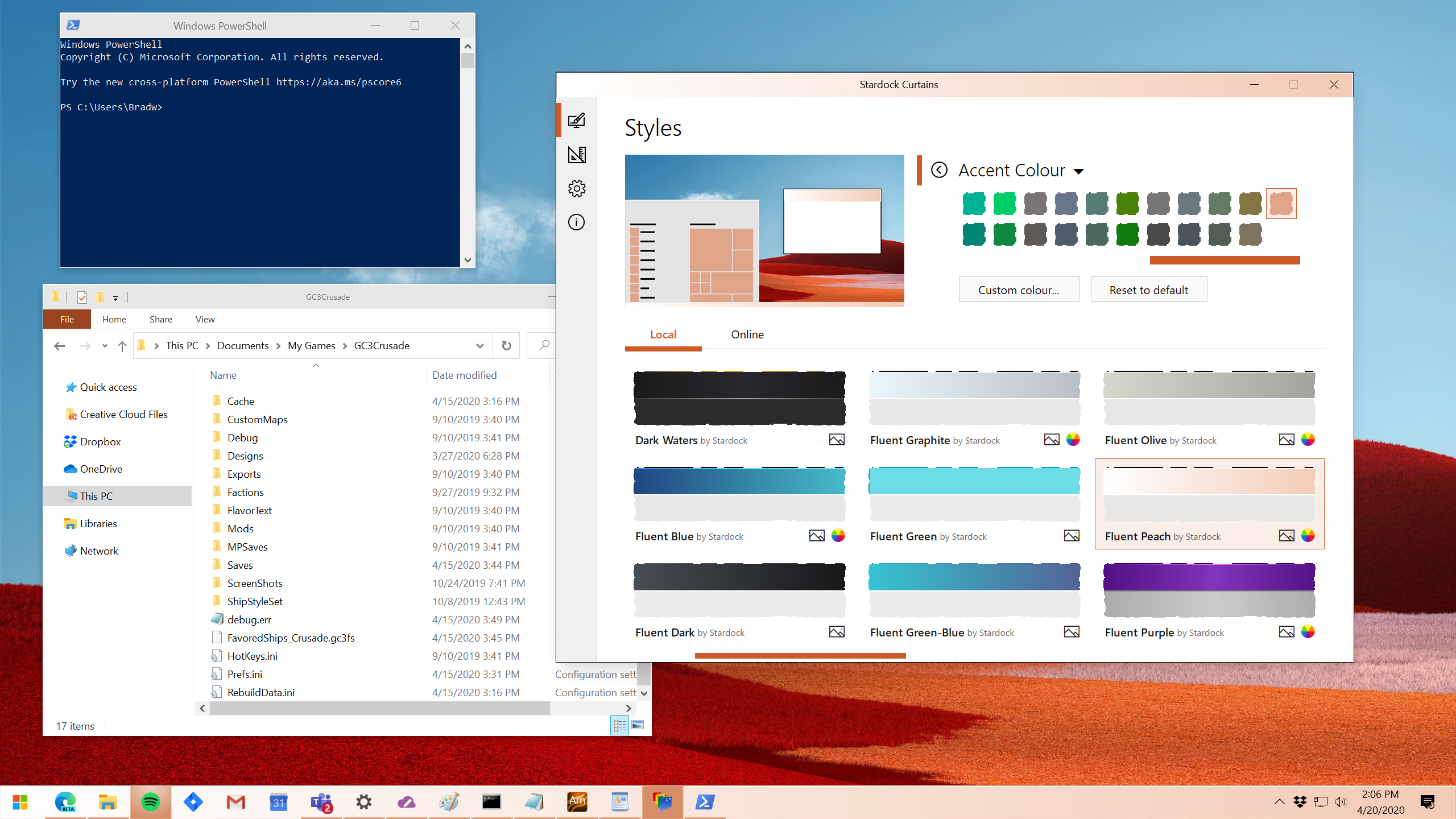
Taking advantage of the groundwork built to support light and dark mode, Curtains includes several new styles including Fluent, Cairo, and Crystal mode that enhance the look and feel of the Windows UI along with apps that already support light and dark mode.  

"The advantage of using a program like Curtains is that it's essentially just adding new 'modes' to Windows," said Brad Wardell, CEO of Stardock.  "It already works with high DPI displays and your existing programs. This gives users a little extra touch of customizing the Windows experience."

In addition, Curtains also includes styles that allow users to switch Windows to looking more like Windows XP or Windows 95 as well as alternative operating systems.
Curtains
Curtains

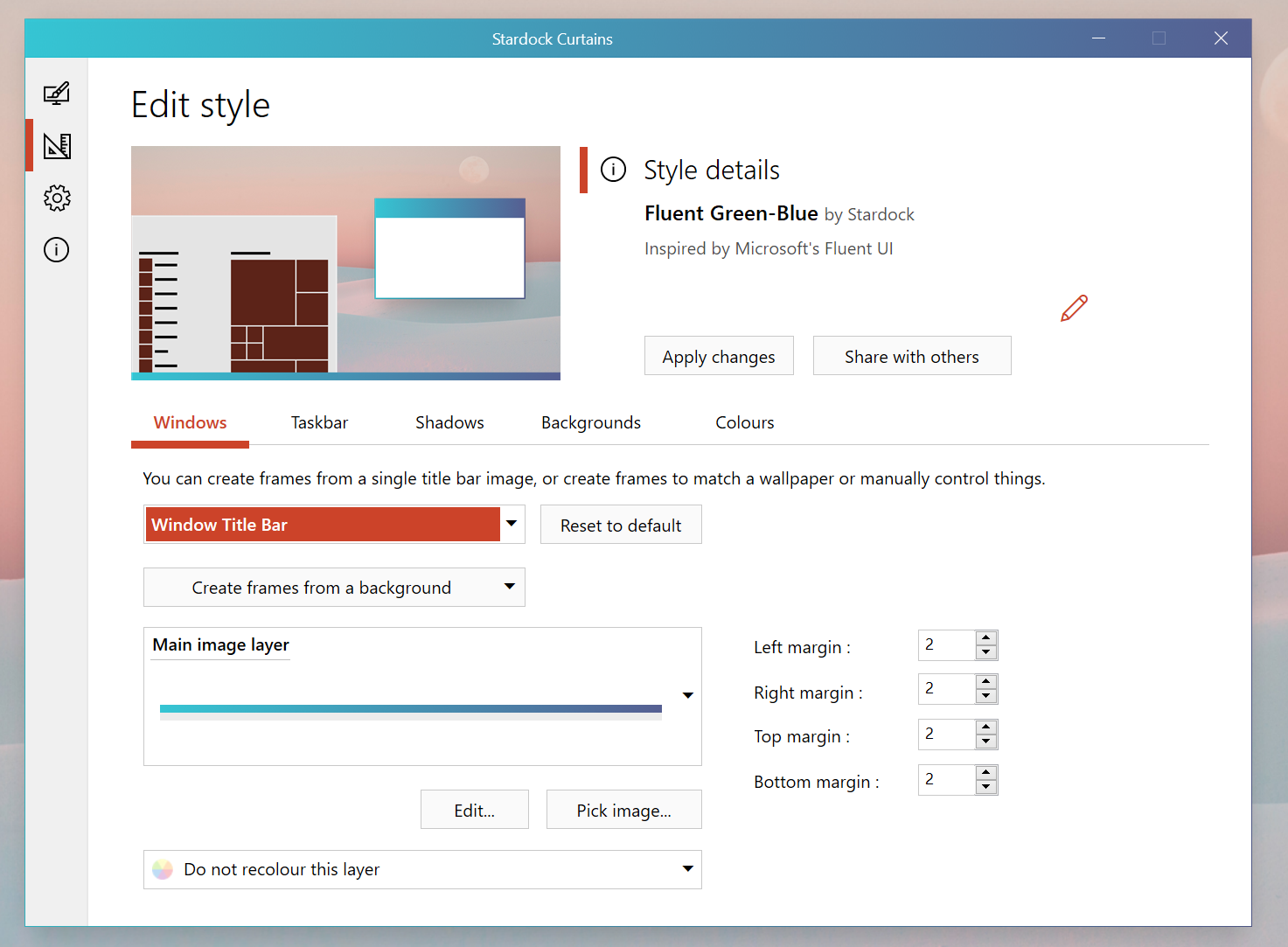
Users can easily create and share their own styles using the built in style editor. A Curtains style can change everything that Light and Dark mode can change, including the Start button, title bar buttons, and title bar coloring.  It also supports tweaking gradients, shadows opacity, and hundreds of other small elements of the Windows GUI.

"Curtains makes it very easy for people to make their own styles," said Wardell. "There are a lot of customization features that have been buried in recent years such as font faces and sizes, detailed color choices and much more. Curtains allows people to adjust all of that and save it with their style easily.”

The beta version of Curtains will be available on Stardock's Object Desktop suite of desktop enhancements starting next week.  Object Desktop includes programs such as Fences, Start10, Groupy, SoundPackager, DeskScapes and Multiplicity. Visit www.objectdesktop.com to download it.

Curtains
Curtains

Visit the Curtains webpage for more information.

209,604 views 57 replies
Reply #26 Top

Psyched for this since learning about it. I will buy this!

Reply #27 Top

Finally, something in the last six months that inspires me enough to consider renewing my Object Desktop subscription. I'm definitely in the camp that prefers a clean native Windows 10 look with relatively small tweaks as opposed to heavy retro skinning.

+1 Loading…
Reply #28 Top

I'll be getting up every morning in anticipation!:w00t:  

+1 Loading…
Reply #30 Top

Quoting LEMMORSebrof, reply 29

How long now for me to see curtains as available for download???

I believe later this week.

Reply #31 Top

Quoting Frogboy, reply 11

It’s not going to replace WB or SkinStudio. It’s for people who want to customize the look and feel of Windows but don’t want to go as far as WindowBlinds.
This.

An interesting announcement! Personally I'm not that interested as I'm a retro-head but I think it's a great idea now that I understand what the product does. I also think a completely free version could be made available with reduced features (and some form of advertising) available as a gateway app for new users to the Stardock community. I can see this being very popular with average Joe public and with a good marketing strategy could entice people to want to get a full OD sub (which would then include the full version of Curtains).

Reply #32 Top

Quoting MagikGimp, reply 31


Quoting Frogboy,

It’s not going to replace WB or SkinStudio. It’s for people who want to customize the look and feel of Windows but don’t want to go as far as WindowBlinds.

This.

An interesting announcement! Personally I'm not that interested as I'm a retro-head but I think it's a great idea now that I understand what the product does. I also think a completely free version could be made available with reduced features (and some form of advertising) available as a gateway app for new users to the Stardock community. I can see this being very popular with average Joe public and with a good marketing strategy could entice people to want to get a full OD sub (which would then include the full version of Curtains).

A product that runs in the background is not very suited to any sort of advertising.

Reply #33 Top

I see Curtains is available in my StarDock downloads, but it redirects me to a 404 page. I guess there're getting ready for the release. :)  

Reply #34 Top

Looking at all the screen shots they are not showing any start menu's, but Danioc's Persona skin shows a skinned start menu. Does Curtains change the start menu too?

Reply #35 Top

Quoting ALMonty, reply 34

Looking at all the screen shots they are not showing any start menu's, but Danioc's Persona skin shows a skinned start menu. Does Curtains change the start menu too?

Start10 yes

Reply #37 Top

I like it. Fast, looks nice. Not as complicated as Windowblinds. BUT I have the same issue I did with Windowblinds around the value of it. So many companies (Microsoft, Spotify, Adobe, Affinity, etc. etc. etc.) use frameworks that can't be "skinned". Outlook, Teams, Atom, the list goes on and on and on. Of the apps I use, only a few look skinned and that's really why I stopped using Windowblinds a few years ago. I know there is nothing Stardock can do about it, just wondering if anyone else is thinking the same.

+1 Loading…
Reply #38 Top

I think it shows great promise and I'm sure I'll love it soon enough but at the moment it won't allow my taskbar and start menu to return to the colors i had chosen for my Win10 color scheme. It used to be a dark green but I could've used purple, blue, yellow, red, orange, or... you get the gist of where I'm going. Now, when I attempt to use the Win10 scheme, my taskbar and start menu are a dark grey and the highlights are the Win10 scheme colors (or colours for you British folks. Maybe Aussies like Jafo and starkers too. It's hard to tell. They all drive on the wrong side of the road. ). Anyway, maybe that's how the Windows 10 Style in Curtains is supposed to work and I'm completely wrong. Also, it doesn't matter what Curtains style I use, the start menu text is always white. It does not change to black when using a light colored Curtains theme. How does a person unload Curtains? I'd like to have my ability to choose the color of my taskbar and start menu again.

I hope everyone is staying safe whoever and wherever you are.

Reply #39 Top

Quoting MadDeez, reply 38

I think it shows great promise and I'm sure I'll love it soon enough but at the moment it won't allow my taskbar and start menu to return to the colors i had chosen for my Win10 color scheme. It used to be a dark green but I could've used purple, blue, yellow, red, orange, or... you get the gist of where I'm going. Now, when I attempt to use the Win10 scheme, my taskbar and start menu are a dark grey and the highlights are the Win10 scheme colors (or colours for you British folks. Maybe Aussies like Jafo and starkers too. It's hard to tell. They all drive on the wrong side of the road. ). Anyway, maybe that's how the Windows 10 Style in Curtains is supposed to work and I'm completely wrong. Also, it doesn't matter what Curtains style I use, the start menu text is always white. It does not change to black when using a light colored Curtains theme. How does a person unload Curtains? I'd like to have my ability to choose the color of my taskbar and start menu again.

I hope everyone is staying safe whoever and wherever you are.

If you have switched to Windows 10 then you have disabled curtains.

Are you unable to change the accent colour using either curtains or the default OS screens for that?

It could be you have been reset to not applying colour to the taskbar / start menu in which case this can be changed from the settings page in Curtains or the OS personalisation screen.

Which style are you using that needs black text on the start menu as it may well be the style needs tweaking.

Reply #40 Top

Quoting VArterJr, reply 37

I know there is nothing Stardock can do about it, just wondering if anyone else is thinking the same.

Yes. I still use WindowBlinds, but get irritated whenever an app can't be skinned.

Reply #41 Top

Is it possible to switch between Windowblinds and Curtains easily?

Reply #42 Top

Quoting LightStar, reply 41

Is it possible to switch between Windowblinds and Curtains easily?

Yes.  Both can be installed at once.

Applying one should turn the other off.

Reply #43 Top

Quoting Neil:

"If you have switched to Windows 10 then you have disabled curtains.

Are you unable to change the accent colour using either curtains or the default OS screens for that?

It could be you have been reset to not applying colour to the taskbar / start menu in which case this can be changed from the settings page in Curtains or the OS personalisation screen.

Which style are you using that needs black text on the start menu as it may well be the style needs tweaking."


I have found the setting that stopped my taskbar and start menu from reverting to the Win10 color scheme. I don't know how it happened because I hadn't changed anything.

I also have Start 10 installed and I'm using the Modern start menu. When I switch to a Win10 start menu with Start 10, my start menu text changes colors but the start menus when using any light Curtains Style are grey, not the color of the taskbar. When using the Win7 start menu in Start 10, the start menu text on the left side changes colors but the right side always has white text. When using the Modern start menu, my text stays white no matter what Curtains style I apply.


Stay safe, everyone!


I wonder why on the Wincustomize home page and comment section for skins I am SamEVO but here I'm still MadDeez. Hmmm.

Reply #44 Top

Quoting MadDeez, reply 43

Quoting Neil:

"If you have switched to Windows 10 then you have disabled curtains.

Are you unable to change the accent colour using either curtains or the default OS screens for that?

It could be you have been reset to not applying colour to the taskbar / start menu in which case this can be changed from the settings page in Curtains or the OS personalisation screen.

Which style are you using that needs black text on the start menu as it may well be the style needs tweaking."


I have found the setting that stopped my taskbar and start menu from reverting to the Win10 color scheme. I don't know how it happened because I hadn't changed anything.

I also have Start 10 installed and I'm using the Modern start menu. When I switch to a Win10 start menu with Start 10, my start menu text changes colors but the start menus when using any light Curtains Style are grey, not the color of the taskbar. When using the Win7 start menu in Start 10, the start menu text on the left side changes colors but the right side always has white text. When using the Modern start menu, my text stays white no matter what Curtains style I apply.


Stay safe, everyone!


I wonder why on the Wincustomize home page and comment section for skins I am SamEVO but here I'm still MadDeez. Hmmm.

Any time the Windows taskbar is set to light mode (when it gets black text), the start menu will also be non coloured.  This is a feature of Windows 10 light mode taskbar.

Which light style were you using as every one I can see are getting black text correctly from Start10 automatically (please ensure your Start10 is upto date however)

Reply #45 Top


WANT YOUR DESKSCAPES AND START10 and windowblinds still rendering,  follow those ticks........


Reply #46 Top

Neil, I'm getting white text with the following light styles: Crystal, Fluent Peach, Fluent Sky, Mac Mono, Workbench, Warp OS.Like I said, with the Modern start menu option in Start 10, my start menu text is ALWAYS white. Start 10 is up to date.

By the way, Cairo Green-Blue is gorgeous!

Stay safe and healthy, everyone.

Reply #47 Top

Quoting MadDeez, reply 46

Neil, I'm getting white text with the following light styles: Crystal, Fluent Peach, Fluent Sky, Mac Mono, Workbench, Warp OS.Like I said, with the Modern start menu option in Start 10, my start menu text is ALWAYS white. Start 10 is up to date.

By the way, Cairo Green-Blue is gorgeous!

Stay safe and healthy, everyone.

I am wondering, what Windows version you have on?

Thank you,

Basj
Stardock Community Assistant.

Reply #48 Top

Quoting MadDeez, reply 46

Neil, I'm getting white text with the following light styles: Crystal, Fluent Peach, Fluent Sky, Mac Mono, Workbench, Warp OS.Like I said, with the Modern start menu option in Start 10, my start menu text is ALWAYS white. Start 10 is up to date.

By the way, Cairo Green-Blue is gorgeous!

Stay safe and healthy, everyone.

Do you have the option in Curtains settings to set style light/dark mode automatically enabled?

Also what colour is the text on the taskbar (say clock) with those themes enabled?

Reply #49 Top

Quoting don5318, reply 13

Thank you, sorry I'm not a fan of the Win 10 default (Metro) look, if that's what it's called, I still like the Win 7 (like) start menu, I guess I'm an old dinosaur. :grin:  
Not (too)old, or a Dinosaur for that matter, but I TOTALLY AGREE with you ^_^  

+1 Loading…
Reply #50 Top

Nice app though. -As long as it won't be a WindowBlinds Killer :star: