fences
from  Stardock Forums
Stardock Forums
How to keep Fences from reconfiguring from larger to smaller amount of icons
 Stardock Forums
How to keep Fences from reconfiguring from larger to smaller amount of icons
Hello,
Sorry to hear you are having issues.
Can you explain your issue in more detail please.
also,
Windows version
Fences version
AzDude
Stardock Community Assistant
I have 6 Fences on my desktop with 3 to 15 icons in each. When they reconfigure each fence reduces in size down to 2 or 4 icons.

Hello,
Sorry to hear you are having issues.
What version of Windows re you using ( use winver.exe for that info )
What version of Fences are you using ?
AzDude
Stardock Community Assistant
Hello,
We need more details that that.
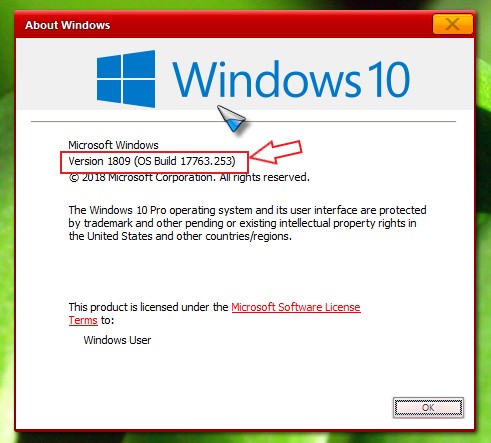
1) Please use Winver.exe for Windows version numbers. When you run Winver.exe, you should see a windows like screenshot below. Please write down that numbers in the redbox and post it here.
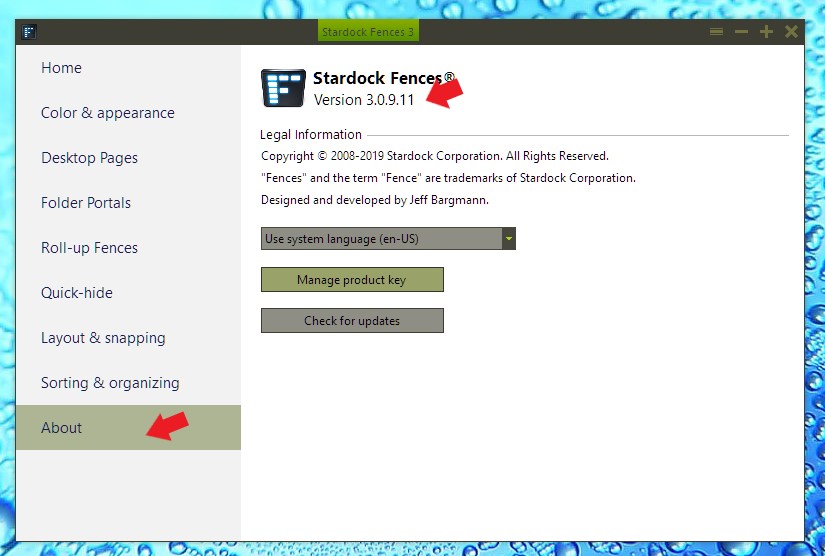
2) and need to see what is your Installed version numbers. You can get to it by right click anywhere on the desktop-> Configure Fences -> When the Fences configuration windows click on the About section and check the numbers. Refer to screenshot below.
Thank you,
Basj
Stardock Community Assistant.
I don't know what 'reconfigure' means here...
That said, you can manually control the size of desktop icons by holding CRTL and using the middle mouse wheel scroll. Doing so will increase / decrease the size of icons on the entire desktop.
Sean Drohan
Stardock Support Manager
Welcome Guest! Please take the time to register with us.
Select a reason for giving karma:
You're about to visit an external site:
Sign up here to get the latest news, updates, and special offers delivered directly to your inbox.
 WinCustomize Forums