What is wrong with the My Skins List area? (FIXED)

Who changed something???

Why is the My Skins List area only showing 9 skins? Yesterday it was 30. The URL is still reading the same ( https://www.wincustomize.com/explore/all/pagesize/30/view/list/author/LightStar ), but as you can see below, it is not showing 30 skins.
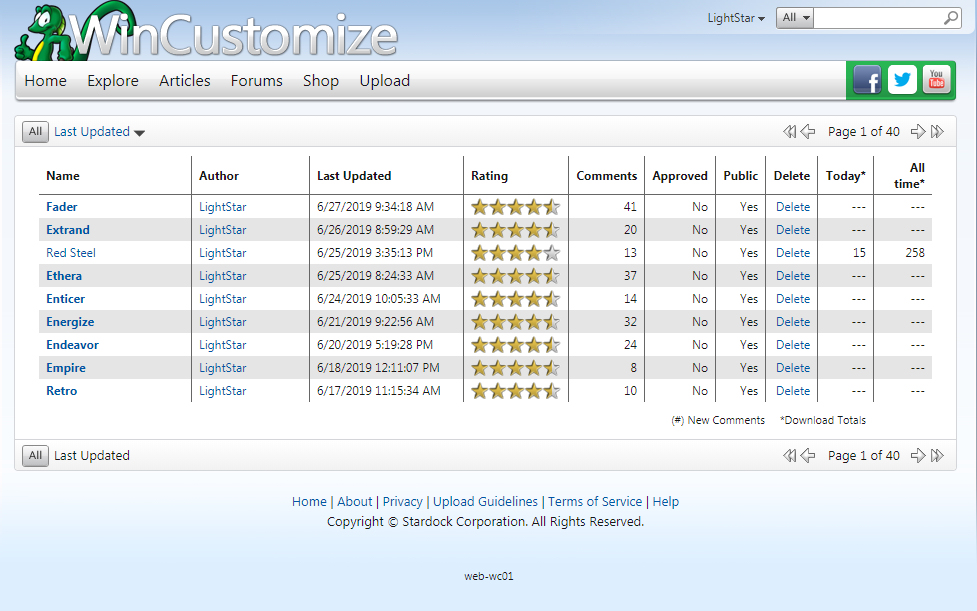
I am using the latest version of Chrome, ( Version 75.0.3770.100 (Official Build) (64-bit) ), and I have already cleared my cache but it is still having the issue.

53,069 views 22 replies
Reply #1 Top

I'm seeing 30 Tom.

Reply #2 Top

Just like Web and RG Tom. 30

Reply #3 Top

Ditto

Reply #4 Top

Thanks for the info guys. Is anyone using Chrome too though? I hope support can fix this issue, it's a pain going through 40 pages. I used to be able to change the "30" in the URL to "390" and view all my skins (just yesterday it worked), but doing so now changes nothing, still just 9 items. :-(

Reply #5 Top

I'm using Chrome (Version 75.0.3770.100 (Official Build) (64-bit)) too Tom, and I get 30 as well. 

Reply #6 Top

Weird! In Windows 7 it has 9 items, but in Windows 8.1 there are 30 items. Guess it's something dealing with Windows 7 then. Maybe support has an idea.

Reply #7 Top

I'm using WaterFox.

Reply #8 Top

Quoting WebGizmos, reply 8

I'm using WaterFox.
Water fox !? :O What's that ?

Reply #9 Top

Showing 30 on my end as well using chrome.

Reply #10 Top

It's strange, with chrome I get 30 but with Firefox I only get 9.


Reply #11 Top

Quoting JuniorCrooks, reply 11

It's strange, with chrome I get 30 but with Firefox I only get 9. 

Definitely weird, has to be something on Stardock's end.

Reply #13 Top

I'm seeing 30 Tom

Firefox Quantum, up to date.

Reply #14 Top


I get 36 on Chrome Tom.

Reply #15 Top

36 Ross? That's even weirder.

Reply #16 Top

My Skins List show all 163 pages \o/   using Chrome .

Reply #17 Top

Some are not having problems, some like me are, different browsers. I just hope support fixes it.

Reply #18 Top

I am using Internet Explorer

When I click on the link supplied I get 60

Cheers

Macca

Reply #19 Top

Just tried Chrome

Same result

Macca

Reply #20 Top

Hi Lightstar,

I think I have solved the problem.
Go to the WinCustomize home page.
Select explore and then a category. ( window blinds, deskscapes etc)
Select explore filters and then check what the page size is.

I selected several different ones 12, 30 and 60 and then went back to your link and whatever I selected is what came up.

Hope this helps

Macca

+1 Loading…
Reply #21 Top

Yes! Thank you so much Macca! That fixed the issue. Wish I knew though who changed it to 9 in the first place. :-)