Save Games wiped
 AshesoftheSingularity Forums
Hey Guys the last update wiped all save games. Is there anyway to retrieve them?
Thanks

Hey Guys the last update wiped all save games. Is there anyway to retrieve them?
Thanks
Depending on what you were updating from, expansions can change where saves are stored. You can see if that is the case by viewing where they are here:
\Documents\My Games\GC3Crusade\Saves
\Documents\My Games\GalCiv3\Saves
Please also see:
https://steamcommunity.com/app/226860/discussions/4/1327844097120954707/
https://steamcommunity.com/app/226860/discussions/1/1735465524707916688/
https://forums.ashesofthesingularity.com/484958/galactic-civilization-iii-classic-edition
Sean Drohan
Stardock Support Manager
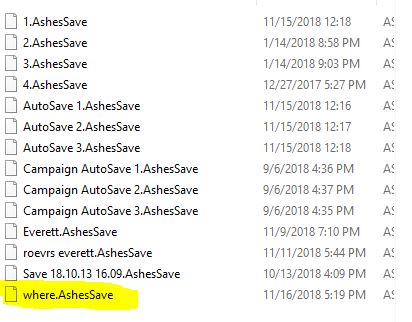
My saves are in the correct location I can see the files but when I hit load in game the list is empty.
EDIT 1
*******I have to edit this post because I can't create anymore replies because my account is new********
I created a new save just now and I can see it in filemanager with all my other saves. When I hit load in game it is the only save I can see though.

Think he's talking about Ashes.
As far as I know, new updates will be incompatible with saves sometimes, so if you can go back to the previous version you can finish them off and then go to the new update when you're done with them.
I thought this was the Ashes forum? How can I go back to a previous version I have the steam version of Ashes.
It is, Sean mixed them up.
Right click on Ashes in your games list, select properties, click on Betas and there'll be a drop down list with the different versions.
I went back to previous build and no saves are showing up? Could the Nov 15th update have updated some game files not associated with game version that's affecting save games?
Maybe, but there's not really anything in that update (that's listed) that should be making saves incompatible anyway.
Yeah, not sure how I missed that - my only excuse being that it is usually GC3 that has had saves become incompatible with expansions.
That said, I was able to confirm that the new Ashes update indeed would have made old save incompatible.
Again, sorry for my confusion.
----------------
Sean Drohan
Stardock Customer Service Manager
Welcome Guest! Please take the time to register with us.
Select a reason for giving karma:
You're about to visit an external site:
Sign up here to get the latest news, updates, and special offers delivered directly to your inbox.
 Stardock Forums