This problem seem to be known since at least 4 years. 
I wrote to Stardock about the problem and got let down by the answer: We do not provide support by email - go to our forums.

So here I am - with little hope - since I find old and locked (?) posts with no replies from Stardock.

Could you please comment on this? Are you aware about the issue and have added it to your roadmap in order to improve on the product? Or do you do the Ostrich-with-head-in-sand trick?

For me, this product would solve some of the cluttering issues I have when working in many different contexts. And if I was sure the product are supported and actively developed - I would for sure be recommending it to my 10.000 colleagues.

Please let us all know if you do care :-)

Best regards,

Aron

18,429 views 15 replies
Reply #1 Top

Hello,

I have forwarded your report to the Stardock support team for their review and recommendations.
Please keep an eye on this thread for any updates.

We really do appreciate your feedback, thanks.

Reply #2 Top

Hello,

I can't reproduce your problem on my system, Try purge and reinstall step https://forums.stardock.com/485902/tiles-support-faq#reinstalling

Make sure reinstall the latest version of Tiles and reboot.

And report back. Thanks.

Note : We also send a report to our support team for their review and recommendations. Please keep an eye on this thread for any updates. We really do appreciate your feedback, thanks.

Reply #3 Top

Thanks for your response. This is the output from the batch file. Seems like it needs some path fixes :)

I will try to reinstall the program and report back to you - but be aware that I purchased it last week so the install is pretty fresh already. Looking forward to your input.

Reply #4 Top

I've now reinstalled the application and until I added the first shortcut to the sidebar - it did not consume any cpu.

After adding just ONE shortcut - the cpu usage sky-rocketed, and is now back to 5-8%.

Reply #5 Top

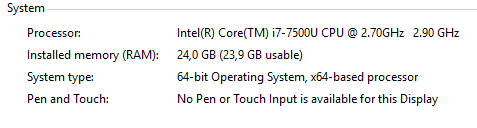
Would like to know what is your PC specifications. Thanks

For your info on my system it just hover around 1.4 - 4.0% with all MS office suite link on it.

Reply #8 Top

Hello, I have forwarded your report, again, to the Stardock support team for their review and recommendations. Please keep an eye on this thread for any updates. We really do appreciate your feedback, thanks.

Reply #10 Top

_aron_  Did you ever get resolution to your problem?  I am doing the 30 day evaluation and trying to determine if I want to buy it.  I have an older Lenovo Thinkpad with these specs:

Windows 10

System Type    x64-based PC
System SKU    LENOVO_MT_20BW_BU_Think_FM_ThinkPad T450s
Processor    Intel(R) Core(TM) i5-5300U CPU @ 2.30GHz, 2295 Mhz, 2 Core(s), 4 Logical Processor(s)
Installed Physical Memory (RAM)    8.00 GB

My CPU usage has been as high as 3.1% with Firefox, Chrome, some other apps as well as Word and Excel but usually seems to stay below that at around 2%.  I am just wondering how responsive Stardock is to their customers before purchasing.  Also I would like to know if they are maintaining this program, do they keep up with Windows updates, and how often do they do an overall update?

I want to see if it would be better to use than Windows 10 Virtual Desktops, which work well, but you never know which desktop you are in and you cannot label the desktops.  There are some apps out there for doing some of this but they haven't worked out for me.

Reply #11 Top

Hello,
I have forwarded your questions/problems to the Stardock Support team for their assistance. Please keep an eye on this thread for any updates. We appreciate your feedback and patience.

Thank You,
Basj
Stardock Community Assistant.

Reply #12 Top

Hello,

Sorry to hear you are having trouble.

Your observations have been noted.

There are no imminent releases pending for Tiles at this time.  Any change will be posted in the forums here.

Thank you for your feedback.

Sean Drohan
Stardock Support Manager

Reply #13 Top

I am not really having problems, just checking out the features, and how responsive support is.  I am comparing Tiles to Windows 10 Virtual Desktops, which I explained in another Tiles support post.  I know Tiles is NOT actually a virtual desktop function, but, want to see if using it and any other Stardock software would be a better solution to which the issues that Virtual Desktops are designed to apply.

BTW, is your image in your post from STOS where Kirk is divided into his bad and good sides by a Transporter malfunction?   If so, obviously your image is displaying his "bad" side totally enraged.

Reply #14 Top

My issue is that tiles from the get go is constantly eating up more CPU than I am comfortable with.  I'm trying the trial to see if I want to purchase it.  I like the functionality but I don't understand why it eats up so much CPU.  I understand it has to keep tabs on running processes but it seems like their should be an option to potentially have it only poll on a given interval to mitigate a constant CPU usage of 1%-8% depending on the machine.  I wrote an simple app that polls the currently running processes every 10 milliseconds and it fluctuates between 0%-%0.1 percent on the task manager.  I have disabled all of the options like transparency that might be the cause (but kept thumbnails).

When the configuration window pops up it spikes to 20-22% and the CPU fan goes into high (and it stays there).  I'm running a core i9 9900 with 8 physical cores.  What could it possibly be doing to eat up 22% of the CPU on a config screen?

The tiles also don't format correctly.  For Visual Studio (below) it appears to be stretching the first thumbnail all the way down the side and overlaying the labels for the other instances.    This is on a 4K monitor, Windows 10 1909.

Reply #15 Top

For the oversized thumbnails, just scroll the mousewheel while hovering over the Tiles bar, or click and drag an empty space on the bar to force it to redraw. Kind of annoying sometimes but also easy enough to fix.