[Tool] Improvement Viewer - Discontinued / Superseded

Discontinued / Superseded 
 
Update: 31/01/2018
Added missing DLC.
Added Prerequisites and Preclusions. N.B. Some improvements have prerequisites/preclusions that are only set on the tech, so will not be filtered correctly ATM.
Added Filter by Type and by Race/Ability
Added Validate improvement. Attempts to check improvement for errors, missing components etc. Highlights it in Red
Improved layout, rendering speed.

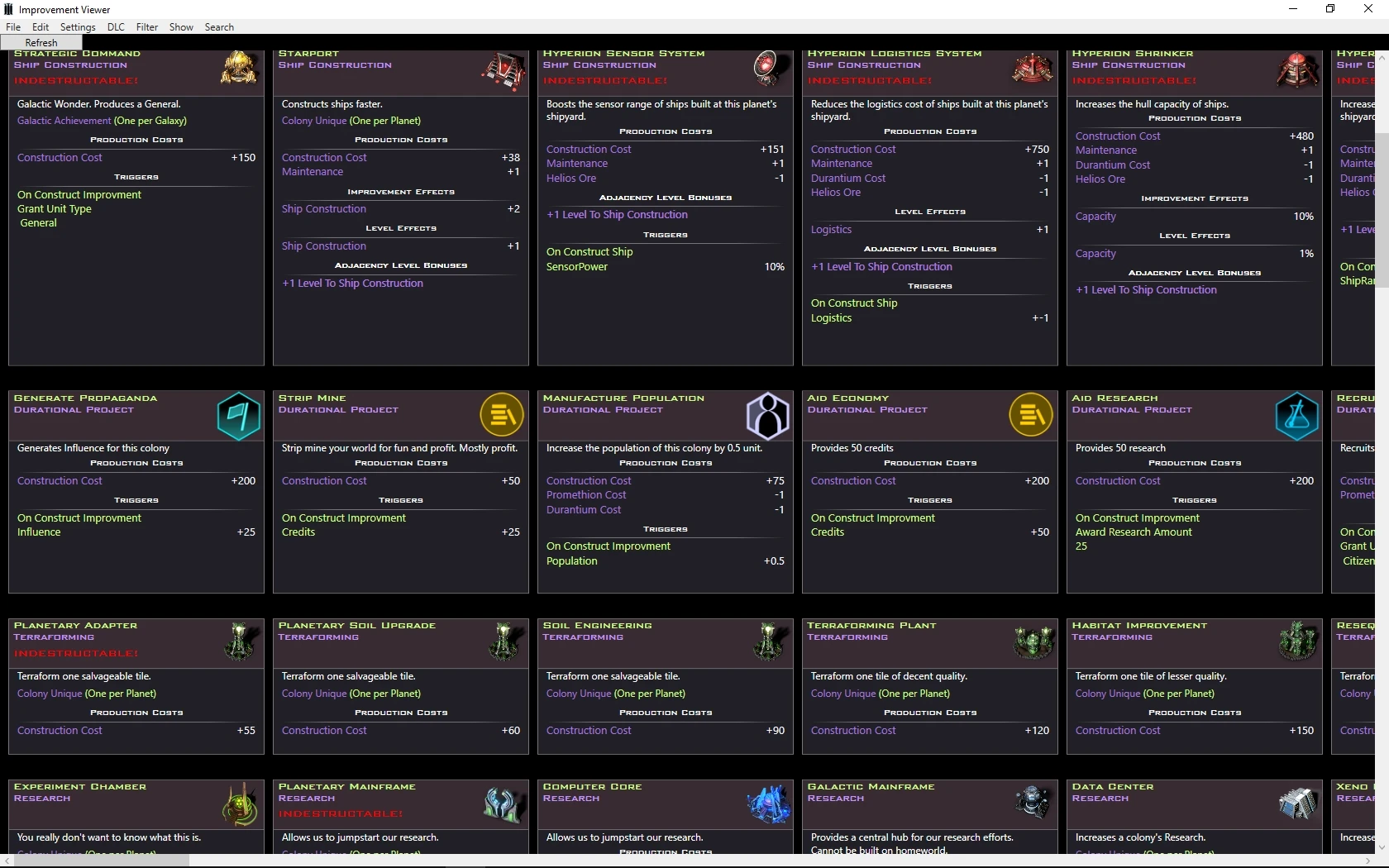
A tool to allow you to view all improvements** similar to the tech tree.
Shows all stats and some stats that are hidden from the user in game.
Bugs and suggestions post here.

 

100,110 views 20 replies
Reply #2 Top

Judging by the screenshot, great job! Tools like this are very useful and make modding a lot easier. It's really helpful to have a visual representation vs scrolling through XML files. Especially the hidden stats. Thanks!

Adding in the prerequisites and preclusions would be a handy addition too.

(Having said all that, I can't get it to run on Win8.1 64. I suspect my paths are wrong. I noticed the XML files mention Crusade but it's not in the default setup.)

Reply #3 Top

Do you get any error messages when trying to run.


when you run for the first time you should get a pop up asking for the paths.

if you have the steam version, it should populate the Galciv path automatically.


can you post the logs?

Reply #4 Top

cant get it to run with win 10,

it just crashes after setting the paths

Logs: https://www.dropbox.com/s/0awrm19izltb9et/Logs.rar?dl=1

Reply #5 Top

@Mortil

Logs not helpful.

Do you get any error message popup?


Reply #6 Top


just this

Reply #7 Top

Quoting treborblue, reply 3

can you post the logs?

No log created in program folder, just this error message appears instantly 

Reply #8 Top

Sorry Guys I had an absolute reference set in a XAML file I used while developing. 

Took ages to find, because it worked on all my PC's.


I have uploaded a fixed version.


On the upside I have added lots of debugging just in case.
Not happy with the performance takes a while to draw the layout.

Let me know how it performs.


Reply #9 Top

 Downloaded your fixed version, works fine for me.  From your comment about performance I was expecting to wait, but it only took a second or two to draw the window.  Perfectly acceptable for me.

Using your viewer it's really easy to review the improvements and note things like the "Recruit Celebrity" project actually produces a diplomat. o_O  

Reply #10 Top

It work the first time, but it still crash when setting: show all


Reply #11 Top

Hmm show all worked for me.  But then I only tried it with DLC Crusade checked on.

Reply #12 Top

Anyone else having issues with show all?


Anything in the logs?


Reply #13 Top

Quoting Publius, reply 9

 Downloaded your fixed version, works fine for me.  From your comment about performance I was expecting to wait, but it only took a second or two to draw the window.  Perfectly acceptable for me.

Using your viewer it's really easy to review the improvements and note things like the "Recruit Celebrity" project actually produces a diplomat. o_O  


One of the reasons I did this was to quickly identify any discrepancies, some of the text is still wrong also.

When its stable and functional, i'll give it to the devs.

The other reason is so when playing you can identify which building does what you want.

I plan to add search by name, stat etc. so you can quickly find the building you need and which tech you need to research.


Reply #14 Top

Updated. See OP.

Reply #16 Top

Quoting rexkelley, reply 15

Very nice viewer! What is needed to make the editor open?


Does it not work for you?

It requires;

Dot Net 4.6.1 
Galciv III installed.
Unzip the folder keeping all files together,
Run the .exe

Reply #17 Top

The viewer works very well as a viewer. I would like to edit improvementdefs the way you set up the GalCiv3 Tech Tree Editor. The file path dialog includes a path to notepad++, but does not open it. The viewer menu Edit-Find does not work, "Find" is greyed out.

I have Win10 home x64 Fall Creators Update, .NET Framework 4.7.1 is preinstalled with the operating system. I tried to install .NET 4.7.1 and got the following ".NET Framework 4.7.1 or a later update is already installed on this computer."

GalCiv 2.70 downloaded & installed from Gog.com without Galaxy installer. Do know where I can download the 2.71, 2.72 and 2.80 techdefs & improvementdefs from Stardock? My understanding is most of the discrepancies with multiplier & flat bonuses have been corrected.

Reply #18 Top

Quoting 2StepsForward, reply 17

The viewer works very well as a viewer. I would like to edit improvementdefs the way you set up the GalCiv3 Tech Tree Editor. The file path dialog includes a path to notepad++, but does not open it. The viewer menu Edit-Find does not work, "Find" is greyed out.


Not all features are implemented yet.
I will be adding the following shortly;
Validate against tech tree,
Filter flat/% , filter Ideology, precursur buildings, 
Find,
Edit xml's

Reply #19 Top

i7 3610 laptop using 7/64

No problems and  only took a sec to create it.

Reply #20 Top

Very cool.