Stardock’s Fences v3.05 Update Release

v3.05 Offers Update to Existing Features and Adds Simplified Chinese Language Support

1 2

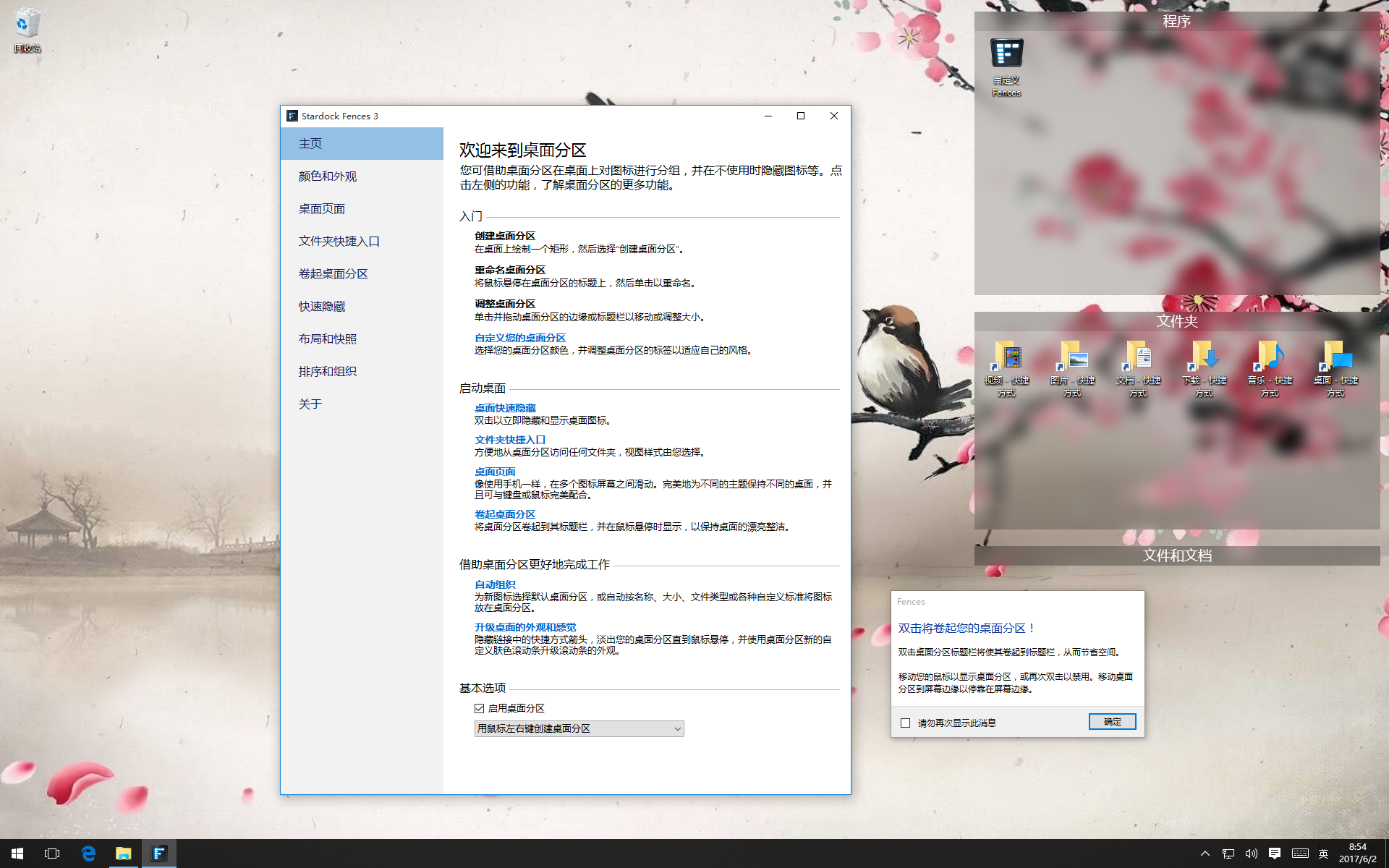
Today, Stardock released an update for Fences. Version 3.05 includes Simplified Chinese language support along with some adjustments to existing features. Fences allows a user to automatically organize their Windows desktop shortcuts and icons in shaded areas that can be hidden by double-clicking to reduce clutter.


A recent demand for Fences from the Asia / Pacific marketplace prompted the new Simplified Chinese language addition. Simplified Chinese language support brings the organization benefits and desktop control features of Fences to an audience of over 1.3 billion people more seamlessly than ever before.


In addition to Simplified Chinese language support, Fences 3.05 offers a number of updates and fixes, including better rule handling and adjustments for Microsoft’s Windows 10 Insider builds.


Fences is $9.99 and is available through Stardock and Steam.


To see Fences in action, view the new Quick Tips video series on YouTube. For more information about Fences and Stardock’s suite of desktop customization and productivity applications, visit www.objectdesktop.com.


Full Change Log:

  • FEATURE: Added simplified Chinese Localization
  • UPDATE: Heuristic improvements (icons go where they should go and shouldn't fall out of fences)
  • UPDATE: Improved start process (users were having to right-click on desktop to show Fences)
  • UPDATE: Fixed Folder Portal spacing for Windows 10 Insider Redstone-3 Fast Track, spacing logic tweak for RS2
  • UPDATE: Improved bug reporting
  • FIX: Fixed issue where drag/drop into a roll-up fence failed
  • FIX: Fixed issue where hidden icons would save excessively during mousedown events
  • FIX: Fences could crash while performing activities such as switching monitors, resizing desktop area, initial startup
656,084 views 29 replies
Reply #2 Top

 You can download from your Stardock account.

http://download.stardock.com


+1 Loading…
Reply #3 Top

 I forgot you can get it by logging into your account.^_^'  

Reply #4 Top

Hi Stardock. Fences is a great product and solves almost all of my desktop management needs. The lack of icon layout preservation with resolution changes is a notable feature that's missing, though. Fences does have options to preserve fences with resolution changes, but all the non-fenced icons on my desktop get disarranged when I launch an application that uses a smaller resolution than my desktop's native 2560x1440. Could an option to preserve icon layout with resolution changes, just like fences are, be added to Fences, please?


Also, I don't know whether this is a bug, or intended functionality, but as I reported in the v3.04.12 feedback thread, when the desktop is set to auto-hide, single-clicking the desktop with a windows in the foreground causes all the icons to reappear, when normally it takes double-clicking to cause the desktop to reappear. Often I try to de-select something by clicking on the desktop, and it causes all the icons to reappear, even though I was not clicking the desktop to see the icons, and would prefer if they would stay hidden. Could an option be added to require a double-click to un-hide desktop, when desktop auto-hide is enabled?

Reply #5 Top

Any chance on fixing the lag with boot up? I have been trying to fix it for a long time now.

40 second lag before I can use my icons is horriable Brand new system too.


Reply #6 Top

Also the update installer is not wanting to install even running as admin

https://gyazo.com/edcf6afa7c3423389dbf55a7143609cf

Windows 10 Pro


Reply #7 Top

I have problems with the scrollbar of a portal with long lists.

When I click on and hold the scrollbar and move it and let go in the center of a long list it will snap back to the front or end of the list automatically and not where I want it.

Example video,

Reply #8 Top

I bought the object desktop package a year or so ago and it has since expired. Everyday Fences wants to update, but it fails (I think my IT blocks the updater or something). Object Desktop Manager does not see fences as installed. My download account only shows desktopmanager and not fences so I can't download the fences update. 

Can you please post direct links with the updates?


Thanks!

Reply #9 Top

Quoting glupaczyk, reply 8

Can you please post direct links with the updates?
You can get the update directly here: https://store.stardock.com/download/3781

+1 Loading…
Reply #11 Top

Quoting b436412, reply 10

How about the Traditional Chinese?
We do not have a schedule for other languages at this time.

Reply #12 Top

Hi, I just wanted to mention that I wasn't able to update Fences using the Object Desktop Manager on both my computers I had to download the installer from my account page in order to update it. With the Manager, it downloads something but the then the update never happens.

Reply #13 Top

Hello Fences team

I am a taiwanese

I can help translate Fences into traditional chinese

can sent language file to me?

Reply #14 Top

Quoting Traditian, reply 13

Hello Fences team

I am a taiwanese

I can help translate Fences into traditional chinese

can sent language file to me?
Thank you for your kind offer. We are still exploring our next language offerings.


Reply #15 Top

Hello,

I am using Traditional Chinese version of windows 7.

For software application, I prefer to use either English or Traditional Chinese User interface only. 

I don't want a Simplified Chinese User interface BUT THERE IS NO WAY FOR ME TO CHANGED IT BACK TO ENGLISH UI. 

I am really disappointed how you forced a Traditional Chinese user to use a Simplified Chinese and there is no way to change it back. That's a stupid move.

PLEASE FIX IT ASAP.

Thanks!!!

Reply #16 Top

Fences is designed to use whatever your system language is set to but you can force it to use English by adding "en" to HKEY_CURRENT_USER\Software\Stardock\Fences "UserLang"

Reply #17 Top

A bug in version 3.04 has not been fixed even with 3.05. We will reprint past posts.

I use Windows 10 on two monitors,
When you download the file to the desktop or copy the file to the desktop,
A file icon is displayed at the upper left of the secondary monitor.
It is displayed in the upper left of the primary from the third file.
In Fences 3.03, it was displayed on the primary monitor from the first one.

Reply #19 Top

Quoting ahriman89, reply 18

The license is for lifetime?

For the current version you purchase.

Reply #23 Top

Quoting lucaspsmachado, reply 22


I'm lost. I want to buy a Fences® 3 life key. I do not know if I'm doing it right.

Purchase here.

https://www.stardock.com/products/fences/