WindowBlinds 10.0.04 and Start10 1.10 BETA releases now available

We have released betas for WindowBlinds 10 and Start10 today. 

Please keep in mind these are BETA releases and if you see any issues please start a support ticket with as much information as you can provide.
 

WindowBlinds 10.0.04:

  • A fix for recording with Camstasia
  • Universal app glyphs at high DPI are now skinned
  • The taskbar on a second monitor flickering issue fixed
  • Aero shake now behaves as expected when a WindowBlinds style is applied


Start10 1.10:

  • WindowBlinds10 compatibility tweaks
  • Configuration UI tweak for high DPI

These beta updates are available for Object Desktop subscribers and owners of the stand-alone products. 

You can find the beta downloads in your Stardock account: http://download.stardock.com

78,078 views 39 replies
Reply #1 Top

paint shop pro 7 only skins the UIS2 frames and frame buttons. Any chance of getting all of the rest of the graphics to skin?

Reply #2 Top

:thumbsup:

Reply #3 Top

Quoting gmc2, reply 1

paint shop pro 7 only skins the UIS2 frames and frame buttons. Any chance of getting all of the rest of the graphics to skin?


Wow, now that is a very old PaintShop Pro! You should really upgrade.

Your problem sounds a bit weird though as PaintShop Pro does not skin anything, it only uses the UIS2 frames for windows within the program. You say it only skins the frames and buttons, but UIS2 frames only have the frames and buttons, nothing else.

Reply #5 Top

Quoting cardinalsyn_25, reply 4

I don't see the update  on the WindowBlinds 10.0.04, in my account.

Is your Object Desktop subscription current?

Reply #7 Top

I believe that betas are only available to current Object Desktop subscribers.

Reply #8 Top


These beta updates are available for Object Desktop subscribers and owners of the stand-alone products.

I don't know about that Hank. I could be wrong but this is what is posted above. But if this person isn't an OD subscriber he wouldn't see the beta. So if someone purchased the stand alone I have no idea where they would get the beta.  

Reply #10 Top

Quoting LightStar, reply 3


Quoting gmc2,

paint shop pro 7 only skins the UIS2 frames and frame buttons. Any chance of getting all of the rest of the graphics to skin?


Wow, now that is a very old PaintShop Pro! You should really upgrade.

Your problem sounds a bit weird though as PaintShop Pro does not skin anything, it only uses the UIS2 frames for windows within the program. You say it only skins the frames and buttons, but UIS2 frames only have the frames and buttons, nothing else.

Actually that's not true. Things that used to skin with WB7 and WB10 does not are things such as pull down menus - mouseover for pull down menus - spinners - track bars - standard buttons - tab backgrounds - group boxes - and any other graphics associated with an older program. As PSP7 is my primary in use program it quite unnerving to see windows default non-graphics while using. 

I went back to a restore point, which has created some other issues. Hopefully something can be worked out with Stardock to update WB10 for older programs (circa 2000 - eeks) or provide me with usable WB7/SKS7 programs as the restore didn't go as desired.

Reply #11 Top

Can we assume you're working on the start button mouseovers not working?


Be it Start10 or Windowblinds 10.

Reply #12 Top

Quoting DaveBax, reply 8


These beta updates are available for Object Desktop subscribers and owners of the stand-alone products.


I don't know about that Hank. I could be wrong but this is what is posted above. But if this person isn't an OD subscriber he wouldn't see the beta. So if someone purchased the stand alone I have no idea where they would get the beta.  

i read that prior to my comment. 

Reply #13 Top

Quoting Hankers, reply 12

i read that prior to my comment. 

No problem I get confused easy.

---

The updates work just fine here.

Reply #14 Top

Quoting LightStar, reply 3

Wow, now that is a very old PaintShop Pro! You should really upgrade.

I still use PSP6.

When and only when I master it will I move on....


....so I won't be moving on.....

Reply #15 Top

Quoting RedneckDude, reply 11

Can we assume you're working on the start button mouseovers not working?
Can you describe the nature of the problem in more detail?  I am not familiar with it.

+1 Loading…
Reply #16 Top

With the 3 new skins (Ice, Eva and The Captain)  I'm seeing this. When I right click on any icon in the task bar the menu text is white. All other skins are good.

Both my laptop and desktop are running 8.1. It happens to both.


Reply #17 Top

Quoting ALMonty, reply 16

With the 3 new skins (Ice, Eva and The Captain)  I'm seeing this. When I right click on any icon in the task bar the menu text is white. All other skins are good.

Both my laptop and desktop are running 8.1. It happens to both.


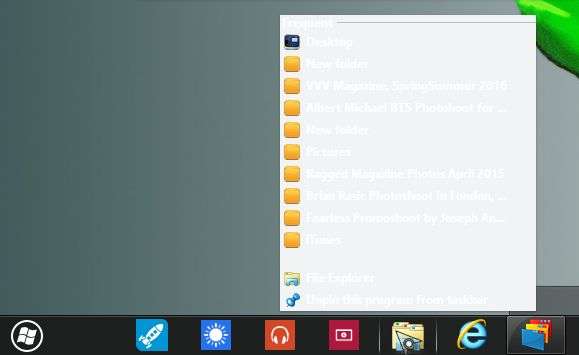
That is because it's a win10 skin. Will work on 7 and 8 but needs adjustments. If you can use SKS and a image program easy fix for this area. Go to edit startmernu/startmenu popup menus.  Go t the jump list top part. Edit that image and make it darker save the change and put it back in SKS. Apply skin

Reply #18 Top

Thanks Dave. What color is it supposed to be?

Reply #19 Top

Quoting ALMonty, reply 18

Thanks Dave. What color is it supposed to be?


On Windows 10 it is almost black ALMonty, try making it RGB color 32,32,32, that should look fine.  :)

Reply #20 Top

Both working fine here. Skins load faster now. Click, boo, done.  :thumbsup:

Reply #21 Top

Quoting Uvah, reply 20

Both working fine here. Skins load faster now. Click, boo, done.  :thumbsup:

EDIT: I forgot the'm'.  :P

Reply #22 Top

Thanks guys. I changed the color on the Ice skin to black and it worked, but for some strange reason the Eva skin also changed to black. I didn't even change that one. The Captain skin has a subskin for Win 8. I didn't see that.

Reply #23 Top

Quoting ALMonty, reply 22

Thanks guys. I changed the color on the Ice skin to black and it worked, but for some strange reason the Eva skin also changed to black. I didn't even change that one.

Most likely because they are both named the same and Eva picked up on the one you changed. Jump_list_top.png. May have to change the name of one of them. Ex: jump_list_top1.png. Unless if the color you changed one works fine leave the other alone if it works for you.

Reply #24 Top

Quoting ZubaZ, reply 15

Quoting RedneckDude,

Can we assume you're working on the start button mouseovers not working?

Can you describe the nature of the problem in more detail?  I am not familiar with it.


It is in the WB 10 beta support thread, as well as others.


The start button has no mouseover effect. Since the beginning of WB10 beta. Funny thing is, the mouseover effect works fine on the secondary screen, but that is when I use DisplayFusion.


Dunno if it's a Start10 issue, or WB10. But it's documented in the forums.

Reply #25 Top

Quoting RedneckDude, reply 24

The start button has no mouseover effect. Since the beginning of WB10 beta. Funny thing is, the mouseover effect works fine on the secondary screen, but that is when I use DisplayFusion.


Dunno if it's a Start10 issue, or WB10. But it's documented in the forums.

Jim did you just try it on one monitor and not have a second hooked up at all? I have no problems and others I know also have none. Don't use DisplayFusion either. Even Tim, 2of3 said it was fixed on reply 46 here. May be a two monitor thing and hope they fix it for you.