GC3 Modder's Guide


In a prior Developer Blog (https://forums.galciv3.com/461709/page/1/ ) I talked about all the cool stuff you can do in the Custom Race tool. We give you a bunch of images, traits, abilities and settings to create whatever race you want.

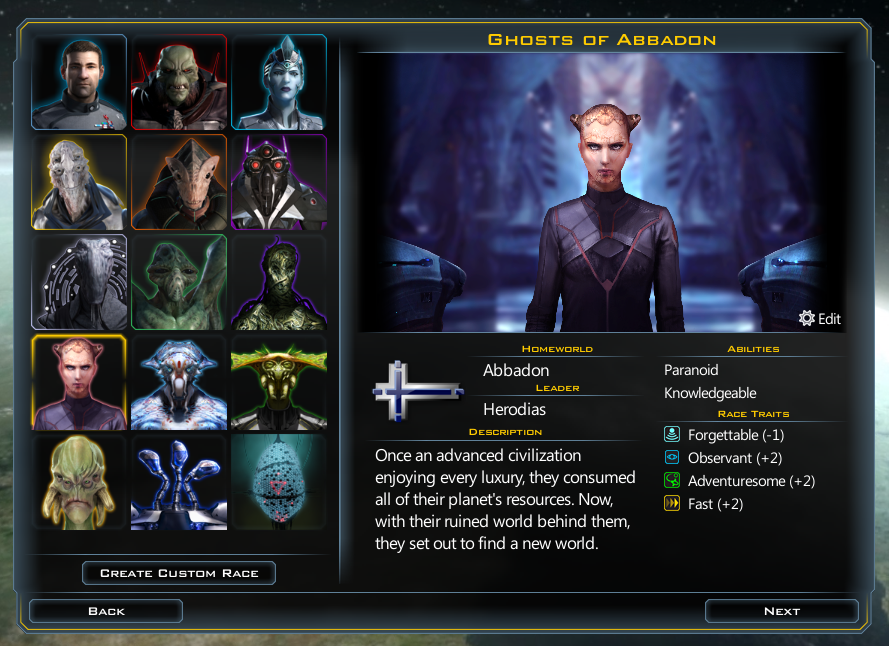
But, if you really want to make something unique you can go so much further. In this post I’ll talk about how modding works in Galactic Civilizations III and show you how I used it to make a new faction for the game, the Ghosts of Abbadon.

How does modding work?

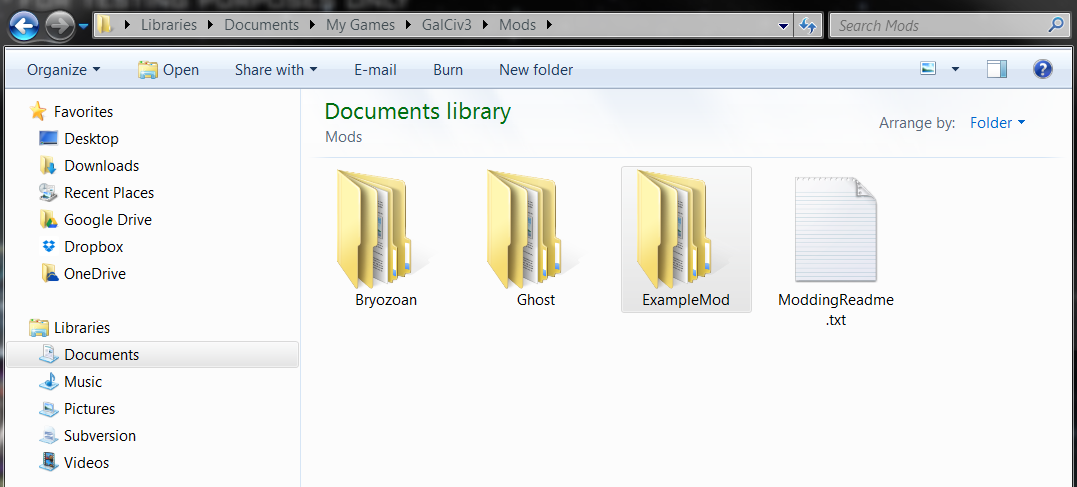
Mods are files placed in your My Games/GalCiv3/Mods/ directory. They can include graphic and XML files. You can have as many mods in here as you want, but keep them in their own directories (so if you want to remove one it’s easy to do). The plan is to get some Steam Workshop integration in here to help manage this at some point. But first we are getting the system working.

NOTE: We use a file structure to help with organization, but the game actually just searches all subdirectories when looking for files. So your files must have unique names (even if they aren' in the same directory).
At a high level there are three things you want to do when modding. You either want to add something, modify something or delete something.

  1. Adding things. This is the easiest, just create a new XML file, with a new name. It doesn’t matter what the name is, as long as it isn’t the same as an existing file. Personally I like using the same name that it uses in GC3, but I append the mod name to make sure it is unique. The only other thing that matter is that it is in the right directory. Faction Defs, Star System Defs and Planet Defs are all in the Game folder (because if you look at the XML in the GalCiv’s real directories those files are in the Game folder). You have to match GalCiv3’s file placement so that the modded files load correctly. Add a new file in here with just the new Faction, Star System, Planet, Tech, Improvement, Ideology Trait, etc (there are about 150 moddable xml files in GC3). Anything Paul can add to the game, you can add too.
  2. Modifying things. What if you want to increase the amount of credits the Iridium to start the game with? If you ever want to modify an existing object you just need to copy the file from the GC3 directories and modify what you like, but be sure to keep the name exactly the same. When the game starts if it sees a file with an identical name in your mod directory to one of the base files it uses your mod file instead. This gives you ultimate control over overwriting anything in the base game (without ever having to modify a base game file).
  3. Removing things. Since you can overwrite any of the existing XML files our deletion solution is built right in. If there is a particular global event that annoys you can copy that xml file into your mod directory, delete that event form your copy and voila, it’s gone.

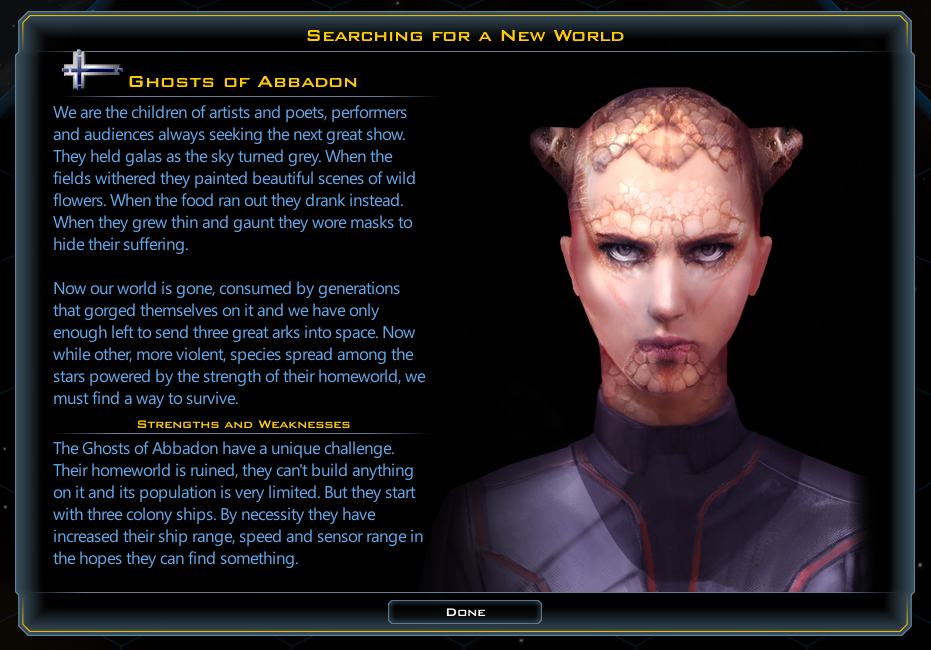
Now let’s use this power to create a new faction, the Ghosts of Abbadon. The Ghosts are unlike any other faction in GC3, and we want to be able to do more with them than the Custom Race tool normally allows. In this case they have ruined their homeworld and used the last of their resources to prepare 3 colony ships to go out and attempt to find a new home.

How do we do this?

1: Copy the FactionDefs.xml file into my new mods \My Games\GalCiv3\Ghost\Game\ directory.

2: Rename it from FactionDefs.xml to FactionDefs_Ghost.xml. (I don’t want to overwrite the existing factiondefs, I just want to add a new one).

3: Open up the file (I use Notepad++ for this) delete the other entries, except maybe one I am about to use as a template, and add the XML for my faction.
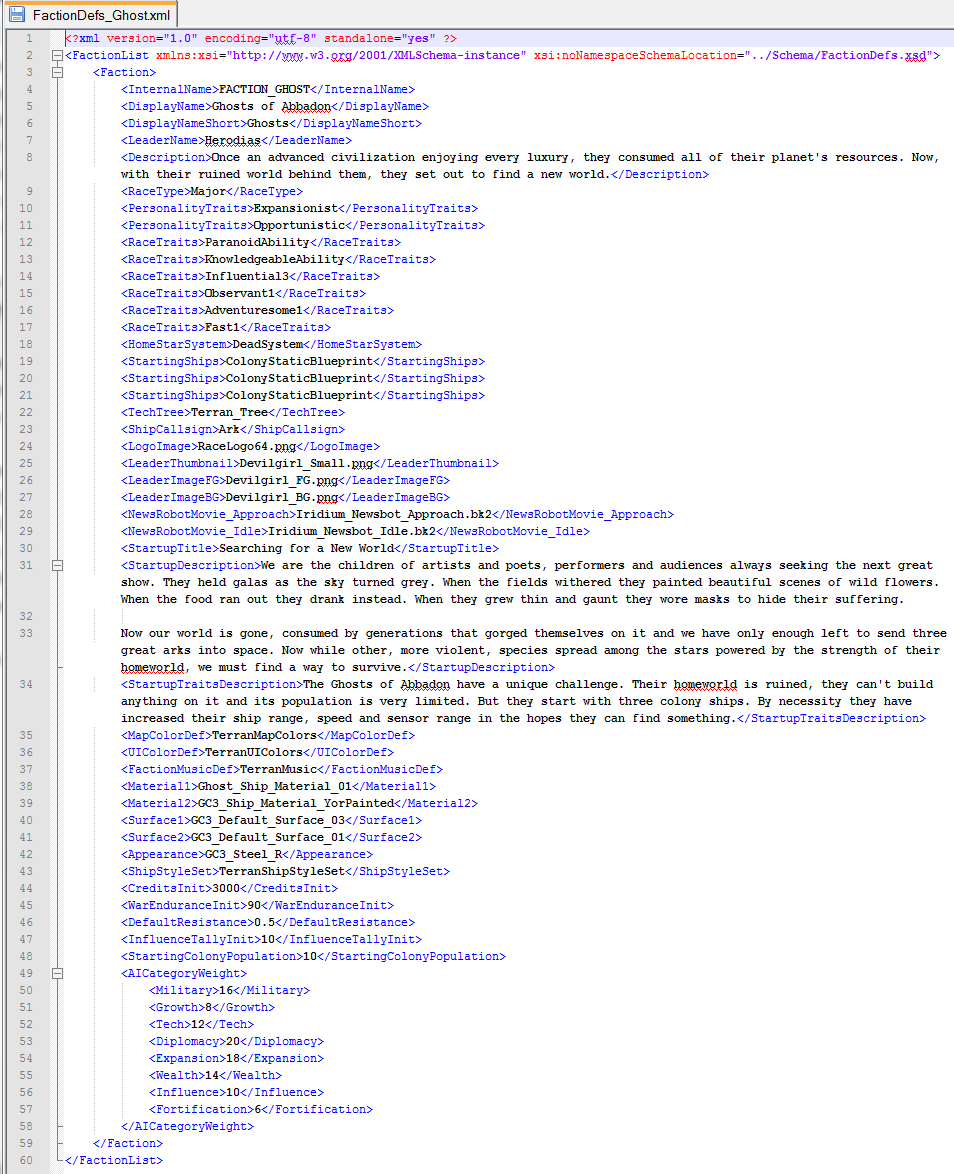
There are lots of things set here. But the important things here are that <HomeStarSystem> is set to “DeadSystem” where normal factions have a Colony, Scout and Survey ship in <StartingShips> they have 3 Colony ships instead. We could put anything we want in here, 12 Colony ships, a Battleship, a fleet of flying toasters, etc.

I played with a bunch of options with their starting ships. At first I gave them the extra colony ships in addition to the normal Survey and Scout. But when it was just Colony ships it made them feel a more desperate. They don’t have the luxury of having a scout out finding planets for them, or time spent collecting anomalies. When they choose to set out for a star it becomes a dramatic step, and when there is nothing there it is a tragedy of the time of a very valuable resource wasted. And when they find a worthwhile planet it is a huge joy. The hardest part is finding a mediocre planet, do they keep going, looking for something better, or settle?

I used the Terran definition for most of their art aspects, and I’m using one of the extra faction foregrounds and backgrounds that come with the game (“Devilgirl”) for the leader art. We could create our own versions of any of this. If you had a custom image you wanted to use for your faction you would just reference it here, I think Paul has one for his dog Maggie.

The only custom art I created for them is that I created a new material in <Material1>, Ghost_Ship_Material_01.
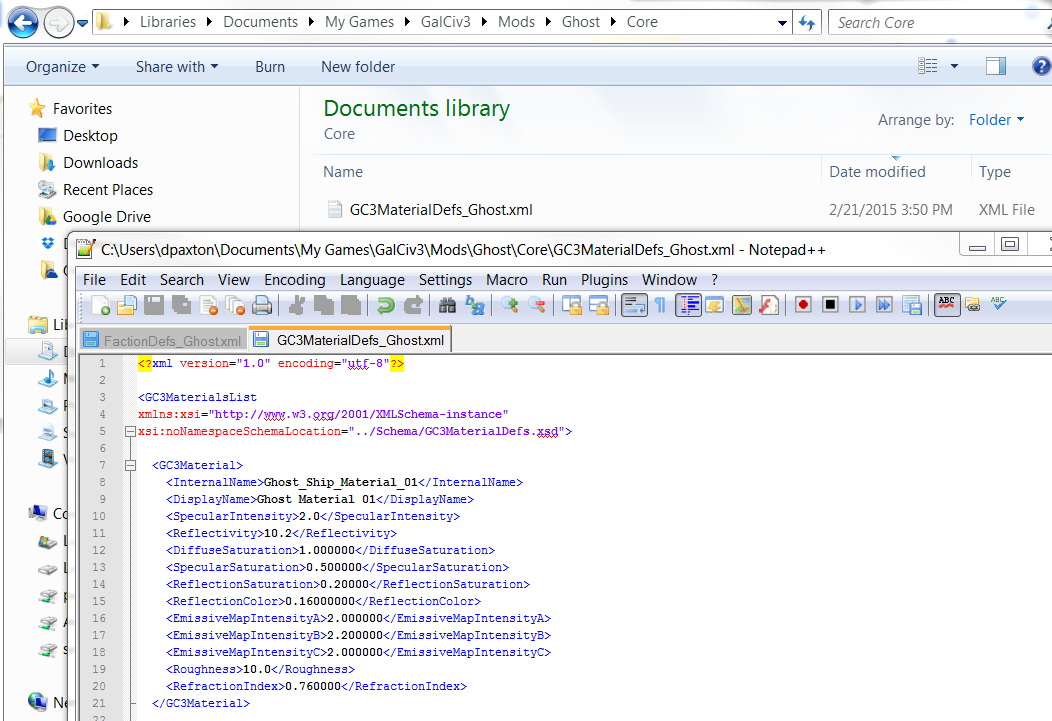
To do that I added a new file for my mod, this time in the \Mods\Ghost\Core\ directory. I’ve used it to define a new material that I can use to create ships. Materials aren’t colors (you will want to add appearances to modify ship colors). They define the way that light interacts with the surface of the object and I wanted to try some things out to make the ghost ships look unusual.

I really don’t know what I’m doing here. But I love having lots of levers available to tweak and play with. So I’m not asking any modder to understand what all these options mean. Instead do what I did, make a bunch of new materials with all sorts of values then load up the game and check them out. I’ve created new color schemes and materials, and I will add them to the base game to make it easy for non-modders to play with. But modders can go wild.

For this new material I bumped the Reflectivity to a crazy 10.2. That’s going to make my ship look like it is made from mirrors. It’s hard to appreciate in a still picture, but it looks pretty cool in motion.
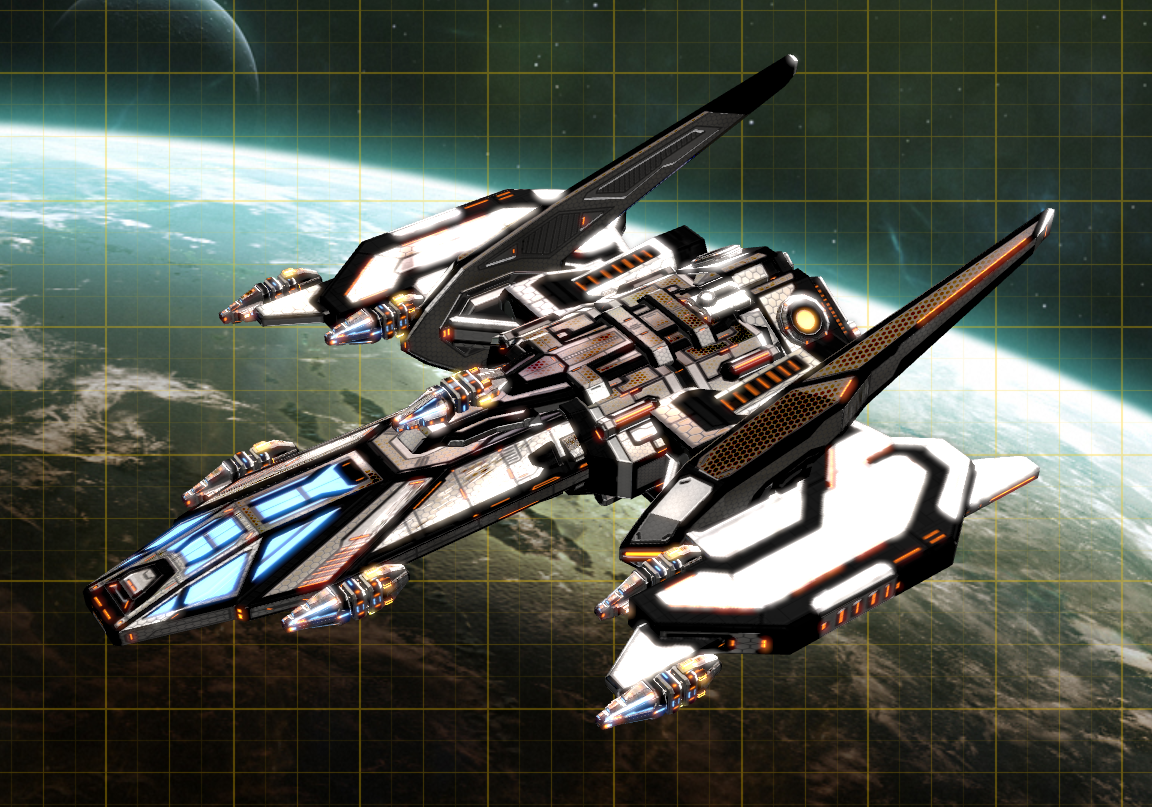
 

So I have some cool looking ships and a fun faction to play as. I’m going to go play some Galactic Civilizations III.
108,368 views 17 replies | Pinned
Reply #1 Top

Great tutorial but I'm having an issue getting the GameStartup custom image to work. The file is .png and placed correctly in my mod, my games folder and even in the core root folder. It only shows up as zoomed in image of my leader_FG image. Any thoughts?

<LogoImage>RaceLogo_Cylon.png</LogoImage>
<LeaderThumbnail>GC3_Cylon_Small.png</LeaderThumbnail>
<LeaderImageFG>CylonCommander.dds</LeaderImageFG>
<LeaderImageBG>Terran_BG.dds</LeaderImageBG>
<NewsRobotMovie_Approach>Yor_NewsBot_Idle.bk2</NewsRobotMovie_Approach>
<NewsRobotMovie_Idle>Yor_NewsBot_Idle.bk2</NewsRobotMovie_Idle>
<StartupImage>StartGameCylon.png</StartupImage>

Reply #2 Top

An excellent tutorial, however, I have been running into the same issue that Hostile1972 has regarding the lines for <LeaderImageFG> and <LeaderImageBG>. I have tried mutiple things including put the image files into the mod folder, however, it will continue to crash loading on those two particular items. 

Has anyone been able to get the <LeaderImageFG> and <LeaderImageBG> lines to be functional?

Reply #3 Top

Thats how i did it and it works.

        <LogoImage>GhostLogo128.png</LogoImage>
        <LeaderThumbnail>Arnor1080.png</LeaderThumbnail>
        <LeaderImageFG>Arnor2_FG.png</LeaderImageFG>
        <LeaderImageBG>Iconian_BG.png</LeaderImageBG>
        <NewsRobotMovie_Approach>Terran_ResearchAdviser_Approach.bk2</NewsRobotMovie_Approach>
        <NewsRobotMovie_Idle>Terran_ResearchAdviser_Idle.bk2</NewsRobotMovie_Idle>
        <StartupImage>StartGameTerran.png</StartupImage>

As far as I see Hostile is using dds files. Use png files instead. Place the respective png files (if you want to use customized pictures) to Documents->My Games->GalCiv3->Mods->"your modfolder"->Gfx->Factions->LeaderBGs and LeaderFGs

That should work

Reply #4 Top

Has anyone been able to get the <LeaderImageFG> and <LeaderImageBG> lines to be functional?


Few months late but........Still relevant.


To use custom LeaderBG's and LeaderFG's you need to remove the two lines referencing the movie files, for example:-


        <FactionMoviesFGDef>TerranMoviesFG</FactionMoviesFGDef>
        <FactionMoviesBGDef>TerranMoviesBG</FactionMoviesBGDef>

Reply #5 Top

Hey Derek, there's a bit of a problem overriding certain XML files. For example, if you want to override MapSetupDefs.xml then it has to go in Mods/data/Game rather than in Mods/ModFolder/Game - at least, that's what I've observed.

Reply #6 Top

Quoting MarvinKosh, reply 5

Hey Derek, there's a bit of a problem overriding certain XML files. For example, if you want to override MapSetupDefs.xml then it has to go in Mods/data/Game rather than in Mods/ModFolder/Game - at least, that's what I've observed.

Nope I edited that file alot in my GST mod and it is in Mods/ModFolder/Game and works perfectly.

Reply #7 Top

Sooooooooo, i've tried everything. I've sacvenged the internet in search for images i could use. Found one (luckly), but when i tried using it, it still doesnt show up. i've looked in the Steam forums, and noticed a problem. tried to solve it, but there's no use, the image still doesnt show up when i try to start a new game. 

Apparently, the leader front images should be 1920x1080. The Logos and Portraits should be 128x128. I've downloaded a software to solve this problem and managed to make an image for my LeaderFG with 1920x1080; Logo and Portrait to 128x128. the images still don't show up. The codes are ok, just as above, and my images are in a C:Douments/My Games/GalCiv3/Mods/Tritonia/Gfx/Factions/(LeaderFG/Portraits/Logos) directory. Is there something wrong?

The Background is working OK, though.

I'ts my first time modding, so if anyone could help me.

Edit: Oh, and every image is in .png, so i'm not sure what is wrong that just Background is working fine. 

Reply #8 Top

Trying to create a new planet surface - what format and/or compression is GC3 looking for?


NM, trial and error, looks like it's standard gaming format BC2/DXT3 compression for anyone else looking for this info.

Reply #9 Top

     This is a good start and was fairly helpful.  Now, can you take things a step further?   FactionDefs.xml is a great start; but it seems it's just the tip of the iceberg (so to speak).  I'd like to see you go on to show examples of how to (properly) modify PlanetDefs.xml, StarDefs.xml and StarSystemDefs.xml and discuss (in detail) how they all relate to one another.

     In addition, you didn't appear to use any of the TEXT files, such as FactionText.xml, PlanetText.xml and StarSystemText.xml.   Shouldn't one be using those to set things up properly?

     One of the reasons I'm asking is due to the fact that I've tried doing so myself and have encountered "errors" that I don't fully understand:

Debug Message:  C:\Users\... ...\Mods\KoTMod\Game\StarSystemDefs_KoT.xml(24,19): error: no declaration found for element 'LaneType'

Debug Message:  C:\Users\... ...\Mods\KoTMod\Game\StarSystemDefs_KoT.xml(25,15): error: no declaration found for element 'Body'

Debug Message:  C:\Users\... ...\Mods\KoTMod\Game\StarSystemDefs_KoT.xml(31,15): error: no declaration found for element 'Body'

Debug Message:  C:\Users\... ...\Mods\KoTMod\Game\StarSystemDefs_KoT.xml(35,9): error: expected end of tag 'StarSystem'

AND this is how that file looks:

<?xml version="1.0" encoding="utf-8" standalone="yes" ?>
<StarSystemList
xmlns:xsi="http://www.w3.org/2001/XMLSchema-instance"
xsi:noNamespaceSchemaLocation="../Schema/StarSystemDefs.xsd">
<!-- Created with the Gal Civ 3 Editor -->
<!-- StarSystemDefs.xml -->
 
  <!-- System Group -->
 
  <StarSystemGroup>
    <InternalName>FactionStart</InternalName>
 
    <StarSystem>
      <InternalName>KoTSystem</InternalName>
      <DisplayName>KoTSystem_Name</DisplayName>
      <Description>KoTSystem_Dec</Description>
      <OrbitLane>
        <LaneType>Star</LaneType>
        <Body>
          <BodyType>UnaryStar</BodyType>
          <BodyDef>KoTStar</BodyDef>
        </Body>
      </OrbitLane>
        <LaneType>HabitableZone</LaneType>
        <Body>
          <BodyType>Planet</BodyType>
          <BodyDef>PlanetKoT_1</BodyDef>
          <IsHomeworld>true</IsHomeworld>
          <Position>5</Position>
        </Body>
        <Body>
          <BodyType>Planet</BodyType>
          <BodyDef>PlanetKoT_2</BodyDef>
        </Body>
      </OrbitLane>
      <OrbitLane>
        <LaneType>NoRandom</LaneType>
        <Body>
          <BodyType>Asteroid</BodyType>
          <BodyDef>NormalAsteroid</BodyDef>
          <Position>0</Position>
        </Body>
      </OrbitLane>
    </StarSystem>
 
 
 </StarSystemGroup>
 
</StarSystemList>

So, what do I need to do to eliminate those errors and get this to work?


SK


Reply #10 Top

Quoting Stohrm, reply 9

In addition, you didn't appear to use any of the TEXT files, such as FactionText.xml, PlanetText.xml and StarSystemText.xml. Shouldn't one be using those to set things up properly?
In the game folders the structure is:

<YourCrusadeDLCFolder>/<YourInstallLanguageFolder>/Text

That's where you find the text files.

Quoting Stohrm, reply 9

Debug Message: C:\Users\... ...\Mods\KoTMod\Game\StarSystemDefs_KoT.xml(24,19): error: no declaration found for element 'LaneType'
Ok let's take it appart:

C:\Users\... ...\Mods\KoTMod\Game\StarSystemDefs_KoT.xml(24,19):

The error occured in your modded xml at line 24, column 19. I marked it for you:

<BodyDef>KoTStar</BodyDef>
        </Body>
      </OrbitLane>
        <LaneType>[ERROR]HabitableZone</LaneType>
        <Body>
          <BodyType>Planet</BodyType>
          <BodyDef>PlanetKoT_1</BodyDef>

error: no declaration found for element 'LaneType'

It just read the LaneType tag and for some reason this does not seem to be allowed at this point.

The Problem, is that you forgot to open the OrbitLane tag before it, thus you were not in an environment where LaneType was allowed.

<BodyDef>KoTStar</BodyDef>
        </Body>
      </OrbitLane>
      <OrbitLane>
        <LaneType>HabitableZone</LaneType>
        <Body>
          <BodyType>Planet</BodyType>
          <BodyDef>PlanetKoT_1</BodyDef>

Doing it like this the game starts without errors for me.

Reply #11 Top

Thanks.

Unfortunately, after making that change I still received the same error; until I went into steam and re-verified the files.  Then I received the following upon trying to launch the game:

An error occurred while updating Galactic Civilizations III (content file locked):

C:\Program Files (x86)\Steam\steamapps\common\Galactic Civilizations III\Tools\Crusade_CampaignCompilerMod.bat

So, I rebooted my PC and re-validated the files one more time.  The game launches okay now; but the new faction is not showing up (in spite of mods being enabled).

Any suggestions?


Plus, I have one other question about the TEXT files; as, yes, I had found them where you mentioned but I have placed the added TEXT xml's in the KoTMod\TEXT directory.  Should I have set up an English directory instead?

For the time being, I've placed them in both. 

SK

Reply #12 Top

Can't really give too many answers on this, I haven't played around with adding races that way.

You could try to take a look at Gauntlets race mod or Horemvores Star Trek mod. From what I know they added races extensively, so you may be able to deduce something from their mods.

With a bit of luck they can also answer your questions.

Reply #13 Top

Quoting Stohrm, reply 11

Plus, I have one other question about the TEXT files; as, yes, I had found them where you mentioned but I have placed the added TEXT xml's in the KoTMod\TEXT directory. Should I have set up an English directory instead?

The text folder is correct. The English folder is just in the main filestructure of the game. If you use the structure of the ExampleMod folder, you will be just fine. Make sure, you use the correct ModFolder. It's; documents\mygames\GC3Crusade\Mods if you use crusade. It's a different folder than in the basic game.

Quoting zuPloed, reply 12

You could try to take a look at Gauntlets race mod or Horemvores Star Trek mod.

That would be my suggestion too. You can check their files and filestructure to see wat's missing. Both guys know what they do and are realy helpfull. You can find their Mods on Nexus.

Reply #14 Top

It's as if the game is simply no longer accepting any changes.  I even tried to change the Global Definitions so that one could have 11 trait points and 7 Abilities; but that change is not showing up.  I tried it first in the mod directory with a modified full copy of the GalCiv3GlobalDefs.xml and that didn't work.  So I even changed that file in both the EXP2_Crusade/Game directory and the  data/Game directory.  The changes do not show.

Is there a file I should delete so that it gets recreated; as it appears that things are simply not being recompiled/integrated?

SK

PS. I tried adding the Ghost mod too; but even it failed to show up. 

PPS.  I, once again, had to go in and re-validate the files; 26 files failed.  I also moved the GhostMod and my KoTMod out of the Mod Directory (prior to that) for now.  I've re-launched the game and now have the 11 and 7 points available (via the ExampleMod).

So, it would appear that with each Mod attempt I will need to re-validate the initial files.  Weird; but apparently true.

Reply #15 Top

are mods still enabled in your options?

Reply #16 Top

Is there a trick to modding new improvements for the Torians (including custom aquatic races)?  A user of my Expanded Cities mod pointed out that it doesn't work for the Torians, in that the improvements added by the mod don't show up in the tech tree.  The Settlement improvement works for all other race types, but not aquatic.  The prereq and preclusion section is coded identically to Crusade's City improvement:

    <Prerequ>
      <Techs>
        <Option>PlanetaryImprovement</Option>
        <Option>TorianPlanetaryImprovement</Option>
      </Techs>
    </Prerequ>
    <Preclusions>
      <RaceTrait>
        <Option>SyntheticLife</Option>
        <Option>SiliconBasedLife</Option>
      </RaceTrait>
    </Preclusions>

Yet despite the presence of the TorianPlanetaryImprovement option, it is not available to a Torian player.

Any suggestions appreciated.

Edit: Upon further review it appears that none of my mods are working on 2.7.  The option to enable mods is on.  So something else is fundamentally wrong.

Reply #17 Top

Whoopsie this ill documented xml vocabulary. Thanks for the tip

<HomeStarSystem>DeadSystem</HomeStarSystem>// Not SolSystem, DrengiSystem, etc.


Trying to invent an evolved nomadic species, spacebourne, silicon. Postulate possible asteroidal origin. NO 'homeworld'. Examining the local galciv xml's it appears that with no home world to conquer this species could not be militarily defeated ?!?!?! NOT looking for griefing.