JcRabbit JcRabbit

Winstep Nexus Dock v15.9 Released!

Winstep Nexus Dock v15.9 Released!


Windows 10 Ready The Winstep Nexus dock is a FREE dock for Windows. Every feature you’d expect from a dock, including widgets, mouse-over effects, skins, drag-and-drop, and many others not available in most other docks, such as live icon reflections, in-dock system tray, blur-behind effects, and much more. Completely customizable, with thousands of different backgrounds freely available online, Nexus is fully compatible with skins for all 3rd party docks.

Supported Languages: Bulgarian, Catalan, Chinese (Traditional), Chinese (Simplified), Croatian, Czech, Dutch, English, Farsi (Persian), Finnish, French, German, Hungarian, Indonesian, Italian, Japanese, Korean, Norwegian, Polish, Portuguese, Portuguese (Brasil), Russian, Serbian, Slovak, Spanish, Swedish.

Nexus runs on the 32 and 64 bit versions of Windows 2000, XP, 2003, Vista, 7, 8.x and Windows 10.

v15.9 is a monster release, with hundreds of changes and additions. Focus was on adding missing key functionality as well as, of course, some new eye-candy.

What's New? Highlighted Features:


    • Speed! Due to new and improved activation and hide delay timings, Nexus simply feels a lot more responsive. Rendering performance when shifting icons in a fully expanded Shelf to make room for a new shortcut is now also an order of magnitude faster (Nexus Ultimate only).


    • Improved Windows 10 integration.
    • Now fully high-DPI aware. Throw anything at it from 100% to 200% scaling and everything will still work and look as it should. New settings added to control the scaling of menus and the Shelf on high DPI systems.
    • Added support for systems with multiple input languages: new 'Language Bar' internal command can be placed anywhere and emulates the functionality of the Windows language bar.


    • New optional Edge Swipe activation mechanism.
    • Shortcuts in the dock now double up as running application icons, so there is no duplication of icons when running applications are being displayed in the dock.


    • Shelf now smoothly resizes when double clicking a tab header to fully expand the Shelf in order to show all the contents of that tab at once (Nexus Ultimate only).
    • Weather module now automatically retrieves the user's location when running for the first time. Also added new 'Get My Location' button in the Weather settings panel.


    • New Smoke mouseover/launch/attention effect. Not too intrusive and makes the dock look like it's on fire! My new personal favorite when combined with the magnify effect.


    • Added support for RKLauncher dock skins.
    • New option to colorize themes based on the dominant color of the current desktop background.


    • Explosion animation shown when an item is deleted or removed is now user-customizable.
    • New optional Windows 10 style for some UI elements, specifically designed so the application blends in with the new Windows version. Automatically enabled on Windows 10 systems.


    • Added new 'Action Center' internal command (Windows 10 only).
    • Clicking the clock module now shows the Windows calendar instead of the Regional Settings dialog (Windows 7 onwards).
    • Font size in the User Interface is now automatically decreased when a non-English language is selected to better accomodate the (usually) longer translations.
    • ... many other performance and stability improvements!


More Information:

Winstep Web Site:
http://www.winstep.net

More information about Winstep Xtreme:
http://www.winstep.net/xtreme.asp

More information about the Winstep Nexus dock:
http://www.winstep.net/nexus.asp


350,830 views 160 replies
Reply #101 Top

Once you've listened to the wonderful surprise I setup for you whenever I was bored and your hate for me is at the highest point, I suggest you start by loading an existing theme. You can do this by selecting File -> Open Theme.

Don't forget only the panels under the 'Dock' root will have anything.

If, in the Open Theme dialog, you change 'Winstep Xtreme (All)' to 'Nexus', only Nexus themes will be shown (native and 3rd party). When you press Ok in that dialog only the Dock nodes will be visible then, so this will make it easier for you guys if you actually want to change an existing Nexus theme. The other nodes are only there at this point for you to get a feeling for how it will work.

Don't forget to fill the Settings under the Theme Builder node with the paths to your favorite image and icon editors, etc...

Reply #103 Top

Ah, yes, but did you try it already? lol

Reply #104 Top

No. I hate you already though...... :D

Reply #105 Top

}:)  He he......I are grabbin' it up...... :cylon:

On top? = stupid question. Lol

Reply #106 Top

I have the theme builder open and something strange happened. I was viewing the different settings and just out of curiosity I clicked on preview. The dock changed to a light grey, tiled it looked like, and it also changed the clock to a kind of stop watch. I clicked restore and they went back to normal.

What are the dimensions...height, width, etc for endcaps and body.

Reply #107 Top

I just get a white screen on the right pane when selecting sections of each category 

Reply #108 Top

You get those white, blank, screens because this build is an Alpha and those sections are not ready yet. What is ready is the section for the Nexus dock, albeit limited. Again, this is a pre-Beta build and everything could change at any time. Its basically for testing.

Reply #110 Top

Not even for testing yet... for playing, this is more like a demo.

And talking about playing... have you already tried clicking on the water when in the About screen?  And you can click and drag too.

Anyway, play a little more so I can pick your brains later on muaaahahahhahhaha }:)

P.S. regarding the dimensions of the endcaps and body: there isn't one, that's the point. The bitmaps can be as small or as large as you want, they will then be automatically stretched (or squished) to fit.


Reply #111 Top

Stretched/squished endcaps aren't gonna look very good.  This is an area that I usually have the most problems with in creating.

Reply #112 Top

Background skinning mode doesn't need (or use) endcaps, so we're talking about making a dock based on individual tiles here (i.e.; a single tile bitmap).

That same body tile bitmap is also going to be stretched/squished as needed, depending on icon size, icon reflection size, etc..., so any endcaps tiles will end-up going to the same process as the main tile itself, which makes it ok. It's like if they were holding invisible icons (assuming we are talking about *extended* endcaps here, of course).

Also, endcaps have their own non-stretchable sections. Just tell the software not to stretch horizontally the first or last half of the endcap bitmap.

Too see how endcaps work (both in the main body and in overlays) I suggest you load the Nexus Nx-WaterBath theme.

Something else that might help for this:

The Theme Builder uses a 'temp scrap' folder named '$ThemeBuilder.~TM' inside the normal Themes folder. Whenever you load a theme into it it copies bitmaps and configuration files into this temp folder. When you drop image files into the picture boxes in the UI, it copies those images into this folder too, renaming them appropriately in the process.

Only when you actually 'Save' a theme using the File menu does it go into its own folder.

Reply #114 Top

Ok, let me know when you've used it a little bit and give me your first impressions (yes, even about that About screen, and feel free to be brutally honest lol), so I can start asking some questions.

For instance, the Edit button will allow you to open the image in your pre-selected image editor, but it will open the copy saved to $ThemeBuilder.~TM (and I haven't implemented a way to refresh the bitmap you see in the Builder yet, but I will), not the original image you dropped into the picture box. So, the question is, which of the images should the Edit button send to the Image Editor? The original or the copy in $ThemeBuilder.~TM ?

Although editing the original source image might make more sense, that would open a can of worms. It's easier for me if, once the image has been dropped, if all remaining work is done in bitmaps inside the $ThemeBuilder.~TM folder. On the other hand, if you're using .PSD files to generate those images, editing the resulting PNG image is useless (but might be handy otherwise).

There are other questions I would like to make regarding a possible Undo feature, but, as I said, I'll wait for your initial feedback first.

Reply #115 Top

If the .psd's are finished, meaning the ones to be used by Theme Builder, there will be no need to edit them......right? Also...I was thinking about the number boxes. Are those the values used by Theme Builder or do you edit them?

Reply #116 Top

I was speaking of endcaps like on the NextStart start menu. Not docks. I'll send some feedback, Jorge, once I get the chance to run the alpha.


Been really busy of late, and haven't skun much.  Losing the urge to skin.

Reply #117 Top

.....................................................................................................................................................................................:waaaa:

I'll help you look for it. 

Reply #118 Top

Quoting RedneckDude, reply 116
I was speaking of endcaps like on the NextStart start menu. Not docks.

Those do not get stretched except horizontally, since menu endcaps (and titlebars) are fixed height. And even then you can set the menu to be fixed width (even though you shouldn't).

Reply #119 Top

Then on the docks you can set them to stretch either horizontally or vertically depending on where you put them. Nice!

Reply #120 Top

Quoting JcRabbit, reply 118

Quoting RedneckDude,
I was speaking of endcaps like on the NextStart start menu. Not docks.


Those do not get stretched except horizontally, since menu endcaps (and titlebars) are fixed height. And even then you can set the menu to be fixed width (even though you shouldn't).

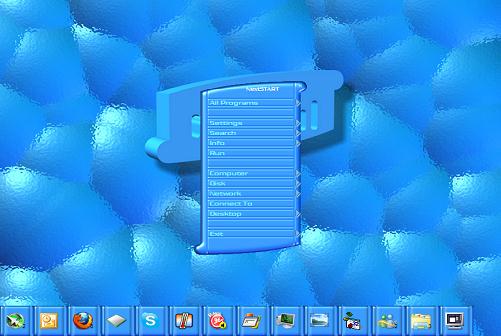
I have the hardest time with the NextStart menu. I want to make them sometimes where the top and bottom (endcaps, are wider than the main menu (buttons). Never can do it, tho I see others do. Mine always seem to have to be straight, rectangular, I can't get any other shape to work. Even tried adding transparency to the button ends, still no go.

Sorry, this should be in another thread, probably in the Winstep forums.  O:)

Reply #121 Top

Quoting RedneckDude, reply 120
I have the hardest time with the NextStart menu. I want to make them sometimes where the top and bottom (endcaps, are wider than the main menu (buttons). Never can do it, tho I see others do. Mine always seem to have to be straight, rectangular, I can't get any other shape to work. Even tried adding transparency to the button ends, still no go.

Adding transparency to the button ends is the way to go. You have to think out of the box, it's not the endcaps that are wider, it's the *menu buttons* that are narrower!

So, imagine you want to make a menu endcap 200 pixels wide, but the menu buttons are only supposed to be 150 pixels wide. You make the actual bitmaps for the menu buttons and endcaps have the same width (i.e.; 200 pixels) but, for the menu buttons, the first and last 25 pixels (25+150+25 = 200)  are completely transparent.

Now, imagine the first and last 8 pixels of the endcap and menu buttons are NOT to be horizontally stretched. For the endcaps you define the Left and Right sections as 8 pixels, for the menu buttons you define the Left and Right sections as 33 pixels (the 25 transparent pixels + 8 pixels margin). You then add 25 pixels to all the horizontal offsets for the menu button text, icons, etc, to make up for those 25 transparent pixels.

Simple, eh? ;-)

Reply #122 Top

Quoting JcRabbit, reply 121

Simple, eh?

o_O  

Reply #123 Top

Quoting JcRabbit, reply 121

Simple, eh?

Yeah, clear as mud.


Copied to a notepad for future use, or at least my alibi for my temporary insanity, in the murder case after I kill you...... o_O

Reply #125 Top

Seriously? lol

Look:

See? Menu endcap and titlebar are (apparently) wider than the menu buttons. But the actual bitmaps are not, they are all 180 pixel wide.

Get them all together and you get something like this:

Clear as mud! Skinning 101! Tsk tsk. >:(