Cannot find Skinning item in SS 8.0

Hi Guys,


Can someone please help me find where it is in skin studio where i can change the color of the menu on the left hand side in an explorer window in win7?
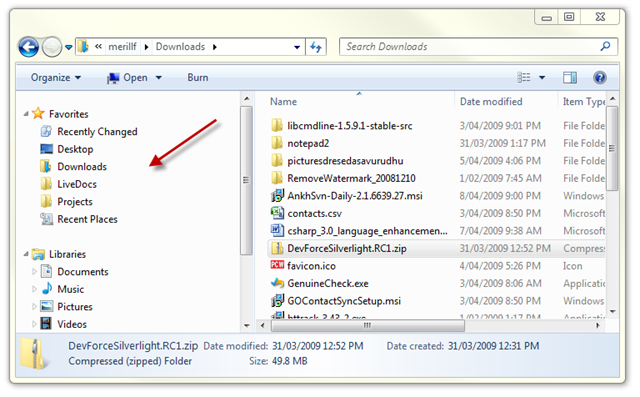
 

The background where the red arrow is.


Many thanks in advance.


JPB05.


11,461 views 20 replies
Reply #1 Top

I think it may be known as the folder tree??..

Reply #2 Top

That is found in Theme Part Details, Command Bars, Folders Bar. Just add a 20 x 20 pixel .bmp image there, then go to the Extra Settings area in Folders bar and set the color there to to be the exact same color as what is in your image.  :)

Reply #3 Top

Hmmm, the "selection image" skins that, no ? o_O

Reply #4 Top

Quoting neone6, reply 3

Hmmm, the "selection image" skins that, no ? o_O


Not that I know of Andy. Where is this selection image at?

Reply #5 Top

create a solid graphic for the "favorite links background" within the "edit vista/7 explorer parts. Probably the same graphic that Tom's mentioned but a different location??

Selection image is on the same page down towards the bottom, but doesn't work for this.

Reply #6 Top

Cheers Guys,


Thats got it!!


many thnaks

Reply #7 Top

Quoting gmc2, reply 5

create a solid graphic for the "favorite links background" within the "edit vista/7 explorer parts. Probably the same graphic that Tom's mentioned but a different location??

Selection image is on the same page down towards the bottom, but doesn't work for this.


Are you using SKS 7 or 8?

Reply #8 Top

Quoting JPB05, reply 6

Cheers Guys,


Thats got it!!


many thnaks


Glad you got it, but which recomendation got it?  o_O

Reply #9 Top

Quoting LightStar, reply 7

Are you using SKS 7 or 8?

SKS7


Reply #10 Top

Quoting gmc2, reply 9


Quoting LightStar,

Are you using SKS 7 or 8?


SKS7


He is using SKS 8 GMC.  ;)

Reply #11 Top

Is it also possible to do the background on the right side as well? the main section background.


JPB05

Reply #12 Top

I'm using SKS v8.0.


Creating a 20px x 20px image and importing it as the folder bar image, and changing the the color in the extra settings tab did the trick perfectly.


Is it possible to change the color of the background on the right also?


JPB05

Reply #13 Top

well, just kidding. there is in 7 so I'd imaging it may still be with 8, but I don't know.

Reply #14 Top

Quoting JPB05, reply 12

I'm using SKS v8.0.


Creating a 20px x 20px image and importing it as the folder bar image, and changing the the color in the extra settings tab did the trick perfectly.


Is it possible to change the color of the background on the right also?


JPB05


Yes, just use that same image in the Backgrounds, Edit Explorer Background Bitmaps, Explorer Backgrounds and Sorted Columns areas. I just apply the Active and Inactive window images, I don't bother with the (Glass) ones.


Just so you know though, this will not change the color of the background in the Preview Pane area in explorer, it cannot be changed and will always be white.

Reply #15 Top

Ok, I seem 2 skin this differently...hmmm :cylon:

Reply #16 Top


this is how ! :cylon:

Reply #17 Top

I think the selection image is used in several places. It's a general/generic mouseover graphic.

Reply #18 Top

Quoting neone6, reply 16


Reduced 31%
Original 1920 x 1080


this is how ! :cylon:

I don't know andrew looks like you skin it the way Tom said and the way I do it.

Reply #19 Top

ok :grin:

Reply #20 Top

how quickly you forget. :grin:
