
DerekPaxton DerekPaxton

Galactic Civilizations III - Modding

Galactic Civilizations III - Modding


In a prior Developer Blog (https://forums.galciv3.com/461709/page/1/ ) I talked about all the cool stuff you can do in the Custom Race tool. We give you a bunch of images, traits, abilities and settings to create whatever race you want.

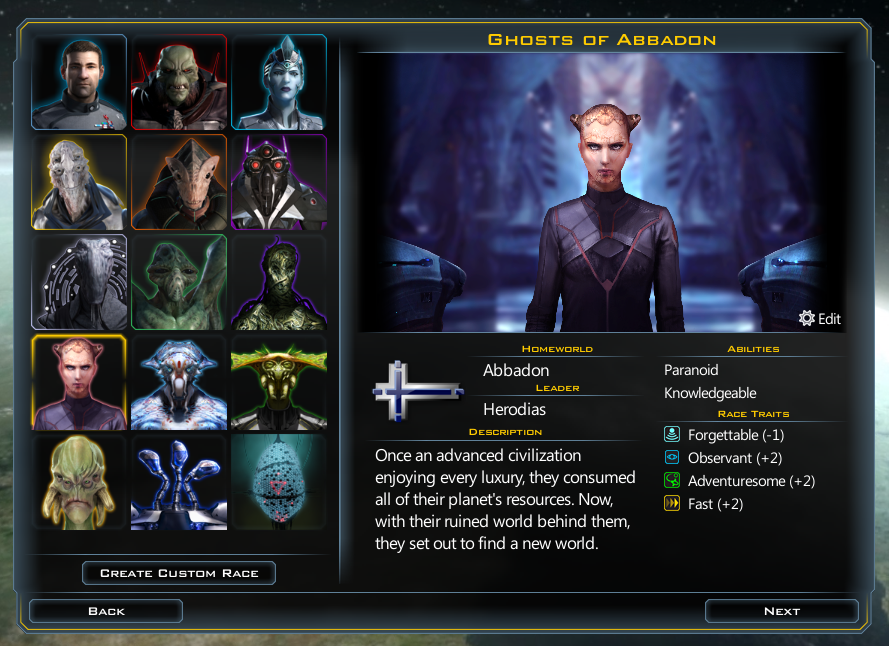
But, if you really want to make something unique you can go so much further. In this post I’ll talk about how modding works in Galactic Civilizations III and show you how I used it to make a new faction for the game, the Ghosts of Abbadon.

How does modding work?

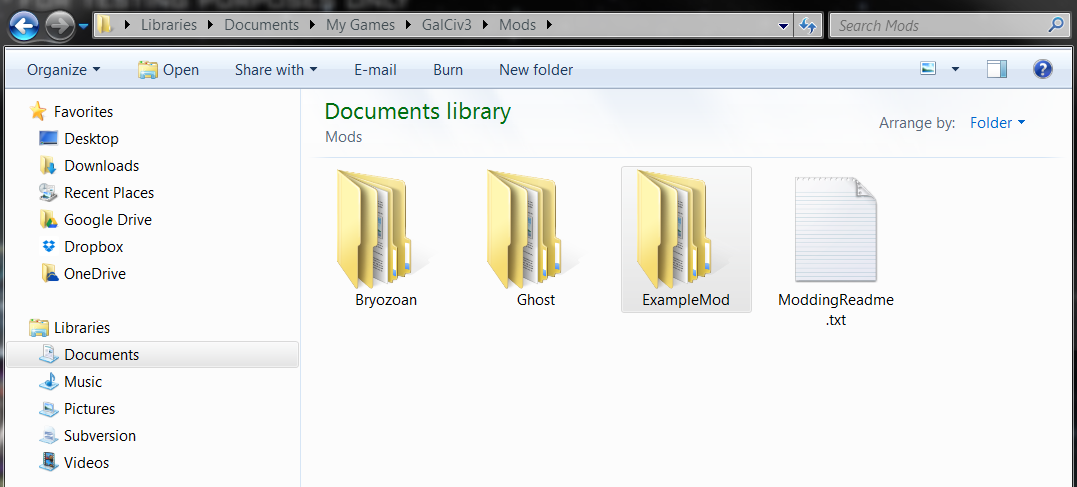
Mods are files placed in your My Games/GalCiv3/Mods/ directory. They can include graphic and XML files. You can have as many mods in here as you want, but keep them in their own directories (so if you want to remove one it’s easy to do). The plan is to get some Steam Workshop integration in here to help manage this at some point. But first we are getting the system working.

NOTE: We use a file structure to help with organization, but the game actually just searches all subdirectories when looking for files. So your files must have unique names (even if they aren' in the same directory).
At a high level there are three things you want to do when modding. You either want to add something, modify something or delete something.

  1. Adding things. This is the easiest, just create a new XML file, with a new name. It doesn’t matter what the name is, as long as it isn’t the same as an existing file. Personally I like using the same name that it uses in GC3, but I append the mod name to make sure it is unique. The only other thing that matter is that it is in the right directory. Faction Defs, Star System Defs and Planet Defs are all in the Game folder (because if you look at the XML in the GalCiv’s real directories those files are in the Game folder). You have to match GalCiv3’s file placement so that the modded files load correctly. Add a new file in here with just the new Faction, Star System, Planet, Tech, Improvement, Ideology Trait, etc (there are about 150 moddable xml files in GC3). Anything Paul can add to the game, you can add too.
  2. Modifying things. What if you want to increase the amount of credits the Iridium to start the game with? If you ever want to modify an existing object you just need to copy the file from the GC3 directories and modify what you like, but be sure to keep the name exactly the same. When the game starts if it sees a file with an identical name in your mod directory to one of the base files it uses your mod file instead. This gives you ultimate control over overwriting anything in the base game (without ever having to modify a base game file).
  3. Removing things. Since you can overwrite any of the existing XML files our deletion solution is built right in. If there is a particular global event that annoys you can copy that xml file into your mod directory, delete that event form your copy and voila, it’s gone.

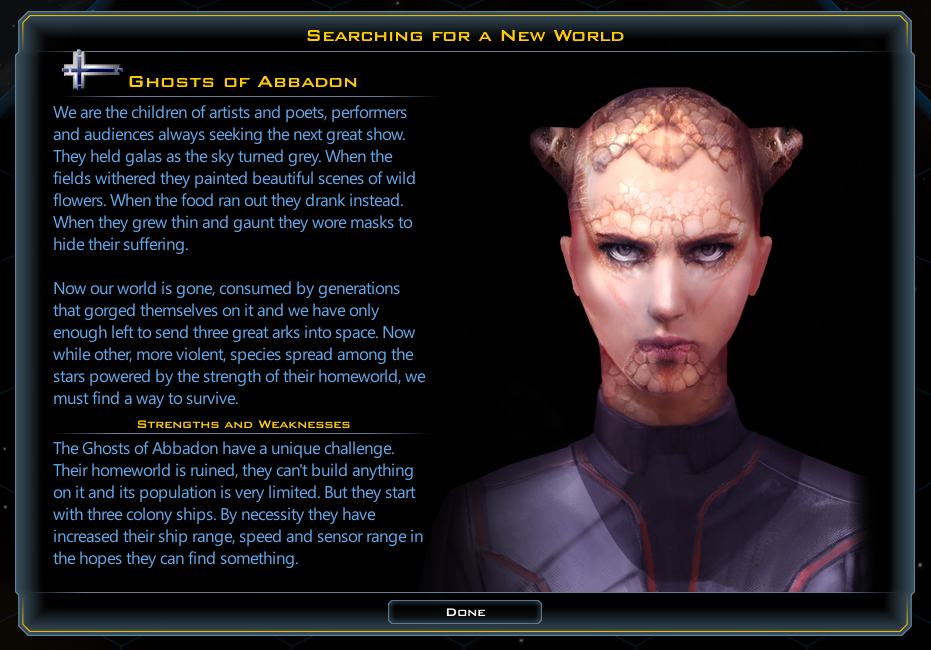
Now let’s use this power to create a new faction, the Ghosts of Abbadon. The Ghosts are unlike any other faction in GC3, and we want to be able to do more with them than the Custom Race tool normally allows. In this case they have ruined their homeworld and used the last of their resources to prepare 3 colony ships to go out and attempt to find a new home.

How do we do this?

1: Copy the FactionDefs.xml file into my new mods \My Games\GalCiv3\Ghost\Game\ directory.

2: Rename it from FactionDefs.xml to FactionDefs_Ghost.xml. (I don’t want to overwrite the existing factiondefs, I just want to add a new one).

3: Open up the file (I use Notepad++ for this) delete the other entries, except maybe one I am about to use as a template, and add the XML for my faction.
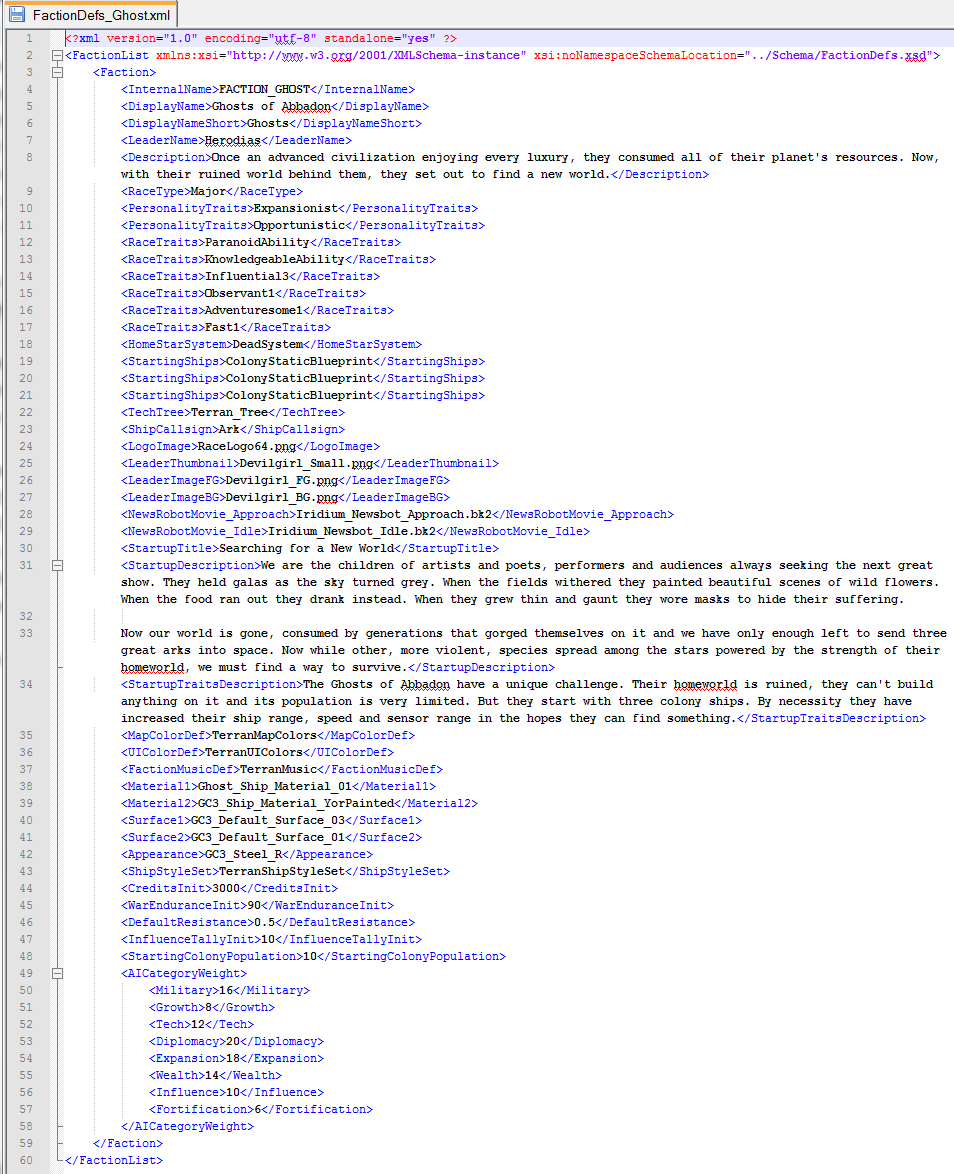
There are lots of things set here. But the important things here are that <HomeStarSystem> is set to “DeadSystem” where normal factions have a Colony, Scout and Survey ship in <StartingShips> they have 3 Colony ships instead. We could put anything we want in here, 12 Colony ships, a Battleship, a fleet of flying toasters, etc.

I played with a bunch of options with their starting ships. At first I gave them the extra colony ships in addition to the normal Survey and Scout. But when it was just Colony ships it made them feel a more desperate. They don’t have the luxury of having a scout out finding planets for them, or time spent collecting anomalies. When they choose to set out for a star it becomes a dramatic step, and when there is nothing there it is a tragedy of the time of a very valuable resource wasted. And when they find a worthwhile planet it is a huge joy. The hardest part is finding a mediocre planet, do they keep going, looking for something better, or settle?

I used the Terran definition for most of their art aspects, and I’m using one of the extra faction foregrounds and backgrounds that come with the game (“Devilgirl”) for the leader art. We could create our own versions of any of this. If you had a custom image you wanted to use for your faction you would just reference it here, I think Paul has one for his dog Maggie.

The only custom art I created for them is that I created a new material in <Material1>, Ghost_Ship_Material_01.
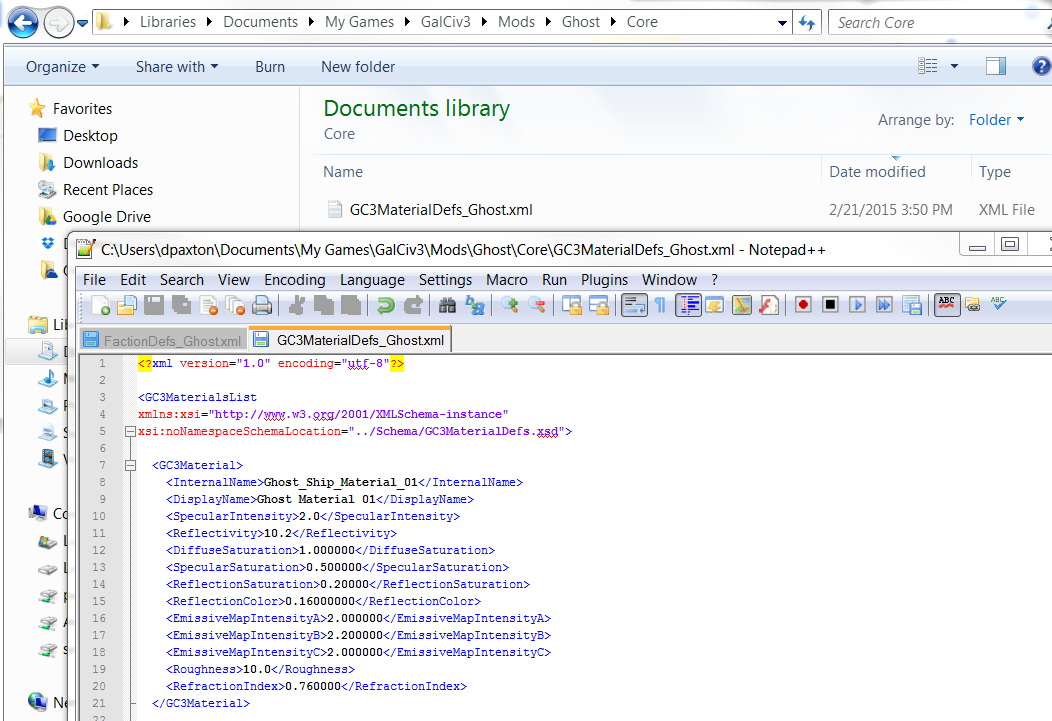
To do that I added a new file for my mod, this time in the \Mods\Ghost\Core\ directory. I’ve used it to define a new material that I can use to create ships. Materials aren’t colors (you will want to add appearances to modify ship colors). They define the way that light interacts with the surface of the object and I wanted to try some things out to make the ghost ships look unusual.

I really don’t know what I’m doing here. But I love having lots of levers available to tweak and play with. So I’m not asking any modder to understand what all these options mean. Instead do what I did, make a bunch of new materials with all sorts of values then load up the game and check them out. I’ve created new color schemes and materials, and I will add them to the base game to make it easy for non-modders to play with. But modders can go wild.

For this new material I bumped the Reflectivity to a crazy 10.2. That’s going to make my ship look like it is made from mirrors. It’s hard to appreciate in a still picture, but it looks pretty cool in motion.
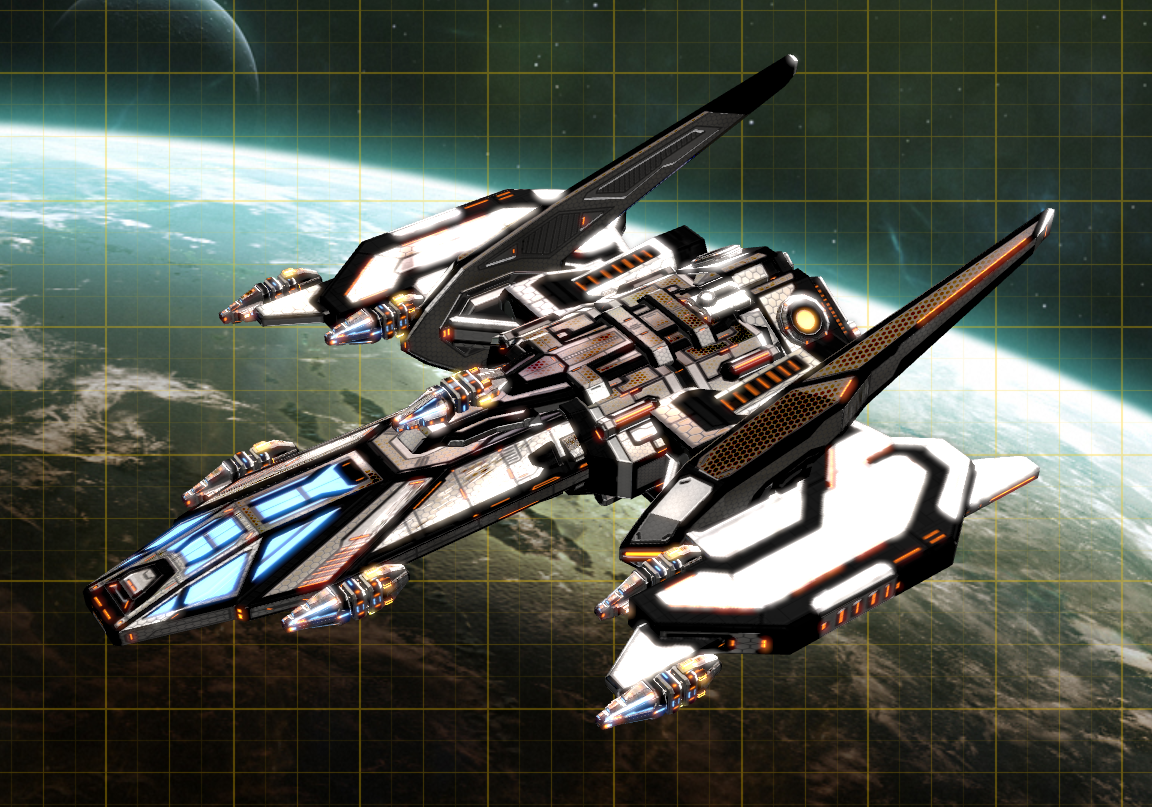
 

So I have some cool looking ships and a fun faction to play as. I’m going to go play some Galactic Civilizations III.

1,206,173 views 173 replies
Reply #126 Top

Quoting Ronnar!!, reply 124

Copy your Dalek folder somewhere else like the desktop, and go to My Games and rename the GalCiv3 folder "GalCiv3.old". Run the game once, it'll nuke your settings, enable mods within settings and quit, then copy the Dalek folder back and see if it does the same thing again.

Yup, did all that, guess what? still don't work, lol????

Reply #127 Top

Quoting econundrum1, reply 113

I was going to say could be the images, I assume you've checked the dimensions and file type all of that already, sounds like you have.


Check there isn't some slight typo either in the reference to the image in you XML files or in the actual file-name, then get someone else to check it to. After years of programming I can tell you I've sometimes spent ages looking at code until my head aches looking for the cause of odd behavior only to find in the end it's down to a typo in the name of a variable that I have looked at 100 times and just not spotted.


yeah I did all that thanks!! BTW copy and paste copy and paste!! when I am naming Pics Planets tech ships Icon LOL that one got me a few times in testing!!

I name them then copying name and paste where relevant. And Yes I`ve been blurry eyed not seeing the typo or > missing come back later and BINGO!! LOL

all in FUN tho all in FUN!! 

Reply #128 Top

Quoting Psiyon, reply 66


Quoting bkeniry,

I'm not at home at the moment, so I cant check which one, but the possible actions are defined in the schemas. Finding where something is defined in the schemas can be quite difficult (there is very little logic to them as far as I can tell). Start off with finding the schema for the xml file you are editing. If it's not defined there, check out the schemas "included" in that schema, the one's "included" in those schemas, and so-on.


Found it, it was in ModifierEffectTypes.xsd. Looks like there is actually an action that awards a free improvement. Awesome stuff, thanks for the help!


I do not see this xsd anywhere, nor can I find any xsd that refers to what is exposed for actions to create new racial abilities say in abilitydefs.xml

Reply #129 Top

Quoting scara_monga, reply 126


Yup, did all that, guess what? still don't work, lol????

Reduced 29%
Original 1920 x 1200


Look closely at the picture, underneath the weakness textbox - I can see the dude's chin, so the original picture (large 1080, with him on the left) is still active. When I change the reference to the leaderFG picture in FactionDefs_Dalek (ie use a different filename), the results are immediate for me, my game isn't caching anything. I've even started a new game under 1.0 with as many custom races as I could find (so like 6 of them...) and when I encounter/trade with them, the picture that I posted shows up, though it's a little strange because they are off center.

Dunno what to say? You're sure you haven't put any file named Dalek_FG.png in the game's root/gfx folder, or don't have copies of it floating around in places that the game normally looks (ie other mod folders)?

Reply #130 Top

Ok, got it sussed.

The image in \GalCiv3\Mods\ModName\Gfx\Factions\LeaderFGs\whatever.FG.png shows up on the faction select screen, AND when the game loads on start screen, and its the same for your mod also, I just tested, it gets used twice.

The image in \GalCiv3\Mods\ModName\Gfx\Leaders\StartGameWhatever.png does nothing whatsoever, as in, it does not show at all, which is why, when you remove the defining line in FactionDefs that points to it, it makes no difference, as the actual image that is loading, is the one in \GalCiv3\Mods\ModName\Gfx\Factions\LeaderFGs.

Sure enough, when I put the Davros image in the \LeaderFGs\ directory, then it shows in game, but in two locations as stated above.

Which begs the questions?

What does <StartupImage>StartGameImage.png</StartupImage> do?

Can't one have a differing image in both those locations?


Reply #131 Top

Oh, haha I thought you knew about that already. Yeah the Leader_FG.png is by far the most important graphic asset (okay maybe logo is tied), it is what you see when talking to leaders in trades/talks, at the UP, on the game loading, and at the new game setup menu. As far as I can tell the startup image does nothing, I have one in my mod too and I've never seen it - at first I thought it might appear when loading up a saved game, but nope. Leader_BG appears in your tech tree as the background, as well as in the UP.

Reply #132 Top

I'm trying to make a little mod that allows all the specializations to be researched like in beta ... 4 .. I think .. because overpowered ships ftw :P

I found the tech xml's and I can see what links the specializations together, I just can't find how the game prevents the others to be developed.

Is this something build in to the engine and do I just have to ungroup the specializations or is it some option I am overlooking ?

Reply #133 Top

Quoting Consequator, reply 132

I'm trying to make a little mod that allows all the specializations to be researched like in beta ... 4 .. I think .. because overpowered ships ftw :P

I found the tech xml's and I can see what links the specializations together, I just can't find how the game prevents the others to be developed.

Is this something build in to the engine and do I just have to ungroup the specializations or is it some option I am overlooking ?


You can't quite just take off the <Specialization> tag, because it kinda breaks everything. What happens is that it does remove the specializations, but the tech tree continues on each of those specializations. This makes thousands of branches in the Tech Tree, which is too much for the game to handle.


What I've done is to leave the specializations as-is, but create duplicates that unlock after choosing a specialization. It's messy, especially when trading, but it works.

You can check out how I've done it: https://forums.galciv3.com/463831/page/1


Reply #134 Top

lol!

Well after some graphic jiggery, I got what I wanted :)

I didn't want the same image showing in both, so I used a transparent cut & join layer method. This way, the image is separated into 2 layers. Both layers are seen on faction select screen (Davros & Daleks) as one image, whilst on start screen, only one layer is shown (the Dalek).  I then swapped the images defined in FactionDefs to make sure that the correct order is loaded.

Result is pretty good :)

We get there in the end, lol!!

Reply #135 Top

Quoting Nastytang, reply 96

ok I  played with this race here a few pics


Reduced 44%
Original 1280 x 720


Here it teal you wanted it is in the ColorDefAlts.xml file  it is called  AltTeal.

Reduced 44%
Original 1280 x 720


 and here the screen just before you go to your Planet! with what you gave us this is what i did.

Reduced 44%
Original 1280 x 720


Sorry On the ship I had no luck with It. I wonder if it is restricted because of tech or hull size or if there another file we have yet to learn about.


I had to rebuilded the factiondefs.xml file to get this to work.


Download Link Please?


Download Link Please?

Reply #136 Top

Unsure if this has been asked before or not. I am in the process of creating a custom Race, making it completely unbalanced for fun, because it is fun to play god every now and then. That being said, I am having difficulties on finding out how to edit the total number of Racial Abilities one can have. I was easily able to edit Racial Traits, but abilities have alluded me thus far.

Anyone know how to edit them to have more than just 2 points/abilities total? 


Thank you for your time!

Reply #137 Top

Quoting TyHanson, reply 136

Unsure if this has been asked before or not. I am in the process of creating a custom Race, making it completely unbalanced for fun, because it is fun to play god every now and then. That being said, I am having difficulties on finding out how to edit the total number of Racial Abilities one can have. I was easily able to edit Racial Traits, but abilities have alluded me thus far.

Anyone know how to edit them to have more than just 2 points/abilities total? 


Thank you for your time!

Those are at the bottom of GalCiv3GlobalDefs.xml, or the actual abilities in AbilityDefs.xml

Reply #138 Top

Quoting Niedzielan, reply 133


You can't quite just take off the <Specialization> tag, because it kinda breaks everything. What happens is that it does remove the specializations, but the tech tree continues on each of those specializations. This makes thousands of branches in the Tech Tree, which is too much for the game to handle.


What I've done is to leave the specializations as-is, but create duplicates that unlock after choosing a specialization. It's messy, especially when trading, but it works.

You can check out how I've done it: https://forums.galciv3.com/463831/page/1


Thanks man, I'll take a look at that.

Reply #139 Top

Quoting TheLegoCruiser, reply 135


Quoting Nastytang,

ok I  played with this race here a few pics


Reduced 44%


Original 1280 x 720


Here it teal you wanted it is in the ColorDefAlts.xml file  it is called  AltTeal.


Reduced 44%


Original 1280 x 720


 and here the screen just before you go to your Planet! with what you gave us this is what i did.


Reduced 44%


Original 1280 x 720


Sorry On the ship I had no luck with It. I wonder if it is restricted because of tech or hull size or if there another file we have yet to learn about.


I had to rebuilded the factiondefs.xml file to get this to work.


Download Link Please?


Download Link Please?


OK I`ll get it up in a day or two I`m sick in bed ATM.


Reply #140 Top

Is there a way to make it so that certain types of starbases or starbase effects will not stack? I.e. if I wanted to make Economic Starbases individually more powerful but incapable of stacking with one another, how would I do that?

Is there a way to scale the tech costs without messing around with colony production or output?

Is there a way to use formulas to compute values in the XML rather than going with fixed values? Say, if I wanted to subtract 0.001 influence from a colony per turn per tile affected by its influence, or if I wanted to scale a colony's population growth by some function of the number of colonies in the empire, where the function was not just (some constant) * (number of colonies).

Not sure this is the right thread for this, but it's the most appropriate official modding-related thread I see.

Reply #142 Top

Hi. I wrote my first mod, but it doesn't work and I can't understand why. I wanted to add a racial characteristic to increase the size of the planets. In the selection window of race appears PlanetClass +200%. but it is not working.
Mod text:

RaceTraitDefs.xml

<RaceTrait>
<InternalName>Planetquality1</InternalName>
<DisplayName>Planetquality1</DisplayName>
<Description>Planetquality1</Description>
<Mod>
<EffectType>PlanetClass</EffectType>
<Scope>Global</Scope>
<Target>
<TargetType>Colony</TargetType>
</Target>
<BonusType>Multiplier</BonusType>
<Value>2</Value>
</Mod>
</RaceTrait>

FactionDefs.xml

Create race append the following line:

<RaceTraits>Planetquality1</RaceTraits>

Reply #143 Top

Quoting RinRaa, reply 142

Hi. I wrote my first mod, but it doesn't work and I can't understand why. I wanted to add a racial characteristic to increase the size of the planets. In the selection window of race appears PlanetClass +200%. but it is not working.
Mod text:

RaceTraitDefs.xml

<RaceTrait>
<InternalName>Planetquality1</InternalName>
<DisplayName>Planetquality1</DisplayName>
<Description>Planetquality1</Description>
<Mod>
<EffectType>PlanetClass</EffectType>
<Scope>Global</Scope>
<Target>
<TargetType>Colony</TargetType>
</Target>
<BonusType>Multiplier</BonusType>
<Value>2</Value>
</Mod>
</RaceTrait>

FactionDefs.xml

Create race append the following line:

<RaceTraits>Planetquality1</RaceTraits>


I'd probably do it as an Ability, rather than a trait - otherwise how would it work if someone took over one of your planets? half of the tiles/buildings would just disappear.

Something like:

(EDITED)

  <RaceTrait>
    <InternalName>PlanetQualityAbility</InternalName>
    <DisplayName>PlanetQualityAbility_Name</DisplayName>
    <DisplayNameShort>PlanetQualityAbility_ShortName</DisplayNameShort>
    <Description>PlanetQualityAbility_Desc</Description>
    <IsAbility>1</IsAbility>
    <Triggers>
      <OnEvent>OnColonizePlanet</OnEvent>
      <Target>
        <TargetType>Colony</TargetType>
      </Target>
      <PerformAction>
        <Action>TerraformTilesOnPlanet</Action>
        <ValueParam>1</ValueParam>
        <ValueParam>0</ValueParam>
      </PerformAction>
    </Triggers>
  </RaceTrait>

first ValueParam is # of tiles to terraform.

+2 Loading…
Reply #144 Top

so this is my custom race ATM may change may not. I do need to work on my story for it tho.


PICS.

I don`t really like the small riker pic but for now I`ll have to use it i wanted a serious look there. 

And the start up screen tho the one causing all the trouble!!! As you can see it looks OK so Compromise and i`m using it. 

Diplomacy Screen yeah it`s the same one in the race set up screen.

The report Screen uses the same Screen as the Startup Screen.


As I learn more or do more i`ll update the race now it`s time to either find a creative writer or write something my self.


Derek is going to be hosting the Stream on Monday I i`ll have a few Question ready hopefully they`ll get answered.

One Why does the startupscreen not work.??

Two can we use or will we beable to use a still shot for our Tech adviser?? 

How did earth planet map get made/use/ How was it done???


Star systems and your own planets??

If I think of more i`ll post them in the stream post when it`s up. 


Nasty!

+1 Loading…
Reply #146 Top

Quoting scara_monga, reply 145

Nice Niedzielan and Nasty!

Great stuff :)


Can you post your faction, or PM me it please :) ?

And I'm looking forward to the reply as to why the start screen does not work properly, yes :)


Scara I`ll PM you 2morrow!

Reply #147 Top

Quoting Niedzielan, reply 143


Quoting RinRaa,

Hi. I wrote my first mod, but it doesn't work and I can't understand why. I wanted to add a racial characteristic to increase the size of the planets. In the selection window of race appears PlanetClass +200%. but it is not working.
Mod text:

RaceTraitDefs.xml

<RaceTrait>
<InternalName>Planetquality1</InternalName>
<DisplayName>Planetquality1</DisplayName>
<Description>Planetquality1</Description>
<Mod>
<EffectType>PlanetClass</EffectType>
<Scope>Global</Scope>
<Target>
<TargetType>Colony</TargetType>
</Target>
<BonusType>Multiplier</BonusType>
<Value>2</Value>
</Mod>
</RaceTrait>

FactionDefs.xml

Create race append the following line:

<RaceTraits>Planetquality1</RaceTraits>


I'd probably do it as an Ability, rather than a trait - otherwise how would it work if someone took over one of your planets? half of the tiles/buildings would just disappear.

Something like:

(EDITED)

  <RaceTrait>
    <InternalName>PlanetQualityAbility</InternalName>
    <DisplayName>PlanetQualityAbility_Name</DisplayName>
    <DisplayNameShort>PlanetQualityAbility_ShortName</DisplayNameShort>
    <Description>PlanetQualityAbility_Desc</Description>
    <IsAbility>1</IsAbility>
    <Triggers>
      <OnEvent>OnColonizePlanet</OnEvent>
      <Target>
        <TargetType>Colony</TargetType>
      </Target>
      <PerformAction>
        <Action>TerraformTilesOnPlanet</Action>
        <ValueParam>1</ValueParam>
        <ValueParam>0</ValueParam>
      </PerformAction>
    </Triggers>
  </RaceTrait>

first ValueParam is # of tiles to terraform.


MMmmmm I`ll have to check this out!

thanks!

Reply #148 Top

Thanks for the reply. Everything works except the homeworld. How to make homeworld. How to address. can't findthe type of the variable. The name of the planet Thala.


<RaceTrait>
<InternalName>Planetquality1</InternalName>
<DisplayName>Planetquality1</DisplayName>
<DisplayNameShort>Planetquality1</DisplayNameShort>
<Description>Planetquality1</Description>
<IsAbility>1</IsAbility>
<Triggers>
<OnEvent>OnStartTurn</OnEvent>
<Target>
<TargetType>Colony</TargetType>
</Target>
<PerformAction>
<Action>TerraformTilesOnPlanet</Action>
<ValueParam>1</ValueParam>
<ValueParam>0</ValueParam>
</PerformAction>
</Triggers>

<RaceTrait>

Reply #149 Top

Define in FactionDefs:

<RequiresHomeworld>true</RequiresHomeworld>
<HomeStarSystem>ThalaSystem</HomeStarSystem>


Define in StarSystemDefs:

<StarSystemGroup>
<InternalName>FACTION_NAME</InternalName>  <!enter your faction name-->

<StarSystem>
<InternalName>ThalaSystem</InternalName>
<DisplayName>Thala System</DisplayName>
<Description></Description>
<OrbitLane>
<LaneType>Star</LaneType>
<Body>
<BodyType>UnaryStar</BodyType>
<BodyDef>ThalaStar</BodyDef>
</Body>
</OrbitLane>
<OrbitLane>
<LaneType>HabitableZone</LaneType>
<Body>
<BodyType>Planet</BodyType>
<BodyDef>PlanetThala</BodyDef>
<IsHomeworld>true</IsHomeworld>
<Position>5</Position>
</Body>
<OrbitLane>
<LaneType>NoRandom</LaneType>
<Body>
<BodyType>Asteroid</BodyType>
<BodyDef>NormalAsteroid</BodyDef>
<Position>0</Position>
</Body>
</OrbitLane>
</StarSystem>

</StarSystemGroup>

</StarSystemList>


Define in PlanetDefs:

<Planet>
<InternalName>PlanetThala</InternalName>
<DisplayName>Thala</DisplayName>
<PlanetType>Habitable</PlanetType>
<PlanetClass>17</PlanetClass>                <!change class to suit-->
<ArtDefine>EarthArt</ArtDefine>             <!change art to suit-->
</Planet>


Define in StarDefs:

<Star>

<InternalName>ThalaStar</InternalName>
<DisplayName>Thala Star</DisplayName>
<ObjectType>Star</ObjectType>
<Type>BlueStar</Type>                            <!change star to suit-->
<ArtDefine>BlueStarArt</ArtDefine>           <!change art to suit-->
<SFXDefine>STAR_AMBIENT</SFXDefine>
</Star>

</StarList>

Reply #150 Top

hi. It would be good to alter the size of the planets in the conquest and annexation through cultureHere is an example for conquest:


<Triggers>
<OnEvent>OnConquerPlanet</OnEvent>
<Target>
<TargetType>Colony</TargetType>
</Target>
<PerformAction>
<Action>TerraformTilesOnPlanet</Action>
<ValueParam>1</ValueParam>
<ValueParam>0</ValueParam>
</PerformAction>
</Triggers>
