Thinking About My Next Gaming PC Build

My current main/gaming PC rig is over 5 years old.  While it still runs most games at a decent rate, I’m having to adjust the setting lower and with that comes with less quality visuals.  With Windows 10 coming next year, I figure now would be a good time to start thinking about what to build.  After doing some research I decided I’m going to go with a smaller system, so something like Mini-ITX/MicroATX build.

After looking at a bunch of cases, I’ve narrowed it down to the Corsair Carbide Series Air 240.  This case can handle a Mini-ITX or MicroATX motherboard with plenty of room for a full-size graphics card and a few SSD and hard drives.  I looked at a few Mini-ITX cases, but their size limited the GPU that could be put in, and that didn’t appeal much to me.  This case has more space, but still is a reasonably small size.

AIR240_BLK_01

Amazon has it for $79, and I really don’t want to spend much more than that just on a case. 

56,778 views 24 replies
Reply #1 Top

Looks like a modded out pc battery backup, lol. Soory ID.

To each his own, I have a giant tower, the A+case "ElDiablo".I like a fancy case, however, functionality is cool too!

Reply #2 Top

Actually, that is quite a nice case with a good, compact design that still accomodates larger GPUs and PSUs.

In fact, I may even look into one or two for my 2nd and guest rigs for their space saving design when I am relocated in my own place once more.

Reply #3 Top

Looks like liquid cooling in the screeny, is that your plan also?

ANd yes Starkers, kinda appealing after the second look, the case, not you, although, send a pic, lol!  :drool:

Reply #5 Top

What on earth do you do for optical drives?

Sometimes I think 'small' becomes just plain useless....;)

Only experience I've had with a 'small' mobo was less than brilliant....hottest part of GPU ended up right on top of the southbridge....requiring the latter to be constantly monitored for getting toasty.

Only advantage was.... I only paid $6 for the whole shebang [not the GPU that was an XFX GTX285 I already had spare].


All my boxes I've built run 2 DVDs [and too many drives to squeeze into that box].

These days the only limitation re size is whether it'll fit into the computer desk I built...;)

Reply #6 Top

I agree with Jafo.  My GD has one of those small mobo's and its a bitch doing anything with it and it gets hot faster and no space to put an extra fan.

Reply #7 Top

Now that you guys mentioned it.....it does look like a toaster........ :-"

Reply #8 Top

I haven't thought about water cooling.  Never needed it before, so not really sure what I would get out of it now.  

And I have no use for optical drives.


Reply #9 Top

Im not cheering quite for Mini-ITX/µATX build as "Gaming rig" for office ok, but for Gaming?   
If you want to build a Gaming rig what CPU are you aiming for?
Is current Gen even supported on those small boards and if they are will they offer enough space for all those goodies like PCI-E x16 *2 or 3 ? Will those be 3.0 with 16 lanes or only 2.0 with 4?
Also will it have four Slots for Ram and so on?
I think having only 11,2x8,2 space will not allow that or does it? Haven#t checked the market for some time...

Do you already know what kind of CPU you want? I7- K model or maybe X?
How many drives should it have how many GPU´s? 

Don´t understand how one will be able to build a DVD drive into that case?
I don’t see a slot for it or will you go for external drive?
I only see three fans, guess that means you will have to buy at least two additional fans if you want to cool it solely with Air.
Would calculate those costs into the price and see if you can get something better for the same buck. Just a thought.


Reply #10 Top

MicroATX motherboards can handle nearly any CPU and other current gen items.  MiniITX are more limited, but as smaller systems have become more popular, more options are out there than there was not too long ago.

If you read my last comment you'll see I don't use or need optical drives. 

Reply #11 Top

I've been contemplating upgrading my case too, but that's because my SOHO file server tower isn't big enough...


I can't use 2 of my 10 drive slots because the GPU is too big so I'm only running a mirror for my 3TB primary storage drives instead of raid 1+0.  I need a deeper form factor to get Steam off my damned SSD before it uses the whole 750GB!

Reply #12 Top

that's not "real" water cooling shown in that pic, folks. i'd bet a bajillion dollahs that what is shown is one of corsair's H series liquid cooling options. i run one myself although i forget the model number. i think it's the H60 but i wouldn't bet a nickel on that.

Reply #13 Top

What on earth do you do for optical drives
End of quote

That's easy for such a case... use an external drive that can easily sit on the desktop.  I use a Samsung portable with my 11" laptop, which is USB powered and does okay at both reading and writing.  However, I do prefer dual optical drives that are internally mounted for my main rig... can save alot of time copying files to HDD for later burning, etc.

As for small and useless.... getting "toasty", Corsair liquid cooling is quite effective and would do a good job at keeping components cool in this case, and given there are 3 mounting places for liquid cooling, one unit could be assigned to the CPU and dual GPUs respectively, thus cooling the 3 hottest components quite well.

Having said that, I would not use this case as a main PC, rather as a guest or backup PC that serves to surf the net, create documents, etc... nothing that's resource intensive, and I certainly wouldn't install high-end components in it as I have all that in my main rig, and thus it would not need power to burn.

I haven't thought about water cooling.  Never needed it before, so not really sure what I would get out of it now.
End of quote

As John pointed out above, the unit in the screenshots is Corsair liquid cooling, not water cooling, which are sealed units and thus makes them safer around PC components. I have one in my main rig and find it better than air cooling, hence I would be inclined to go with liquid cooling in a smaller case such as this one.  It wouldn't be essential but recommended, especially if you are going with higher end CPU and GPUs for gaming.

:)

Reply #14 Top

"Island Dog: And I have no use for optical drives."


Indeed. Everything is downloadable or prepared for flash drives. Can't remember the last time I had used one that I have taken them out of all computers.


http://www.youtube.com/watch?v=G_cbsSPiDIQ

Reply #15 Top

While I quite like the Corsair Carbide 240 for its compact design, I'm somewhat impressed with the Corsair Carbide 540 as well.  It is a larger case and has plenty of room for large GPUs, liquid cooling, etc.  It could very well be a consideration if I ever wanted to change from the Thermaltake cases I currently have for my main rigs.

Indeed. Everything is downloadable or prepared for flash drives. Can't remember the last time I had used one that I have taken them out of all computers.
End of quote

To be honest, I haven't used an optical drive for a while because the need hasn't arisen of late, but I still like to have them for burning off hard copies of things like skin collections, documents, photos and program installers, etc.... and Bluray discs hold so much data these days it's fairly economical to back up your most important files to disc.  So yeah, I think I'll be keeping mine for a while to come.


Reply #16 Top

[quote=Island Dog]MicroATX motherboards can handle nearly any CPU and other current gen items.  MiniITX are more limited, but as smaller systems have become more popular, more options are out there than there was not too long ago.

If you read my last comment you'll see I don't use or need optical drives.[/quote]

:|


Ok if you dont need an optical drive... I dont know i might be old fashioned but if windows needs certain MObo drivers they usually come on disk and without out the ethernet driver you are unable to dl those without another pc... (who knows, might be that you have those on a USB drive)

Just had a look did not expect that the newer sockets are supported yet but they are.
I was worried about the amount of PCI-E slots such a board has to offer but they managed to get up to three  PCI-E 3.0 x16 on them and that is not bad at all.

Looks like building a small "beast" is now possible even with Air cooling  :thumbsup:


Reply #17 Top

Looks like building a small "beast" is now possible even with Air cooling
End of quote


Yes, for a compact case it has rather good air cooling, but adding liquid cooling for the CPU and GPU(s) would allow for some 'beastly' high-end components to be installed.... so yes, it has potential to become quite a decent work/gaming machine.  However, I'm a bit like Jafo when it comes to my main rig.... bigger is better cos there's alot of stuff to go inside: what with multiple HDDs and SDDs; Dual GPUs; soundcards; TV Tuner Cards; SATA and IDE expansion cards, etc.

Having said that, I could see a couple of these replacing the towers housing my backup and guest PCs... cos they're compact and so much better looking than those old things.  Those cream/white towers may have looked good in their day, but I much prefer black finishes for all my PC gear, looks slick and more elegant IMHO.

Reply #18 Top

no opto is fine till you NEED to re-install the OS that is on a DISC, and the carbo 540 looks like a nice SMALL case, but it does NOT have enough HDD bays for me to even consider it.

harpo the NON-subscriber

Reply #19 Top

External USB Optical drive can cover for those rare usages - most mobos support booting from USB drives now. 

Reply #20 Top

and the carbo 540 looks like a nice SMALL case, but it does NOT have enough HDD bays for me to even consider it.
End of quote

That's when you use an external drive bay and e-SATA to hook it up.  I have a 4 bay one that sits nicely out of the way and performs as well as any internal drive bay.  Just sayin'.

External USB Optical drive can cover for those rare usages - most mobos support booting from USB drives now.
End of quote

Yes, USBs can be used to install just about anything these days, and I often use them, but I still like to have an optical drive on board for those burning jobs that pop up from time to time: eg, making hard copies of important files... to be sure, to be sure.  And these days I use the Bluray format for larger jobs cos it works out more economical than using several DVD or CD discs. 

In fact, I recently read about a bootable drive image that incudes all program installations, plus updates and the OS, etc.  In the past that was not possible with the size restriction of DVDs, but now it is with Bluray discs holding considerably more data...just gotta read up more to see how it is done...

... now where's that damned magazine again, grrrr.

Reply #21 Top

@starkers sorry quote does not work for me 
you could go for SLI or Xfire  just would need more fans like i mentioned
you would still have one slot free for a soundcard if you want to have a better one than the on-board sound or you could add your TV card
still if you want PCI-e SSD your limited of course

To the liquid cooling part for the CPU don’t let yourself fool the closed prefilled corsair liquid cooling isn’t as good as a Noctua NH-D14 
There have been numerous tests were they overclock the CPU and a BSOD pops up on corsair while the system stays stable with the NH-D14
However if you use proper Liquid cooling with a big radiator that’s a different story.
When it comes to GPU´s most reference cards get blazing hot while other DC, OC cards mostly come with different coolers that are pretty good ASUS cards for example stay cool unless you let them run on 100% usage with certain tools. But in practice that hardly ever happens.
For example i have a solely Air cooled Rig i never exceed CPU temps of 40C and my GPU is mostly on 60C on Ultra settings when gaming mainly because i have a fan positioned to blow right onto the card. And my rig is super silent you don’t hear anything but air moving but that’s it.
I know some rigs that have reference cards installed that sound like a vacuum cleaners when they get beyond 50% Fan speed.
Bought a "Gainward Phantom" one day because i was told they would stay cool well it did but the noise was terrible.


Reply #22 Top

@starkers sorry quote does not work for me
End of quote

Doesn't work for me, either.  I have been doing quotes manually by typing [quote] then doing the same again but with a forward slash before the word quote and copy/pasting the text between them.

With regard to the expansion cards I'd use in these cases, I'd only be using a single GPU, a Nvidia 9800GTX, a Creative Soundblaster X-Fi Xtreme and a Winfast DTV 2000 TV tuner card for my spare/backup PC, so I wouldn't have any issues with available slots there.  Not exactly recent or high-end, but I have 2 other rigs for that. 

As for the guest PC, which is mostly be used for surfing the net, maybe writing up documents, etc, well it's fairly basic, with onboard sound and graphics, a standard SATA HDD for the OS [Vista Home x64] and a bit of storage, so it would fit nicely into one of these cases.

As for the Corsair liquid cooling, I have found the Hydro Series H80i to be quite efficient with my Intel i7 4790K, not that I've attempted to overclock it as yet.  I haven't looked at it as of late [due to it still being packed] but I do recall temps well below 40c, usually hovering around the 32c to 34c mark.  I'm currently using my 2nd rig [was easier to get out of storage], which has an AMD FX 8150 that is air cooled by a Thermaltake FRIO-OCK with 6 heatpipes, but that and what's in that case [Thermaltake Chaser full tower] wouldn't fit in this Corsair case.

Reply #23 Top

starkers, the problems with external drives are

1 MORE powerpoints in use, and more power being used (assuming the higher capacity desktop drive externals)(also the laptop (no power brick) drives are SLOWER than the desktop drives and hold less data

2 usb3 interface does slow the data transfers compared to the internal sata 3 to the same model drive

3 external drives usually run about 10+ c hotter (hdds make cpus look temp tolerant) and with hdds you want the temps to be as close to ambient as possible, not as FAR as possible (and hdds should NOT exceed 50 c, and it is not uncommon with an ambient of 30c to have external hdds get to 60c)

4 extra desk space taken up by external drives

5 usb interface occasionally FORGETS that it is connected (even in the middle of transfers, corrupting the hdd AND the transfer)


harpo the NON-subscriber

Reply #24 Top

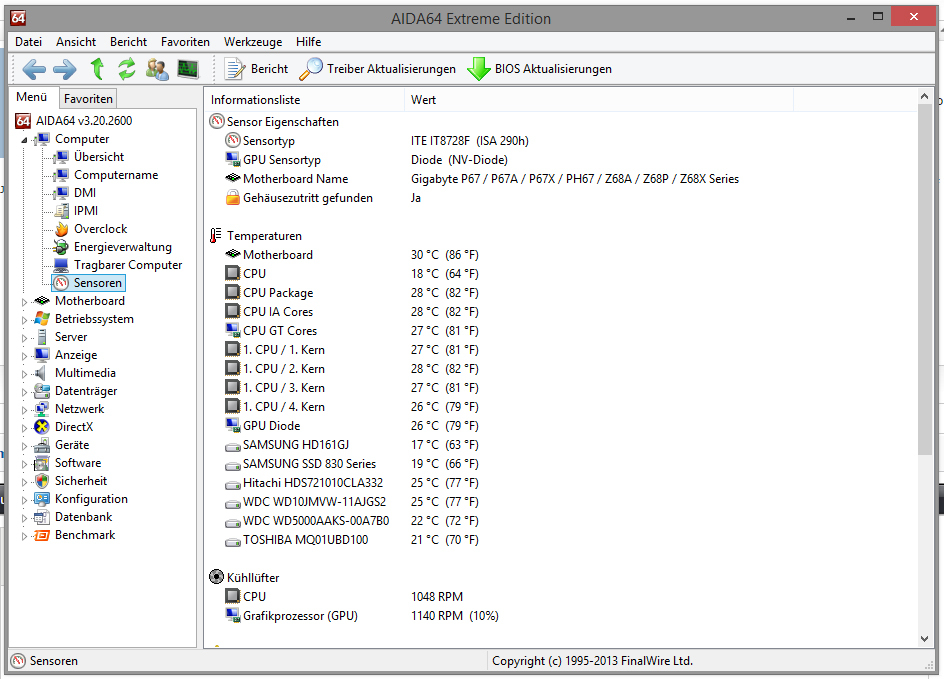
That 40C temp mentioned was while playing games like Lord of the Fallen where physX is handled via CPU isntead of GPU due of crashes. 
The idle temps are much lower though.
This is not idle but shows some normal usage temps