

BigDogBigFeet BigDogBigFeet

Why it's not too difficult to run Windows 10 Technical Preview

Why it's not too difficult to run Windows 10 Technical Preview

THANKS WINCUSTOMIZE!!!

Well I've searched and searched and searched and joined Windows Insider Program and all to no avail there is no download and install available to me of Windows 10 technical preview.

Why do they make it soooo hard.


It's working and auto activated and will update.
221,456 views 46 replies
Reply #26 Top

 Anybody else get this? Its makin' me nuts.

Reply #27 Top

Uvah are you booting your VM directly from your Win 10 ISO file?  When you click run you will see Devices in the VM commands at top click that and point it to your ISO download file.

Then when the WIN 10 setup runs chose the second option custom which installs Win 10 as if it is a new PC.  That works.

DO NOT choose the top option in the Win 10 setup even though its recommended. 

I also told the VM that the OS was WIN 8.1 64bit when I initialized it even the I have Win Home Premium 7 64 installed on my PC.

Don't try Win 10 32 bit.  If you can run 64 bit do that.

Again when making your  VM set your OS as Win 8.1 64

Reply #28 Top

I haven't even got the ISO on the VM yet.

Reply #29 Top

Quoting Uvah, reply 28

I haven't even got the ISO on the VM yet.


What OS do you run?  Also you may need to change your PC Bios settings for your CPU to allow VM's.  I did.


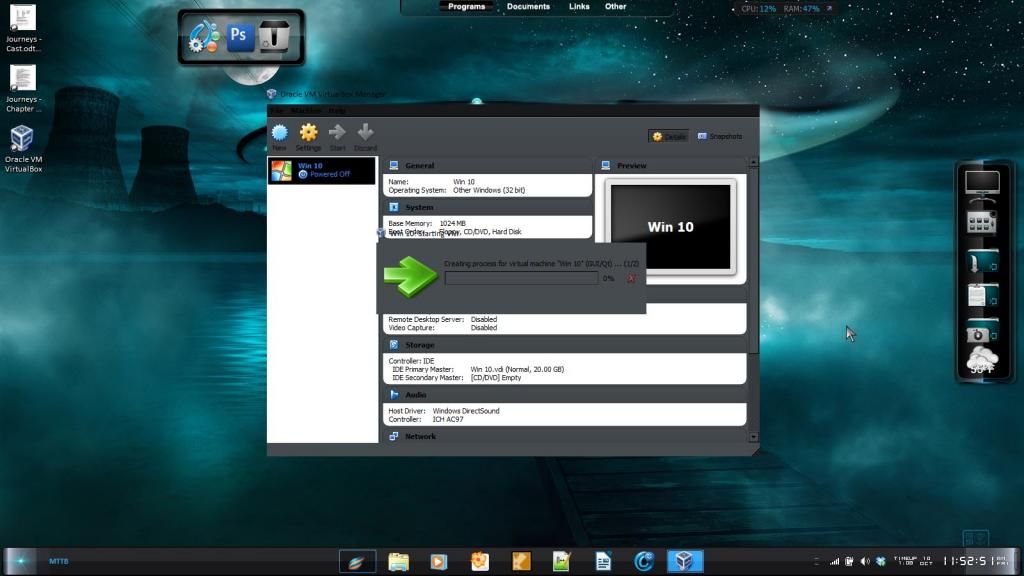
And, BTW that pic you show; on my setup that screen is done in a flash.

Reply #30 Top

I spoke to an IT guy here and he said if it runs longer than thirty minutes its hanging up. So far its done that three times. Try number four in progress.

Running Win 7 Home Premium 64bit. This thing is still going and going and..........

Hold the phone. In the drop down list it only has 32 bit OS's. Did I get the wrong one? Nope. The VM is for both 32 and 64 but 64 bit doesn'tshow up in that list. 

Reply #31 Top

Quoting Uvah, reply 30

Hold the phone. In the drop down list it only has 32 bit OS's. Did I get the wrong one? Nope. The VM is for both 32 and 64 but 64 bit doesn'tshow up in that list.

That was the same problem I had.  To solve it I de-installed the VM Virtualbox rebooted and went into the BIOS then checked my CPU settings.  I had to enable processor support for VM's in the BIOS CPU configuration.  Saves the change booted up then reinstalled VM Virtualbox.

That's when I could choose the 64 bit Win 8.1 in the VM Drop down.

Reply #32 Top

I'll give it a shot. Thanks

Reply #33 Top

I burned a disk and just went for it on a full install to my main drive. I did of course back up all of my documents and such to an external drive just in case. But I have to tell you that I'm very pleased so far with how everything is going. Speed wise , things are pretty snappy. I'm using WindowBlinds 8 , Start8 , and Iconpackager, and so far ,everything is performing without a hitch !!!   I'm very impressed so far. I also love the fact that you can pin almost everything to the taskbar ( including hard Drives and externals) without jumping through hoops. Very, very nice so far.   :thumbsup:        -- Ace --

Reply #34 Top

I went into the BIOS setup and there was no CPU configuration. Just the usual...main...power management...boot...etc etc. I get that same screen and it says its creating a process but does it have to take hours? I'm really getting fed up! It just keeps hanging.

BTW: I thought it was supposed to be for both 32 and 64 bit yet it lists only 32 bit. I think I said that. Anyway...I uninstalled Virtual Box. Gonna try to re-install and see what happens. Where's the duck when ya need him. 

Reply #35 Top

Uvah....dunno what it is that you're getting...unless it's to do with the difference between a dynamic disk and 'formatting' a fixed size one...

My VB ver is 4.3.6 ....the current is 4.3.12 and from memory I used the 32bit of 10.

Full install took only a few minutes....there was no hang...;)

Reply #36 Top

I got the 4.3.6 version of VB and the 64 bit Win 10. Should I go for the 4.3.12 version then dl the 32 bit W10? During the install I did the dynamic disk. Dunno if that's the problem though. I haven't re-installed VB yet, hoping for some kind of solution.

Reply #37 Top

Quoting Uvah, reply 36

I got the 4.3.6 version of VB and the 64 bit Win 10. Should I go for the 4.3.12 version then dl the 32 bit W10? During the install I did the dynamic disk. Dunno if that's the problem though. I haven't re-installed VB yet, hoping for some kind of solution.

No need to go to 4.3.12 ...as I am fine with the older ver....and used 'dynamic'.  Read somewhere that 32bit was the one to try....[or maybe it was me being lazy/conservative with dl size....the 64 is a bigger iso...and I have a monthly dl limit].

Did you google the error?

Reply #38 Top

Didn't google as the error is the screenie I put up. There was no error code. I'm downloading the 32 bit version now. We'll see how that goes.

Reply #39 Top

Quoting Uvah, reply 38

Didn't google as the error is the screenie I put up. There was no error code.

It doesn't matter re a 'code'...you google the text message....

Here's a hit...

https://forums.virtualbox.org/viewtopic.php?f=6&t=63755 

Solution....possibly....disable your AV prior to starting the VB proggy...and running the 'machine' ...;)

Reply #40 Top

Link's problem was re host having 'Avast' as its AV ...;)

Reply #41 Top

I have very little trouble with VMWare, I find it much easier to use than VirtualBox. But it doesn't have a free version, only a trial.

Reply #42 Top

Ok...re-installed VB. Deleted the 64 bit preview. Have to wait on dl'ing 32 bit version. Tried last night and got as far as 1.2 gigs then a popup says windows detected another computer on this network with the same IP address, download failed. Gonna keep at it. I'll let ya know. 

Un installed Avast and installed Avira in its place. Went to PCmag website to check out different free AV's and Avira was their top choice. Anyway...I dl'd the 32 version Win 10 and it seemed to install correctly but when I hit start it starts creating the process and hangs. Its still doin' it even now, an hour later.  

Reply #43 Top

Quoting Uvah, reply 42

but when I hit start it starts creating the process and hangs. Its still doin' it even now, an hour later.

When you setup VM you need to make sure you have the right internet setting  established.  Try either NAT or Bridge.  Bridge worked for me. 

Also look at the advanced setting there and make sure it doesn't day Deny(it's the default).  I set mine for all.

Reply #44 Top

It caused so many problems. For one I couldn't shutdown the laptop, wouldn't reboot, couldn't kill the processes or the .exe. Always getting access denied. Found a way to finally get rid of Avast AND bitdefender leftovers by deleting them in safe mode after going into msconfig and stopping processes there. For now its uninstalled until I clean up the HD. Too much on it and not enough room for other stuff. Hopefully after that.

Reply #45 Top

I have a question:

What Stardock Apps should I install on my Win 10 Tech Preview??

So far I've tried Object Dock 2.


Suggestions?  Have you tried it first?

Reply #46 Top

Quoting Uvah, reply 44

For now its uninstalled until I clean up the HD. Too much on it and not enough room for other stuff.

One assumes you actually had enough space for a virtual machine in the first place

My link would have seen me disabling the AV while setting up the VM ....not looking for an alternative to run in its place [also probably causing an issue]....;)