DeskScapes 8 Available Now!

logo_and_text_horiz

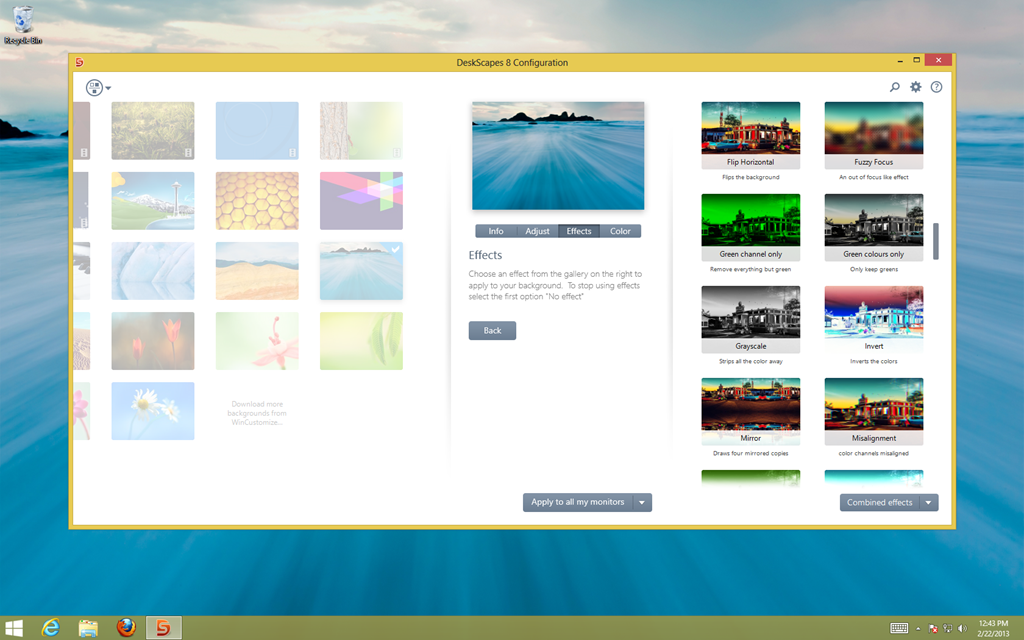
DeskScapes enables users to customize their PC wallpapers and screensavers with pictures and video to create visually stunning results. Featuring an all new user interface and support for Windows 8, DeskScapes makes it easy to apply special effects to any wallpaper with just a few clicks.

DeskScapes includes DreamMaker, which enables users to design their own animated wallpapers called Dreams. Users may also choose from the many Dreams available from Stardock’s WinCustomize.com community. DeskScapes 8 also supports displaying different wallpapers on multiple monitors.

DeskScapes 8 is available as a free 30-day trial and can be purchased for only $9.99.

Features:

  • Windows 8 support (Windows 7 also supported)
  • Windows 8-ready Dream Library on WinCustomize
  • Customize desktop wallpapers with animations and effects
  • Apply any Dream as your PC screensaver
  • Apply over 40 special effects to your wallpapers
  • Support for custom wallpapers on multiple monitors
  • And more!

To learn more visit: http://tinyurl.com/bz3vvn6

ds8_ui_01 ds8_ui_color ds8_ui_effects
30,536 views 9 replies
Reply #1 Top

Great news! :thumbsup:

Reply #2 Top

Hooray!!  Stardock rocks the world of Windows!!!  Even Windows 8! 


Thanks Stardock, for making my PC purty!!

Reply #3 Top

I purchased DeskScapes 3.5 in December 2012 with 19.99 $ and now i have to pay again...??? this is serios or what?

Reply #4 Top

Quoting Enkde, reply 3

I purchased DeskScapes 3.5 in December 2012 with 19.99 $ and now i have to pay again...??? this is serios or what?

You can get it for $6.99 if you go to https://www.stardock.com/products/deskscapes/purchase.asp and check eligibility.

Reply #5 Top

I have to admit I love it. Its been a great shot of beauty much needed to counteract the austerity of the Windows 8 interface.

Reply #7 Top

Very useful app, I liked a lot how the new UI work, was fun to work with it :D 

Reply #8 Top

can't get it to run. Crashes explorer immediately after applying a dream.

Reply #9 Top

I was so excited to play with this.. but the only effects this version offers is photo effects and snow. Is the only deference that it now works with windows 8? Also I looked thru tutorials and could not find one that gives me step by step instructions on how to create a dream for a novice like me. I took an awesome picture of a sailboat in LA and I wanted to add water effects. I run win7 and d/l'ed dreammaker and dreamseven.